

- Top Pick: Clevy Kids Mouse – Colorful Ergonomic USB Computer and Laptop Kids Mouse for School and Home Computer Use – Wired Children Friendly – Compatible with Windows, macOS, Chromebook
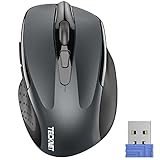
- Best Value: TECKNET Wireless Mouse, 2.4G Ergonomic Computer Mouse, 2600 DPI, Grey
- Premium Choice: BENGOO Gaming Mouse Wired with RGB Backlit, Ergonomic PC Computer Mice
Your first mouse should be simple, comfortable and dependable — not a spec-sheet puzzle. If you are new to PCs, setting up a home office, or buying for someone who just wants a mouse that works the moment it is plugged in, you do not need eleven buttons or a tunable sensor. You need something that fits your hand, tracks reliably, and does not cost much. This guide rounds up the best mice for beginners in 2026 across the choices that actually matter for a first purchase: plug-and-play wired mice, easy wireless options, and one affordable gaming mouse for anyone who wants room to grow.
- Best Mice for Beginners at a Glance
- 1. seenda Wireless Mouse for Laptop (2.4G Noiseless)
- 2. Amazon Basics 3-Button USB Wired Mouse (Plug & Play)
- 3. TECKNET Wireless Mouse (2.4G Ergonomic Optical)
- 4. Logitech G502 Hero High Performance Wired Gaming Mouse
- 5. Logitech B100 Wired Mouse (Ambidextrous USB Corded)
- 6. Logitech M185 Wireless Mouse (12-Month Battery)
- How to Choose Your First Mouse
- Frequently Asked Questions
- Related Guides
- Related Articles
Our picks were chosen on a simple basis: ease of use, comfort, reliability and value. Every mouse here is essentially plug-and-play — connect it and start clicking, with no software required to get going. We have kept prices low on purpose, from around $7 to around $32, because a beginner’s mouse should be inexpensive and stress-free. Whether you want the cheapest reliable wired mouse, a tidy wireless option with a long battery life, or a first gaming mouse you can settle into, there is a sensible pick here. Below is an at-a-glance comparison, then a closer look at each mouse and a buyer’s guide covering what a beginner really needs.
As an Amazon Associate we earn from qualifying purchases at no extra cost to you.




🛒 Best Price Today on Amazon
Prime members get fast, free shipping on everything above, plus member-only deals. New members get a 30-day free trial — cancel anytime.
Best Mice for Beginners at a Glance
| Mouse | Best For | Standout Spec | Approx Price |
|---|---|---|---|
| seenda Wireless Mouse | Easy first wireless mouse | 2.4G USB receiver, noiseless | around $10 |
| Amazon Basics Wired 3-Button | Cheapest plug-and-play | USB wired, plug & play | around $7 |
| TECKNET Wireless 2.4G | Comfortable wireless value | Ergonomic optical, 2.4G | around $10 |
| Logitech G502 Hero | Beginner with room to grow | HERO 25K sensor, 11 buttons | around $32 |
| Logitech B100 Wired | Reliable everyday wired | Ambidextrous, USB corded | around $8 |
| Logitech M185 Wireless | Long battery wireless | 12-month battery, USB receiver | around $14 |
1. seenda Wireless Mouse for Laptop (2.4G Noiseless)

seenda Wireless Mouse for Laptop, 2.4G Noiseless Computer Mouse,Mint Green | Small portable design,USB receiver, quiet clicks, smooth tracking, 24-month battery life Mice for laptop,Chromebook and PC.


As an Amazon Associate we earn from qualifying purchases. Product prices and availability are accurate as of the date/time indicated.
The seenda wireless mouse is the easiest way for a beginner to cut the cable. It uses a simple 2.4G USB receiver — plug the little dongle into a USB port and the mouse just works, no pairing menus or software to learn. Add noiseless clicks and a comfortable, compact shape, and at around $10 it is a stress-free first wireless mouse.
This is the right pick for a new laptop or desktop user who wants to avoid cable clutter without any setup hassle. The noiseless buttons are pleasant in a shared room, library or office, and the optical sensor tracks reliably for everyday browsing, documents and light work. Its intent is simple, cable-free ease — exactly what a beginner needs from a first wireless mouse.
Pros: Plug-and-play 2.4G wireless, quiet clicks, comfortable shape, very affordable.
Cons: Basic sensor for everyday use; not aimed at gaming.
2. Amazon Basics 3-Button USB Wired Mouse (Plug & Play)
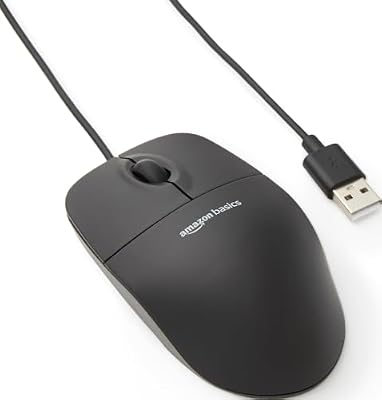
Amazon Basics 3-Button USB Wired Mouse with Responsive Tracking, Plug & Play, Compatible with Windows and Mac, Black


As an Amazon Associate we earn from qualifying purchases. Product prices and availability are accurate as of the date/time indicated.
The Amazon Basics wired mouse is the no-nonsense, cheapest pick on the list. It is a standard three-button USB mouse — left click, right click and a scroll wheel — that you plug in and use immediately, with nothing to install or charge. At around $7 it is about as simple and affordable as a working mouse gets.
For a true beginner, a backup mouse, or anyone who just wants reliable tracking with zero fuss, this is the obvious starting point. The wired connection means it never needs batteries and never drops out, the responsive tracking handles everyday tasks, and the familiar shape suits most hands. If you want the most straightforward, budget-friendly mouse that simply works, the Amazon Basics is hard to beat.
Pros: Lowest price here, true plug-and-play, no batteries, dependable everyday tracking.
Cons: Wired only; plain design with no extras.
3. TECKNET Wireless Mouse (2.4G Ergonomic Optical)

TECKNET Wireless Mouse, 2.4G Ergonomic Computer Mouse, 2600 DPI, Purple | Ergonomic Design with Side Grips, Adjustable DPI, 2-Year Battery, Compact Size, USB-A Plug & Play, Wide OS Compatibility
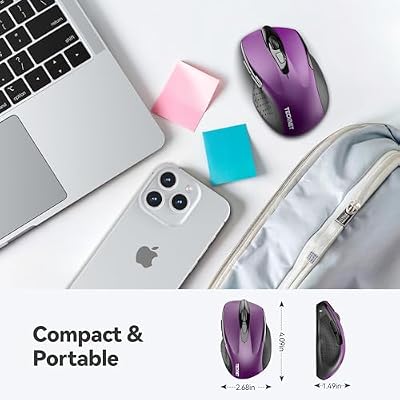


As an Amazon Associate we earn from qualifying purchases. Product prices and availability are accurate as of the date/time indicated.
The TECKNET 2.4G wireless mouse is the comfortable wireless value pick. It pairs a contoured, ergonomic shape with a reliable optical sensor and a plug-and-play 2.4G USB receiver, so it is both easy to set up and easy to hold for longer stretches. At around $10 it offers a noticeable comfort step up for very little money.
This suits the beginner who spends a fair amount of time at the computer and wants a wireless mouse that feels good in the hand. The ergonomic contour supports a natural grip, the wireless receiver keeps the desk tidy, and the optical sensor tracks dependably across everyday surfaces. For a cheap, comfortable, fuss-free wireless mouse, the TECKNET is an easy recommendation.
Pros: Ergonomic comfort, plug-and-play 2.4G wireless, reliable optical sensor, low price.
Cons: Entry-level feature set; best for everyday rather than gaming use.
4. Logitech G502 Hero High Performance Wired Gaming Mouse

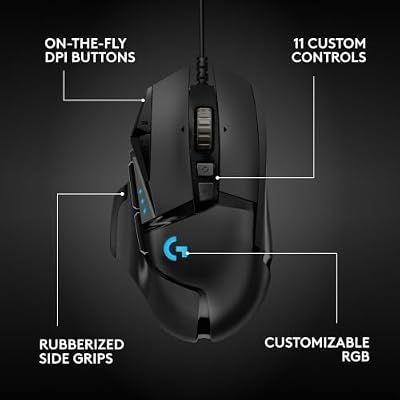
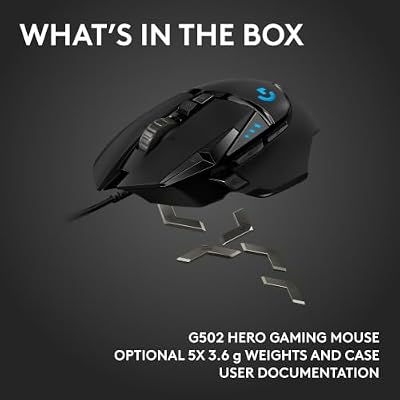
Logitech G502 Hero Wired Gaming Mouse - Black | High performance, 25,600 DPI, RGB, adjustable weights, 11 programmable buttons, on-board memory, PC/Mac





As an Amazon Associate we earn from qualifying purchases. Product prices and availability are accurate as of the date/time indicated.
The Logitech G502 Hero is the pick for a beginner who suspects they will catch the gaming bug. It is a genuine enthusiast mouse — Logitech’s excellent HERO 25K sensor, eleven programmable buttons and adjustable weights — yet it still works as a plug-and-play wired mouse out of the box. At around $32 it is the priciest option here, but it is the one you are least likely to outgrow.
This is the right choice if you want to start simple but leave room to grow. A new user can ignore the extra buttons and use it like any ordinary mouse, then gradually explore Logitech’s G HUB software to remap buttons, tune the sensor and adjust the weight as they learn. If your first mouse might also become your gaming mouse, the G502 Hero is a future-proof place to begin.
Pros: Plug-and-play out of the box, top HERO 25K sensor, grows with you, 11 buttons.
Cons: Pricier and heavier than basic mice; more features than a pure beginner needs.
5. Logitech B100 Wired Mouse (Ambidextrous USB Corded)

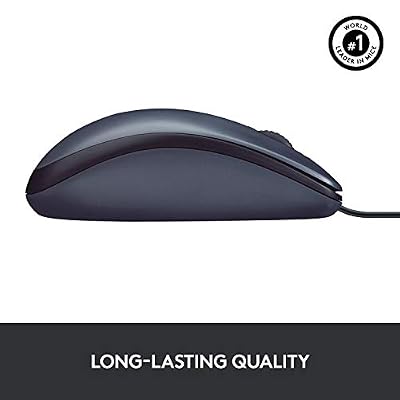
Logitech B100 Ambidextrous Wired Mouse - Black | USB corded, right or left hand use, for computer and laptop




As an Amazon Associate we earn from qualifying purchases. Product prices and availability are accurate as of the date/time indicated.
The Logitech B100 is the trusted-brand everyday wired pick. It is a simple, ambidextrous USB corded mouse from Logitech, built for reliable, comfortable use by left- or right-handed users alike. At around $8 it brings Logitech’s build quality to the budget end of the list.
For a beginner who wants a dependable, name-brand mouse without spending much, the B100 is a smart buy. The wired connection means no charging or batteries, the ambidextrous shape works for anyone in the household, and Logitech’s reputation for durable peripherals gives extra peace of mind. As a no-surprises everyday mouse for work, study or browsing, it is a solid, affordable choice.
Pros: Trusted Logitech build, ambidextrous shape, plug-and-play wired, very affordable.
Cons: Wired only; minimal features and styling.
6. Logitech M185 Wireless Mouse (12-Month Battery)

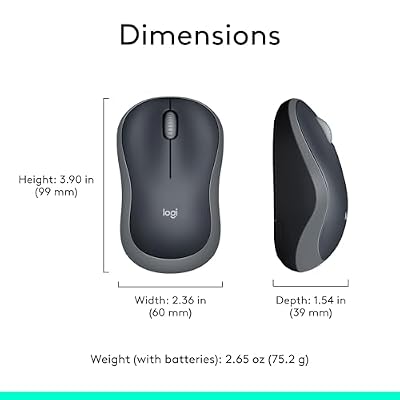
Logitech M185 Compact Ambidextrous 2.4 GHz Wireless Mouse - Swift Grey | Ambidextrous mouse with 2.4 GHz USB-A Nano Receiver, Optical Tracking, 12-Months Battery Life, PC, Mac, Laptop compatible




As an Amazon Associate we earn from qualifying purchases. Product prices and availability are accurate as of the date/time indicated.
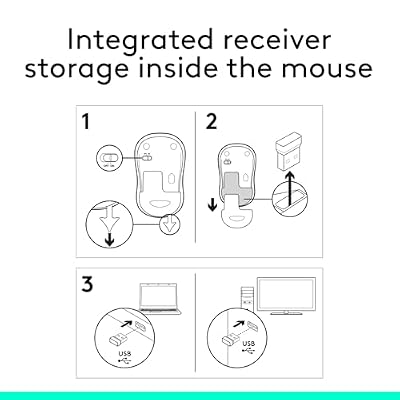
Rounding out the list is the Logitech M185, the long-battery wireless pick. It uses a tiny 2.4GHz USB receiver and is rated for up to twelve months of battery life, so you can set it up and largely forget about it. At around $14 it pairs Logitech reliability with genuine wireless convenience.
This is the mouse to choose if you want cable-free use but dread frequent battery swaps. Plug in the mini receiver, switch it on, and the long battery life means months of use before you think about it again. The compact, comfortable shape and dependable tracking suit everyday browsing and work, making the M185 an easy, low-maintenance wireless mouse for any beginner.
Pros: Up to 12-month battery life, plug-and-play receiver, trusted Logitech reliability.
Cons: Uses a replaceable battery rather than rechargeable; everyday-grade sensor.
How to Choose Your First Mouse
Choosing a first mouse comes down to a few simple decisions, starting with wired versus wireless. A wired mouse, like the Amazon Basics or Logitech B100, is the most foolproof option — plug it in and it always works, with no batteries to charge or replace and no connection to drop. A wireless mouse, like the seenda, TECKNET or Logitech M185, keeps your desk tidy and is barely any harder to use thanks to plug-and-play 2.4G receivers. For a beginner, either is fine; choose wired for absolute simplicity or wireless for a cleaner desk.
Comfort and shape matter more than any spec for a first mouse. You will hold it for hours, so a shape that fits your hand is the priority. Ergonomic, contoured mice like the TECKNET support a natural grip, while ambidextrous designs like the Logitech B100 work for both left- and right-handed users — useful in a shared household. Do not overthink sensors and DPI for everyday use; every mouse here tracks reliably for browsing, documents and general tasks.
Ease of setup is the next consideration, and it is where these picks shine. Every mouse on this list is essentially plug-and-play: connect the USB cable or insert the wireless receiver and you are ready to click, with no software required to get started. That matters for a beginner who wants to avoid drivers and configuration. If you later want extra control — remapping buttons or adjusting sensitivity — a mouse like the Logitech G502 Hero adds optional software, but you never have to touch it to use the mouse normally.
Finally, think about value and whether you want room to grow. Most beginners are best served by an inexpensive, reliable mouse in the $7 to $14 range — the seenda, Amazon Basics, TECKNET, B100 and M185 all qualify and will not overwhelm a new user. But if you suspect gaming is in your future, spending a little more on a capable mouse like the G502 Hero means you will not need to upgrade soon. Set a budget, decide between wired and wireless, pick the most comfortable shape, and the best beginner mouse is simply the one you stop thinking about.
Frequently Asked Questions
What is the best mouse for a complete beginner?
For a true beginner, a simple plug-and-play mouse is ideal. A wired option like the Amazon Basics 3-Button or Logitech B100 just works the moment you plug it in, with no batteries or software. If you prefer no cables, the seenda or TECKNET wireless mice are nearly as easy thanks to their 2.4G USB receivers, and the Logitech M185 adds an exceptionally long battery life.
Should a beginner choose a wired or wireless mouse?
Both are beginner-friendly. A wired mouse is the most foolproof — it never needs charging and never disconnects — so it is great for absolute simplicity. A wireless mouse keeps your desk tidier and, with modern plug-and-play receivers like those on the seenda, TECKNET and Logitech M185, is only marginally more complex. Choose based on whether you value zero maintenance or a cable-free desk.
Do I need a gaming mouse if I am just starting out?
No. For browsing, work and everyday use, an affordable everyday mouse is plenty. A gaming mouse like the Logitech G502 Hero is only worth it if you expect to start gaming, since it offers a premium sensor, extra buttons and software you can grow into. If you are unsure, a simple mouse now and an upgrade later is a perfectly sensible path.
Do these mice need software to work?
No. Every mouse on this list is plug-and-play and works without installing anything — connect the cable or receiver and start clicking. Some, such as the Logitech G502 Hero, offer optional software if you later want to remap buttons or adjust the sensor, but it is never required for normal everyday use.
Related Guides
- Best Gaming Mouse
- Best Wireless Gaming Mouse
- Best Budget Gaming Setup
- Best Mouse Pads for Gaming
- Best RGB Mouse
- Best Gaming Keyboards for Beginners
Affiliate Disclosure: As an Amazon Associate, we earn from qualifying purchases. If you click a link and make a purchase, we may earn a small commission at no extra cost to you. Prices and availability are accurate as of publication and may change.










