Our Short List of 3

- Best for: Players with a Razer setup who want lighting and a spring arm.
- Chroma RGB underglow lighting
- Spring-loaded cable arm
- Weighted base with non-slip feet
- Cable clip for braided and rubber cables

- Best for: Competitive players who want a heavy, adjustable holder.
- Adjustable arm height, 12.5 cm or 16.5 cm
- 376 g weighted base
- Spring-loaded cable arm
- Rubber base for desk grip
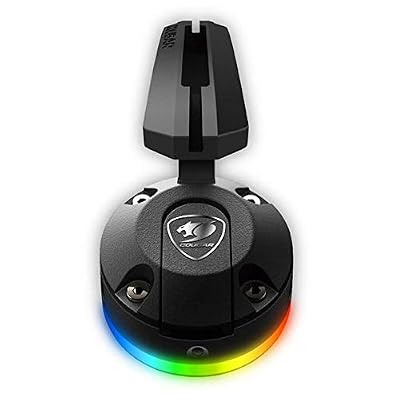
- Best for: Players who want spare USB ports built into the bungee.
- 2-port USB 2.0 hub
- RGB lighting around the base
- Vacuum suction pad base
- Flexible cable arm
All 4 Picks at a Glance
| Product | Specs | Action |
|---|---|---|
| Razer Mouse Bungee V3 Chroma |
| Check price on Amazon |
| BenQ ZOWIE CAMADE II |
| Check price on Amazon |
| Cougar Bunker RGB |
| Check price on Amazon |
 Pulsar Micro Bungee ES |
| Check price on Amazon |
A mouse bungee is a small weighted holder that lifts the mouse cable off the desk and keeps it from dragging, snagging, or pulling against the mouse. It is one of the cheapest upgrades for a wired setup, and it changes how a mouse feels during fast flicks more than most players expect. The right bungee matches the cable, the desk surface, and the way the mouse moves across the pad.
This guide is for wired-mouse players who want cleaner cable control, for competitive players who dislike cable drag, and for anyone building a tidy desk. Each pick below was chosen from the name and specifications shown on its Amazon product page, with attention to arm design, base stability, desk grip, and any extra features the holder brings to the setup.
Quick Picks
As an Amazon Associate we earn from qualifying purchases
| Product | Best for | Key spec from title |
|---|---|---|
| Razer Mouse Bungee V3 Chroma | RGB lighting and a spring arm | Chroma RGB underglow |
| BenQ ZOWIE CAMADE II | Adjustable height and heavy base | 376 g weighted base |
| Cougar Bunker RGB | Extra USB ports on the desk | 2-port USB 2.0 hub |
| Pulsar Micro Bungee ES | Tiny desks and travel setups | 9 g adhesive mount |
How to Choose
Arm Design and Cable Fit
The arm is the part that holds the cable, so its design decides how freely the mouse moves. A spring arm flexes with quick flicks and returns to shape, which suits fast-paced shooters. A fixed arm holds the cable at one height and works well for slower, deliberate play. Check that the cable clip fits the mouse cable: braided cables are thicker and need a wider opening, while thin rubber cables can slip out of a loose clip. The cable should leave the arm with enough slack to reach every corner of the pad without pulling. The clip should hold snugly without kinking the cable.
Base Weight and Desk Grip
A bungee that slides across the desk is worse than no bungee at all, so the base matters as much as the arm. Heavier bases stay put during aggressive flicks, and rubber feet or a suction pad add grip on smooth surfaces. Look for a base weight above 300 g when the desk is large and the mouse moves widely. On a small desk, a compact base with strong grip can work just as well, because there is less cable pulling sideways. Test the base on the actual desk surface before trusting it in a match. A base that slides once will slide again, so grip matters more than looks.
Extra Ports and Features
Some bungees add useful hardware to the desk, and those extras can decide between two similar models. A built-in USB hub puts spare ports within reach for a headset or a phone cable, which helps when the PC sits under the desk. RGB lighting adds a glow that matches the rest of the setup, though it needs a USB connection of its own. Adjustable height lets the arm sit higher for a long cable or lower for a short one. Skip extras that add bulk without a clear purpose, since a bungee should stay out of the way. Count the ports already in use before buying, so the hub actually adds something useful.
Size, Placement, and Desk Space
A bungee earns its place by sitting close to the mouse without crowding the pad. Measure the space behind the pad before buying, because a wide base can push the keyboard or monitor stand out of position. The arm should sit just behind the mouse, with the cable running straight from the arm to the mouse without sharp bends. Left-handed players should check that the arm and clip work from either side. A small adhesive model fits desks where a full-size base has no room at all. Keep the bungee behind the pad, not beside it, so the cable never crosses the mouse path.
The 4 Best Options
Razer Mouse Bungee V3 Chroma
- Best for: Players with a Razer setup who want lighting and a spring arm.
- Chroma RGB underglow lighting
- Spring-loaded cable arm
- Weighted base with non-slip feet
- Cable clip for braided and rubber cables
Players with a Razer setup who want lighting and a spring arm.
The lighting needs a USB connection, so it uses one port on the PC.
The Razer Mouse Bungee V3 Chroma pairs a spring arm with lighting that matches a Razer setup, and the combination works well on a desk that already runs Chroma gear. The spring arm gives the cable room to move during fast flicks, then settles back without dragging the mouse. A weighted base with non-slip feet keeps the holder in place, and the Chroma RGB underglow adds a soft ring of light beneath the base. The cable clip holds braided and rubber cables alike, so most wired mice fit without fuss. Setup takes a minute: place the base, clip the cable, and play.
Watch out for: The lighting needs a USB connection, so it uses one port on the PC.
BenQ ZOWIE CAMADE II
- Best for: Competitive players who want a heavy, adjustable holder.
- Adjustable arm height, 12.5 cm or 16.5 cm
- 376 g weighted base
- Spring-loaded cable arm
- Rubber base for desk grip
Competitive players who want a heavy, adjustable holder.
The taller height setting needs clear space behind the pad.
The BenQ ZOWIE CAMADE II is built around adjustability, and that focus shows in how it handles different cables and desk layouts. The arm height adjusts between two positions, so a long cable can run higher and a short cable can sit lower without slack pooling on the desk. A 376 g weighted base holds firm during wide flicks, and the rubber underside grips smooth surfaces. The spring arm flexes with the mouse and returns to shape, which keeps cable tension even across the pad. ZOWIE players will recognise the plain, tournament-style design at once.
Watch out for: The taller height setting needs clear space behind the pad.
Cougar Bunker RGB
- Best for: Players who want spare USB ports built into the bungee.
- 2-port USB 2.0 hub
- RGB lighting around the base
- Vacuum suction pad base
- Flexible cable arm
Players who want spare USB ports built into the bungee.
The suction pad needs a smooth desk surface to grip properly.
The Cougar Bunker RGB turns a cable holder into a small desk hub, and that extra function sets it apart from simpler bungees. Two USB 2.0 ports sit on the base, putting connections within reach for a headset or a charging cable. A vacuum suction pad grips the desk firmly, and the flexible arm holds the cable at a steady height. RGB lighting runs around the base and can match the rest of the setup. The combination suits players whose PC sits far away and whose desk has few spare ports within arm’s reach.
Watch out for: The suction pad needs a smooth desk surface to grip properly.
Pulsar Micro Bungee ES
- Best for: Small desks, travel setups, and crowded workspaces.
- Adhesive mount for desks and monitor stands
- 9 g weight
- Spring-loaded cable arm
- Compact size for small desks
Small desks, travel setups, and crowded workspaces.
The adhesive mount is less forgiving if the holder needs to move often.
The Pulsar Micro Bungee ES is the smallest holder in this guide, and it suits desks where a full-size base has no room. An adhesive mount sticks to the desk or the monitor stand, and the whole unit weighs only 9 g, so it travels well in a bag. The spring arm still gives the cable room to move, and the clip holds thin and braided cables alike. Because it sticks down rather than sitting on a heavy base, it works on narrow desk edges and crowded setups where other bungees cannot fit at all.
Watch out for: The adhesive mount is less forgiving if the holder needs to move often.
Which One Fits Your Situation
If You Play Competitive Shooters
Competitive shooters punish cable drag, because a snag during a flick can cost a round. The CAMADE II leads here, with its heavy base and adjustable arm keeping tension even across the pad. The Razer V3 Chroma is a strong second choice when the setup already runs Chroma lighting. Either one holds the cable steady through wide, fast movements, and both settle back into place between rounds.
If Your Desk Is Small
A small desk needs a bungee that works without eating space. The Pulsar Micro Bungee ES fits here, since its adhesive mount sticks to a desk edge or a monitor stand and leaves the surface clear. The Cougar Bunker RGB also works when the desk has room behind the pad, because its suction base holds firm in a small footprint. Measure the space behind the pad first, then pick the model that fits.
If You Want Extra USB Ports
Players whose PC sits under the desk often run short of reachable ports. The Cougar Bunker RGB answers that directly, with two USB 2.0 ports on the base for a headset or a charging cable. No other pick in this guide adds ports, so the choice is simple when a hub matters. Pair it with a short cable run so the desk stays tidy.
If You Travel With Your Setup
Travel setups need gear that packs small and sets up fast. The Pulsar Micro Bungee ES weighs 9 g and fits in a bag pocket, and its adhesive mount sticks to a hotel desk or a LAN table. The other picks are heavier and better left at home. Bring spare adhesive pads when travelling, since a mount that has lost its grip will not hold through a long session.
Common Mistakes
- Buying a bungee with a clip that does not fit a thick braided cable.
- Placing the bungee too far from the mouse, which leaves the cable dragging anyway.
- Choosing a light base for a large desk, then watching it slide during flicks.
- Sticking an adhesive mount to a dusty or uneven surface, where it cannot grip.
- Running the cable with too little slack, so the mouse pulls against the arm at the pad edge.
Frequently Asked Questions
Does a mouse bungee really improve aiming?
A bungee removes cable drag, which is the pull a cable exerts on the mouse during movement. Without that drag, the mouse moves more freely and tracking feels consistent across the pad. The gain is largest for wired mice with stiff or heavy cables, and smallest for light, flexible cables. Most players notice the difference within a few matches.
Will a bungee work with any wired mouse?
Most bungees accept the cables of common wired gaming mice, since the clips are sized for braided and rubber cables alike. Very thick cables from older models can be a tight fit, and very thin cables can slip from a loose clip. Check the clip size before buying, and test the fit with the mouse cable in hand when possible.
Where should I place the bungee on my desk?
Place the bungee just behind the mouse pad, with the cable running straight from the arm to the mouse. Leave enough slack for the mouse to reach every corner of the pad without pulling. Avoid sharp bends in the cable, and keep the base clear of the keyboard and monitor stand so nothing pushes it out of position.
Is an adhesive bungee as stable as a weighted one?
An adhesive mount holds well on a clean, smooth surface, and it suits small desks where a heavy base cannot fit. A weighted base is steadier on large desks and survives being bumped without losing grip. Choose adhesive for travel and tight spaces, and weighted for a permanent desk where the bungee rarely moves.