Our Short List of 3
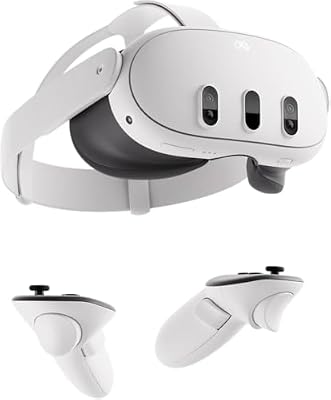
- Best for: The best all-round wireless VR experience with the sharpest picture.
- Resolution: 2064 x 2208 pixels per eye
- Processor: Snapdragon XR2 Gen 2
- Lenses: Pancake
- Storage: 128GB

- Best for: Wireless VR on a budget with the newest chip inside.
- Resolution: 1832 x 1920 pixels per eye
- Processor: Snapdragon XR2 Gen 2
- Lenses: Fresnel
- Storage: 128GB

- Best for: The cheapest entry into wireless VR for a first-time Galaxy owner.
- Resolution: 1832 x 1920 pixels per eye
- Processor: Snapdragon XR2
- Lenses: Fresnel
- Storage: 128GB
All 4 Picks at a Glance
| Product | Specs | Action |
|---|---|---|
| Meta Quest 3 |
| Check price on Amazon |
| Meta Quest 3S |
| Check price on Amazon |
| Meta Quest 2 |
| Check price on Amazon |
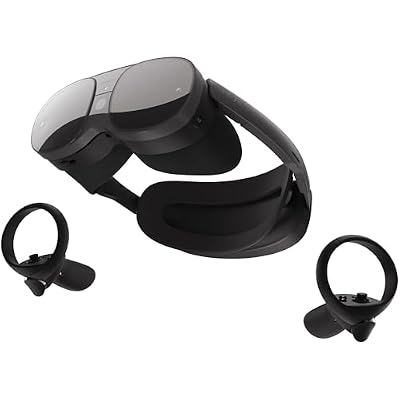 HTC Vive XR Elite |
| Check price on Amazon |
A Samsung Galaxy phone pairs naturally with a standalone VR headset, because the phone becomes the setup screen, the store browser and the casting display while the headset does the heavy work. The Meta Horizon app runs on Android, so a Galaxy phone handles account setup, game purchases and casting the headset view to the room. The question is not whether the phone works with VR, but which headset gives the clearest picture and the most comfortable fit for the money.
This guide is for Galaxy owners who want wireless VR without a gaming PC or a console. Every headset below was chosen from the resolution, processor and storage details shown on its Amazon listing, so you can compare the picture quality and the value before ordering. The four headsets below cover the sharpest picture, the best value, the cheapest entry and a PC VR option.
Quick Picks
As an Amazon Associate we earn from qualifying purchases
| Product | Best for | Key spec from title |
|---|---|---|
| Meta Quest 3 | Sharpest picture and best all-round VR | 2064 x 2208 per eye |
| Meta Quest 3S | Best value with the same chip as the Quest 3 | 1832 x 1920 per eye |
| Meta Quest 2 | Cheapest entry into wireless VR | 1832 x 1920 per eye |
| HTC Vive XR Elite | PC VR without base stations | 1920 x 1920 per eye |
How to Choose
Check the display clarity first
Display clarity decides how sharp the virtual world looks, and it comes from the resolution per eye and the lens type together. Pancake lenses stay sharp across more of the view than fresnel lenses, which blur toward the edges, so a headset with pancake lenses reads text more cleanly at the sides. Compare the per-eye resolution on the listing rather than a single headline number, since that is the figure your eyes actually see. A sharper display matters most for reading, browsing and detailed games, and it is the first thing to compare across models.
Match the processor to the games you want
The processor decides which games run smoothly and how detailed they can be. A newer chip handles richer scenes and higher frame rates, while an older chip still runs the same store library with simpler graphics. Check the chip name on the listing and compare it across models, because two headsets can look similar yet differ a lot in power. If you plan to stream PC VR over Wi-Fi as well, the newer chip also handles the wireless link more smoothly, which keeps the picture steady during play.
Think about comfort and battery
Comfort decides whether a headset gets used or gathers dust, since a heavy front and a tight strap cause fatigue fast. Look for a balanced design and a strap that spreads weight, and remember that a battery strap is an easy upgrade later. Battery life matters too: most standalone headsets run for around two hours, so long sessions need a break or a battery strap. Check the storage size as well, because games take up space and the base model fills up quickly when you install a few large titles. A battery strap is an easy upgrade later, and it also improves the balance of the headset on your head. Balanced headsets feel lighter.
Confirm the Galaxy phone connection
A Galaxy phone connects to these headsets through the Meta Horizon app, which you install from the Google Play Store. The app handles the first setup, lets you browse and buy games from the phone, and casts the headset view to the phone screen so friends can watch. Check that your Galaxy phone runs a recent Android version and has enough free space for the app, and make sure your home Wi-Fi is a clear 5 GHz signal for smooth casting and PC VR streaming without dropouts. The Vive XR Elite uses its own Android app the same way, so a Galaxy phone sets it up too.
The 3 Best Options
Meta Quest 3
- Best for: The best all-round wireless VR experience with the sharpest picture.
- Resolution: 2064 x 2208 pixels per eye
- Processor: Snapdragon XR2 Gen 2
- Lenses: Pancake
- Storage: 128GB
The best all-round wireless VR experience with the sharpest picture.
The battery lasts around two hours, so long sessions need a break or a battery strap.
The Meta Quest 3 is the sharpest headset here, pairing 2064 by 2208 pixels per eye with pancake lenses that stay clear across the view. Its Snapdragon XR2 Gen 2 chip is the fastest here, so games run smoother and more detailed scenes stay steady. The 128GB of storage holds a solid library, and the Touch Plus controllers track your hands without base stations. Set it up with the Meta Horizon app on your Galaxy phone, cast the view to the room, and it becomes the best all-round wireless VR experience a Galaxy owner can buy.
Meta Quest 3S
- Best for: Wireless VR on a budget with the newest chip inside.
- Resolution: 1832 x 1920 pixels per eye
- Processor: Snapdragon XR2 Gen 2
- Lenses: Fresnel
- Storage: 128GB
Wireless VR on a budget with the newest chip inside.
The fresnel lenses blur toward the edges, so the picture is softer than the Quest 3.
The Meta Quest 3S is the value pick, sharing the same Snapdragon XR2 Gen 2 chip as the Quest 3 while costing less. Its 1832 by 1920 pixels per eye and fresnel lenses give a slightly softer picture at the edges, yet the same chip runs the same games just as smoothly. The 128GB of storage and Touch Plus controllers match the Quest 3, and setup runs through the same Meta Horizon app on your Galaxy phone. It is the right choice when you want the newest chip and the full game library without paying for the sharpest lenses.
Meta Quest 2
- Best for: The cheapest entry into wireless VR for a first-time Galaxy owner.
- Resolution: 1832 x 1920 pixels per eye
- Processor: Snapdragon XR2
- Lenses: Fresnel
- Storage: 128GB
The cheapest entry into wireless VR for a first-time Galaxy owner.
Meta has discontinued the Quest 2, so new stock is limited and the listing needs a careful check.
The Meta Quest 2 is the cheapest entry into wireless VR, pairing 1832 by 1920 pixels per eye with a Snapdragon XR2 chip and fresnel lenses. Its 128GB of storage holds a good library, and the Touch controllers track without base stations. It runs the same Meta Horizon app on your Galaxy phone for setup and casting, and it plays the same standalone game library as its successors. It suits a first-time buyer who wants to try VR properly before spending more on a sharper headset.
HTC Vive XR Elite
- Best for: PC VR streaming without base stations.
- Resolution: 1920 x 1920 pixels per eye
- Processor: Snapdragon XR2
- Storage: 128GB
- Memory: 12GB
PC VR streaming without base stations.
The standalone games library is smaller than the Meta Quest store.
The HTC Vive XR Elite is the wireless headset for Galaxy owners who want PC VR without Meta’s ecosystem, pairing a 1920 by 1920 pixels per eye display with base-station-free tracking. Its Snapdragon XR2 chip and 128GB of storage hold a solid set of standalone apps, while the headset also streams demanding PC VR games over Wi-Fi without a cable. The swappable battery lets you change power mid-session, which is something the Meta headsets cannot do. Setup runs through VIVE’s Android app on your Galaxy phone, so the phone still handles the first setup and the store.
Which One Fits Your Situation
You want the clearest picture possible
Pick the Meta Quest 3. Its pancake lenses and 2064 by 2208 resolution per eye keep text and detail sharp across the whole view, and the XR2 Gen 2 chip handles the most demanding games without stuttering. It is the headset to buy when picture quality is the priority and you want the best VR a Galaxy phone can set up. The 128GB of storage holds a solid library for your games.
You want the newest chip for less
Pick the Meta Quest 3S. It shares the Quest 3 chip, so games run just as smoothly, and the lower cost leaves room for a battery strap or extra games. The fresnel lenses soften the edges a little, yet most players stop noticing after the first session, and the value is hard to beat for a first serious headset. The 128GB of storage holds a solid library.
You want to try VR for the least money
Pick the Meta Quest 2. It plays the same standalone library, sets up through the same Galaxy app, and costs the least of the three. Check the listing carefully, since Meta has discontinued it and stock varies, and confirm the storage size before ordering so you know what you are getting. The 128GB of storage holds a good library, so the cheapest headset still gives you plenty to play.
You want PC VR without base stations
Pick the HTC Vive XR Elite. It streams PC VR over Wi-Fi without base stations on the walls, and the swappable battery keeps a long session going. The standalone library is smaller than Meta’s, but for PC VR players that matters less than the freedom from cables and base stations, and the Galaxy phone handles setup through VIVE’s Android app.
Common Mistakes
- Buying a wireless headset and expecting it to match a tethered PC headset for graphics.
- Ignoring the battery and starting a long session with a half-charged headset.
- Setting up a play space full of furniture and tripping over it while wearing the headset.
- Streaming PC VR over a crowded 2.4 GHz network instead of a clear 5 GHz signal.
- Choosing a headset for its resolution alone without checking the games library.
Frequently Asked Questions
Can I use a Samsung Galaxy phone with a Meta Quest headset?
Yes. The Meta Horizon app runs on Android, so you install it on your Galaxy phone from the Google Play Store. The app handles setup, game purchases and casting the headset view to your phone screen. The Vive XR Elite uses its own Android app the same way.
Do I need a gaming PC for these headsets?
No. All three headsets are standalone, so they run games on their own chips without a PC or console. A PC adds the option of streaming PC VR games over Wi-Fi, yet it is not required to play the large standalone library in the Meta store. Most owners never connect a PC at all.
How long does the battery last on a Quest headset?
Most standalone headsets run for around two hours on a charge, which covers a typical session. A battery strap or a portable battery extends that time, and taking a short break between sessions keeps the headset comfortable and the battery topped up. Plan sessions around the two-hour mark to avoid running out mid-game.
Is the Quest 3 worth it over the Quest 3S?
The Quest 3 is worth it if picture clarity matters most to you, since its pancake lenses and higher resolution keep the view sharp at the edges. The Quest 3S shares the same chip, so games run equally well, which makes it the better choice when value matters more than lens quality and you want the newest chip for less.