

- Top Pick: ASUS ROG Maximus Z890 Hero Intel® Z890 LGA 1851 ATX Motherboard, Advanced AI PC-Ready, 22+2+1+2 Stages, DDR5, WiFi 7, 3X PCIe® 5.0 M.2, Thunderbolt™ 4, USB Type-C®, AI Overclocking/Cooling/Networking
- Best Value: ASUS ROG Crosshair X870E Hero AMD X870E AM5 ATX Motherboard, Advanced AI PC Ready, 18+2+2 Power Stages, DDR5, PCIe® 5.0, 5X M.2, Wi-Fi 7, USB4®, AI Overclocking, Core Flex, PCIe Slot Q-Release Slim
- Premium Choice: ASUS ROG Strix X870E-E Gaming WiFi AMD AM5 X870 ATX Motherboard 18+2+2 Power Stages, Dynamic OC Switcher, Core Flex, DDR5 AEMP, WiFi 7, 5X M.2, PCIe® 5.0, Q-Release Slim, USB4®, AI OCing & Networking
Overclocking lives and dies by the motherboard. A capable CPU can only push past its stock limits if the board feeding it has the power delivery, the cooling and the BIOS controls to do so safely — which is why enthusiasts obsess over VRM quality and chipset support long before they touch a multiplier. A strong overclocking board pairs a robust multi-phase VRM with generous heatsinks, a mature BIOS full of voltage and frequency options, and the right socket and chipset to unlock the headroom. This guide rounds up the best motherboards for overclocking in 2026 across AMD and Intel platforms.
- Best Motherboards for Overclocking at a Glance
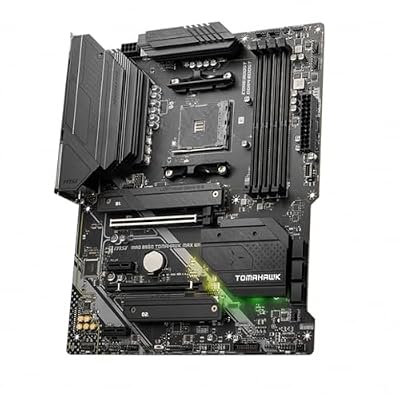
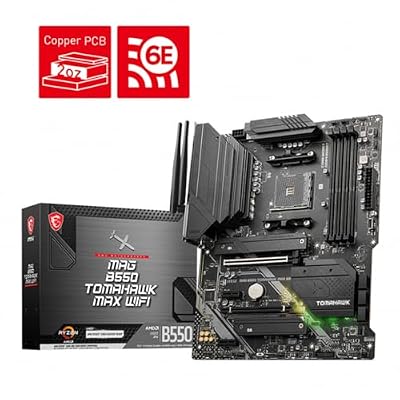
- 1. MSI MAG B550 Tomahawk Gaming Motherboard (AMD Ryzen 5000, AM4, DDR4, PCIe 4.0)
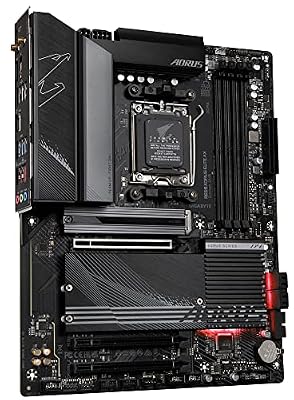
- 2. GIGABYTE B650 AORUS Elite AX AMD AM5 ATX Motherboard (Ryzen 9000/8000/7000)
- 3. ASUS ROG Strix B450-F Gaming Motherboard (ATX, AMD AM4, DDR4)
- 4. ASUS Prime Z390-P LGA1151 (Intel 8th/9th Gen) ATX Motherboard
- 5. ASUS ROG Strix Z390-E Gaming Motherboard LGA1151 (Intel 8th/9th Gen) ATX DDR4
- 6. ASUS ROG Strix X570-E Gaming ATX Motherboard – PCIe 4.0, Aura Sync RGB
- How to Choose a Motherboard for Overclocking
- Frequently Asked Questions
- Related Guides
- Related Articles
Our picks were chosen on what genuinely enables a stable overclock: VRM power stages and cooling, the depth and usability of the BIOS overclocking tools, socket and chipset support for unlocked CPUs, and overall value. We have spanned several platforms — AMD AM4 and the latest AM5, plus Intel LGA1151 — because the right board depends on the CPU you are pushing. Prices run from around $112 up to around $492. Below is an at-a-glance comparison, then a closer look at each board and a buyer’s guide built around VRMs, chipsets and BIOS features — the things that actually matter when you overclock.
As an Amazon Associate we earn from qualifying purchases at no extra cost to you.


🛒 Best Price Today on Amazon
Prime members get fast, free shipping on everything above, plus member-only deals. New members get a 30-day free trial — cancel anytime.
Best Motherboards for Overclocking at a Glance
| Motherboard | Best For | Standout Spec | Approx Price |
|---|---|---|---|
| MSI MAG B550 Tomahawk | Best value AM4 OC | Robust VRM, AM4, PCIe 4.0 | around $112 |
| GIGABYTE B650 AORUS Elite AX | Modern AM5 overclocking | AM5, DDR5, Wi-Fi 6E | around $150 |
| ASUS ROG Strix B450-F Gaming | Budget AM4 starter OC | B450, AM4, sturdy power | budget pick |
| ASUS Prime Z390-P (LGA1151) | Affordable Intel Z390 OC | Z390 unlocked overclocking | around $194 |
| ASUS ROG Strix Z390-E Gaming | Premium Intel Z390 OC | Strong VRM, Z390, ROG BIOS | around $390 |
| ASUS ROG Strix X570-E Gaming | Flagship AM4 OC + PCIe 4.0 | X570, PCIe 4.0, Aura Sync | around $492 |
1. MSI MAG B550 Tomahawk Gaming Motherboard (AMD Ryzen 5000, AM4, DDR4, PCIe 4.0)

MSI MAG B550 Tomahawk MAX WiFi Gaming Motherboard (AMD Ryzen 5000 Series, AM4, DDR4, PCIe 4.0, SATA 6Gb/s, M.2, USB 3.2 Gen 2, HDMI/DP, Wi-Fi 6E, Bluetooth 5.2, 2.5Gbps LAN, ATX)



As an Amazon Associate we earn from qualifying purchases. Product prices and availability are accurate as of the date/time indicated.
The MSI MAG B550 Tomahawk is the value overclocking champion of this list and one of the most recommended AM4 boards ever made. Its reputation rests on a genuinely robust VRM with extended heatsinks — power delivery that punches well above its price class — paired with the B550 chipset’s PCIe 4.0 support and full compatibility with AMD Ryzen 5000 CPUs. At around $112 it is outstanding value for serious overclocking.
This is the board to choose if you want flagship-grade power delivery without flagship spending. The strong VRM stays cool under sustained load, letting you push a Ryzen chip with confidence, while MSI’s Click BIOS gives clear access to multiplier, voltage and memory overclocking. Throw in PCIe 4.0, dual M.2 slots and 2.5G LAN and you have a board that handles overclocking and modern components alike. For most AM4 overclockers, the B550 Tomahawk is the smart default.
Pros: Robust VRM and cooling for the price, PCIe 4.0, clear Click BIOS, exceptional value.
Cons: DDR4 and AM4 platform; not the latest socket.
2. GIGABYTE B650 AORUS Elite AX AMD AM5 ATX Motherboard (Ryzen 9000/8000/7000)

GIGABYTE B650 AORUS Elite AX AMD AM5 ATX Motherboard, Support Ryzen 9000/8000/7000 Series, DDR5, 14+2+1 Power Phase, PCIe 5.0 M.2, USB-C 3.2 Gen 2, WIFI6E, 2.5GbE, EZ-Latch, Q-Flash, RGB Fusion



As an Amazon Associate we earn from qualifying purchases. Product prices and availability are accurate as of the date/time indicated.
The GIGABYTE B650 AORUS Elite AX is the pick for modern overclocking on AMD’s current AM5 platform. It brings DDR5 memory support, PCIe 5.0 readiness and a solid multi-phase VRM with substantial heatsinks, all on the latest socket for Ryzen 9000, 8000 and 7000 CPUs. At around $150 it is a well-priced gateway to current-generation overclocking and EXPO memory tuning.
This is the board for anyone building fresh on AM5 who wants overclocking headroom and a future-proof platform. The reinforced VRM and cooling support stable CPU overclocks, the BIOS exposes the voltage and frequency controls enthusiasts expect plus one-click EXPO for DDR5 memory tuning, and onboard Wi-Fi 6E rounds out a complete spec. For modern AM5 overclocking without stepping up to a pricey flagship, the B650 AORUS Elite AX is a strong, sensible choice.
Pros: Latest AM5 socket, DDR5 and EXPO support, solid VRM and cooling, Wi-Fi 6E.
Cons: Requires DDR5 and an AM5 CPU; pricier overall platform cost.
3. ASUS ROG Strix B450-F Gaming Motherboard (ATX, AMD AM4, DDR4)

ASUS ROG Strix Scope II 96 Wireless Mechanical Gaming Keyboard – 96% Full-Size, Tri-Mode Connectivity, Hot Swappable Pre-lubed ROG NX Snow Linear Switches, PBT Keycaps, RGB, PC/Mac Support-Black


As an Amazon Associate we earn from qualifying purchases. Product prices and availability are accurate as of the date/time indicated.
The ASUS ROG Strix B450-F Gaming is the budget AM4 starter board for overclocking. As a B450 board it offers sturdy ROG-grade power delivery and cooling at an entry price, supporting Ryzen overclocking on the mature AM4 platform with DDR4 memory. It is the pick for builders who want a dependable, affordable foundation to start pushing a Ryzen CPU.
This is the board for a first overclocking build or a budget Ryzen rig that still wants real tuning ability. The reinforced VRM handles moderate overclocks on mainstream Ryzen chips, the ASUS UEFI BIOS is among the most approachable for newcomers learning voltage and multiplier adjustments, and the ROG build quality is a step above bargain boards. While B450 is an older chipset, it remains a proven, cost-effective entry into AM4 overclocking for those not chasing the highest-end CPUs.
Pros: Affordable ROG build quality, sturdy power delivery, beginner-friendly UEFI BIOS, AM4.
Cons: Older B450 chipset; best for moderate overclocks on mainstream CPUs.
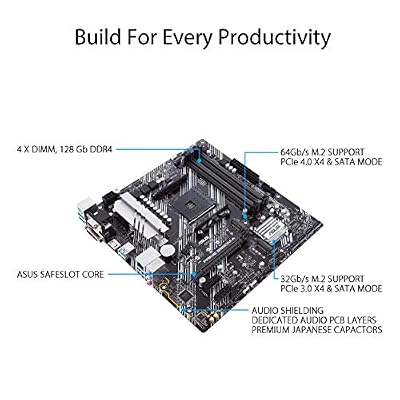
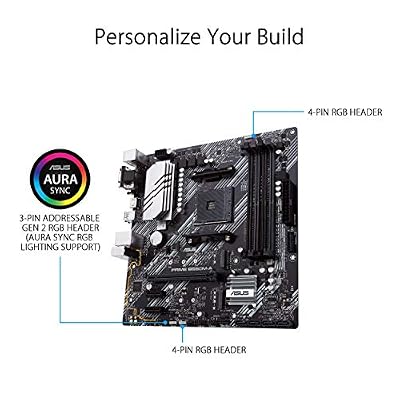
4. ASUS Prime Z390-P LGA1151 (Intel 8th/9th Gen) ATX Motherboard

ASUS Prime B550M-A WiFi II AMD Micro ATX DDR4 Motherboard with PCIe 4.0, WiFi 6, ECC Memory, HDMI 2.1, RGB Header



As an Amazon Associate we earn from qualifying purchases. Product prices and availability are accurate as of the date/time indicated.
The ASUS Prime Z390-P is the affordable Intel overclocking pick. Built on the Z390 chipset — the Intel chipset that actually unlocks CPU overclocking for 8th and 9th Gen K-series chips — it brings ASUS power delivery and a capable UEFI to the LGA1151 platform at a reasonable price. At around $194 it is a value route into Intel overclocking on this generation.
This is the board for someone overclocking an unlocked Intel 8th or 9th Gen CPU who does not need premium ROG extras. The Z390 chipset is the key ingredient — only Z-series boards allow multiplier overclocking — and the Prime’s VRM and BIOS handle sensible overclocks on mainstream K-series chips. The ASUS UEFI keeps voltage and frequency tuning accessible. For a cost-conscious Intel LGA1151 overclocking build, the Prime Z390-P delivers the essential unlocked-overclocking capability without the flagship price.
Pros: Z390 unlocks CPU overclocking, affordable, accessible ASUS UEFI, LGA1151 8th/9th Gen.
Cons: Older Intel platform; VRM modest versus high-end Z390 boards.
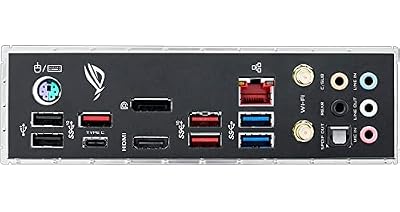
5. ASUS ROG Strix Z390-E Gaming Motherboard LGA1151 (Intel 8th/9th Gen) ATX DDR4

Asus ROG Strix Z390-E Gaming Motherboard LGA1151 (Intel 8th 9th Gen) ATX DDR4 DP HDMI M.2 USB 3.1 Gen2 802.11AC Wi-Fi


As an Amazon Associate we earn from qualifying purchases. Product prices and availability are accurate as of the date/time indicated.
The ASUS ROG Strix Z390-E Gaming is the premium Intel Z390 overclocking pick. It steps well above the Prime with a stronger multi-phase VRM, larger heatsinks and the full ROG BIOS, giving 8th and 9th Gen K-series CPUs the power and control to overclock harder and more stably. At around $390 it is built for enthusiasts who want to extract the most from an unlocked Intel chip.
This is the board for the Intel overclocker who refuses to be bottlenecked by power delivery. The beefed-up VRM stays composed under heavy sustained overclocks, the comprehensive ROG UEFI offers deep voltage, frequency and memory tuning with extensive monitoring, and the robust cooling keeps the power stages in check. Add premium connectivity and Aura Sync RGB and it is a complete enthusiast platform. For pushing a 9th Gen K-series CPU hard on LGA1151, the Z390-E is a top-tier choice.
Pros: Strong VRM and cooling, full ROG overclocking BIOS, deep tuning controls, premium build.
Cons: Expensive for an older platform; overkill for mild overclocks.
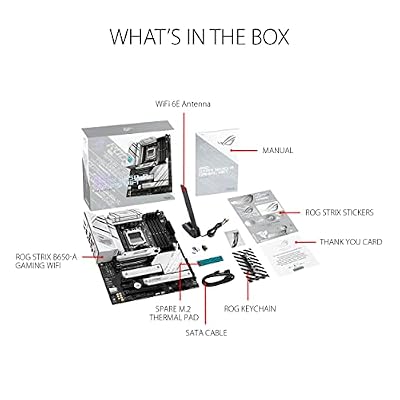
6. ASUS ROG Strix X570-E Gaming ATX Motherboard – PCIe 4.0, Aura Sync RGB

ASUS ROG Strix B650-A Gaming WiFi AMD B650 AM5 Ryzen™ Desktop 9000 8000 & 7000 ATX motherboard, 12 + 2 power stages, DDR5, 3x M.2 slot, PCIe® 4.0, 2.5G LAN, WiFi 6E, USB 3.2 Gen 2x2 Type-C®, Aura Sync



As an Amazon Associate we earn from qualifying purchases. Product prices and availability are accurate as of the date/time indicated.
Rounding out the list is the ASUS ROG Strix X570-E Gaming, the flagship AM4 overclocking board here. The X570 chipset brings full PCIe 4.0 across the board, and ASUS pairs it with a powerful ROG VRM, heavy-duty cooling and the complete ROG BIOS — everything needed to overclock high-core-count Ryzen CPUs to their limits. At around $492 it is the premium pick, and the engineering earns it.
This is the board for the AM4 enthusiast who wants no compromises on power delivery, expansion or tuning. The robust VRM and substantial heatsinks sustain aggressive Ryzen overclocks, the ROG UEFI delivers exhaustive voltage, frequency and memory controls with detailed telemetry, and full PCIe 4.0 plus dual M.2 and premium networking make it future-ready within AM4. For the most demanding AM4 overclocking and the headroom to match, the X570-E Gaming is the standout.
Pros: Powerful VRM and cooling, full PCIe 4.0, comprehensive ROG BIOS, flagship AM4 build.
Cons: Highest price here; X570 boards can run warmer and pricier.
How to Choose a Motherboard for Overclocking
Overclocking starts with the VRM — the voltage regulator module that feeds clean, stable power to the CPU. The more (and higher-quality) power stages a board has, and the better its heatsinks, the harder and more reliably you can push a chip without the VRM overheating and throttling. This is why a board like the MSI B550 Tomahawk earns its reputation: its robust VRM and extended heatsinks deliver flagship-class power delivery at a mainstream price. Always check the power stages and cooling before anything else.
The chipset and socket decide whether overclocking is even possible. On Intel, only Z-series chipsets like the Z390 here unlock CPU multiplier overclocking — a B- or H-series board will lock you out — so the Prime Z390-P and ROG Strix Z390-E are the gateways for 8th and 9th Gen K-series chips. On AMD, overclocking is far more open across B450, B550 and X570 (AM4) and the newer B650 (AM5); just match the socket to your CPU and confirm BIOS support for your exact chip.
The BIOS is your overclocking cockpit, so its depth and clarity matter enormously. A mature UEFI exposes granular control over CPU multiplier, core and memory voltages, load-line calibration and frequency, ideally with good monitoring and safety limits. ASUS ROG and MSI Click BIOS interfaces are well-regarded for blending depth with usability, and one-click memory profiles — XMP on Intel, EXPO on AM5 boards like the B650 AORUS Elite AX — make tuning DDR memory straightforward. If you are new to overclocking, favour an approachable BIOS like the ASUS UEFI.
Finally, balance cooling, features and budget against how hard you actually plan to push. Robust VRM cooling is non-negotiable for heavy overclocks, but if you only want a mild bump, a value board like the B550 Tomahawk or B450-F covers you for far less than a flagship X570-E or Z390-E. Decide your platform (AMD or Intel, and which generation), match the chipset and socket to your CPU, prioritise a strong VRM and a capable BIOS, and pick the overclocking motherboard on this list that fits your ambitions and your wallet. The right board is the one that lets your CPU stretch its legs without ever running out of clean power.
Frequently Asked Questions
Why does the motherboard matter so much for overclocking?
Because the motherboard delivers power to the CPU. Its VRM (voltage regulator module) and cooling determine how much clean, stable current the chip can receive under load — push past what the board can supply or cool and it throttles or becomes unstable. A board with a robust VRM and good heatsinks, like the MSI B550 Tomahawk, gives a CPU room to overclock reliably, while a weak board limits even a capable processor.
Do I need a Z-series chipset to overclock an Intel CPU?
Yes, for CPU multiplier overclocking. Intel only unlocks overclocking of K-series chips on Z-series chipsets — the Z390 boards here, for instance — while B- and H-series boards lock the multiplier. AMD is far more permissive, allowing Ryzen overclocking across B450, B550, X570 and AM5 B650 boards. Always match the chipset to both your CPU and your overclocking plans.
What is a VRM and how many power phases do I need?
A VRM (voltage regulator module) converts and stabilises the power feeding your CPU; its power stages, or phases, share that load. More high-quality phases with good heatsinks mean cooler, steadier delivery under sustained overclocks. For mainstream CPUs a strong mid-range VRM like the B550 Tomahawk’s is plenty, while high-core-count chips pushed hard benefit from a flagship VRM like the X570-E or Z390-E.
Can I overclock memory as well as the CPU?
Yes. All of these boards support memory overclocking through stored profiles — XMP on the Intel Z390 boards and EXPO on the AM5 GIGABYTE B650, with manual tuning available too. Enabling the profile in BIOS runs your RAM at its rated speed with one click, and the more advanced BIOS interfaces let you tighten timings and voltages further for extra performance once you are comfortable.
Related Guides
- Best CPUs for Gaming
- Best CPU Coolers
- Best RAM for Gaming
- Best Power Supplies
- Best PC Cases for Airflow
- Best Gaming PCs
Affiliate Disclosure: As an Amazon Associate, we earn from qualifying purchases. If you click a link and make a purchase, we may earn a small commission at no extra cost to you. Prices and availability are accurate as of publication and may change.










