

- Top Pick: AI Systems Performance Engineering: Optimizing Model Training and Inference Workloads with GPUs, CUDA, and PyTorch
- Best Value: Mastering GPU Machine Learning: Accelerate AI with Graphics Processing Units
- Premium Choice: HPE NVIDIA Tesla V100 32GB HBM2 PCIe 3.0 x16 Passive GPU Computational Accelerator for AI Machine Learning HPC Deep Learning 699-2G500-0216-400 (Renewed)
🛒 Best Price Today on Amazon
Prime members get fast, free shipping on everything above, plus member-only deals. New members get a 30-day free trial — cancel anytime.
- Top Machine Learning Gpus Picks for 2026
- Best Machine Learning GPUs at a Glance
- 1. PNY NVIDIA RTX PRO 6000 Blackwell Max-Q Workstation GPU
- 2. PNY NVIDIA RTX PRO 5000 Blackwell 48GB GDDR7 Graphics Card
- 3. NVIDIA Tesla L4 24GB PCIe Graphics Accelerator, 75W
- 4. ASUS TUF Gaming GeForce RTX 5090 Triple Fan GPU, 32GB GDDR7
- 5. ASUS Turbo AMD Radeon AI PRO R9700, Built for AI-Driven Workflows
- 6. MSI Gaming GeForce RTX 3060 12GB GDDR6 Graphics Card
- How to Choose a Machine Learning GPU
- Frequently Asked Questions
- Related Guides
- Related Articles
- Related Guides
Top Machine Learning Gpus Picks for 2026
Here are our current top machine learning gpus picks, compared on real Amazon owner reviews, price, and features. Live prices update below.
As an Amazon Associate we earn from qualifying purchases at no extra cost to you.






Machine learning lives and dies by the GPU. Training and running models is massively parallel work, and the right graphics card — with enough memory to hold your model and data, plenty of compute throughput, and a mature software stack — is the difference between iterating in minutes and waiting hours. The two specs that matter most for ML are VRAM (video memory, which caps the size of the model and batch you can fit) and compute capability, including the tensor cores that accelerate the math behind deep learning. This guide rounds up the best machine learning GPUs in 2026 across a very wide range, from purpose-built workstation accelerators to consumer cards that punch above their price.
We will be straight with you about one thing throughout: several of these are gaming GPUs fitted to machine learning rather than dedicated data-centre parts. They work superbly for learning, experimentation and many real workloads thanks to NVIDIA’s CUDA ecosystem, but they lack the ECC error-correcting memory, the certified drivers and the enormous VRAM of true professional cards. Our picks were chosen on VRAM capacity, CUDA and tensor-core capability, software-stack maturity, and value — and we flag honestly where a card is a consumer part versus a workstation accelerator. Prices span an enormous range, from around $399 to around $12,695. Below is an at-a-glance comparison, then a closer look at each and a buyer’s guide built around the things that genuinely drive ML performance.
Best Machine Learning GPUs at a Glance
| GPU | Best For | Standout Spec | Approx Price |
|---|---|---|---|
| NVIDIA RTX PRO 6000 Blackwell Max-Q | Serious professional ML workstation | Massive VRAM, pro Blackwell | around $12,695 |
| PNY RTX PRO 5000 Blackwell 48GB | Large-VRAM pro without flagship cost | 48GB GDDR7, pro-grade | around $4,820 |
| NVIDIA Tesla L4 24GB | Efficient 75W inference | 24GB, low-power data-centre | around $3,499 |
| ASUS TUF GeForce RTX 5090 32GB | Best value high-VRAM CUDA card | 32GB GDDR7, huge AI throughput | around $4,149 |
| ASUS Turbo Radeon AI PRO R9700 | AMD AI workflow alternative | Built for AI-driven workflows | around $1,699 |
| MSI GeForce RTX 3060 12GB | Affordable learning starter | 12GB VRAM on a budget | around $399 |
1. PNY NVIDIA RTX PRO 6000 Blackwell Max-Q Workstation GPU

PNY Technology VCNRTXPRO6000BQ-PB NVIDIA RTX PRO 6000 Blackwell Max-Q Workstation Graphics Card
As an Amazon Associate we earn from qualifying purchases. Product prices and availability are accurate as of the date/time indicated.
The NVIDIA RTX PRO 6000 Blackwell Max-Q is the no-compromise professional pick for serious machine learning, and the most capable card on this list by a wide margin. It is a true workstation accelerator built on NVIDIA’s latest Blackwell architecture, with an enormous pool of professional-grade VRAM, ECC memory for data integrity, and certified drivers for production reliability. At around $12,695 it is unambiguously a flagship investment.
This is the GPU for a professional or research team training large models, running big batches, or working with datasets that simply will not fit on consumer cards. Unlike the gaming GPUs further down this list, it is purpose-built for compute: the massive VRAM lets you hold large models in memory, the ECC memory guards against the silent bit-errors that can corrupt long training runs, and the certified stack is meant for production use. If your work demands the headroom and reliability of a real workstation accelerator and the budget supports it, the RTX PRO 6000 is the standout.
Pros: Enormous professional VRAM, latest Blackwell architecture, ECC memory, certified pro drivers.
Cons: Extremely expensive flagship; overkill and out of reach for hobbyists and most learners.
2. PNY NVIDIA RTX PRO 5000 Blackwell 48GB GDDR7 Graphics Card
PNY Technology VCNRTXPRO6000BQ-PB NVIDIA RTX PRO 6000 Blackwell Max-Q Workstation Graphics Card
As an Amazon Associate we earn from qualifying purchases. Product prices and availability are accurate as of the date/time indicated.
The PNY RTX PRO 5000 Blackwell is the large-VRAM professional pick that stops short of flagship pricing. It pairs the modern Blackwell architecture with a generous 48GB of GDDR7 memory, giving you the kind of capacity that lets you work with sizeable models and batches that would overflow a consumer card. As a workstation-class part it brings pro-grade reliability features. At around $4,820 it is a serious but more attainable professional accelerator.
This is the GPU for the professional or serious researcher who needs lots of VRAM and workstation-grade dependability but cannot justify the cost of the RTX PRO 6000. The 48GB of memory is the headline: it accommodates larger models and bigger batch sizes than the 24GB and 32GB cards here, which directly expands what you can train and run. As a true professional card rather than a repurposed gaming GPU, it also offers the ECC and driver maturity that production ML benefits from. For large-VRAM work at a relative discount, it is an excellent choice.

Pros: Large 48GB GDDR7 VRAM, modern Blackwell architecture, workstation-grade reliability.
Cons: Still a costly professional card; far pricier than consumer GPUs with similar raw speed.
3. NVIDIA Tesla L4 24GB PCIe Graphics Accelerator, 75W

NVIDIA Tesla L4 24GB PCIe Graphics ACELLERATOR HH/HL 75W GPU 900-2G193-0000-000


As an Amazon Associate we earn from qualifying purchases. Product prices and availability are accurate as of the date/time indicated.
The NVIDIA Tesla L4 is the efficiency pick, a data-centre accelerator designed for inference and lighter training at a remarkably low 75W power draw. It packs 24GB of memory in a compact, low-profile, passively cooled card that slots into servers and small workstations without demanding extra power connectors. At around $3,499 it is a specialised, professional-class part.
This is the GPU for someone deploying inference workloads or running ML in a power- and space-constrained environment — a home server, a compact workstation, or a rack where efficiency matters. The 24GB of memory comfortably handles many inference tasks and moderate models, and the 75W envelope means it runs cool and cheap to power, with no need for beefy cooling or PSU headroom. It is not built for the fastest raw training — its strength is efficiency and deployment density — but as a purpose-built, low-power data-centre card with real VRAM, the L4 fills a niche the gaming cards here cannot.
Pros: Very efficient 75W draw, 24GB VRAM, compact data-centre design, ideal for inference.
Cons: Lower raw throughput than big training cards; passively cooled, needs proper server airflow.
4. ASUS TUF Gaming GeForce RTX 5090 Triple Fan GPU, 32GB GDDR7

ASUS TUF Gaming GeForce RTX 5090 Triple Fan GPU, 32GB GDDR7, 3352 AI Tops, 28 Gbps, 512-bit, DLSS 4, AI Content Creation, Local LLM Inference, DP 2.1b x3, HDMI 2.1b x2, with GPU Holder


As an Amazon Associate we earn from qualifying purchases. Product prices and availability are accurate as of the date/time indicated.
The ASUS TUF GeForce RTX 5090 is the best-value high-VRAM pick for machine learning, and the card most enthusiasts and individual researchers will actually want. It is a flagship consumer gaming GPU with a substantial 32GB of GDDR7 memory and enormous AI throughput from its latest-generation tensor cores, all backed by NVIDIA’s mature CUDA ecosystem. At around $4,149 it delivers professional-rivalling compute at a fraction of a workstation card’s price.
Here is the honest framing: this is a gaming GPU fitted to ML, not a data-centre part — it has no ECC memory and uses standard GeForce drivers rather than certified professional ones. But for learning, research and a great deal of real work, that is absolutely fine, and the value is exceptional. The 32GB of VRAM holds genuinely large models, the tensor cores accelerate training and inference enormously, and CUDA means virtually every ML framework runs out of the box. For an individual who wants maximum machine learning capability per dollar, the RTX 5090 is the standout pick.

Pros: Huge 32GB GDDR7 VRAM, massive tensor/AI throughput, full CUDA support, outstanding value.
Cons: A gaming GPU adapted to ML: no ECC memory and consumer drivers, not a certified workstation card.
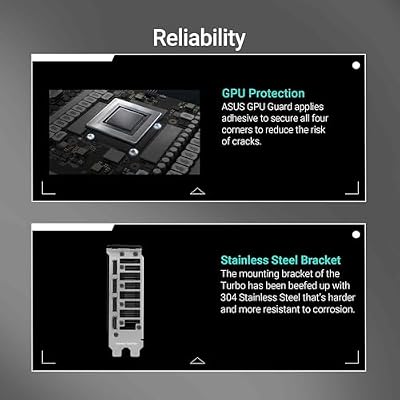
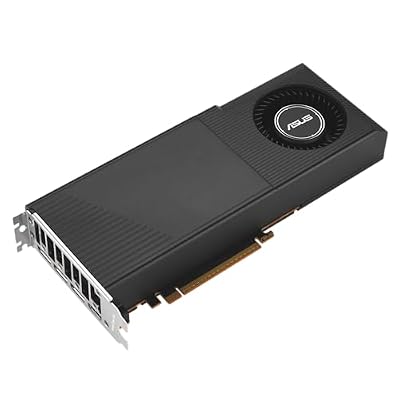
5. ASUS Turbo AMD Radeon AI PRO R9700, Built for AI-Driven Workflows

ASUS Turbo Radeon AI PRO R9700 32GB Graphics Card Built for AI workflows | RDNA™ 4 Architecture, 32GB VRAM, Diecast Shroud and Backplate Boost Cooling






As an Amazon Associate we earn from qualifying purchases. Product prices and availability are accurate as of the date/time indicated.
The ASUS Turbo Radeon AI PRO R9700 is the AMD alternative for AI workflows. Positioned by AMD specifically for AI-driven and demanding professional work, it offers a blower-style ‘Turbo’ cooler suited to multi-card or workstation installs. At around $1,699 it is the most affordable workstation-oriented card here and an option for those building outside the NVIDIA ecosystem.
This is the GPU for a user who wants a professional-leaning AI card and is willing to work with AMD’s ROCm software stack instead of CUDA. The card is built for AI workflows and the blower cooler makes it practical for stacked or rack-style setups where airflow is tight. The honest caveat is the software ecosystem: the overwhelming majority of machine learning tooling is written and tested first for NVIDIA’s CUDA, so AMD cards can require more setup effort and broader-but-less-mature framework support. If you specifically want an AMD AI card and are comfortable with ROCm, the R9700 is a capable, value-minded choice.
Pros: Affordable workstation-oriented AI card, blower cooler for multi-card builds, AMD value.
Cons: ROCm ecosystem is less mature than CUDA; most ML tooling targets NVIDIA first, so expect more setup.
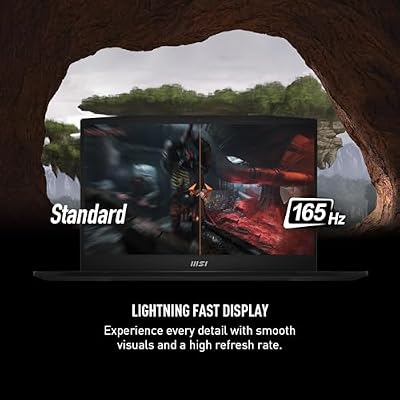
6. MSI Gaming GeForce RTX 3060 12GB GDDR6 Graphics Card

msi Katana 15 15.6” 165Hz QHD Gaming Laptop: Intel Core i7-13620H, NVIDIA Geforce RTX 4070, 16GB DDR5, 1TB NVMe SSD, Cooler Boost 5, Win 11: Black B13VGK-2000US



As an Amazon Associate we earn from qualifying purchases. Product prices and availability are accurate as of the date/time indicated.
Rounding out the list is the MSI GeForce RTX 3060 12GB, the affordable learning starter — and a perennial favorite for anyone getting into machine learning on a budget. Its key feature for ML is the 12GB of VRAM, unusually generous for its price class, which lets newcomers train and run more substantial models than cheaper cards allow. Backed by CUDA and tensor cores, and at around $399, it is the most accessible entry point here.
This is the GPU for students, hobbyists and anyone learning the ropes without a large budget. The 12GB of memory is the reason it punches above its weight: it fits models and batch sizes that 8GB cards choke on, making it genuinely useful for coursework, experimentation and smaller projects. CUDA support means every major framework runs without fuss, and the modest price keeps the barrier to entry low. To be clear it is a consumer gaming card — no ECC, consumer drivers, and far less raw power than the flagships — but as an affordable, VRAM-rich way to start learning ML, the RTX 3060 12GB is hard to beat.

Pros: Generous 12GB VRAM for the price, full CUDA support, very affordable ML entry point.
Cons: Consumer gaming card with no ECC; far less compute than flagship or workstation GPUs.
How to Choose a Machine Learning GPU
For machine learning, VRAM is king. Video memory determines the largest model and batch size you can fit on the card, and running out of it stops a workload dead — no amount of raw speed compensates for too little memory. That is why capacity, not just clock speed, drives these picks: the 12GB on the RTX 3060 is a sensible learning floor, the 24GB on the Tesla L4 and 32GB on the RTX 5090 open up larger models, and the 48GB on the RTX PRO 5000 (and more on the PRO 6000) is for serious professional work. Decide how large your models are first, then buy enough VRAM to hold them.
Compute capability and the software ecosystem come next, and here NVIDIA’s CUDA is the practical default. CUDA, together with tensor cores that accelerate deep-learning math, is the platform virtually every machine learning framework is built and tested against, so NVIDIA cards — from the humble RTX 3060 to the flagship RTX PRO 6000 — generally ‘just work.’ AMD’s Radeon AI PRO R9700 is a capable alternative, but its ROCm stack is less mature and can demand more setup. If you value the smoothest path and the widest tool support, an NVIDIA card is the safer choice.
Be honest with yourself about consumer versus workstation cards, because the right answer depends entirely on your needs. Gaming GPUs fitted to ML, like the RTX 5090 and RTX 3060, deliver tremendous value and are perfect for learning, research and many production tasks — but they lack ECC error-correcting memory and certified drivers. True workstation accelerators like the RTX PRO 6000, RTX PRO 5000 and Tesla L4 add ECC, reliability features and (often) more VRAM for production and long training runs, at a much higher price. For a hobbyist or individual, a consumer card is usually the smart buy; for production at scale, the professional parts earn their cost.
Finally, weigh power, cooling and budget together against how you will actually use the card. Efficient parts like the 75W Tesla L4 suit servers and space-constrained builds, while flagship gaming cards draw far more power and need serious cooling and a strong PSU. Match the card to your real workload — the size of your models, whether you need ECC, your framework of choice, and your power and budget limits — and pick accordingly. For most individuals learning or researching ML, a VRAM-rich CUDA card like the RTX 3060 12GB or RTX 5090 offers the best balance; the workstation cards are there when the job genuinely demands them.
Frequently Asked Questions
How much VRAM do I need for machine learning?
As much as your models require — VRAM caps the size of model and batch you can fit, and running out halts the job. For learning and smaller projects, 12GB like the RTX 3060 is a workable floor. For larger models, 24GB to 32GB cards such as the Tesla L4 or RTX 5090 give real room, and serious professional work benefits from the 48GB on the RTX PRO 5000 or more. Prioritise memory capacity over raw clock speed.
Can I use a gaming GPU for machine learning?
Yes, and many people do — cards like the RTX 5090 and RTX 3060 12GB work very well for ML thanks to CUDA and tensor cores, and offer excellent value. The honest caveat is that they are gaming GPUs adapted to ML: they lack ECC error-correcting memory and certified professional drivers, which matter for production reliability and long training runs. For learning and most individual work, that trade-off is well worth the savings.
Do I need an NVIDIA card, or will AMD work for ML?
Both can work, but NVIDIA is the practical default because its CUDA ecosystem is what virtually every machine learning framework targets first, so NVIDIA cards generally run tools out of the box. AMD’s Radeon AI PRO R9700 is a capable card, but its ROCm software stack is less mature and may require more setup. If you want the smoothest experience and widest support, choose NVIDIA.
What is ECC memory and do I need it for ML?
ECC (error-correcting code) memory detects and fixes the rare bit-errors that can silently corrupt long computations, and it is found on workstation accelerators like the RTX PRO 6000, RTX PRO 5000 and Tesla L4 but not on gaming cards. It matters for production and very long training runs where data integrity is critical. For learning, experimentation and most individual projects, consumer cards without ECC are perfectly adequate.
Related Guides
- Best GPUs for Your Build
- Best Workstation GPUs
- Best CPUs for Beginners
- Best Power Supplies
- Best NVMe SSDs
- Best Pre-Built PCs
Affiliate Disclosure: As an Amazon Associate, we earn from qualifying purchases. If you click a link and make a purchase, we may earn a small commission at no extra cost to you. Prices and availability are accurate as of publication and may change.










