

- Top Pick: TP-Link BE6500 Dual-Band WiFi 7 Router (BE400)
- Best Value: TP-Link AX1800 WiFi 6 Router (Archer AX21 V5)
- Premium Choice: TP-Link AX5400 WiFi 6 Router (Archer AX73)
If your Wi-Fi fades in the back bedroom, drops on the patio, or crawls upstairs, the fix is rarely a faster internet plan — it is a router built to throw a strong signal across your whole home. Long range is about coverage: how many square feet a system blankets, how well its antennas and beamforming push signal through walls and floors, and whether it can hand you off seamlessly as you move from room to room. This guide rounds up the best long range routers in 2026, leading with the mesh systems that genuinely cover large homes, then the high-power single routers that stretch a strong signal across a typical house.
- Best Long Range Routers at a Glance
- 1. TP-Link Deco S4 Mesh AC1900 WiFi System – Up to 5,500 Sq.ft. Coverage
- 2. Amazon eero 6 mesh wifi system – Coverage up to 1,500 sq.ft. per unit
- 3. TP-Link AX5400 WiFi 6 Router (Archer AX73) – Dual Band Gigabit
- 4. TP-Link Dual-Band AX3000 Wi-Fi 6 Router (Archer AX55)
- 5. TP-Link AX1800 WiFi 6 Router (Archer AX21 V5) – Dual Band
- 6. TP-Link AC1200 Gigabit WiFi Router (Archer A6) – Dual Band MU-MIMO
- How to Choose a Long Range Router
- Frequently Asked Questions
- Related Guides
- Related Articles
Our picks were chosen on what actually drives reach: rated coverage area, antenna and beamforming design, mesh expandability, and value. We have deliberately included two true mesh systems alongside four powerful standalone routers, with prices from around $40 up to around $140, because the right choice depends on your home’s size and layout. A small apartment may be perfectly served by one strong router, while a sprawling multi-floor house needs mesh nodes spread around it. Below you will find an at-a-glance comparison of all six, then a closer look at each and a buyer’s guide focused squarely on coverage, mesh versus standalone, and killing dead zones for good.
As an Amazon Associate we earn from qualifying purchases at no extra cost to you.








🛒 Best Price Today on Amazon
Prime members get fast, free shipping on everything above, plus member-only deals. New members get a 30-day free trial — cancel anytime.
Best Long Range Routers at a Glance
| Router | Best For | Standout Spec | Approx Price |
|---|---|---|---|
| TP-Link Deco S4 Mesh AC1900 | Largest whole-home coverage | Mesh, up to 5,500 sq.ft. | around $96 |
| Amazon eero 6 Mesh System | Simple mesh + smart home | Mesh, Wi-Fi 6, Zigbee hub | around $140 |
| TP-Link Archer AX73 (AX5400) | High-power single router | 6 antennas, Wi-Fi 6 AX5400 | around $99 |
| TP-Link Archer AX55 (AX3000) | Strong mid-range reach | Wi-Fi 6 AX3000, beamforming | around $80 |
| TP-Link Archer AX21 (AX1800) | Affordable Wi-Fi 6 coverage | Wi-Fi 6, 4 antennas | around $52 |
| TP-Link Archer A6 (AC1200) | Budget single-router reach | MU-MIMO, 4 antennas | around $40 |
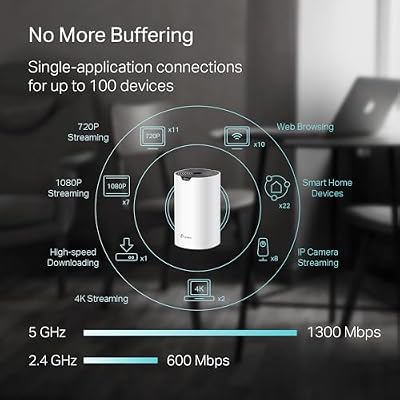
1. TP-Link Deco S4 Mesh AC1900 WiFi System – Up to 5,500 Sq.ft. Coverage

TP-Link Deco S4 Mesh AC1900 WiFi System, Deco S4(3-Pack) | Up to 5,500 Sq.ft. Coverage, Replaces WiFi Router and Extender, Gigabit Ports, Works with Alexa



As an Amazon Associate we earn from qualifying purchases. Product prices and availability are accurate as of the date/time indicated.
The TP-Link Deco S4 is the long-range pick when raw coverage area is the whole point. As a mesh system it uses multiple units that work together as a single network, and the kit is rated to blanket up to 5,500 square feet — the largest coverage figure on this list. Instead of fighting a single router’s signal limits, you place nodes around the home and let them relay to one another. At around $96 it is an affordable route to true whole-home Wi-Fi.
This is the system to choose for a larger or awkwardly shaped house where one router simply cannot reach every corner. Because the Deco units form one seamless network, your phone or laptop roams between them automatically as you move from the office to the patio without dropping the connection or making you switch networks. The AC1900 dual-band speeds are ample for streaming and gaming across the home, and you can add more Deco units later if you extend into a garage or basement. For maximum coverage, this is the obvious starting point.
Pros: Largest rated coverage (5,500 sq.ft.), seamless mesh roaming, expandable, great value.
Cons: AC1900 (Wi-Fi 5) rather than Wi-Fi 6; needs node placement to hit rated reach.
2. Amazon eero 6 mesh wifi system – Coverage up to 1,500 sq.ft. per unit

The Amazon eero 6 is the long-range pick for people who want mesh coverage with the least possible setup fuss. It is a Wi-Fi 6 mesh system designed to cover large homes when you add units, configured entirely through a friendly phone app, and it doubles as a built-in Zigbee smart-home hub for compatible devices. At around $140 it is the premium option here, and the polish and ecosystem are the reason.
This is the system for the household that values simplicity and a connected smart home as much as reach. The eero app walks you through placing nodes for even coverage, automatically steers devices to the strongest unit, and keeps the network updated in the background. Wi-Fi 6 brings better efficiency in homes packed with phones, TVs and smart plugs, and the Zigbee hub means compatible lights and sensors connect without a separate bridge. If you want expandable whole-home coverage that is genuinely easy to live with, the eero 6 is the standout.
Pros: Easy app-driven mesh, Wi-Fi 6 efficiency, built-in Zigbee smart-home hub, expandable.
Cons: Most expensive here; deep features tied to the eero/Amazon ecosystem.
3. TP-Link AX5400 WiFi 6 Router (Archer AX73) – Dual Band Gigabit

TP-Link AX5400 WiFi 6 Router (Archer AX73) | Dual Band Gigabit Wireless Internet Router for Streaming, Long Range Coverage


As an Amazon Associate we earn from qualifying purchases. Product prices and availability are accurate as of the date/time indicated.
The TP-Link Archer AX73 is the strongest single router on this list for stretching a signal across a typical home. It is a Wi-Fi 6 AX5400-class router with six external antennas and beamforming that focuses the signal toward your devices rather than scattering it. While it is not a mesh system, its high transmit power and antenna array make it a genuine long-range performer for one box. At around $99 it offers a lot of reach for the money.
This is the router to choose for a medium-to-large single-floor home, or a two-story house where the router sits centrally, when you would rather run one powerful unit than scatter mesh nodes. The six antennas and beamforming push a strong, focused signal toward the far rooms, the AX5400 Wi-Fi 6 speeds handle a busy household, and you can still add a mesh extender later if a stubborn dead zone remains. For maximum reach from a single standalone router, the AX73 is the top pick.
Pros: Six antennas plus beamforming, high-power Wi-Fi 6 AX5400, strong single-unit reach.
Cons: Single unit, not mesh; very large or multi-wing homes still benefit from nodes.
4. TP-Link Dual-Band AX3000 Wi-Fi 6 Router (Archer AX55)
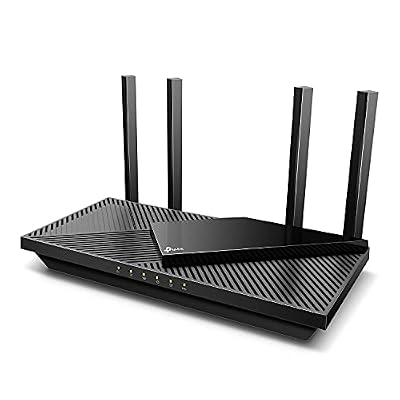
TP-Link Dual-Band AX3000 Wi-Fi 6 Wireless Gigabit Internet Router for Home | EasyMesh, VPN Clients & Server, HomeShield, OFDMA, MU-MIMO, USB 3.0, Secure by Design - Archer AX55


As an Amazon Associate we earn from qualifying purchases. Product prices and availability are accurate as of the date/time indicated.
The TP-Link Archer AX55 is the strong mid-range coverage pick. It is a Wi-Fi 6 AX3000 dual-band router with four high-gain antennas and beamforming, striking a balance between reach, speed and price. At around $80 it covers a typical home well while leaving headroom for a busy network, making it a sensible middle ground between the budget routers and the flagship AX73.
This is the router for a standard house or apartment where you want dependable coverage in every room without overspending. The four high-gain antennas and beamforming concentrate the signal toward your devices for better reach to the edges of the home, while Wi-Fi 6 keeps things efficient when many devices are online at once. It is powerful enough for whole-home use in most layouts, and if a far corner still struggles, TP-Link’s OneMesh support lets you add a compatible extender. For solid all-round reach at a fair price, the AX55 is a smart choice.
Pros: Wi-Fi 6 AX3000, four high-gain antennas, beamforming, OneMesh-ready for extra reach.
Cons: Single router; the largest homes may still need mesh or an extender.
5. TP-Link AX1800 WiFi 6 Router (Archer AX21 V5) – Dual Band
The TP-Link Archer AX21 is the affordable Wi-Fi 6 coverage pick. It pairs entry-level Wi-Fi 6 (AX1800) speeds with four antennas and beamforming to deliver respectable reach across a small-to-medium home at a friendly price. At around $52 it is one of the most popular value routers around, and it punches above its cost for everyday whole-home use.
This is the router to choose for an apartment, a smaller house, or anyone upgrading from an old ISP box who wants better coverage without spending much. The four antennas and beamforming help the signal reach the corners of a modest home, Wi-Fi 6 improves efficiency when phones, TVs and laptops are all connected, and TP-Link’s OneMesh support means you can bolt on an extender if you later need to cover more ground. For affordable, capable coverage in a typical home, the AX21 is a dependable pick.
Pros: Affordable Wi-Fi 6, four antennas, beamforming, OneMesh-ready, strong value.
Cons: AX1800 reach suits small-to-medium homes; large houses need more power or mesh.
6. TP-Link AC1200 Gigabit WiFi Router (Archer A6) – Dual Band MU-MIMO

TP-Link AC1200 Gigabit Dual Band WiFi Router (Archer A6) | MU-MIMO Wireless Internet Router, 4 x Antennas, OneMesh and AP Mode, Long Range Coverage


As an Amazon Associate we earn from qualifying purchases. Product prices and availability are accurate as of the date/time indicated.
Rounding out the list is the TP-Link Archer A6, the budget single-router pick for basic coverage. It is an AC1200 (Wi-Fi 5) dual-band router with four external antennas and MU-MIMO, designed to spread a steady signal across a small home or apartment. At around $40 it is the cheapest option here and a low-cost way to improve reach over a tired router.
This is the router for the tightest budgets and the smallest spaces, where you want better, more even coverage than an old single-antenna box without spending on Wi-Fi 6. The four antennas help push the signal to the edges of a compact home, and MU-MIMO lets it serve a few devices at once more efficiently. Be realistic about its limits: it is Wi-Fi 5 and aimed at smaller spaces, so it is not the answer for a large multi-floor house. But for affordable, reliable coverage in an apartment or starter home, the A6 does the job.
Pros: Lowest price here, four antennas, MU-MIMO, even coverage for small spaces.
Cons: Wi-Fi 5 (AC1200) and best for small homes; limited reach in larger houses.
How to Choose a Long Range Router
Choosing for range starts with honestly assessing the size and shape of your home. The single most useful number is rated coverage area in square feet — the TP-Link Deco S4 here claims up to 5,500 — but treat it as a best case, because thick walls, multiple floors, brick and metal all eat into real-world reach. Measure or estimate your square footage and add margin for an awkward layout, then match it to a system rated comfortably above your space rather than right at the limit.
The biggest decision is mesh versus a single powerful router. A mesh system like the Deco S4 or eero 6 uses several units that blanket a large or multi-floor home and hand your devices off seamlessly as you walk around — the right answer for big or oddly shaped houses and stubborn dead zones. A high-power single router like the Archer AX73 or AX55 can cover a typical home from one central spot, which is simpler and often cheaper. As a rule, the larger and more divided the space, the more mesh makes sense.
For single routers, look at antennas and beamforming. More external antennas and higher gain, as on the AX73’s six-antenna array, generally push signal further, while beamforming focuses that signal toward your connected devices instead of radiating it evenly into empty space. These features improve reach to the edges of a home, and several routers here add OneMesh support so you can bolt on a compatible extender later if one corner still refuses to cooperate.
Finally, weigh Wi-Fi standard, speed and budget against your actual needs. Wi-Fi 6 (the AX models) is more efficient than Wi-Fi 5 (the AC1900 Deco and AC1200 A6) when many devices are online at once, which matters in a busy smart home, though for raw coverage placement matters more than the standard. Set a budget, decide whether your home calls for mesh or one strong router, prioritise coverage area and antenna design, and pick the option here that comfortably covers your space. The best long range router is the one that leaves no dead zones in your home.
Frequently Asked Questions
Is a mesh system or a single router better for long range?
It depends on your home. For large, multi-floor or awkwardly shaped houses, a mesh system like the TP-Link Deco S4 or eero 6 is usually better because several units blanket the space and hand your devices off seamlessly. For a typical single-floor home or apartment, a high-power single router like the Archer AX73 can cover everything from one central spot more simply and often more cheaply. The larger and more divided the space, the more mesh wins.
How much square-footage coverage do I actually need?
Estimate your home’s size and choose a system rated comfortably above it, since walls and floors reduce real-world reach. The Deco S4 here claims up to 5,500 square feet, which suits large homes, while single routers like the AX21 or A6 are better matched to small-to-medium spaces. Treat manufacturer coverage figures as a best case and leave margin for thick walls, multiple stories and a complex layout.
Do more antennas mean more range?
Generally yes, with a caveat. More external high-gain antennas, like the six on the Archer AX73, combined with beamforming that focuses the signal toward your devices, tend to improve reach compared with a single internal antenna. But placement matters just as much — a central, elevated, unobstructed spot helps any router. For very large homes, adding mesh nodes does more for coverage than antennas on one box ever can.
Can I extend a single router’s range later?
Often, yes. Several TP-Link routers here, including the Archer AX55 and AX21, support OneMesh, which lets you add a compatible range extender that joins the same network rather than creating a separate one. That means you can start with one strong router and bolt on coverage if a stubborn dead zone appears, or simply choose a full mesh system like the Deco S4 from the outset if you already know your home is large.
Related Guides
- Best Routers with VPN
- Best Mesh Wi-Fi Systems
- Best Wi-Fi 6 Routers
- Best Gaming Routers
- Best Wi-Fi Range Extenders
- Best Budget Gaming Setup
Affiliate Disclosure: As an Amazon Associate, we earn from qualifying purchases. If you click a link and make a purchase, we may earn a small commission at no extra cost to you. Prices and availability are accurate as of publication and may change.










