

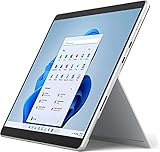
- Top Pick: Microsoft Surface Pro 8 Tablet, LTE, Intel i5-1145G7, 16GB RAM, 256GB SSD, Intel UHD Graphics, 13" Touchscreen Display, Windows 11 Pro Laptop Computer, Platinum, EIP-00001 (Renewed)
- Best Value: SAMSUNG Galaxy Chromebook Go Laptop (32GB, 4GB RAM, Wi-Fi + 4G LTE) 14.0" Intel N4500, Fully Unlocked for All Carriers, Chrome OS, Cellular Notebook w/ 180-Degree Hinge (Silver) (Renewed)
- Premium Choice: Microsoft Surface Pro 7+ LTE Advanced Laptop, Platinum, Intel i5-1135G7, 8GB RAM, 256GB SSD, 12.3-inch Touchscreen, Windows 10 Pro, Perfect for Business and GamingPlatinum – 1S3-00001
A laptop with built-in LTE answers a very specific frustration: you open the lid at a job site, in a vehicle or on a train platform and there is no trustworthy Wi-Fi. Instead of tethering to a phone and watching its battery drain, you slide in a SIM, or activate an eSIM where supported, and the laptop connects on its own. That convenience narrows the field a lot, because only a small slice of laptops ship with a cellular modem, and many of the ones that do are business-class machines, tablets with keyboards or refurbished units.
This guide covers seven of them, from slim Surface tablets and a carrier-unlocked Chromebook to a family of Panasonic Toughbook models built for field work. It is for mobile professionals, inspectors, utility crews, traveling consultants and anyone buying in 2026 who wants a dependable connection without hunting for a hotspot. Several listings are renewed units, which changes what you should look for, and the guidance below addresses that directly.
Quick Picks
As an Amazon Associate we earn from qualifying purchases at no extra cost to you.



| Product | Best for | Key spec from the title |
|---|---|---|
| Microsoft Surface Pro 8 (LTE, Renewed) | Windows 11 tablet-laptop hybrid | Core i5-1145G7, 16GB RAM, 256GB SSD, 13-inch touchscreen |
| Samsung Galaxy Chromebook Go (LTE, Renewed) | Light cloud-based work | Wi-Fi plus 4G LTE, fully unlocked for all carriers, 14-inch, Chrome OS |
| Microsoft Surface Pro 7+ LTE Advanced | Thin business tablet | Core i5-1135G7, 8GB RAM, 256GB SSD, 12.3-inch touchscreen |
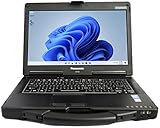
| Panasonic Toughbook CF-33 MK2 (Renewed) | Rugged detachable field unit | 12-inch, i5, 16GB, 512GB, 4G LTE, dGPS, Windows 11 Pro |
| Panasonic Toughbook CF-31 MK5 | Classic rugged laptop with big storage | 13.1-inch XGA touch, i5-5300U, 16GB RAM, 1TB SSD, 4G LTE |
| Panasonic Toughbook CF-53 MK4 (Renewed) | Optical drive and large SSD | 14-inch HD, i5-4310U, 16GB RAM, 1TB SSD, 4G LTE, DVD |
| Panasonic Toughbook CF-54 MK3 (Renewed) | Rugged FHD touch with smartcard reader | 14-inch FHD touch, i5, 8GB, 256GB, 4G LTE, dGPS |
How to Choose
Check the LTE bands and carrier compatibility
A modem is not universal. Cellular hardware supports a defined list of bands, and your carrier needs to use bands the laptop understands. A listing that says unlocked for all carriers, like the Chromebook Go, is the clearest on this point, while the others do not spell it out in the title. Ask the seller for the modem model and compare its band list with your carrier’s coverage before ordering, especially for units made several years ago.
Decide between a tablet and a true laptop
Surface Pro models are tablets with detachable keyboards sold separately in many cases, and they excel at portability. Toughbooks are designed around hinges, ports and physical protection. If you type for long stretches, want a lap-friendly form and need serial or other legacy ports, favor the traditional laptop shapes. If you mostly review documents and sign forms, the tablet shape is lighter.
Renewed units and operating-system support
Five of the seven titles say Renewed, meaning previously owned and refurbished. Look for seller warranty terms, battery condition and return rights. Also read the operating system line. Windows 11 listings suit current update schedules, while titles naming Windows 10 Pro deserve extra thought about security-update eligibility. A Chromebook has its own automatic update window tied to the device model.
Battery, ports and field features
Field machines live and die by connectivity beyond the modem. Look for dGPS if you need positioning data, a smartcard reader if your employer requires card sign-in, a backlit keyboard for night shifts, and a touch screen if you wear gloves or tap through forms. Check also whether the battery is removable, since swapping in a spare pack extends a shift without hunting for outlets. The titles here do not describe battery design, so ask the seller.
Processor, memory and storage thresholds
For Windows, 8GB of RAM is workable for light business tasks and 16GB is better for multitasking. A 256GB SSD covers basics, while 512GB or 1TB leaves space for offline maps, forms and photos. Older Intel Core i5 generations such as the 4th and 5th generation chips named in two Toughbook titles are slower than recent designs, so judge them as field tools and not as speed machines. Budget configurations trim memory and storage first.
The 7 Best Options
Microsoft Surface Pro 8 (LTE, Renewed)
This renewed Surface Pro 8 combines a Core i5-1145G7, 16GB of RAM and a 256GB SSD behind a 13-inch touchscreen, running Windows 11 Pro with LTE. It is a polished tablet-laptop for people who move between meetings and want cellular access built in.
- Strength: 16GB of RAM is generous for a thin tablet.
- Strength: Windows 11 Pro with LTE suits business sign-in and remote access.
- Trade-off: renewed condition varies, so battery health and warranty terms matter.
Skip it if you need physical rugged protection. Consultants, sales staff and managers who sign documents and join calls from client lobbies are the natural audience for this slim format.
Samsung Galaxy Chromebook Go (LTE, Renewed)
A 14-inch Chromebook with Wi-Fi plus 4G LTE, an Intel N4500 processor, 4GB of RAM and 32GB of storage. The title stresses that it is fully unlocked for all carriers, and a 180-degree hinge makes it handy for sharing a screen.
- Strength: carrier-unlocked LTE gives flexible SIM choices.
- Strength: Chrome OS suits browser-based work and school.
- Trade-off: 4GB of memory and 32GB of storage limit heavy workloads.
Skip it if you rely on Windows desktop software. It makes sense as a travel companion for email, web apps and video calls, or as a classroom machine that stays connected off campus.
Microsoft Surface Pro 7+ LTE Advanced
The Surface Pro 7+ lists a Core i5-1135G7, 8GB of RAM and a 256GB SSD in a 12.3-inch touchscreen. It is the lighter-spec Surface here and runs Windows 10 Pro per the title. It will appeal to users who value thin hardware for notes and email on the road.
- Strength: compact 12.3-inch tablet body is easy to carry.
- Strength: an i5 with 8GB handles office tasks.
- Trade-off: Windows 10 Pro in the title calls for a check on update support.
Skip it if you need long-term operating-system certainty. It works best as a secondary device for note-taking, presentations and email, where the thin body matters more than raw capacity.
Panasonic Toughbook CF-33 MK2 (Renewed)
The CF-33 is a 12-inch rugged laptop with multi-touch, an i5 processor, 16GB of RAM and a 512GB SSD. The listing adds 4G LTE, dedicated GPS and Windows 11 Pro. It is the best-equipped Toughbook in this set.
- Strength: rugged build with 4G LTE and dGPS for fieldwork.
- Strength: 16GB and 512GB are balanced for field apps.
- Trade-off: renewed rugged gear can be heavier than a consumer tablet.
Skip it if you want the thinnest possible device. Surveyors, inspectors and service technicians who work outdoors and need positioning data alongside a cellular connection will find the combination purpose-built.
Panasonic Toughbook CF-31 MK5
This rugged laptop has a 13.1-inch XGA touchscreen, an i5-5300U at 2.3GHz, 16GB of RAM and a 1TB SSD, with 4G LTE and a backlit keyboard under Windows 10 Pro. It targets crews who want large local storage and a familiar clamshell.
- Strength: 1TB SSD and 16GB of RAM in a rugged shell.
- Strength: a backlit keyboard helps in dim vehicles.
- Trade-off: XGA resolution and an older processor feel dated.
Skip it if you want a modern high-resolution display. Fleet managers who need big local storage for maps, manuals and work orders, and who value a keyboard that lights up at night, are the intended audience.
Panasonic Toughbook CF-53 MK4 (Renewed)
The CF-53 offers a 14-inch HD display, an i5-4310U at 2.0GHz, 16GB of RAM and a 1TB SSD, plus 4G LTE, an optical drive, Wi-Fi, Bluetooth and Windows 11 Pro. It is a throwback built for utility and maintenance work that still touches discs.
- Strength: 1TB of storage and 16GB of RAM at the renewed tier.
- Strength: built-in DVD drive for legacy media.
- Trade-off: the processor is a fourth-generation design.
Skip it if you need current-generation speed. Maintenance teams that still read manuals or software from discs can appreciate keeping the optical drive in a machine that also carries a cellular modem.
Panasonic Toughbook CF-54 MK3 (Renewed)
A 14-inch rugged laptop with an FHD touch screen, an i5, 8GB of RAM and a 256GB SSD. The title lists 4G LTE, dGPS, a smartcard reader, a webcam and a DVD drive with Windows 11 Pro, which suits government and security-conscious users.
- Strength: a smartcard reader supports secure sign-in.
- Strength: FHD touch is sharper than other Toughbooks here.
- Trade-off: 8GB and 256GB are on the lean side.
Skip it if you store large offline datasets. Public-sector workers and contractors who need card-based authentication in the field can treat it as the most security-oriented option in this guide.
Which One Fits Your Situation
You work in the field in rough conditions
The Toughbook CF-33 MK2 combines a rugged build, 16GB, 512GB, 4G LTE and dGPS, and is the most balanced of the rugged group.
You need secure sign-in with a smartcard
The Toughbook CF-54 MK3 is the only listing naming a smartcard reader, along with an FHD touchscreen.
You travel light and need Windows
The Surface Pro 8 with LTE gives you 16GB of RAM in a thin tablet, and the Surface Pro 7+ is the lighter-spec alternative.
You still need a disc drive
The Toughbook CF-53 MK4 and CF-54 MK3 both list a DVD drive, which is rare now. The CF-53 brings 1TB of storage and the CF-54 brings the sharper screen.
Your work lives in a browser
The Samsung Galaxy Chromebook Go is carrier-unlocked, so you can pick the SIM that fits your coverage.
Common Mistakes
- Assuming every LTE laptop works on every carrier; verify the bands.
- Ignoring the operating system line on older listings.
- Skipping battery condition and warranty terms on renewed units.
- Expecting rugged hardware to be thin and light.
- Forgetting that a data plan or eSIM profile is a separate purchase from the laptop.
- Judging a rugged machine by its processor generation alone instead of the work it was built to survive.
Frequently Asked Questions
Do I need a special SIM for a laptop with LTE?
Usually a standard data SIM or an eSIM profile from your carrier works, provided the plan allows laptop or tablet use. Check the plan terms before activating.
Is LTE faster than a phone hotspot?
Speeds depend on the carrier and signal, not the device alone. The advantage of built-in LTE is convenience and battery savings on your phone, plus one fewer device to carry and pair. Antenna placement in a laptop can also be better than in a pocket-sized phone.
Are renewed laptops a good idea?
They can be, especially for rugged models that are built to last. Choose sellers who state warranty and return terms clearly.
Which is better for work, Chromebook or Windows?
Choose Chromebook for browser-based tasks and Windows when you need desktop applications, specialized field software or domain management. If your employer manages devices through a Windows domain, the Surface and Toughbook entries are the safer match.









