

A macro key is a physical key you can bind to a recorded sequence of inputs — a string of commands, a combo, or a multi-step action — fired with a single press. For MMO and MOBA players, streamers and anyone who runs repetitive actions, having dedicated macro keys (or a generous bank of keys to record onto) is a genuine quality-of-life upgrade. The emphasis here is on the hardware: how many keys you can bind, whether they are dedicated macro keys or fully remappable mainline keys, and how easily you can record to them. This guide rounds up the best keyboards with macro keys in 2026 across budgets and form factors.
- Best Keyboards with Macro Keys at a Glance
- 1. Redragon K585 DITI Wired One-Handed RGB Mechanical Gaming Keyboard, 42 Keys
- 2. Razer Ornata Chroma Gaming Keyboard, Hybrid Mechanical Key Switches
- 3. HyperX Alloy Origins Mechanical Gaming Keyboard, Software-Controlled
- 4. Redragon S101-3 PRO Gaming Keyboard and Mouse, RGB Backlit Programmable
- 5. SteelSeries Apex 3 RGB Gaming Keyboard, 10-Zone RGB, Water Resistant
- 6. Redragon K517 Pro Wireless Gaming Keyboard, Tri-Mode BT/2.4GHz/USB-C, RGB
- How to Choose a Keyboard with Macro Keys
- Frequently Asked Questions
- Related Guides
- Related Articles
Our picks were chosen on what matters for macro use specifically: the number and accessibility of bindable keys, the quality of the switches you will be hammering, onboard or software-based macro recording, and value. We have ordered the list to lead with the boards that hand you the most dedicated keys to bind, including a purpose-built one-handed macropad, then move toward full-size boards with remappable keys. Prices run from around $33 to around $200. Below is an at-a-glance comparison of all six, then a closer look at each and a buyer’s guide built around macro keys, switches and recording — the things that genuinely make a keyboard good for macros.
As an Amazon Associate we earn from qualifying purchases at no extra cost to you.







🛒 Best Price Today on Amazon
Prime members get fast, free shipping on everything above, plus member-only deals. New members get a 30-day free trial — cancel anytime.
Best Keyboards with Macro Keys at a Glance
| Keyboard | Best For | Standout Spec | Approx Price |
|---|---|---|---|
| Redragon K585 DITI One-Handed Macropad | Dedicated macro pad | 42 keys, 7 macro keys, one-handed | around $33 |
| Razer Ornata Chroma | Many bindable keys + comfort | Hybrid switches, Razer macros | around $200 |
| HyperX Alloy Origins | Premium full-size macros | Onboard memory, full remap | around $125 |
| Redragon S101-3 PRO Combo | Budget macro starter + mouse | Programmable, keyboard+mouse | around $40 |
| SteelSeries Apex 3 RGB | Durable everyday macros | 10-zone RGB, software macros | around $50 |
| Redragon K517 Pro Wireless | Wireless bindable keys | Tri-mode wireless, RGB | around $32 |
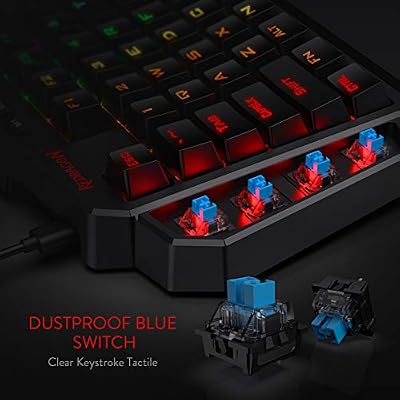
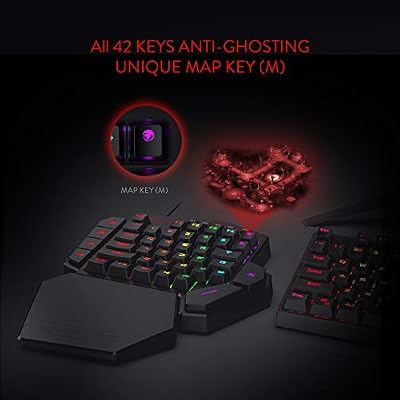
1. Redragon K585 DITI Wired One-Handed RGB Mechanical Gaming Keyboard, 42 Keys

Redragon K585 Wired One-Handed RGB Gaming Keypad, Tactical 42-Key Layout | On Board 28 Combo Slots 4 Profiles Keyboard, USB Pass-Through Port, 16.8M Colors, Swap-Ready Socket, Detachable Wrist Rest





As an Amazon Associate we earn from qualifying purchases. Product prices and availability are accurate as of the date/time indicated.
The Redragon K585 DITI is the most focused macro device on this list, and the natural lead pick for the keyword: it is a one-handed mechanical macropad built specifically for binding commands. Across its 42 keys it includes seven dedicated macro keys, all sitting under your left hand for instant access. At around $33 it is an affordable, purpose-built tool for anyone whose priority is having physical macro keys at their fingertips.
This is the pick when dedicated macro keys are the whole point. The seven macro keys can be programmed with recorded sequences for MMO rotations, MOBA combos, stream commands or repetitive productivity tasks, and because the pad sits beside your main keyboard or mouse you keep every binding within easy reach. The mechanical switches give crisp, reliable actuation for rapid-fire macros, and the compact one-handed layout is designed around exactly this job. If your goal is the most dedicated macro keys for the money, the K585 is unmatched here.
Pros: Seven dedicated macro keys, purpose-built one-handed layout, mechanical switches, very affordable.
Cons: Not a full keyboard — it supplements, rather than replaces, your main board.
2. Razer Ornata Chroma Gaming Keyboard, Hybrid Mechanical Key Switches
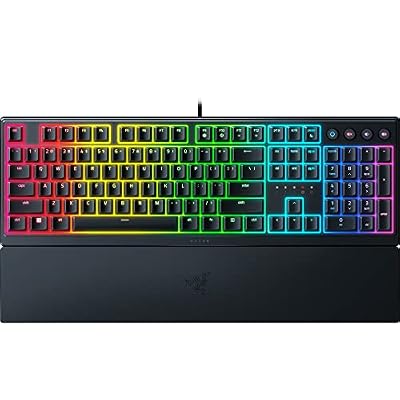
Razer Ornata V3 Gaming Keyboard, Low-Profile Keys, Black | Mecha-Membrane Switches, UV-Coated Keycaps, Backlit Media Keys, 10-Zone RGB Lighting, Snap Tap, Magnetic Wrist Wrest


As an Amazon Associate we earn from qualifying purchases. Product prices and availability are accurate as of the date/time indicated.
The Razer Ornata Chroma is the premium full-size pick for macro users who also want comfort and Razer’s mature software. It uses hybrid mechanical-membrane switches for a distinctive soft-yet-clicky feel, ships with a plush wrist rest, and pairs with Razer Synapse to record macros and remap keys across the board. At around $200 it is the most expensive option here, leaning on brand, build and software polish.
This is the keyboard for the player who wants to record macros onto a full-size, comfortable board rather than a separate pad. Razer Synapse lets you capture multi-step macros and assign them to keys, store profiles, and fine-tune lighting, while the hybrid switches and included wrist rest keep long sessions comfortable. The dedicated macro keys are not as numerous as a purpose-built macropad, so for binding many commands the recording lives across the main keys via software. For a polished, comfortable full-size board with strong macro software, the Ornata delivers.
Pros: Mature Synapse macro recording, comfortable hybrid switches, included wrist rest, full-size layout.
Cons: Highest price here; relies on software remapping rather than many dedicated macro keys.
3. HyperX Alloy Origins Mechanical Gaming Keyboard, Software-Controlled

HyperX Alloy Origins 65 - Mechanical Gaming Keyboard – Compact 65% Form Factor - Linear Red Switch - Double Shot PBT Keycaps - RGB LED Backlit - NGENUITY Software Compatible,Black


As an Amazon Associate we earn from qualifying purchases. Product prices and availability are accurate as of the date/time indicated.
The HyperX Alloy Origins is the premium full-size pick that pairs solid macro support with excellent build quality. It uses HyperX’s own mechanical switches in a rigid aircraft-grade aluminium body, and HyperX NGENUITY software handles macro recording, key remapping and lighting, with onboard memory to store your profiles. At around $125 it is a high-quality board for macro users who value durability.
This is the keyboard for the gamer who wants to record and remap macros on a rock-solid, premium board that travels well. NGENUITY lets you capture multi-step macros and assign them across the keys, and the onboard memory means your bindings come with you to another PC without reinstalling software. The crisp HyperX switches handle rapid macro presses cleanly, and the aluminium frame feels built to last. For a durable full-size board with dependable macro recording and onboard profile storage, the Alloy Origins is a strong pick.
Pros: Reliable macro recording, onboard memory for profiles, premium aluminium build, crisp switches.
Cons: No bank of dedicated macro keys; macros are mapped onto the main keys.
4. Redragon S101-3 PRO Gaming Keyboard and Mouse, RGB Backlit Programmable

Redragon S101-3 PRO Gaming Keyboard and Mouse, RGB Backlit Programmable Keyboard Mouse with Software, Independent Macro Record Keys, Value Combo Set, New Update Version


As an Amazon Associate we earn from qualifying purchases. Product prices and availability are accurate as of the date/time indicated.
The Redragon S101-3 PRO is the budget macro starter pick, and it throws in a mouse too. It is an RGB backlit programmable keyboard with media controls bundled with a gaming mouse, and at around $40 for the pair it is one of the cheapest ways to get into macro-capable gear. The keys can be programmed for macros, making it an accessible entry point for new players.
This is the kit to choose when you want to experiment with macros without spending much, or you need a complete keyboard-and-mouse starting point. The programmable keys let you record and bind sequences for repetitive in-game or everyday tasks, the RGB backlighting looks the part, and the included mouse rounds out a budget setup in one purchase. It is a membrane-style board rather than a premium mechanical one, so it suits casual macro use best. For an affordable, all-in-one introduction to programmable macro keys, the S101-3 PRO combo is a sensible buy.
Pros: Programmable keys for macros, bundled mouse, RGB backlighting, very affordable all-in-one.
Cons: Membrane-style feel; macro depth and durability trail dedicated boards.
5. SteelSeries Apex 3 RGB Gaming Keyboard, 10-Zone RGB, Water Resistant

SteelSeries Apex 3 Gaming Keyboard - Black | 10-Zone RGB Illumination – IP32 Water Resistant – Premium Magnetic Wrist Rest (Whisper Quiet Gaming Switch)


As an Amazon Associate we earn from qualifying purchases. Product prices and availability are accurate as of the date/time indicated.
The SteelSeries Apex 3 is the durable everyday pick for macro users on a mid-range budget. It is a quiet whisper-switch board with 10-zone RGB, an IP32 water-resistant build and a magnetic wrist rest, and SteelSeries Engine software handles macro recording and remapping. At around $50 it is a well-rounded, hard-wearing board for binding everyday commands.
This is the keyboard for the gamer who wants reliable software macros on a comfortable, spill-resistant board for daily use. SteelSeries Engine lets you record macros and assign them to keys, store per-game configurations, and tune the 10-zone lighting, while the water-resistant design adds peace of mind for long sessions with drinks nearby. The quiet switches suit shared spaces, and the wrist rest keeps things comfortable. For dependable, software-driven macros on a durable everyday keyboard, the Apex 3 is a smart middle-ground choice.
Pros: Software macro recording, durable IP32 water-resistant build, quiet switches, magnetic wrist rest.
Cons: Membrane switches rather than mechanical; no dedicated macro key row.
6. Redragon K517 Pro Wireless Gaming Keyboard, Tri-Mode BT/2.4GHz/USB-C, RGB

Redragon K517 Pro Wireless Gaming Keyboard, RGB Backlit, Tri-Mode BT/2.4GHz/USB-C, Mechanical Feel 94 Keys Computer Keyboard with 4 Macro Keys, Number Pad, 4000mAh Battery for Win/MAC


As an Amazon Associate we earn from qualifying purchases. Product prices and availability are accurate as of the date/time indicated.
Rounding out the list is the Redragon K517 Pro, the wireless pick for macro users who want a clean, cable-free desk. It is a tri-mode board that connects over Bluetooth, 2.4GHz wireless or USB-C, with RGB backlighting and programmable keys you can bind to macros. At around $32 it is the most affordable board here and a flexible wireless option.
This is the keyboard to choose when wireless freedom matters and you still want bindable keys for macros. The tri-mode connectivity lets you pair with a PC, laptop or tablet and switch between them, the programmable keys can hold recorded sequences for games or productivity, and USB-C charging keeps it topped up. As a wireless board the macro tooling is more basic than a purpose-built pad or premium software suite, but for affordable, flexible macro-capable keys without a cable, the K517 Pro fits the bill.
Pros: Programmable keys, flexible tri-mode wireless, RGB, USB-C charging, lowest price here.
Cons: Macro tooling is basic; not a dedicated macro-key board.
How to Choose a Keyboard with Macro Keys
When the priority is macros, the first question is how you want to access them: dedicated macro keys versus remapped mainline keys. A dedicated macro device like the Redragon K585 one-handed macropad gives you a bank of physical keys that exist solely for your bindings, sitting under your hand for instant, no-mistake access. A full-size board instead lets you record macros onto its regular keys via software. If you fire a lot of macros mid-game, dedicated keys are the more ergonomic choice; if you only need a few, mapping them onto a normal board is fine.
How many bindings you actually need shapes everything else. MMO and MOBA players who run long ability rotations, complex combos or many stream commands benefit from the most keys they can get — the seven dedicated macro keys on the K585, for instance — while a player who just wants a couple of shortcuts can happily remap a few keys on any of the full-size boards here. Count the commands you genuinely want one-press access to, then pick hardware that comfortably covers that number with room to spare.
Switch type and recording method are the next practical considerations. Mechanical switches, like those on the K585 and Alloy Origins, give crisp, consistent actuation that suits rapid macro presses, while membrane and hybrid boards such as the Apex 3 and Ornata trade some of that snap for a softer, quieter feel. On recording, check whether macros are stored via software (Razer Synapse, HyperX NGENUITY, SteelSeries Engine) and whether the board has onboard memory — the Alloy Origins does — so your bindings travel with you to another PC without reinstalling anything.
Finally, weigh form factor, connection and budget against how you play. A one-handed macropad supplements your main keyboard for maximum dedicated keys; a full-size board keeps everything on one device; a wireless option like the K517 Pro clears your desk if you value a clean setup. Comfort features such as the Ornata’s and Apex 3’s wrist rests help during long binding-heavy sessions. Decide whether you want dedicated keys or remapped ones, confirm the switch and recording method suit you, set your budget, and pick the board on this list that puts your macros exactly where you want them.
Frequently Asked Questions
What are macro keys and who needs them?
Macro keys are physical keys you bind to a recorded sequence of inputs — a combo, a command string or a multi-step action — fired with one press. They are most useful for MMO and MOBA players running ability rotations, streamers triggering scene changes, and anyone repeating the same actions often. If you frequently perform multi-step tasks, dedicated macro keys like those on the Redragon K585 save real time and effort.
Is a dedicated macro pad better than a full keyboard’s macros?
It depends on how many macros you use. A dedicated pad like the Redragon K585, with seven physical macro keys under your hand, is the most ergonomic and mistake-proof option if you fire macros constantly. If you only need a few, recording them onto the regular keys of a full-size board such as the Alloy Origins or Ornata via software works perfectly well and keeps everything on one device.
Do I need mechanical switches for macros?
Not strictly, but they help. Mechanical switches, as on the K585 and HyperX Alloy Origins, give crisp, consistent actuation that suits rapid-fire macro presses and feels reliable over time. Membrane and hybrid boards like the SteelSeries Apex 3 and Razer Ornata still record and play macros perfectly well, with a softer and often quieter feel — so choose the switch type you prefer to type and game on.
Can I store macros on the keyboard itself?
Some boards support it. Onboard memory, like that on the HyperX Alloy Origins, stores your recorded macros and profiles directly on the keyboard, so your bindings travel with you to another PC without reinstalling software. Other boards here rely on their companion app — Razer Synapse, SteelSeries Engine — running on the host machine. If you move between computers often, look for onboard storage.
Related Guides
- Best Programmable Keyboards
- Best Mechanical Keyboards
- Best Gaming Keyboards
- Best Gaming Mouse
- Best Keyboard Wrist Rests
- Best Budget Gaming Setup
Affiliate Disclosure: As an Amazon Associate, we earn from qualifying purchases. If you click a link and make a purchase, we may earn a small commission at no extra cost to you. Prices and availability are accurate as of publication and may change.










