

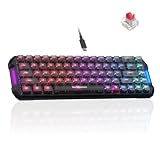
- Top Pick: AhaKey Vibecoding AI Keyboard for Claude Cursor Codex LCD Screen RGB Toggle Switch Voice Recognition External for Voice Input
- Best Value: Virtusx Phronesis Wireless AI Keyboard with Voice Typing & AI Meeting Notes
- Premium Choice: VSDINSIDE K1 Pro Macro Keyboard, Wired Only Full-Key Programmable On-Board Keypad, Custom Gaming Streaming Mechanical Keyboards with Screen & Knob, Gasket, RGB Backlit, Hot Swappable Shortcut Pad
Let us be honest up front: there is no such thing as an ‘AI keyboard’. No board runs a model, writes your prompts or trains a network — and any product marketed that way is selling a sticker, not a feature. What people searching for the best keyboard for AI actually want is a great keyboard for the work AI involves: writing and refining prompts, coding in Python, living in the terminal, and spending long hours typing into chat interfaces and notebooks. That is fundamentally developer-and-writer work, so this guide rounds up the best keyboards for AI work in 2026 — comfortable, tactile, programmable boards that make long sessions of coding and prompting easier.
- Best Keyboards for AI Work at a Glance
- 1. Logitech Ergo K860 Wireless Ergonomic Keyboard – Split Keyboard, Wrist Rest, Natural Typing
- 2. Razer Ornata Chroma Gaming Keyboard: Hybrid Mechanical Key Switches – Customizable
- 3. SteelSeries Apex 3 RGB Gaming Keyboard – 10-Zone RGB Illumination – IP32 Water Resistant
- 4. Logitech G213 Prodigy Gaming Keyboard – Wired RGB Backlit Keyboard with Mech-Dome Keys
- 5. Redragon S101-3 PRO Gaming Keyboard and Mouse, RGB Backlit Programmable Keyboard
- 6. Redragon S107KS Wireless Gaming Keyboard and Mouse, RGB Backlit, 3 Mode (Wired/2.4GHz/Bluetooth)
- How to Choose a Keyboard for AI Work
- Frequently Asked Questions
- Related Guides
- Related Articles
Our picks were chosen on what genuinely helps the person doing AI and ML work: comfortable typing for long prompt-and-code sessions, tactile feedback, programmable keys to bind repeated commands and prompt snippets, a full layout for numeric and shortcut work, and value. We have led with comfort and programmability, since prompting and coding are typing-heavy, and included a true ergonomic option, with prices from around $40 up to around $200. None of these is an ‘AI keyboard’ — they are simply excellent boards for AI work. Below is an at-a-glance comparison of all six, then a closer look at each and a buyer’s guide built around comfort, feedback and programmability for the way AI practitioners actually type.
As an Amazon Associate we earn from qualifying purchases at no extra cost to you.



🛒 Best Price Today on Amazon
Prime members get fast, free shipping on everything above, plus member-only deals. New members get a 30-day free trial — cancel anytime.
Best Keyboards for AI Work at a Glance
| Keyboard | Best For | Standout Spec | Approx Price |
|---|---|---|---|
| Logitech Ergo K860 Split Ergonomic | Marathon prompt + code comfort | Split curve, wrist rest | around $150 |
| Razer Ornata Chroma Hybrid | Tactile, cushioned typing | Hybrid mech-membrane switches | around $200 |
| SteelSeries Apex 3 RGB | Quiet terminal sessions | Whisper-quiet, IP32 resistant | around $50 |
| Logitech G213 Prodigy | Durable full-size daily driver | Mech-dome, full-size, spill-resistant | around $57 |
| Redragon S101-3 PRO Programmable | Budget programmable combo | Programmable keys, mouse included | around $40 |
| Redragon S107KS Tri-Mode Wireless | Flexible multi-device wireless | 3-mode wireless, RGB combo | around $47 |
1. Logitech Ergo K860 Wireless Ergonomic Keyboard – Split Keyboard, Wrist Rest, Natural Typing

Logitech Ergo K860 Wireless Ergonomic Split Keyboard with Wrist Rest | Curved split keyframe, pillowed wrist rest, Bluetooth, USB connectivity with included USB Receiver, Windows Mac compatible


As an Amazon Associate we earn from qualifying purchases. Product prices and availability are accurate as of the date/time indicated.
The Logitech Ergo K860 leads this list because AI work is relentlessly typing-heavy and comfort is what lasts. It is a split, curved ergonomic keyboard with a generous integrated wrist rest, engineered to keep your hands, wrists and forearms in a natural, neutral posture through long days. It connects wirelessly over Bluetooth or Logitech’s Unifying receiver and keeps a full number pad. At around $150 it is an investment in your hands.
For someone iterating on prompts, debugging Python and reading model output for hours, the ergonomic payoff is real. The split, curved key wells ease the unnatural inward angle of a flat keyboard, the cushioned wrist rest supports your palms during long writing-and-coding stretches, and the gentle tenting lifts your hands to a more comfortable position. The full layout retains the number pad, and wireless keeps the desk uncluttered. If you do AI or ML work all day and want to protect your wrists, the Ergo K860 is the strongest pick here.
Pros: Split ergonomic comfort, supportive wrist rest, full-size with number pad, wireless and tidy.
Cons: Premium price; the split layout takes time to learn.
2. Razer Ornata Chroma Gaming Keyboard: Hybrid Mechanical Key Switches – Customizable
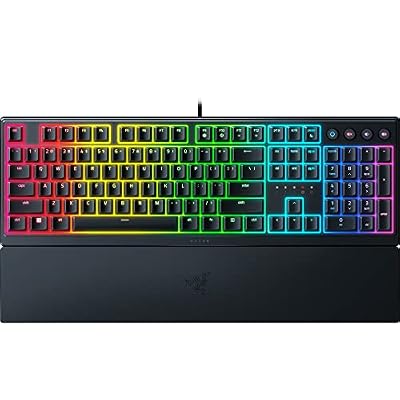
Razer Ornata V3 Gaming Keyboard, Low-Profile Keys, Black | Mecha-Membrane Switches, UV-Coated Keycaps, Backlit Media Keys, 10-Zone RGB Lighting, Snap Tap, Magnetic Wrist Wrest


As an Amazon Associate we earn from qualifying purchases. Product prices and availability are accurate as of the date/time indicated.
The Razer Ornata Chroma is the tactile-yet-cushioned pick for AI work. Its hybrid mechanical-membrane switches blend a soft, cushioned base with a tactile, clicky bump, aiming to give crisp feedback without the harder landing of a full mechanical board. It is full-size with a number pad, includes a wrist rest and customizable Chroma RGB, and offers software remapping. It is listed at around $200, so treat it as the premium option and watch for a better price.
For prompting and coding, the typing feel is the attraction. The hybrid switches give you a clear sense of each keypress — useful when you are typing long, carefully worded prompts and do not want dropped characters — while the cushioned base and wrist rest keep things comfortable through extended sessions. The full layout keeps the number pad, and Razer’s software lets you remap keys or program snippets and shortcuts you reuse constantly in AI workflows. If you want tactile feedback with a softer landing, the Ornata is a comfortable, capable choice.
Pros: Tactile hybrid switches, cushioned wrist rest, full-size with number pad, software remapping.
Cons: Listed price is high; hybrid feel is not the same as true mechanical.
3. SteelSeries Apex 3 RGB Gaming Keyboard – 10-Zone RGB Illumination – IP32 Water Resistant

SteelSeries Apex 3 Gaming Keyboard - Black | 10-Zone RGB Illumination – IP32 Water Resistant – Premium Magnetic Wrist Rest (Whisper Quiet Gaming Switch)


As an Amazon Associate we earn from qualifying purchases. Product prices and availability are accurate as of the date/time indicated.
The SteelSeries Apex 3 is the quiet pick for AI practitioners who work in shared spaces or take a lot of calls. It uses whisper-quiet switches in a full-size body with 10-zone RGB, a magnetic wrist rest and IP32 water and dust resistance. At around $50 it is a well-priced board that prioritises quiet, comfortable, durable typing — exactly what long terminal and prompt sessions reward.
For AI and ML work the standout is quiet, comfortable operation. The whisper-quiet switches keep you from disturbing colleagues or microphones during the long stretches you spend typing into a terminal or chat interface, the magnetic wrist rest supports your hands, and the IP32 rating guards against the coffee that inevitably lives next to a coding desk. The full-size layout keeps the number pad for numeric work and shortcuts. If you want a quiet, spill-tolerant, comfortable keyboard for focused AI work at a fair price, the Apex 3 is a smart, sensible choice.
Pros: Whisper-quiet switches, IP32 water resistance, magnetic wrist rest, full-size with number pad.
Cons: Membrane-style switches are not truly mechanical; full RGB control needs software.
4. Logitech G213 Prodigy Gaming Keyboard – Wired RGB Backlit Keyboard with Mech-Dome Keys

Logitech G213 Prodigy Wired RGB Gaming Keyboard - Black | Mech-Dome Keys, Palm Rest, Adjustable Feet, Media Controls, LIGHTSYNC RGB, USB, Compatible with Windows


As an Amazon Associate we earn from qualifying purchases. Product prices and availability are accurate as of the date/time indicated.
The Logitech G213 Prodigy is the durable, no-drama daily driver for AI work. Its tactile ‘Mech-Dome’ keys aim for a responsive, mechanical-inspired feel at a membrane price, housed in a robust, spill-resistant full-size body with RGB zones and dedicated media controls. At around $57 it is an affordable, hard-wearing board for someone who spends all day at the keyboard.
For prompting and coding, this is a dependable workhorse. The Mech-Dome keys feel more tactile and satisfying than a flat office membrane while staying quieter and cheaper than full mechanical, the full-size layout keeps the number pad for numeric and shortcut work, and the spill-resistant build tolerates a busy desk. The wired connection never drops mid-session and the media keys are a small daily convenience when you are heads-down. For a tough, comfortable, full-featured keyboard for AI work without spending much, the G213 fits well.
Pros: Tactile Mech-Dome keys, durable spill-resistant body, full-size with number pad, reliable wired link.
Cons: Not true mechanical switches; wired only and on the heavier side.
5. Redragon S101-3 PRO Gaming Keyboard and Mouse, RGB Backlit Programmable Keyboard

Redragon S101-3 PRO Gaming Keyboard and Mouse, RGB Backlit Programmable Keyboard Mouse with Software, Independent Macro Record Keys, Value Combo Set, New Update Version


As an Amazon Associate we earn from qualifying purchases. Product prices and availability are accurate as of the date/time indicated.
The Redragon S101-3 PRO is the budget programmable pick for AI work, and it comes as a complete set. It is a full-size RGB backlit keyboard with programmable keys and macro support, bundled with a gaming mouse, all for around $40 — the lowest price here. For someone who wants programmability for their AI workflow without spending much, it delivers real function for the money.
For prompting and coding, the appeal is programmability on a budget. The programmable keys and macros let you bind frequently reused prompt snippets, terminal commands or IDE shortcuts to single presses, which can speed up an iterative AI workflow, and the full-size layout keeps the number pad for numeric entry. The backlight helps during late-night sessions, and the bundled mouse makes it a complete setup. The feel is a tactile membrane rather than mechanical, so adjust expectations, but as an affordable, programmable starting point for AI work, it offers strong value.
Pros: Programmable keys and macros, full-size with number pad, mouse included, lowest price here.
Cons: Membrane (not mechanical) feel; gaming-styled rather than understated.
6. Redragon S107KS Wireless Gaming Keyboard and Mouse, RGB Backlit, 3 Mode (Wired/2.4GHz/Bluetooth)

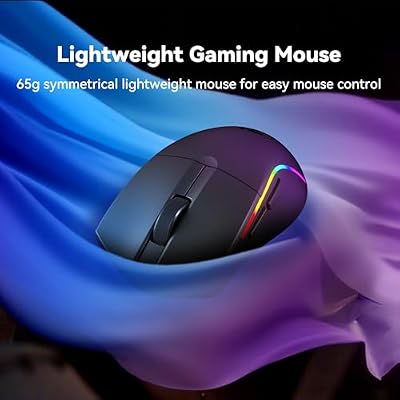
Redragon S107KS Wireless Gaming Keyboard and Mouse, RGB Backlit, 3 Mode (Wired/2.4G/BT), Up to 10,000 DPI Gaming Mouse with Software, Ultra Lightweight 65g, 25 Key Anti-Ghosting Keyboard for PC




As an Amazon Associate we earn from qualifying purchases. Product prices and availability are accurate as of the date/time indicated.
Rounding out the list is the Redragon S107KS, the flexible wireless pick for AI practitioners who work across more than one machine. It is a full-size RGB backlit keyboard-and-mouse combo with three-mode connectivity — wired, 2.4GHz and Bluetooth — letting you pair a workstation, a laptop and a tablet and switch between them. At around $47 it is an affordable way to get multi-device wireless flexibility.
For AI work the draw is connection flexibility. If you move between a GPU workstation, a laptop and a tablet through the day — common when you train on one box, prototype on another and read on a third — three-mode connectivity lets you switch without swapping peripherals, and the full-size layout keeps the number pad. The bundled mouse rounds out the set and the backlight suits dim rooms. As with most affordable gaming combos this is a membrane board with RGB rather than a subtle mechanical piece, and the lighting can be dimmed, but for flexible, multi-device wireless on a budget, the S107KS is a practical choice.
Pros: Three-mode wireless (wired/2.4GHz/Bluetooth), full combo with mouse, switches between devices, good value.
Cons: Membrane feel and gaming styling; not a true mechanical or ergonomic board.
How to Choose a Keyboard for AI Work
First, set expectations honestly: no keyboard makes you better at AI, and there is no genuine ‘AI keyboard’. The real question is which board best suits the work — long sessions of writing prompts, coding in Python, and living in a terminal — which is essentially developer-and-writer typing. So the criteria are the same ones that serve any heavy typist: comfort, feedback, programmability and reliability. Ignore marketing that promises ‘AI features’ and focus on how a keyboard actually feels over a long day of prompting and coding.
Comfort comes first because AI work is relentlessly typing-heavy. Long hours iterating on prompts and debugging code reward a board that supports your hands: a wrist rest, as on the SteelSeries Apex 3 and Razer Ornata, eases strain, while a split ergonomic keyboard like the Logitech Ergo K860 fundamentally improves posture and is the best defence against repetitive strain. If you spend most of your day at the keyboard, prioritise comfort above almost everything else — your wrists will thank you over the months and years.
Feedback and programmability shape your speed and accuracy. Tactile switches — the Razer Ornata’s hybrids, the G213’s Mech-Dome keys — give a clear sense of each keypress, which matters when you are typing long, precisely worded prompts and want to avoid dropped characters. Programmable keys and macros, as on the Redragon S101-3 PRO and via software on the Razer and SteelSeries boards, let you bind reused prompt snippets, terminal commands and shortcuts to single presses, streamlining an iterative AI workflow. Decide how much you value crisp feedback and command automation.
Finally, weigh noise, connectivity and budget. AI work often happens in shared spaces or alongside calls, so a whisper-quiet board like the Apex 3 is kinder to colleagues and microphones than a loud clicky one. If you switch between a workstation, a laptop and a tablet, multi-device wireless like the Redragon S107KS keeps one keyboard across all of them. Set a budget, decide whether comfort, feedback, programmability or flexibility matters most for how you work, and pick the keyboard on this list that lands on your priority — remembering that the best keyboard for AI is simply the best keyboard for the long hours of typing the work demands.
Frequently Asked Questions
Is there really such a thing as an ‘AI keyboard’?
No. No keyboard runs a model, writes prompts or trains a network, and any product marketed as an ‘AI keyboard’ is selling branding rather than a real feature. What people doing AI work actually need is an excellent keyboard for typing-heavy tasks — prompting, coding and terminal work. The boards in this guide are simply great keyboards for that work; none of them is, or needs to be, a special ‘AI’ device.
What keyboard features actually help with AI and ML work?
Comfort for long sessions, tactile feedback for accurate typing, programmable keys to bind reused prompts and commands, a full layout for numeric and shortcut work, and a reliable connection. An ergonomic board like the Logitech Ergo K860 protects your wrists, programmable boards like the Redragon S101-3 PRO speed up repetitive commands, and quiet switches like the SteelSeries Apex 3’s suit shared spaces. These practical traits matter far more than any ‘AI’ label.
Are programmable keys useful for prompt engineering?
They can be. If you reuse the same prompt fragments, system instructions, terminal commands or IDE shortcuts repeatedly — common in iterative AI work — binding them to programmable keys or macros, as the Redragon S101-3 PRO and the software on the Razer and SteelSeries boards allow, saves time and keystrokes. If your prompting is more freeform and varied, programmability matters less and comfort and feedback should take priority instead.
Should AI practitioners get an ergonomic keyboard?
If you spend long days writing prompts and code, it is well worth considering. AI work is intensely typing-heavy, and a split ergonomic board like the Logitech Ergo K860 holds your hands in a more natural posture and is the strongest protection against repetitive strain over time. The trade-offs are a higher price and a learning curve on the split layout, but for full-time AI and ML work, the long-term comfort often justifies it.
Related Guides
- Best Keyboards for Developers
- Best Mechanical Keyboards
- Best Keyboards for the Home Office
- Best Monitors for Coding
- Best PCs for AI and ML Work
- Best Chairs for Long Sessions
Affiliate Disclosure: As an Amazon Associate, we earn from qualifying purchases. If you click a link and make a purchase, we may earn a small commission at no extra cost to you. Prices and availability are accurate as of publication and may change.
Ready to decide? Our #1 pick for 2026 is the Logitech Ergo K860 Split Ergonomic.
Live price & availability on Amazon.


