The best headphones for iPad gaming turn a tablet into a serious portable gaming machine. A good pair keeps footsteps, dialogue, and music in sync with the action on screen, keeps voice chat clear for squad play, and stays comfortable through long sessions. The iPad makes this easier than many players expect, because modern iPads support USB-C audio, Bluetooth audio, and wired connections, so the right headset can connect in seconds and simply work.
Choosing well matters because not every headset suits a tablet. Some wireless models add a delay between the picture and the sound, which ruins timing in fast games. Some headsets need a dongle that only works through a USB-C port, while older iPads use a different connector. Battery life, microphone quality, weight, and the way each model connects all shape the experience. This guide explains how iPad audio works, what to check before buying, and presents five headsets that fit iPad gaming, with clear connection steps for each one.
As an Amazon Associate we earn from qualifying purchases.
How iPad Gaming Audio Works
Modern iPads handle game audio in three ways. Bluetooth carries sound wirelessly to any paired headset, USB-C carries digital audio through the charging port on newer models, and a wired connection sends audio through a cable. Each route has a trade-off. Bluetooth is the most convenient because it needs no cable and no dongle, but it can add a small delay that matters in competitive play. USB-C dongles and wired links usually keep sound tightly in sync with the picture, which is why many players prefer them for fast games.
iPadOS also shapes what a headset can do. The system pairs Bluetooth headsets through the Settings app, routes game audio and voice chat through the connected device, and supports spatial audio on compatible Apple headsets. USB-C headsets and dongles work plug-and-play on iPads with a USB-C port, with no extra app needed for basic audio. Microphone input travels over the same connection, so a headset mic works for in-game voice chat as well as calls. Knowing which connection a headset uses is the first step toward a setup that sounds right and feels effortless.
What to Look for in iPad Gaming Headphones
Low latency. Sound that lags behind the picture breaks immersion and costs matches. Headsets with a 2.4GHz USB-C dongle usually deliver the sharpest sync, while Bluetooth models with modern codecs keep delay low enough for casual and story-driven games. If competitive timing matters, put a dongle or wired model at the top of the list.
Connection options. A headset that offers both a USB-C dongle and Bluetooth gives the most freedom. Use the dongle at home for the lowest delay, then switch to Bluetooth on the move. A wired USB-C mode is a useful backup when the battery runs low.
Microphone quality. Clear voice chat depends on a good mic. Detachable boom mics usually capture voice better than built-in mics hidden in an earcup, while beamforming mics built into the cups keep the design clean and travel-friendly. Check whether the mic works over the connection you plan to use.
Battery life and weight. Long sessions demand a battery that lasts through the day and a frame light enough to forget. Over-ear models in the 165 to 285 gram range suit most players, and a battery of 18 hours or more covers several evenings of play between charges.
iPadOS compatibility. Confirm the headset works with your iPad model. USB-C dongles need a USB-C iPad, while Bluetooth works with any iPad that supports the headset profile. Apple headsets add extras such as spatial audio and automatic device switching when paired with an Apple account.
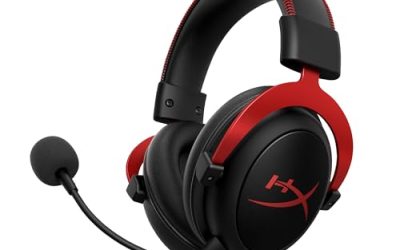
Razer Barracuda X Wireless Gaming Headset

The Razer Barracuda X is a strong all-round pick for iPad gaming because it connects two ways and keeps the design light. A USB-C dongle delivers low-delay 2.4GHz wireless audio, while Bluetooth handles phone calls and music on the move. SmartSwitch lets the headset jump between the two connections, so a call can come through without ending the game session. The 40 mm TriForce drivers split sound into separate highs, mids, and lows, which helps footsteps and dialogue stand out in busy scenes. A detachable HyperClear cardioid mic focuses on the voice and filters out room noise, and the 250 gram frame with memory foam ear cushions stays comfortable during long play.
Specs. Drivers: 40 mm TriForce. Wireless: 2.4GHz HyperSpeed plus Bluetooth. Battery: up to 50 hours. Weight: 250 grams. Microphone: detachable HyperClear cardioid. Charging: USB-C. Model: RZ04-04430100-R3M1.
How to connect to iPad. Plug the USB-C dongle into the iPad USB-C port for the lowest delay, then power on the headset. For Bluetooth, hold the pairing button, open Settings, choose Bluetooth, and pick the headset from the device list. Amazon ASIN: B09X5G16ZM
SteelSeries Arctis Nova 7 Wireless Gaming Headset

The SteelSeries Arctis Nova 7 suits players who want wireless audio and Bluetooth running at the same time. Its 2.4GHz link carries game sound with low delay, while Bluetooth mixes in a second audio source, so music or a call can run alongside the game. The ClearCast Gen2 AI microphone uses noise reduction to keep voice chat clear, and the neodymium magnetic drivers deliver a wide soundstage that suits both shooters and adventure games. Battery life reaches 38 hours, and a USB-C fast charge adds hours of play from a short top-up. The comfort-fit headband spreads weight evenly, which helps during marathon sessions.
Specs. Drivers: neodymium magnetic. Wireless: 2.4GHz plus mixable Bluetooth. Battery: up to 38 hours. Microphone: ClearCast Gen2 AI with noise reduction. Charging: USB-C fast charging. Model: 61553.
How to connect to iPad. Plug the compact USB-C dongle into the iPad USB-C port and switch the headset on for low-delay play. For Bluetooth, pair through Settings, then use the headset controls to balance game audio and the Bluetooth source. Amazon ASIN: B0B15QM5LL
Logitech G435 Lightspeed Wireless Gaming Headset
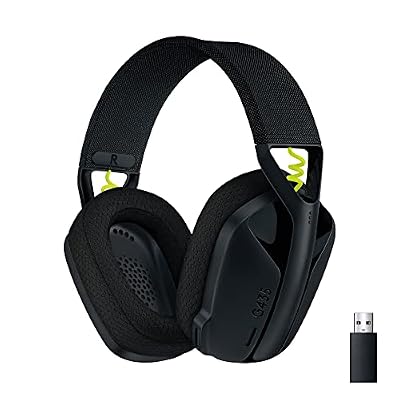
The Logitech G435 is the most portable headset in this guide and a smart choice for players who value comfort and portability. It weighs only 165 grams, so it sits easily on the head for hours, and its memory foam earcups keep the fit gentle. Lightspeed wireless delivers a low-delay link, while Bluetooth 5.0 covers phones and tablets that lack a dongle port. Dual beamforming microphones sit inside the earcups, so there is no boom mic to adjust or lose. The 40 mm drivers support Dolby Atmos, which adds depth to game worlds, and the 18-hour battery covers several play sessions before a recharge.
Specs. Drivers: 40 mm. Wireless: Lightspeed plus Bluetooth 5.0. Battery: up to 18 hours. Weight: 165 grams. Microphones: dual beamforming built-in. Audio: Dolby Atmos compatible. Model: 981-001049.
How to connect to iPad. The simplest route is Bluetooth: put the headset in pairing mode, open Settings, choose Bluetooth, and select the G435. The Lightspeed receiver uses a USB-A plug, so it needs a USB-C adapter to work with a USB-C iPad. Amazon ASIN: B08R8DT7X6
Sony WH-1000XM5 Wireless Noise Canceling Headphones

The Sony WH-1000XM5 is the pick for players who want silence and detail in equal measure. Its active noise canceling uses eight microphones to cut background sound, which helps in noisy rooms, on flights, and in shared spaces. Two processors control the sound, and the 30-hour battery outlasts every other headset in this guide. A three-minute charge adds about three hours of playback, so a dead battery rarely ends a session. The headset connects by Bluetooth with LDAC support for high-resolution audio, and a wired mode works through the included cable. Eight microphones also keep voice calls clear, and the touch controls on the earcup handle volume and playback without reaching for the screen.
Specs. Battery: up to 30 hours. Quick charge: 3 minutes for about 3 hours of playback. Microphones: 8. Noise control: active noise canceling. Wireless: Bluetooth with LDAC. Weight: 250 grams. Model: XM5BK.
How to connect to iPad. Pair by Bluetooth through Settings for wireless play, or use a wired USB-C to 3.5 mm cable for a zero-delay link. The headset pairs quickly and reconnects automatically after the first setup. Amazon ASIN: B09XS7JWHH
Apple AirPods Max USB-C Wireless Headphones

The Apple AirPods Max in Blue with USB-C charging is the natural match for players deep inside the Apple ecosystem. It pairs instantly with an iPad signed into the same Apple account, switches automatically between Apple devices, and supports personalized spatial audio with dynamic head tracking for a cinema-like soundstage. Active noise cancellation blocks distractions, while transparency mode lets outside sound in when needed. The knit-mesh canopy and memory foam ear cushions spread pressure evenly, and the Digital Crown gives precise volume control. USB-C charging matches the cable used by modern iPads, so one charger covers both devices.
Specs. Noise control: active noise cancellation plus transparency mode. Audio: personalized spatial audio with dynamic head tracking. Battery: up to 20 hours. Charging: USB-C. Wireless: Bluetooth. Model: MWW63AM/A.
How to connect to iPad. Hold the headset near the iPad and follow the on-screen pairing prompt, or pair through Settings and Bluetooth. Audio and voice chat route automatically, and the headset switches between Apple devices on its own. Amazon ASIN: B0DGJJDFPR
Choosing the Right Headset for Your iPad
The best choice depends on how and where you play. Competitive players should favor a 2.4GHz dongle model such as the Barracuda X or the Arctis Nova 7, because the low-delay link keeps sound and picture in step. Players who travel light will love the G435 for its featherweight frame and dual wireless modes. Those who play in noisy places should look at the WH-1000XM5, whose noise canceling and 30-hour battery are hard to beat. Apple users who want the smoothest pairing and spatial audio will feel at home with the AirPods Max.
Check your iPad model before ordering. A USB-C iPad works with every dongle and wired option here, while older iPads rely on Bluetooth or an adapter. Think about the microphone too: boom mics suit team play, while built-in mics suit solo sessions and travel. Battery life matters less when a wired mode exists as a backup, but a long battery keeps wireless play worry-free. For a deeper look at which iPad suits gaming in the first place, see the guide to the best gaming iPad.
FAQ
Which connection gives the lowest delay for iPad gaming?
A 2.4GHz USB-C dongle or a wired link usually gives the lowest delay, because the signal travels straight from the iPad to the headset. Bluetooth adds a small delay that suits casual games but can feel off in fast competitive play.
Can I use a USB-C dongle headset with any iPad?
A USB-C dongle needs an iPad with a USB-C port, which covers most iPad Pro, iPad Air, and recent iPad models. Older iPads with a Lightning port need a Bluetooth headset or a suitable adapter instead.
Do gaming headset microphones work for voice chat on iPad?
Yes, the microphone works over the same connection as the audio, whether that is a USB-C dongle, Bluetooth, or a wired cable. Check the game and the headset settings if teammates cannot hear you, since iPadOS sometimes needs the microphone permission enabled for the game.
Is Bluetooth good enough for iPad gaming?
Bluetooth is good enough for story games, puzzles, and casual play, where a tiny delay goes unnoticed. For competitive shooters and rhythm games, a dongle or wired connection keeps timing tighter and is the safer choice.