Memory latency decides how quickly your processor gets the data it asks for, and in gaming that delay shows up in frame pacing, scene loading, and how smooth a busy fight feels. The best memory latency for gaming comes from kits that pair a high transfer rate with tight timings, so the memory answers fast and moves a lot of data once it answers. This guide explains what CAS latency means, how it interacts with speed, and which low-latency kits fit which platform.
As an Amazon Associate we earn from qualifying purchases.
What CAS latency actually measures. CAS latency, written as CL, counts the clock cycles between the moment the memory controller asks for a column of data and the moment the first piece of that data arrives. A lower CL number means fewer cycles of waiting. The number alone does not tell the whole story, because a cycle at DDR5-6000 is shorter than a cycle at DDR4-3600. That is why two kits can share the same CL number yet answer at different speeds, and why a DDR4 kit at CL16 can answer sooner in real time than a DDR5 kit at CL30. The useful comparison is true latency in nanoseconds, and you can work it out with simple arithmetic: divide the CAS latency by half the transfer rate in megahertz, then multiply by one thousand. For a DDR5-6000 kit at CL30, the math is 30 divided by 3000, times 1000, which gives 10 nanoseconds. For a DDR4-3600 kit at CL16, the math is 16 divided by 1800, times 1000, which gives about 8.9 nanoseconds. Both numbers are first-word latency, the delay before the first chunk of data arrives, and they give a fair way to compare kits across generations.
Latency against speed. Speed and latency pull in different directions, and a good gaming kit balances both. Transfer rate decides how much data moves per second once the memory answers, which matters when a game streams textures, loads a new area, or feeds a processor that juggles a game, voice chat, and a browser at the same time. Latency decides how long each individual request waits, which matters in the many small, scattered reads a game engine performs every frame. A kit with a very high transfer rate and loose timings can feel sluggish where responsiveness counts, while a kit with tight timings and a modest transfer rate can run out of bandwidth in heavy scenes. The sweet spot for most current gaming builds is DDR5-6000 at CL30, which pairs a strong transfer rate with 10 nanoseconds of first-word latency, or DDR4-3600 at CL16 for older platforms, which answers in about 8.9 nanoseconds. Chasing a higher transfer rate beyond that point usually means accepting looser timings, and the extra bandwidth rarely pays off in games once you pass the platform sweet spot.
How to read a timing string. A full timing string looks like 30-38-38-96 or 16-19-19-39. The first number is CAS latency, the headline figure. The second number is the delay between row activation and column access, the third is the delay between a read and the next precharge, and the fourth is the total row cycle time. When you compare two kits at the same speed, the one with the lower first number answers sooner, and lower secondary numbers usually mean a more carefully screened set of memory chips. Voltage matters too: DDR5 kits at 1.35V run cooler than kits that need 1.40V or more for the same timings, while DDR4 kits at 1.35V are the norm for 3600 MT/s CL16 parts. Every kit below ships as a matched pair of two modules, because two sticks in dual channel roughly double the available bandwidth against a single stick, and a matched pair is validated to run together at the rated timings.
The five kits at a glance. The table below lines up the five kits by the numbers that matter for latency. All five run at the rated speed with a single BIOS profile, and all five use two matched modules.
| Kit | Speed | Timings | True latency |
|---|---|---|---|
| G.SKILL Trident Z5 RGB | DDR5-6000 | CL30-40-40-96 | 10 ns |
| G.SKILL Trident Z5 Neo RGB | DDR5-6000 | CL30-38-38-96 | 10 ns |
| Corsair Vengeance RGB | DDR5-6000 | CL30-36-36-76 | 10 ns |
| Kingston Fury Beast | DDR5-6000 | CL30-36-36-96 | 10 ns |
| G.SKILL Trident Z Neo DDR4 | DDR4-3600 | CL16-19-19-39 | 8.9 ns |
G.SKILL Trident Z5 RGB DDR5-6000 CL30

The Trident Z5 RGB is the reference point for low-latency DDR5 on Intel platforms, and it earns that place with a combination of tight CL30 timings and a clean, mature Intel XMP 3.0 profile. The kit runs at DDR5-6000 with timings of 30-40-40-96 at 1.35V, giving 10 nanoseconds of first-word latency alongside enough bandwidth for modern titles. The aluminium heat spreader keeps the modules cool under sustained load, and the RGB light bar covers the top edge of each stick with a diffused glow that suits a windowed case. This is the kit to pick when you run an Intel board with DDR5 slots and want a set-and-forget XMP profile that simply works.
Specs
- Capacity: 32GB (2x16GB); Speed: DDR5-6000; Timings: CL30-40-40-96; Voltage: 1.35V; Profile: Intel XMP 3.0; Model: F5-6000J3040F16GA2-TZ5RK; ASIN: B09Y1BM3ZH
G.SKILL Trident Z5 Neo RGB DDR5-6000 CL30

The Trident Z5 Neo RGB is the AMD counterpart to the kit above, tuned for Ryzen processors with an AMD EXPO profile and slightly tighter secondary timings of 30-38-38-96. On AM5 boards, DDR5-6000 is the widely recommended sweet spot because it keeps the memory controller and the Infinity Fabric in a one-to-one ratio, and this kit hits that speed at CL30 without demanding extra voltage. The black heat spreader and RGB bar match most AMD builds, and 32GB covers current games with room for background applications. Pick this kit when you build on AM5 and want EXPO support that enables the rated speed with one BIOS setting.
Specs
- Capacity: 32GB (2x16GB); Speed: DDR5-6000; Timings: CL30-38-38-96; Voltage: 1.35V; Profile: AMD EXPO; Model: F5-6000J3038F16GX2-TZ5NR; ASIN: B0BF8FVLSL
Corsair Vengeance RGB DDR5-6000 CL30

The Corsair Vengeance RGB stands out in this group for its secondary timings: 30-36-36-76 is the closest set of the DDR5 kits here, which means shorter waits between the internal steps of each memory access, not just a low headline CAS number. The kit supports both AMD EXPO and Intel XMP 3.0, so the same part number suits either platform, and the ten-zone RGB lighting on each module is controlled through Corsair iCUE software. At 1.40V it asks for a little more voltage than the other DDR5 kits here, the trade for those closer secondary timings. Choose this kit when you want the sharpest DDR5 timings available at 6000 MT/s and you already use, or plan to use, iCUE lighting control.
Specs
- Capacity: 32GB (2x16GB); Speed: DDR5-6000; Timings: CL30-36-36-76; Voltage: 1.40V; Profiles: AMD EXPO and Intel XMP 3.0; Model: CMH32GX5M2B6000Z30K; ASIN: B0BPTKD797
Kingston Fury Beast DDR5-6000 CL30

The Kingston Fury Beast is the plain, no-lighting option in this guide, and that simplicity is its strength. It runs at DDR5-6000 with CL30-36-36-96 timings at 1.35V, matching the latency of the RGB kits while keeping a low-profile black heat spreader that clears large air coolers. Kingston Plug N Play lets the kit run at its rated speed on many boards without any BIOS change, and an AMD EXPO profile is there for boards that need it. The absence of lighting also means no extra software and no cable clutter. Pick this kit when you want low latency without paying for lighting, or when cooler clearance rules out taller RGB modules.
Specs
- Capacity: 32GB (2x16GB); Speed: DDR5-6000; Timings: CL30-36-36-96; Voltage: 1.35V; Profile: AMD EXPO with Plug N Play; Model: KF560C30BBEK2-32; ASIN: B0CYHC58P6
G.SKILL Trident Z Neo DDR4-3600 CL16
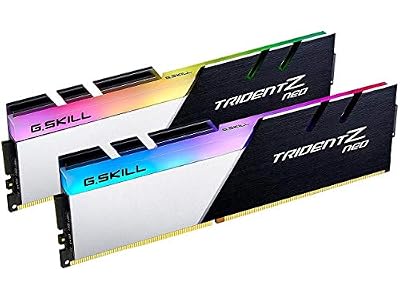
The Trident Z Neo DDR4 is the pick for anyone still gaming on a DDR4 platform, and its numbers deserve respect: at DDR4-3600 with CL16-19-19-39 timings, its true latency of about 8.9 nanoseconds is lower than any DDR5 kit in this guide. That is the nature of DDR4 — slower cycles, but fewer of them per access. The kit suits AMD Ryzen 3000 and newer systems as well as Intel boards with DDR4 slots, and its XMP profile enables the rated speed in one step. The 32GB capacity and dual-channel layout handle modern games comfortably, and the RGB lighting adds a clean accent to an older build. Choose this kit when your board takes DDR4 and you want the lowest latency available on that platform, rather than spending on a full platform change for DDR5.
Specs
- Capacity: 32GB (2x16GB); Speed: DDR4-3600; Timings: CL16-19-19-39; Voltage: 1.35V; Profile: Intel XMP; Model: F4-3600C16D-32GTZNC; ASIN: B07WTS8T2W
Matching a kit to your platform. Platform fit comes before latency numbers, because the wrong generation will not fit your board at all. DDR5 and DDR4 use different slots, so check your board manual before ordering. On AMD AM5, DDR5-6000 CL30 is the sweet spot, and the Trident Z5 Neo RGB or the Kingston Fury Beast are natural fits. On Intel LGA1700 or LGA1851 boards with DDR5 slots, the Trident Z5 RGB or the Vengeance RGB suit the XMP ecosystem. On AM4 or Intel boards with DDR4 slots, the Trident Z Neo DDR4-3600 CL16 is the right call. For a broader look at memory choices beyond latency, see the guide to the best memory for gaming. Once you know the generation, confirm the kit appears on your board maker compatibility list, and check that your CPU cooler clears the heat spreader height, since tall RGB modules can clash with large air coolers.
Setup notes that protect your latency. A low-latency kit only delivers its rated timings when the memory profile is enabled. After installing the two modules in the slots your board manual marks for dual channel, open the BIOS and enable EXPO on AMD boards or XMP on Intel boards, then save and reboot. Without that step, the kit runs at a slow default speed and the CL30 label means nothing. Two modules beat four for reaching rated speeds, because four sticks load the memory controller more and often force looser timings. Keep the BIOS updated, since board makers keep improving memory compatibility, and leave the voltage at the rated value rather than pushing it higher in search of closer timings.
When latency matters most. Low latency pays off most in games that lean on the processor: competitive shooters at high frame rates, simulation and city-building titles with many moving parts, and open-world games that stream data as you move. In those cases, the processor waits on memory constantly, and shaving nanoseconds off each wait adds up across thousands of requests per frame. In games that lean on the graphics card at high resolutions, the difference narrows, because the graphics card does most of the heavy work. Either way, 32GB is the right capacity for a gaming build today, leaving room for the game, voice chat, and a browser without swapping data to storage.
What to avoid. Avoid single-module kits, since one stick halves your bandwidth and no latency figure can compensate for that. Avoid mixing kits from different brands or speeds, because the board runs every module at the slowest common setting. Avoid chasing the highest transfer rate without checking the timings, since a DDR5-7200 kit at loose timings can answer more slowly than a DDR5-6000 kit at CL30. And avoid ordering DDR5 for a DDR4 board, or the reverse — the connector notch prevents it, but the mistake still costs time.
Frequently Asked Questions
What is the best memory latency for gaming right now?
For most current builds, DDR5-6000 at CL30 is the best balance, with 10 nanoseconds of first-word latency and enough bandwidth for modern titles. On DDR4 platforms, DDR4-3600 at CL16 answers in about 8.9 nanoseconds and remains the best latency figure available on that generation.
Is lower CAS latency always better?
Lower CAS latency is better only when you compare kits at the same transfer rate. A DDR4-3600 CL16 kit answers sooner than a DDR5-6000 CL30 kit in nanoseconds, yet the DDR5 kit moves far more data per second, so the right choice depends on your platform.
Should I pick DDR5-6000 CL30 or a higher-speed DDR5 kit?
DDR5-6000 CL30 is the safer pick for most gaming builds, especially on AM5, where it keeps the memory controller in its preferred ratio. Higher-speed kits usually carry looser timings, and the extra bandwidth rarely changes gaming smoothness once you pass the platform sweet spot.
Do I need to enable anything in the BIOS after installing low-latency RAM?
Yes. Install the two modules in the dual-channel slots, then enable the EXPO profile on AMD boards or the XMP profile on Intel boards. Without that step, the kit runs at a slow default speed and the rated CL30 or CL16 timings never apply.