- Top Pick: Glorto GeForce GT 730 4G Low Profile Graphics Card, 2X HDMI, DP, VGA, DDR3, PCI Express 2.0 x8, Entry Level GPU for PC, SFF and HTPC, Compatible with Windows 11
- Best Value: Glorto GeForce GT 210 1024 MB DDR3 Low Profile Graphics Card, PCI Express 1.0 x16, Entry Level GPU for PC, SFF and HTPC (HDMI/VGA)
- Premium Choice: Glorto GeForce GT 730 4G Low Profile Graphics Card, 2X HDMI, VGA, DDR3, PCI Express 2.0 x16, Entry Level GPU for PC, SFF and HTPC
A home theater PC asks very little of a graphics card compared with a gaming tower, and that is exactly why shopping for one goes wrong. The case is usually small, the slot is often low profile, the living room demands quiet, and the job is mostly to push video to a TV or receiver over HDMI. Raw frame rates barely matter. Output connectors, bracket height, noise, and which codecs the chip can handle matter far more than a headline performance number, and the best card is often the one you stop thinking about once the cables are plugged in.
This guide is for people building or reviving an HTPC, a small-form-factor media box, or a multi-monitor information display, who want a card that fits and does the video job without drama. Seven low-profile options are compared below, all judged only from the specs in their listing titles. Two caveats up front for 2026: older GT-class chips lack hardware decoding for some modern streaming formats, and the listings rarely state the HDMI version, so confirm both before ordering. If your processor already has video outputs, you may not need a card at all.
Quick Picks
As an Amazon Associate we earn from qualifying purchases at no extra cost to you.



| Product | Best for | Key spec from the title |
|---|---|---|
| Glorto GT 730 4G (HDMI, DP, VGA) | Mixed displays | 2x HDMI, DP, VGA, PCIe 2.0 x8 |
| GT 610 2G | Simple one-screen setups | 2G DDR3, HDMI/VGA, PCIe 1.1 x16 |
| Glorto GT 210 1024 MB | Basic output only | 1024 MB DDR3, HDMI/VGA |
| Glorto GT 730 4G (dual HDMI, VGA) | Two-TV setups | 2x HDMI, VGA, PCIe 2.0 x16 |
| Glorto GT 730 2G | Smaller memory needs | 2G DDR3, 2x HDMI, PCIe 1.0 x16 |
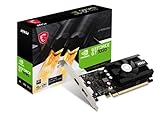
| MSI GT 1030 4GD4 LP OC | Newest design on the list | 4GB DDR4, DP/HDMI, DirectX 12 |
| Vandossy GT 730 4GB | Multi-screen walls | 4x HDMI, 4GB GDDR5, 384 CUDA |
How to Choose
Bracket height and slot width
Low profile means the card ships with a short bracket, but you still need to measure the case. Small-form-factor cases often accept only single-slot cards, and some HTPC enclosures have little clearance above the slot. A card with a single fan, like the MSI model, needs more airflow room than a passive card would. Write down your slot type and thickness limit before comparing anything else, and keep the original full-height bracket in case you move the card to another machine later.
Outputs you will actually use
Count the displays you plan to connect and match them to connectors. A living-room TV needs HDMI. Older monitors may need VGA, while DisplayPort suits a modern screen. Listings with multiple HDMI ports help multi-screen builds, but keep in mind that the chip must still drive all of them, and the HDMI version is rarely stated in the title. If you want 4K at 60 Hz on a television, ask the seller or check the manufacturer sheet first.
Memory type and interface generation
DDR3, DDR4, and GDDR5 all appear in this group. For a media machine, memory size matters less than the chip generation. A PCIe 2.0 or 1.0 listing will still work in newer slots because the interface is backward compatible. An x8 label means the card uses fewer lanes than an x16 model, which is rarely a bottleneck for video playback, but it is worth knowing when you compare otherwise identical cards.
What to ignore, and where budget cards cut corners
Ignore the CUDA core count and the word gaming. Entry-level cards save on cooling, board components, and driver support. Older chips such as the GT 210 and GT 610 are the first to drop out of current driver releases, and none of the listings state hardware support for modern streaming codecs, so verify that before you commit. A passive heatsink is quiet but needs case airflow, while a small fan trades silence for margin.
The 7 Best Options
Glorto GT 730 4G (HDMI, DP, VGA)
The most connector-rich of the Glorto cards. The title lists 4G of DDR3, a low-profile design, two HDMI ports, DisplayPort, VGA, PCIe 2.0 x8, and Windows 11 compatibility, a mix that covers older and newer displays on one bracket without adapters.
- Four video outputs let you mix a TV, a monitor, and a projector.
- The listing positions it for small-form-factor PCs and HTPC use.
- Trade-off: the x8 interface offers fewer lanes than the x16 sibling.
Skip it if you only need one display or want the newest chip generation.
GT 610 2G
An older chip for very basic duty. The title lists 2G of DDR3, a low-profile card, PCIe 1.1 x16, HDMI and VGA outputs, and Windows 11 compatibility for entry-level and SFF builds, which is a plain recipe for a machine that mostly shows a desktop and plays local video.
- HDMI plus VGA covers a TV and an older monitor.
- A full x16 connection is a straightforward fit for a standard slot.
- Trade-off: the 610 name signals one of the oldest designs in this group.
Skip it if you want newer codec support or more than two outputs.
Glorto GT 210 1024 MB
This is the lightest option on the list, intended for output duty only. The title lists 1024 MB of DDR3, a low-profile form, PCIe 1.0 x16, and HDMI plus VGA ports for entry-level, SFF, and HTPC builds, so think of it as a way to get a picture rather than a way to get performance.
- The simplest connector set suits a single screen.
- The low-profile layout fits compact cases.
- Trade-off: the smallest memory and the oldest interface generation among the picks.
Skip it if you plan to run a modern streaming app or add more screens.
Glorto GT 730 4G (Dual HDMI, VGA)
A simpler cousin of the first Glorto card. The title lists 4G of DDR3, two HDMI ports, VGA, and a PCIe 2.0 x16 connection, with low-profile positioning for SFF and HTPC use, which makes it the easy option for two televisions or a TV plus a receiver.
- A full x16 interface keeps the slot question simple.
- Dual HDMI suits two TVs or a TV plus an audio receiver.
- Trade-off: no DisplayPort, so a DP monitor needs an adapter.
Skip it if you need DisplayPort or want the newest chip.
Glorto GT 730 2G
This card keeps the same outputs with less memory. The title lists 2G of DDR3, two HDMI ports, VGA, a low-profile design, and PCIe 1.0 x16, aimed at SFF and HTPC builds where the display count matters more than anything else.
- Dual HDMI covers the same two-screen layouts as its siblings.
- The lower memory figure keeps the listing focused on basic output.
- Trade-off: PCIe 1.0 is the oldest interface generation among the GT 730 variants here.
Skip it if the 4G variants fit your case and your plans.
MSI GT 1030 4GD4 LP OC
The newest design on the list, and the only one from a major board brand. The title lists 4GB of DDR4 on a 64-bit bus, HDCP support, DirectX 12, DP and HDMI outputs, a single fan, and an OC edition, which together suit a modern television and monitor pairing.
- HDCP support matters for protected streaming content.
- DisplayPort plus HDMI suits a modern TV and monitor.
- Trade-off: the single fan adds a little noise compared with passive designs.
Skip it if you want a silent build or need a VGA port.
Vandossy GT 730 4GB LP
Built for screen walls and silent PCs. The title lists four HDMI outputs, 4GB of GDDR5, PCIe 2.0 x8, 384 CUDA cores, and use cases that include multi-monitor business, home theater, and silent PC builds, so it is aimed at signage and lobby displays as much as living rooms.
- Four HDMI ports is the highest output count here.
- GDDR5 is listed, a faster memory type than the DDR3 on most others.
- Trade-off: the brand is less established, so support options may be thinner.
Skip it if you want a recognized manufacturer or DisplayPort.
Which One Fits Your Situation
You are building a living-room media box
The MSI GT 1030 4GD4 LP OC is the safest choice when the case has fan room, since it has the newest design and HDCP support for protected streams. If silence matters more than anything, the Vandossy card is the one whose title mentions silent PC use, though you should confirm how it is cooled before buying.
You need several screens off one card
Take the Vandossy GT 730 4GB LP for four HDMI outputs, or the first Glorto GT 730 4G for a mix of HDMI, DisplayPort, and VGA when your displays are of different ages.
You are reviving an older office PC
The Glorto GT 730 4G with dual HDMI and VGA fits a standard x16 slot and keeps the older connectors you may still need for a legacy monitor.
You only need a picture on one screen
The Glorto GT 210 or the GT 610 gives basic output, as long as you accept their age and limited codec support. Between them, the GT 610 has more memory and an HDMI and VGA pairing, while the GT 210 is the more stripped-down choice.
Common Mistakes
- Skipping the bracket and slot measurement, then discovering the card will not seat.
- Assuming every HDMI port supports 4K at 60 Hz. The listings rarely say.
- Buying for gaming specs when the job is video playback.
- Forgetting that a fan adds noise in a quiet living room.
- Counting on very old chips to keep receiving driver updates.
- Treating a larger memory figure as a sign of a faster card, when entry-level chips are limited by the chip itself, not by how much memory sits next to it.
Related guides
- Aio Liquid Coolers For High Performance Gaming
- How To Lower Input Delay In Competitive Shooters
- Wireless Gaming Headsets Under 100 For Pc
Frequently Asked Questions
Do I need a graphics card in an HTPC at all?
Only if your processor lacks video outputs or you need more displays than the board provides. Many modern processors handle video playback without a card, which also keeps the build quieter.
What does low profile mean?
It refers to a shorter bracket and board height designed for slim cases. Confirm the bracket included with your card matches your case before you order. The titles also do not state a maximum resolution or HDMI version, so check the manufacturer specification for HDMI 2.0 or newer if you plan to drive a 4K television at a high refresh rate.
Can a PCIe 2.0 card work in a newer slot?
Yes. PCIe is backward compatible, so a 2.0 card runs in a newer slot at its own speed, provided the physical length fits. For video playback the difference is not noticeable.
Is DDR3 or GDDR5 better for a media PC?
GDDR5 offers more bandwidth, but video playback rarely needs it. Chip generation and output connectors are better deciding factors, followed by cooling and the length of the bracket that ships in the box. If two cards look alike on paper, pick the one whose listing mentions your Windows version. Whichever card you choose, update to the latest drivers the maker still offers and keep the case vents clear, since a small card in a tight chassis has little thermal headroom.