The Ryzen 5 7600 is an easy processor to pair well. It is a modern six-core Zen 4 chip on the AM5 platform, with strong single-core performance for gaming, support for DDR5 memory, and PCI Express connectivity that suits current graphics cards. That combination means the processor itself is rarely the limiting factor at 1440p, and at 1080p it can keep up with fast cards in esports titles as long as the rest of the system is balanced.
The real decision is which GPU tier matches your monitor, power supply, and games. A card perfect for high-refresh 1080p can feel stretched at 1440p, while a stronger 1440p card is wasted on a basic 60Hz display. This guide compares four cards listed on Amazon US: the GeForce RTX 4070, Radeon RX 7800 XT, Radeon RX 7700 XT, and GeForce RTX 4060 Ti.
As an Amazon Associate we earn from qualifying purchases
If you are still deciding on the processor side of the build, start with our guide to the best gaming CPU Ryzen 5 7600 and then come back to the GPU tier that fits your resolution.
How to Choose a GPU for the Ryzen 5 7600
Start with resolution, not brand
Resolution is the cleanest way to shortlist. At 1080p, an 8GB card can still do well in competitive and older titles. At 1440p, VRAM, bandwidth, and shading power matter much more. So this guide splits naturally: the RTX 4060 Ti as the 1080p-first option, the RX 7700 XT as a step into 1440p, and the RX 7800 XT and RTX 4070 as the more comfortable 1440p choices. None should be bought expecting native 4K at high settings in every new release.
VRAM and memory bus
More VRAM gives textures more room, which helps at 1440p. Bus width and memory type matter alongside capacity: a 16GB card on a 256-bit bus, like the RX 7800 XT, has a different profile from a 12GB card on a 192-bit bus.
Platform features
NVIDIA RTX 40-series cards bring DLSS upscaling and frame generation in supported games. AMD RX 7000-series cards bring FSR upscaling and, on these models, DisplayPort 2.1. Neither automatically wins — check whether your titles support the method you care about.
Power draw and your power supply
Power draw decides whether your power supply is suitable, which connectors you need, and how much heat the case must move. Check the specific board partner model, because factory overclocks vary by configuration, and confirm its recommended power supply on the exact listing.
Comparison Table
| GPU | Platform | VRAM | Reference power draw | Best resolution fit | Key idea |
|---|---|---|---|---|---|
| GeForce RTX 4070 | NVIDIA Ada Lovelace, PCIe 4.0 | 12GB GDDR6X, 192-bit | 200W total graphics power, per Digital Trends spec summary | 1440p, high-refresh 1080p | Efficient 1440p card with DLSS |
| Radeon RX 7800 XT | AMD RDNA 3, PCIe 4.0 x16 | 16GB GDDR6, 256-bit | 263W typical board power, per AMD | 1440p | Most VRAM and widest bus here |
| Radeon RX 7700 XT | AMD RDNA 3, PCIe 4.0 x16 | 12GB GDDR6, 192-bit | 245W typical board power, per AMD reporting via TechPowerUp | 1440p entry, strong 1080p | 1440p step-up with 12GB |
| GeForce RTX 4060 Ti | NVIDIA Ada Lovelace, PCIe 4.0 | 8GB GDDR6, 128-bit | 160W max consumption on the ZOTAC Twin Edge OC listing checked | 1080p, lighter 1440p | Lowest power, DLSS in a compact tier |
A note on benchmarks: this guide does not invent frame rates. Where performance character is described, it follows how AMD and NVIDIA position these cards — AMD, for example, describes the RX 7800 XT as its ultimate 1440p card — and the resolution fit that follows from their VRAM, bandwidth, and power class. For game-specific numbers, look for named benchmark coverage of the exact titles you play, because results change with settings, drivers, and patches.
The Picks
1. ASUS TUF Gaming GeForce RTX 4070 OC Edition — Balanced 1440p Pick
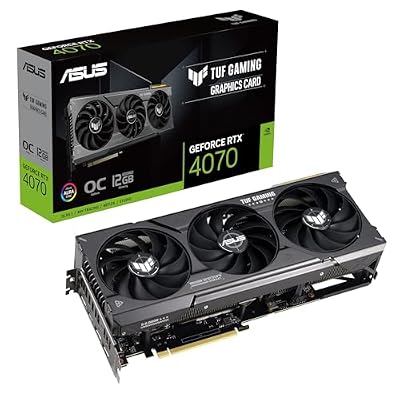
The ASUS TUF Gaming GeForce RTX 4070 OC Edition is listed on Amazon with 12GB of GDDR6X memory, PCI Express 4.0, HDMI 2.1, and DisplayPort 1.4a. ASIN: B0BZTDZL7J — View on Amazon
The RTX 4070 is the efficiency story in this group. Its reference total graphics power is 200W, lower than either Radeon card here, while its 12GB of faster GDDR6X memory on a 192-bit bus is aimed squarely at 1440p gaming. With a Ryzen 5 7600, that makes for a well-matched system: the processor is not holding the card back at 1440p, and the power supply requirement stays more manageable than with higher-draw alternatives.
Choose this card if you value DLSS in supported games, care about ray tracing performance for its class, or want a 1440p system that does not demand an oversized power supply. Its limit is VRAM headroom compared with the RX 7800 XT. Twelve gigabytes is workable at 1440p today, but the Radeon gives you more margin for texture-heavy games over a longer ownership period.
Best for: 1440p players who prefer NVIDIA features and lower power draw.
2. GIGABYTE Radeon RX 7800 XT Gaming OC 16G — Most VRAM for 1440p

The GIGABYTE Radeon RX 7800 XT Gaming OC 16G is listed on Amazon with 16GB of GDDR6 memory on a 256-bit interface, the WINDFORCE cooling system, and the model name GV-R78XTGAMING OC-16GD. ASIN: B0CGRMJF6C — View on Amazon
This is the most generous memory system in the guide. AMD lists the RX 7800 XT with 16GB of GDDR6, a 256-bit interface, and 263W typical board power, and positions it for 1440p. That extra VRAM is the reason to pick it over the RX 7700 XT if your power supply can support it. The trade-offs: it draws the most power here, and its upscaling path is FSR rather than DLSS.
Best for: 1440p players who want the most VRAM and memory bandwidth in this tier.
3. GIGABYTE Radeon RX 7700 XT Gaming OC 12G — The 1440p Step-Up

The GIGABYTE Radeon RX 7700 XT Gaming OC 12G is listed on Amazon with 12GB of GDDR6 memory on a 192-bit interface, 3X WINDFORCE fans, and the model name GV-R77XTGAMING OC-12GD. ASIN: B0CGC5P7H3 — View on Amazon
The RX 7700 XT shares the RDNA 3 platform and Navi 32 family with the RX 7800 XT, but with fewer compute resources, 12GB rather than 16GB of VRAM, a narrower 192-bit bus, and a typical board power of 245W according to AMD specifications reported by TechPowerUp. In practice, that places it between the RTX 4060 Ti and the RX 7800 XT: a genuine 1440p option, and a very strong high-refresh 1080p card.
This is often the sensible middle path for a Ryzen 5 7600 build. It avoids the 8GB ceiling of the RTX 4060 Ti, keeps power draw a little below the RX 7800 XT, and still gives the processor a GPU with enough work to do at 1440p. If you later move from a 1080p monitor to a 1440p monitor, this card travels with you better than the entry pick below.
Best for: players moving up to 1440p who want 12GB of VRAM without stepping to the highest power draw here.
4. ASUS Dual GeForce RTX 4060 Ti EVO OC Edition 8GB — Efficient 1080p Pick

The ASUS Dual GeForce RTX 4060 Ti EVO OC Edition is listed on Amazon with 8GB of GDDR6 memory, PCI Express 4.0, DLSS 3 support, HDMI 2.1a, and DisplayPort 1.4a, in a design ASUS describes as built for broad compatibility. ASIN: B0CVPHDLTD — View on Amazon
The RTX 4060 Ti is the lightest card here in VRAM and power. A comparable ZOTAC Twin Edge OC listing states 160W maximum consumption, which is why this tier suits smaller systems refreshed around a 7600. DLSS also helps it stretch further at 1080p. Its limit is clear: 8GB on a 128-bit bus is the tightest memory configuration here. For esports and many 1080p titles it is rational; for texture-heavy 1440p over several years, the RX 7700 XT is safer.
Best for: 1080p and esports-focused builds, compact cases, and lower power budgets.
Which One Should You Buy?
If your monitor is 1440p and you want the longest hardware runway, the RX 7800 XT is the strongest specification match, thanks to its 16GB of VRAM and 256-bit bus. If your monitor is 1440p but you prefer NVIDIA features or a lower power draw, the RTX 4070 is the balanced alternative.
If you are buying for 1440p on a tighter budget, or you split time between high-refresh 1080p now and 1440p later, the RX 7700 XT is the middle pick that makes the fewest uncomfortable compromises. If you are staying at 1080p, play competitive titles, or need to respect a modest power supply, the RTX 4060 Ti keeps the build simple and efficient.
Before ordering, check the exact listing for card length against case clearance, power connectors, and display outputs. Board partner models with the same GPU name can differ in size, connectors, and clocks.
FAQ
Will a Ryzen 5 7600 bottleneck these GPUs?
At 1440p, generally no for this tier. The workload shifts toward the GPU as resolution rises, so these cards are a natural match. At 1080p with very high frame rates, the processor and memory configuration matter more, but the 7600 remains a capable gaming processor for this class of graphics card.
Is 8GB of VRAM enough with a Ryzen 5 7600?
It depends on resolution and settings, not on the processor. At 1080p with competitive or medium settings, 8GB can work well. At 1440p with high textures in newer games, 12GB or 16GB gives more headroom, which is why the other three picks in this guide carry more memory.
Do I need a new power supply for the RX 7800 XT?
Check the exact model. AMD lists a typical board power of 263W for the RX 7800 XT and a higher minimum power supply recommendation than for the lower-draw cards here. Compare that recommendation with your current unit, its age, and its available connectors before assuming a straight swap.
Should I choose DLSS or FSR?
Choose based on the games you actually play. DLSS is an NVIDIA feature on the GeForce cards here, while FSR is the AMD-supported path on the Radeon cards and also works more broadly. Support and quality modes vary by title, so check your main games rather than buying on the logo alone.
Verdict
The best GPUs for a Ryzen 5 7600 are not the most expensive cards you can find. They are the cards whose resolution fit, VRAM, and power draw line up with the rest of a balanced AM5 system. For 1440p headroom, pick the RX 7800 XT. For efficient 1440p with NVIDIA features, pick the RTX 4070. For a step-up that still makes sense at 1080p, pick the RX 7700 XT. For focused 1080p gaming with the lowest power draw in this guide, pick the RTX 4060 Ti.