Skull and Bones is Ubisoft’s open-world naval action game, built around ship combat, busy ports, storms, and long online sessions. It is not the heaviest recent PC release, but it needs a proper gaming GPU, a fast SSD, and cooling that can hold boost clocks through extended battles. The best gaming laptop for Skull and Bones is therefore not one that merely clears the minimum bar, but one that comfortably beats the recommended specification.
As an Amazon Associate we earn from qualifying purchases
Below are the official PC requirements, what they mean in laptop terms, and four laptops currently listed on Amazon US that clear them with headroom.
Skull and Bones PC system requirements
Minimum, aimed at 1080p and 30 frames per second on the low preset:
- Windows 10, 64-bit
- CPU: Intel Core i7-4790 or AMD Ryzen 5 1600
- RAM: 8 GB in dual-channel mode
- GPU: NVIDIA GeForce GTX 1060 with 6 GB, or AMD Radeon RX 5500 XT with 8 GB
- Storage: 65 GB on an SSD, which is required rather than optional
- DirectX 12
Recommended, aimed at 1080p and 60 frames per second on the high preset:
- Windows 10 or Windows 11, 64-bit
- CPU: Intel Core i7-8700K or AMD Ryzen 5 3600
- RAM: 16 GB in dual-channel mode
- GPU: NVIDIA GeForce RTX 2070 with 8 GB, or AMD Radeon RX 5700 XT with 8 GB
- Storage: 65 GB on an SSD
- DirectX 12
Ubisoft also published higher targets: for 1440p at 60 frames per second it points to a Core i7-9700K or Ryzen 5 5600X with RTX 3070-class graphics, and for 4K it steps up to RTX 3080-class graphics. Every laptop below uses an RTX 4060 or RTX 4070 laptop GPU with 8 GB of video memory, a much newer CPU than the recommended chips, and at least 16 GB of DDR5 memory, so all of them sit above the 1080p recommended specification.
How to choose
GPU and power limit matter most. The same GPU name can run at very different power limits in different laptops, and a higher ceiling, listed as TGP or MGP, usually means higher sustained clocks. Where a maker publishes a figure for the exact model, we note it. Where it does not, confirm the wattage on the listing before ordering, because configurations differ.
Display resolution sets your workload. A 1920 x 1200 or 1920 x 1080 panel is an easy match for an RTX 4060, especially with the DLSS support in the PC version. A 2560 x 1600 panel looks sharper but pushes the GPU harder, which is why the higher-resolution pick below pairs that screen with an RTX 4070.
RAM, storage, ports, and warranty. Look for 16 GB as a floor and an SSD with room beyond the 65 GB install, so 1 TB is more comfortable than 512 GB. Wired Ethernet helps in an online-only game, and HDMI or USB-C with DisplayPort support makes an external screen easy. If you are also weighing AMD-based machines more broadly, our guide to gaming laptops with AMD Ryzen processors helps cross-check CPU tiers. Warranty length and coverage vary by seller and region for all these brands, so confirm the terms on the listing and the manufacturer’s support page for that exact model.
The picks
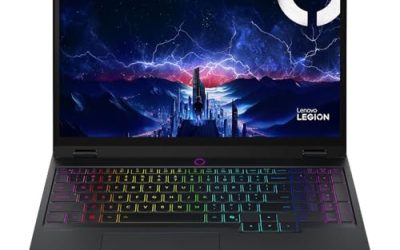
Lenovo Legion Pro 5i Gen 8 — best for higher-resolution play

- CPU: Intel Core i7-13700HX
- GPU: NVIDIA GeForce RTX 4070, 8 GB GDDR6
- Display: 16-inch WQXGA 2560 x 1600, 165 Hz
- RAM: 32 GB DDR5
- Storage: 1 TB SSD
- Ports, as listed: 4 x USB-A 3.2 Gen 1, 2 x USB-C 3.2 Gen 2, RJ45 Ethernet, HDMI, combo audio jack
- Wireless: Wi-Fi 6
- Amazon US: https://www.amazon.com/dp/B0CDQRY4HX
The RTX 4070 is a clear step above the recommended RTX 2070, and 32 GB of memory doubles the recommended amount, which helps if you keep voice chat and other tools open while playing. Spec sheets for the Legion Pro 5i Gen 8 platform list a high RTX 4070 power ceiling for this class, although the exact figure depends on configuration, so check the listing for the unit you buy. For upgrades, the platform uses two SO-DIMM slots and two M.2 slots, so you can add a second SSD later. The CPU and GPU are not upgradeable, as is normal.
Choose this one for its sharper screen and the most headroom. Skip it if you mainly play at 1080p, where the RTX 4060 models below already cover the recommended specification.
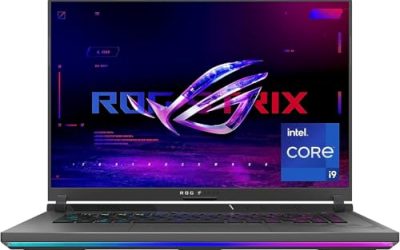
ASUS ROG Strix G16 (G614JV-AS74) — strong all-round 16-inch pick

- CPU: Intel Core i7-13650HX
- GPU: NVIDIA GeForce RTX 4060, 8 GB GDDR6, listed by ASUS for this model family at up to 140 W with Dynamic Boost
- Display: 16-inch FHD+ 1920 x 1200, 165 Hz, G-SYNC, MUX switch with Advanced Optimus
- RAM: 16 GB DDR5-4800
- Storage: 1 TB PCIe 4.0 NVMe SSD
- Ports: Thunderbolt 4, USB-C 3.2 Gen 2 with DisplayPort and power delivery, 2 x USB-A 3.2 Gen 2, HDMI 2.1, RJ45 Ethernet, combo audio jack
- Wireless: Wi-Fi 6E
- Amazon US: https://www.amazon.com/dp/B0CRDCXRK2
This clears the recommended specification comfortably: a much newer CPU than the Core i7-8700K, 16 GB in dual-channel form, and an RTX 4060 with DLSS support. The 1920 x 1200 panel is also a sensible match for the GPU, so you are not paying for pixels the graphics card struggles to drive. ASUS lists two DDR5 SO-DIMM slots and two M.2 PCIe slots for the G614JV, with one M.2 slot free in documented configurations, so adding storage is straightforward and memory can be swapped for a larger matched kit.
Acer Predator Helios Neo 16 (PHN16-71-76H5) — full-power RTX 4060

- CPU: Intel Core i7-13650HX
- GPU: NVIDIA GeForce RTX 4060 laptop GPU, listed at a maximum 140 W MGP for this model
- Display: 16-inch WUXGA 1920 x 1200, 165 Hz, G-SYNC, Advanced Optimus
- RAM: 16 GB DDR5 dual-channel, listed maximum 32 GB
- Storage: 512 GB PCIe Gen 4 SSD, two M.2 slots with one slot available
- Ports: 2 x Thunderbolt 4, 2 x USB 3.2 Gen 2, 1 x USB 3.2 Gen 1, HDMI 2.1, Ethernet
- Wireless: Intel Killer Wi-Fi 6E
- Amazon US: https://www.amazon.com/dp/B0CX27GY7N
The documented full-power GPU ceiling is the headline, because it removes the worry that a same-named RTX 4060 in a thinner chassis is running at a much lower limit. The port mix is also the broadest here, suiting a desk setup with a monitor and wired network. The trade-off is storage: 512 GB holds Skull and Bones and a few other games, but not a large library. The free M.2 slot makes that easy to fix later, and memory can be raised to the listed maximum by replacing the installed modules.
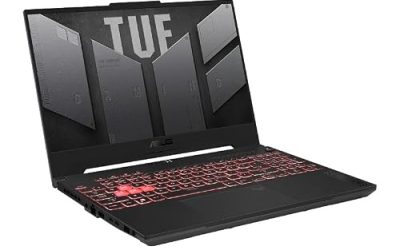
ASUS TUF Gaming A15 (FA507NV-EH74) — the practical AMD option

- CPU: AMD Ryzen 7 7735HS
- GPU: NVIDIA GeForce RTX 4060
- Display: 15.6-inch Full HD 1920 x 1080, 144 Hz, full sRGB coverage as listed
- RAM: 16 GB DDR5
- Storage: 1 TB PCIe SSD
- Ports: USB4 Type-C, USB-C 3.2 Gen 2 with DisplayPort, power delivery and G-SYNC support, 2 x USB-A 3.2 Gen 1, HDMI 2.1, RJ45 Ethernet, combo audio jack
- Wireless: Wi-Fi 6
- Amazon US: https://www.amazon.com/dp/B0CJSY4PLN
The eight-core Ryzen 7 7735HS sits well above the Ryzen 5 3600 on Ubisoft’s recommended list, and the 1 TB drive avoids the Acer’s storage squeeze. Its Full HD panel is the easiest of the four for the GPU to drive, making it a sensible choice if you prefer higher settings over extra sharpness. Two DDR5 SO-DIMM slots and two M.2 PCIe slots are listed for the FA507NV, so memory and storage can both be expanded. ASUS does not present a single GPU wattage figure as prominently for this configuration and TUF configurations vary, so check the power details on the listing if that number matters to you.
Which one should you buy?
For play above 1080p on the laptop’s own screen, the Legion Pro 5i is the clear pick, as the only model here pairing an RTX 4070 with a 2560 x 1600 display and 32 GB of memory. At 1080p or 1200p, where Ubisoft’s recommended specification is aimed, the other three are all comfortably sufficient: the Strix G16 for its balance of screen, storage, and ports, the Helios Neo 16 for its documented full-power GPU and Thunderbolt connections, and the TUF A15 for a smaller chassis with a 1 TB drive and an AMD processor.
Whichever you choose, play plugged in, because gaming laptops reduce GPU power on battery, and use wired Ethernet or a strong Wi-Fi signal, since the game requires a constant internet connection.
FAQ
Can an RTX 4060 laptop run Skull and Bones well?
Yes, based on the published requirements. Ubisoft recommends an RTX 2070 with 8 GB for 1080p at 60 frames per second on the high preset, and an RTX 4060 laptop GPU is a newer card with the same amount of video memory plus DLSS support. The exact result depends on the laptop’s power limit and cooling, which is why higher-power configurations were favoured above.
How much RAM and storage does Skull and Bones need?
The minimum is 8 GB of RAM and 65 GB of SSD space, and the recommended level is 16 GB. Every laptop here has at least 16 GB and at least 512 GB of SSD storage, so all clear the requirement. A 1 TB drive is more comfortable with several large games installed.
Is an SSD really required?
Yes. Ubisoft lists an SSD as required rather than recommended at both levels. All four laptops use NVMe SSDs, so none needs a storage change before you install the game.
Can I upgrade the CPU or GPU later?
No. In all four laptops the processor and graphics are fixed to the main board. Memory and storage can be upgraded, because each model provides SO-DIMM and M.2 slots. That is another reason to buy above the recommended specification now.
Conclusion
Skull and Bones does not demand a flagship laptop, but it rewards one that beats the recommended specification instead of scraping past the minimum. An RTX 4060 laptop with 16 GB of memory and a 1 TB SSD is the sweet spot for 1080p and 1200p play, while the RTX 4070 Legion Pro 5i is the better answer for a sharper 2560 x 1600 screen. Check the exact configuration, GPU power limit, and warranty terms on the listing before you order.