As an Amazon Associate we earn from qualifying purchases.
Blood Bowl 3 is a turn-based fantasy sports game, and that genre shapes the hardware it needs. Matches play out on a grid, with short bursts of animation between turns, so the game leans on a solid CPU and a capable graphics card rather than the extreme frame rates demanded by fast shooters. The published system requirements are modest by 2026 standards, so a buyer does not need a flagship machine. What matters is choosing a laptop that clears the recommended specs with room to spare, carries enough memory and fast storage for the rest of a modern library, and stays useful for several years. This guide compares five such laptops sold on Amazon US.
Blood Bowl 3 System Requirements
The published requirements for Blood Bowl 3 on Windows list two tiers. The minimum tier calls for Windows 10, an Intel Core i5-2300 or AMD FX-4350 processor, 4GB of RAM, and a graphics card on the level of an NVIDIA GeForce GTX 650 with 1GB of video memory or an AMD Radeon HD 7770 with 1GB. The recommended tier raises the processor to an Intel Core i5-6600 or AMD Ryzen 5 1400 and asks for a GeForce GTX 1050 Ti with 4GB or a Radeon RX 570 with 4GB. A later store listing gives the recommended tier as an Intel Core i5-4570 or AMD Ryzen 3 1300X, 8GB of RAM, and a GeForce GTX 960 with 4GB or a Radeon R9 380 with 4GB, with 12GB of available storage space.
Any current gaming laptop with a dedicated RTX graphics card clears the recommended tier by a wide margin: the GTX 1050 Ti and GTX 960 named there are several generations old, and an RTX 4050 laptop card carries 6GB of video memory, while an RTX 4060 carries 8GB. That headroom keeps the game smooth at high settings on a 1080p display and leaves capacity for newer titles. Memory is the other detail worth attention: the game asks for 4GB to 8GB depending on the listing, but Windows 11 and background applications consume memory too, so 16GB is the sensible floor for a new laptop. One pick below ships with 8GB and is included because its memory can be expanded. Storage is the third check: the game needs only 12GB of space, so a 512GB drive holds it easily.
What to Check Before Buying
Start with the processor and graphics card as a pair. A modern Ryzen 7 or Core i5 mobile processor paired with an RTX 4050 handles the game at high settings on a 1080p panel without strain. An RTX 4060 adds video memory that matters more for other games than for Blood Bowl 3 itself. Power limits are the hidden variable in laptop graphics: two laptops can carry the same graphics card name and deliver different performance because the card is configured with a different total graphics power. The listings below do not all publish a wattage figure, so confirm it on the listing or the manufacturer page for the exact model number before ordering.
Memory and storage decide how long a laptop stays comfortable. Two memory slots with a stated maximum capacity mean a buyer can add a second stick later, while a soldered configuration locks the memory in place. The same logic applies to storage: a second M.2 slot makes adding a larger drive a simple job, while a single slot means replacing the existing drive. Each product section states the upgrade path the listing confirms for that exact model, and where the listing does not confirm a detail, the section says so plainly. Ports and warranty vary by model, so check both on the listing before ordering.
1. ASUS TUF Gaming A15 FA507NU-DS74

The ASUS TUF Gaming A15 in the FA507NU-DS74 configuration is the most balanced pick in this guide. Its Ryzen 7 7735HS processor has 8 cores, and its RTX 4050 laptop graphics card carries 6GB of GDDR6 video memory, a combination that handles Blood Bowl 3 at high settings and still has capacity for far more demanding games. The 16GB of DDR5 memory and 1TB PCIe solid-state drive mean no immediate upgrade is required. The 15.6-inch Full HD display runs at 144Hz and covers 100 percent of the sRGB colour range according to the Amazon listing.
For upgrades, the FA507NU chassis supports up to 32GB of DDR5 memory across two slots, and an empty M.2 NVMe slot makes adding a second solid-state drive straightforward when the 1TB drive fills up. That upgrade path is confirmed in the manufacturer material for the FA507NU family. Before ordering, confirm the memory configuration and the second M.2 slot on the exact listing.
Specs
- CPU: AMD Ryzen 7 7735HS
- GPU: NVIDIA GeForce RTX 4050, 6GB GDDR6
- RAM: 16GB DDR5
- Storage: 1TB PCIe SSD
- Display: 15.6-inch FHD 1920 x 1080, 144Hz, 100 percent sRGB
- Wireless: Wi-Fi 6E
- OS: Windows 11
- Model: FA507NU-DS74
2. Lenovo LOQ 15 83DX00B2US

The Lenovo LOQ 15 in the 83DX00B2US configuration pairs a newer Ryzen 7 8845HS processor with the same RTX 4050 graphics card, giving it the strongest processor of the RTX 4050 picks in this guide. The Ryzen 7 8845HS is an 8-core processor from the newer Ryzen 8000 mobile series, The 16GB of memory and 512GB solid-state drive match the game and leave room for a modest library, and the 15.6-inch Full HD display is the standard size for this class of machine. Lenovo positions the LOQ line as the entry point to its gaming range, below the Legion series. The laptop ships with Windows 11 Home in Luna Grey.
One detail to confirm before ordering is the display refresh rate, because the Amazon listing for this exact configuration describes the panel as Full HD without stating the refresh rate in the excerpt available at the time of writing. For upgrades, the listing for this exact configuration does not state the number of memory slots or the maximum supported capacity, so confirm those figures on the listing or the Lenovo support page for model 83DX00B2US before buying parts.
Specs
- CPU: AMD Ryzen 7 8845HS
- GPU: NVIDIA GeForce RTX 4050, 6GB GDDR6
- RAM: 16GB
- Storage: 512GB SSD
- Display: 15.6-inch FHD
- OS: Windows 11 Home
- Model: 83DX00B2US
- Colour: Luna Grey
3. HP Victus 15

The HP Victus 15 is the value pick in this guide. Its Ryzen 7 7445HS processor has 6 cores and boosts up to 4.7GHz, and its RTX 4050 graphics card carries 6GB of GDDR6 video memory. The 16GB of DDR5 memory and 512GB solid-state drive are the right baseline for Blood Bowl 3. The 15.6-inch Full HD IPS display runs at 144Hz, and the listing confirms 300 nits of brightness, which keeps the screen readable in a bright room. The port selection is one of its stronger points: the Amazon listing confirms one HDMI 2.1 port, one USB-C 3.2 port, two USB-A 3.2 ports, and one RJ-45 Ethernet port, plus Wi-Fi 6 and a backlit keyboard with a numeric keypad. The laptop also includes DTS:X Ultra audio support and a 70Wh battery according to the manufacturer specification for this model.
For upgrades, the Victus 15 family supports additional memory and a second storage drive in some configurations, but the listing for this exact configuration does not state the number of memory slots, the maximum memory capacity, or the number of M.2 slots. Confirm those figures on the listing or the HP support page for the exact model before buying upgrade parts.
Specs
- CPU: AMD Ryzen 7 7445HS, 6 cores, up to 4.7GHz
- GPU: NVIDIA GeForce RTX 4050, 6GB GDDR6
- RAM: 16GB DDR5
- Storage: 512GB SSD
- Display: 15.6-inch FHD IPS 1920 x 1080, 144Hz, 300 nits
- Ports: 1x HDMI 2.1, 1x USB-C 3.2, 2x USB-A 3.2, 1x RJ-45 Ethernet
- Wireless: Wi-Fi 6
- Battery: 4-cell, 70Wh
- OS: Windows 11
4. Acer Nitro V ANV15-51-51H9
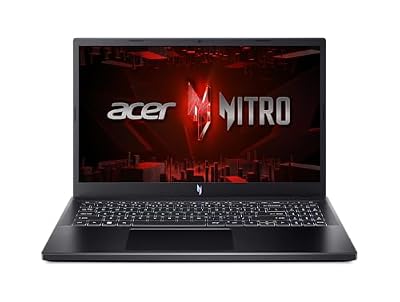
The Acer Nitro V in the ANV15-51-51H9 configuration is the entry-level pick, and it is the only laptop in this guide that ships with 8GB of memory. Its Intel Core i5-13420H processor and RTX 4050 graphics card with 6GB of video memory still clear the Blood Bowl 3 recommended specs comfortably, and the 15.6-inch Full HD IPS display runs at 144Hz. The 512GB Gen 4 solid-state drive is fast, and the laptop ships with Windows 11 Home, Wi-Fi 6, and a backlit keyboard.
The reason this laptop earns a place despite its 8GB of memory is its upgrade path, which the Amazon listing states clearly: 8GB of DDR5 memory across two DDR5 slots, with a maximum capacity of 32GB, and 512GB of PCIe Gen 4 storage across two M.2 slots. That means a buyer can add a second 8GB memory stick and a second drive without replacing anything that is already installed. If 8GB is your starting point, see our guide to best 8GB RAM laptops for more on how far 8GB stretches and when an upgrade becomes the right move. For Blood Bowl 3 alone, 8GB is enough, because the game asks for 8GB at most in the recommended listing. For a machine that also runs a browser and voice chat at the same time, plan the memory upgrade early.
Specs
- CPU: Intel Core i5-13420H
- GPU: NVIDIA GeForce RTX 4050, 6GB GDDR6
- RAM: 8GB DDR5, 2 slots, maximum 32GB
- Storage: 512GB PCIe Gen 4 SSD, 2x M.2 slots
- Display: 15.6-inch FHD IPS 1920 x 1080, 144Hz
- Wireless: Wi-Fi 6
- OS: Windows 11 Home
- Model: ANV15-51-51H9
5. MSI Katana A15 AI B8VF-448US
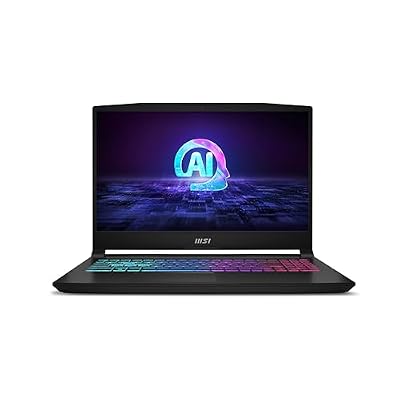
The MSI Katana A15 AI in the B8VF-448US configuration is the strongest laptop in this guide, and the pick for buyers who want the most headroom. Its Ryzen 7-8845HS processor pairs with an RTX 4060 graphics card carrying 8GB of video memory, a step up from the RTX 4050 in the other four picks. The extra video memory matters less for Blood Bowl 3 and more for newer titles. The 32GB of DDR5 memory is double the baseline of the other picks, and the 1TB solid-state drive holds a large library without an immediate upgrade. The 15.6-inch Full HD display runs at 144Hz, and the laptop includes MSI Cooler Boost 5 cooling. The laptop ships with Windows 11.
For upgrades, the listing for this exact configuration does not state the number of memory slots or the maximum supported memory, and it does not confirm a second M.2 slot. With 32GB of memory and 1TB of storage already installed, most buyers will not need an upgrade soon, but confirm the slot layout on the listing or the MSI support page for model B8VF-448US before buying parts.
Specs
- CPU: AMD Ryzen 7-8845HS
- GPU: NVIDIA GeForce RTX 4060, 8GB GDDR6
- RAM: 32GB DDR5
- Storage: 1TB SSD
- Display: 15.6-inch FHD 144Hz
- Cooling: MSI Cooler Boost 5
- OS: Windows 11
- Model: B8VF-448US
Frequently Asked Questions
Can a laptop with 8GB of RAM run Blood Bowl 3?
Yes. The recommended listing for Blood Bowl 3 asks for 8GB of RAM, and the Acer Nitro V in this guide ships with 8GB. For the game alone, 8GB is enough, but a buyer who runs a browser and voice chat alongside it should plan a memory upgrade; the Nitro V supports up to 32GB across two slots.
Is an RTX 4050 enough for Blood Bowl 3 at high settings?
Yes. The recommended graphics card for Blood Bowl 3 is a GeForce GTX 1050 Ti or GTX 960 with 4GB of video memory, and the RTX 4050 laptop card carries 6GB of video memory with a far newer architecture. That margin keeps the game smooth at high settings on a 1080p display.
Does Blood Bowl 3 need a high refresh rate display?
No. Blood Bowl 3 is a turn-based game, so a high refresh rate is not required to play it well. A 144Hz panel still makes the interface and camera movement feel smoother, and it helps in faster games.
How much storage should a gaming laptop have for Blood Bowl 3?
Blood Bowl 3 needs 12GB of available storage space, so the game itself fits easily on any modern drive. A 512GB drive is the sensible minimum for a laptop that also holds other games, and a 1TB drive is the better choice for a larger library.
Conclusion
Blood Bowl 3 asks little of modern hardware, and that is good news for buyers. Any of the five laptops in this guide clears the recommended specs with room to spare, so the right pick is the one whose memory, storage, display, and upgrade path fit the rest of the library. The ASUS TUF Gaming A15 is the most balanced choice, the MSI Katana A15 AI offers the most headroom, and the Acer Nitro V offers the clearest upgrade path for buyers who start with 8GB.