

- Top Pick: Samsung 32" Odyssey (G55C) Series QHD 1000R Curved Gaming Monitor,
- Best Value: Sceptre New 22-Inch Gaming Monitor, FHD 1080p, Up to 144Hz, HDMI, DisplayPort, Built-in Speakers, Machine Black (E225W-FW144 Series, 2026)
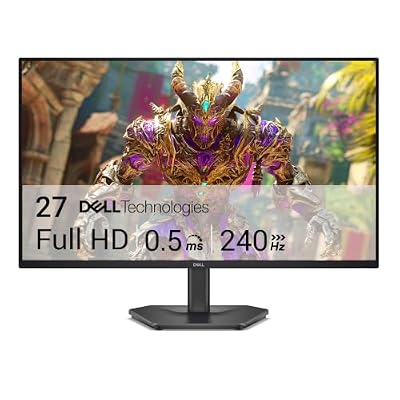
- Premium Choice: Dell 27 240Hz Gaming Monitor – SE2726HG – 27-inch FHD (1920×1080) Display, in-Plane Switching (IPS) Technology, AMD FreeSync Premium, TÜV 3-Star, 2X HDMI, DisplayPort 1.4, Tilt
What ₹20,000 Actually Buys You
At this budget you’re almost always looking at a 23 to 27 inch 1080p monitor with either a VA or IPS panel, running 100Hz to 165Hz. True 1440p at this price is rare and usually means cutting corners somewhere else, like a weaker panel or no height adjustment on the stand. If someone tells you they found a 1440p 165Hz IPS panel for ₹18,000, check the response time and HDR claims carefully, because something is usually off.
The realistic trade-off under ₹20,000 is between panel quality and refresh rate. You can get a decent 165Hz VA panel or a smoother-feeling 144Hz IPS panel, but rarely both a great panel and the highest refresh rate in this range. Know which one matters more for what you play before you shop.
As an Amazon Associate we earn from qualifying purchases at no extra cost to you.




VA vs IPS: Which Trade-Off Fits You
VA panels in this price range give you better contrast and deeper blacks, which matters in dark games like horror titles or anything with a lot of night scenes. The catch is response time. Budget VA panels often show smearing or trailing during fast motion, especially dark-to-light transitions, something you’ll notice in fast FPS games or racing titles with headlights sweeping across dark backgrounds.
IPS panels at this budget trade contrast for better color accuracy and wider viewing angles. Blacks look more gray than black, especially in a dim room, but motion clarity is usually a notch better and colors stay consistent if you’re sitting slightly off-center. For competitive shooters, IPS is the safer pick. For single-player and story-driven games, VA’s contrast often looks better to the eye even if the specs look worse on paper.
TN panels still exist under ₹20,000 but I’d skip them unless you’re buying specifically for the lowest input lag and don’t care about color or viewing angle at all. Most TN panels at this price have narrow verticals viewing angles, so your colors shift if you adjust your chair height.
Refresh Rate: 144Hz vs 165Hz vs 100Hz
The jump from 60Hz to 100Hz or 144Hz is the single biggest upgrade you’ll feel, full stop. It changes how the cursor moves, how scrolling feels, everything. The jump from 144Hz to 165Hz is real but much smaller, and most people can’t reliably tell the difference in blind testing unless they’re playing competitively at a high level.
What matters more than the number on the box is whether your GPU can actually push those frames. If you’re running a GTX 1650 or similar entry-level card, you’re not hitting 165fps in most modern games anyway, so a 100Hz or 144Hz panel is genuinely fine and you’d be paying extra for a number you’ll never see used. Save the money or put it toward the panel quality instead.
Also check the actual response time spec, not just the refresh rate. A 165Hz panel with an 8ms response time can look worse in motion than a 144Hz panel with 1ms, because ghosting shows up regardless of how many frames you’re feeding it.
Side-by-Side: What You’re Actually Choosing Between
| Spec | VA 165Hz, 1080p | IPS 144Hz, 1080p | TN 144Hz, 1080p |
|---|---|---|---|
| Best for | Single-player, horror, open-world | Competitive FPS, color-sensitive work | Lowest input lag only |
| Contrast | Strong, deep blacks | Weak, grayish blacks | Weak |
| Motion clarity | Can show trailing in dark scenes | Cleaner, more consistent | Cleanest but least color accuracy |
| Viewing angles | Good | Best | Poor, color shifts off-angle |
| Typical response time | 4-5ms | 1-4ms | 1ms |
If you’re not sure which column fits you, default to IPS. It’s the more forgiving choice across more game genres and it holds up better if you ever use the monitor for anything outside gaming.
Specs That Don’t Matter at This Price
Ignore HDR claims under ₹20,000. Almost none of these panels hit the brightness (400 nits minimum, realistically 600+ for real HDR impact) or color volume needed to make HDR look different from SDR. Some will just dim the image and call it HDR400, which is a certification tier, not a guarantee of a good experience.
Curved screens at 23-24 inches are mostly cosmetic at this size. Curve matters more past 27 inches where the edges are far enough from your eyes that flattening becomes noticeable. Don’t pay extra for curve on a small panel.
Built-in speakers are almost universally bad and worth nothing in a buying decision. Don’t let a monitor with speakers win over one without just because it looks like you’re getting more.
How to Actually Shop This Budget
Start by deciding your genre priority: if it’s competitive multiplayer, filter for IPS and the highest refresh rate your GPU can realistically drive. If it’s narrative or horror games, lean VA and don’t worry about chasing 165Hz. Browse 144Hz IPS gaming monitors first if you’re unsure, since IPS is the safer default.
If you specifically want the deepest blacks for dark games, look at VA panel 165Hz monitors and read reviews for complaints about smearing before buying, since VA quality control varies more than IPS at this price.
Check the stand before you check anything else in the spec sheet. A lot of ₹18,000-20,000 monitors only tilt and don’t adjust height, which forces you to either stack books under it or hunch. If ergonomics matter to you, look at gaming monitors with height-adjustable stands, since swapping a fixed stand for VESA mount later adds cost you didn’t plan for.
Lastly, don’t upgrade your monitor before your GPU if your GPU is the actual bottleneck. A 165Hz panel paired with a card that tops out at 70fps in your games is a wasted spec. Match the panel to what you can actually push, not to what looks best on the box.















