Most gaming laptops leave touch out entirely. Performance models from the major gaming lines ship with fast, matte, non-touch panels, because touch glass adds weight, reflections, and cost that competitive players rarely ask for. That means the best gaming laptop with touchscreen is almost always a convertible 2-in-1, a detachable gaming tablet, or a premium creator laptop whose discrete graphics are strong enough for play. If you are also weighing up cheaper touch machines for everyday use, our guide to the best touchscreen laptops under 500 covers that separate budget category.
This guide covers models where touch is confirmed for the exact configuration described, not just the model family, because several ranges offer touch on one display option and no touch on another. Each pick was checked for processor, graphics and graphics power where published, display, pen support, memory, storage, ports, warranty, and upgradeability. Where a maker does not publish a figure, the guide says so.
As an Amazon Associate we earn from qualifying purchases
ASUS ROG Flow Z13 (2025) GZ302EA-XS96

The 2025 ROG Flow Z13 is a detachable gaming tablet rather than a conventional laptop. The screen section carries the processor, graphics, memory, and storage, a kickstand opens behind it, and the keyboard attaches magnetically. That format makes touch central: you can hold it as a tablet, prop it on the kickstand, or use it as a small laptop.
Its processor is the AMD Ryzen AI MAX+ 395, a sixteen-core chip with integrated Radeon 8060S graphics based on AMD RDNA 3.5 architecture. There is no discrete graphics card in this configuration, so a discrete GPU power limit does not apply. Instead, the integrated graphics share the unified memory pool with the processor, which is why the fitted memory matters. This configuration carries 32 GB of LPDDR5X memory at 8000 MHz in a quad-channel arrangement, plus a 1 TB PCIe Gen 4 SSD.
The display is a 13.4-inch ROG Nebula panel at 2560 by 1600 resolution, with a 180 Hz refresh rate, full DCI-P3 color coverage as listed by ASUS, and touchscreen capability. That mix is unusual in a detachable, and it suits fast games and creative work alike. Pen support for this exact configuration is not stated in the listing information checked, so buyers who need an active pen should confirm compatibility before ordering.
Ports include two USB4 Type-C ports with DisplayPort and power delivery support, an HDMI 2.1 port, a combo audio jack, and a microSD card reader, according to ASUS specifications. Upgradeability is limited: the memory is on board and cannot be upgraded, and storage sits in a single compact M.2 2230 slot, so a swap means replacing the fitted drive. Warranty details for this exact configuration are not stated in the listing information checked.
This model suits players who want the most portable serious gaming machine in the guide. It is less suited to buyers who want a large screen or the option to add memory later.
ASUS ROG Flow Z13 (2023) GZ301VU-DS94
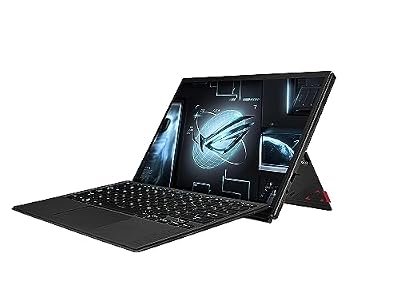
The earlier Flow Z13 takes the same detachable idea but pairs it with Intel processing and a discrete NVIDIA graphics card, making it the more traditional gaming proposition of the two Z13 models here. The configuration described is the GZ301VU-DS94, with an Intel Core i9-13900H processor and a GeForce RTX 4050 Laptop GPU. ASUS publishes a maximum graphics power of 65 W for this GPU in this model, made up of a 50 W base plus 15 W of Dynamic Boost, and the machine includes a MUX switch with Advanced Optimus.
Memory is 16 GB of LPDDR5, and storage is a 1 TB PCIe SSD. The display is a 13.4-inch Nebula panel at 2560 by 1600 resolution with a 165 Hz refresh rate and touchscreen operation, and ASUS lists active stylus support for this generation, so touch extends to pen input. The detachable keyboard is included, and the kickstand lets the tablet stand on a desk for controller play.
Ports include a Thunderbolt 4 port, a USB Type-C port, a USB Type-A port, a microSD card reader with UHS-II support, a combo audio jack, and the proprietary ROG XG Mobile interface for an external ROG graphics dock sold separately. Upgradeability mirrors the newer model: the memory is on board and cannot be upgraded, and storage uses a single M.2 2230 slot. Warranty details for this exact configuration are not stated in the sources checked.
This model suits buyers who want a detachable with a discrete NVIDIA GPU, DLSS support, and confirmed stylus support. Buyers who need more than 16 GB of memory should look elsewhere in this guide, because that ceiling cannot be raised after purchase.
HP Envy 16 (16-h1023dx)

The HP Envy 16 is the conventional clamshell in this guide, and the easiest recommendation for someone who wants a normal laptop shape with a bigger screen. It is a creator-focused machine rather than a gaming-branded one, but the exact configuration described, the 16-h1023dx, pairs an Intel Core i9-13900H processor with a GeForce RTX 4060 Laptop GPU with 8 GB of GDDR6 memory, a genuinely capable gaming combination. HP does not state the graphics power limit for this configuration in the specifications checked.
The display is a 16-inch IPS panel at 2560 by 1600 resolution with multitouch support, a 120 Hz refresh rate, 400 nits of brightness, and full sRGB coverage, according to HP specifications. That is a lower refresh rate than the two Flow Z13 panels, but the larger screen and standard hinge suit long desk sessions and split-screen work. Pen support is not stated in the HP specifications checked, so treat it as a finger-touch display unless HP confirms otherwise for the unit you buy.
Memory is 16 GB of DDR5 in two slots, and storage is a 1 TB PCIe Gen 4 SSD. Upgradeability is the strongest in this guide: the slotted memory can be replaced with larger modules later, and the SSD is a standard replaceable drive. Ports include two Thunderbolt 4 ports, two USB Type-A ports, an HDMI 2.1 port, an SD card reader, and a combo audio jack. HP lists a one-year limited hardware warranty for this model family.
This model suits buyers who want a larger touchscreen, a familiar laptop design, and a clear memory upgrade path, along with RTX 4060 graphics for gaming and creative applications. It is less suited to buyers who want a detachable form or the higher refresh rates of the Flow models.
Comparison table
| Model | Processor | Graphics | Display | Memory and storage | Upgradeability |
|---|---|---|---|---|---|
| ASUS ROG Flow Z13 (2025) GZ302EA-XS96 | AMD Ryzen AI MAX+ 395 | Radeon 8060S integrated | 13.4-inch, 2560 by 1600, touch, 180 Hz | 32 GB LPDDR5X, 1 TB SSD | Memory not upgradeable, single M.2 2230 slot |
| ASUS ROG Flow Z13 (2023) GZ301VU-DS94 | Intel Core i9-13900H | GeForce RTX 4050, up to 65 W | 13.4-inch, 2560 by 1600, touch, 165 Hz, stylus support | 16 GB LPDDR5, 1 TB SSD | Memory not upgradeable, single M.2 2230 slot |
| HP Envy 16 (16-h1023dx) | Intel Core i9-13900H | GeForce RTX 4060, power not stated | 16-inch, 2560 by 1600, touch, 120 Hz | 16 GB DDR5, 1 TB SSD | Memory in two slots, SSD replaceable |
How to choose a gaming laptop with a touchscreen
Start by confirming touch on the exact configuration, not the range. Several lines sell the same model name with touch and non-touch displays, and a listing title that omits the word touch is a warning sign. Match the model code in the display specification to the listing before you buy.
Next, weigh graphics power, not just the GPU name. A laptop GPU runs at a power limit set by the maker, and the same GPU name can perform very differently at different limits. Where a maker publishes the figure, as ASUS does for the 2023 Flow Z13 at up to 65 W, use it. Where no figure is published, treat it as not stated and do not assume the fastest version of that GPU.
Then decide how you will use touch. If you want pen input, confirm active stylus support for the exact model, because finger touch and pen support are separate features. If touch is mainly for menus, media, and touch-friendly games, finger touch alone is enough, and a clamshell such as the Envy 16 may serve you better than a detachable.
Finally, check upgradeability and warranty. On-board memory cannot be changed later, so buy the capacity you need on day one for the Flow Z13 models; the Envy 16 is the exception, with slotted memory. Confirm the warranty term on the exact listing too.
Frequently asked questions
Do any mainstream gaming brands sell a touchscreen gaming laptop?
Most dedicated gaming lines are non-touch, which is why this guide is built around detachable models such as the ROG Flow series, plus creator laptops with strong discrete graphics such as the Envy 16. Always verify touch for the exact display option, because a model family can include both touch and non-touch panels.
Does a touchscreen hurt gaming performance?
The touch layer itself does not reduce frame rates in any meaningful way. What affects performance is the processor, the graphics hardware, and the graphics power limit. A high-resolution panel can demand more from the GPU at native resolution, so some players lower the rendering resolution in demanding games while keeping the sharp display for desktop work.
Can I use a pen with every touchscreen gaming laptop?
No. Finger touch and active pen support are different features. The 2023 Flow Z13 lists active stylus support, while pen support is not stated for the other configurations in this guide. If pen input matters, confirm it for the exact model code before buying.
Can I upgrade the memory in a touchscreen gaming laptop later?
It depends on the model. The HP Envy 16 configuration here uses two memory slots, so its memory can be replaced with larger modules. The Flow Z13 models use on-board memory, which cannot be upgraded after purchase.
Verdict
For most buyers who want touch, the HP Envy 16 is the balanced choice: a large 120 Hz touchscreen, RTX 4060 graphics, and the only slotted, upgradeable memory in this guide. For portability and the fastest touch panels, the two ROG Flow Z13 models lead, the 2025 version with far more memory and integrated graphics that draw on it, the 2023 version with a discrete RTX 4050, published power figures, and stylus support. Whichever you choose, match the model code, display, and memory capacity to the listing before you order.
Product and ASIN Reference
| Product | ASIN |
|---|---|
| ASUS ROG Flow Z13 (2025) GZ302EA-XS96 | B0DT7MNLTD |
| ASUS ROG Flow Z13 (2023) GZ301VU-DS94 | B0BWHK29QK |
| HP Envy 16 (16-h1023dx) | B0CBKVZ2RR |