A USB-C plug tells you almost nothing about the cable behind it. Two cables can look identical and charge a controller at the same speed, then behave completely differently with a dock, an eGPU, a fast drive, or a high-refresh monitor. One may carry USB4 at 40 Gbps with DisplayPort Alt Mode video, while the other is a USB 2.0 cable limited to 480 Mbps with no video at all. That difference is usually why a dock feels slow, a monitor will not run at its advertised refresh rate, or a drive copies far below its rated speed.
Buy by job, not by plug. Keep a short, certified full-featured cable for a dock, eGPU, or display, and use simpler charging cables for controllers and phones, where data and video do not matter. The picks below use manufacturer and listing specifications only, and mark anything unpublished as not stated.
As an Amazon Associate we earn from qualifying purchases.
How to read a USB-C cable spec sheet
First, the data standard. USB 2.0 means 480 Mbps, fine for charging and for low-bandwidth peripherals such as controllers, but a bottleneck for any modern external drive. USB4 and Thunderbolt 4 cables in this guide are published at up to 40 Gbps, the class needed for docks, eGPUs, and fast external storage.
Second, power delivery. Wattage is a ceiling, not a promise. A cable published at 100W carries up to 100W when charger and device also support it. Higher ratings, such as 240W under USB Power Delivery 3.1 Extended Power Range, add headroom for laptops, but a controller only draws what it requests.
Third, video. A cable carries a display signal only if it supports DisplayPort Alt Mode or a Thunderbolt or USB4 connection that carries it. Assume a USB 2.0 cable carries none unless the maker publishes one. Monitor, PC port, and cable must all support the bandwidth for your resolution and refresh rate.
Fourth, length. Full-speed passive cables are short by design, with 0.8 metres common for a 40 Gbps link. Longer full-featured cables are usually active, and their published rate can differ by mode, so read the exact listing for the exact length. Long cables are best reserved for power.
If you are also planning a build around front-panel USB-C, check that the case and motherboard header match your peripherals, as explained in this guide to the best PC cases with USB-C.
Cable Matters USB4 Cable, 1 Metre

This is the most versatile pick for a gaming desk, combining a full-speed data rating with the highest published charging ceiling in this guide, in a one-metre length that still reaches from a PC to a nearby dock or monitor.
Specs
- Data: USB4, USB-IF certified, up to 40 Gbps, compatible with Thunderbolt 4 and Thunderbolt 3 as published
- Power: up to 240W, USB Power Delivery 3.1 Extended Power Range as published
- Length: 1 metre, about 3.3 feet
- Video: up to 8K video as published; check the listing for the exact resolution and refresh combination you need
- Model: 201304-BLK-1m as published
- Jacket and housing materials beyond the published description: not stated in the sources used
Who it suits
Choose it for a single-cable dock connection, an eGPU link where the enclosure maker allows this length, fast external drives, and a USB-C monitor. The 240W ceiling also makes it a sensible spare charging cable for a gaming laptop, provided the laptop and charger support the wattage requested. Skip it for a long run across a room: at one metre it is a desk cable, and extending a full-speed link with adapters or couplers is a common way to lose negotiated speed or the display signal.
CalDigit Thunderbolt 4 Cable, 0.8 Metre

CalDigit publishes this short cable for Thunderbolt and USB4 connections such as docks, storage, and eGPUs, and its 0.8 metre length is the classic full-speed format. Short is a feature here, because it removes length as a variable when diagnosing a dock or display problem.
Specs
- Data: Thunderbolt 4 and USB4, up to 40 Gbps as published
- Power: up to 100W, published as 20 volts at 5 amps
- Length: 0.8 metres, about 2.62 feet
- Certification: Intel Certified, as published in the listing title
- Video: resolution and refresh rating for this exact cable, not stated in the sources used, so confirm DisplayPort Alt Mode support for your monitor on the manufacturer page before relying on it for a display-only connection
- Model: TB4-P08B-540 as published
Who it suits
This cable suits a PC or laptop beside its dock, storage enclosure, or eGPU. It is also the best diagnostic cable here: swapping it in is the fastest reversible way to prove whether an existing cable is the bottleneck. Skip it if your dock sits across a desk or you mainly need sofa charging.
Belkin Thunderbolt 4 Cable, 2 Metres
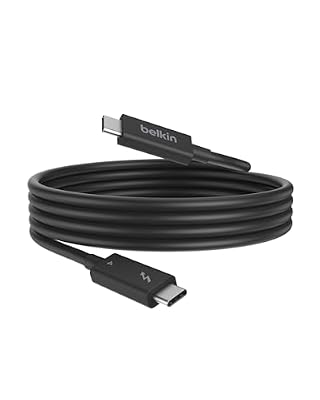
Belkin publishes this as an active Thunderbolt 4 cable, which is how it reaches two metres for dock, display, and eGPU style connections. That reach helps with a standing desk or a tower on the floor, but verify the negotiated result after connecting rather than assuming it.
Specs
- Data: Thunderbolt 4, USB4 compliant, up to 40 Gbps bandwidth as published
- Power: up to 100W, Power Delivery 3.0 as published
- Length: 2 metres, about 6.6 feet, active cable as published
- Video: up to 8K at 30Hz as published
- Model: INZ002, also shown as INZ002bt2MBK as published
- Backward compatibility: Thunderbolt 3, USB 3.2, and USB 2.0 as published
Who it suits
Choose it when a shorter cable cannot reach between a laptop and its dock, or a PC and a USB-C monitor, and you still need a Thunderbolt 4 connection. The published 8K at 30Hz figure is a reminder to check refresh rate, not just resolution, and to confirm the exact mode in display settings. Skip it for pure charging and for short dock links, where a passive certified cable is the cleaner reference.
UGREEN USB C to USB C Cable, 100W, 3.3 Feet
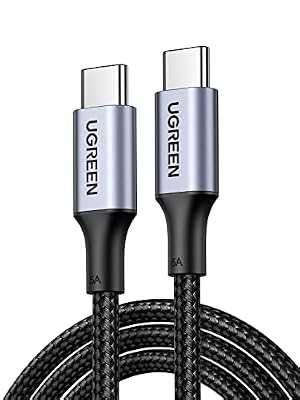
This cable is the opposite of the three above: a USB 2.0 charging cable. That is a strength for charging controllers, phones, and headsets, where 480 Mbps data is irrelevant and a tough braided cable matters more than bandwidth.
Specs
- Data: USB 2.0, 480 Mbps as published
- Power: up to 100W, published as 20 volts at 5 amps
- Length: 3.3 feet for the version covered here; other lengths are sold under separate listings
- Construction: nylon braid and aluminium connector housing as published
- Video: not stated, and no display rating is published, so do not use it for a monitor
- Model: 70427 as published
Who it suits
Keep one or two by the sofa and in a travel bag for controllers and phones. The 100W ceiling means it can also top up a gaming laptop or handheld PC when its own cable is elsewhere, as long as the charger supports the wattage requested. Skip it completely for docks, eGPUs, external drives, and monitors. If a drive is slow through a cable like this, the cable is not faulty; it is doing exactly what its USB 2.0 specification says.
Comparison table
| Cable | Data as published | Power as published | Length | Best gaming use |
|---|---|---|---|---|
| Cable Matters USB4 | USB4, up to 40 Gbps | Up to 240W | 1 metre | Dock, eGPU, fast drive, USB-C monitor |
| CalDigit Thunderbolt 4 | Thunderbolt 4 and USB4, up to 40 Gbps | Up to 100W | 0.8 metres | Short dock or eGPU link, reference cable |
| Belkin Thunderbolt 4 | Thunderbolt 4, up to 40 Gbps | Up to 100W | 2 metres, active | Longer dock or monitor reach |
| UGREEN 100W | USB 2.0, 480 Mbps | Up to 100W | 3.3 feet | Controller, phone, and headset charging |
How to tell if the cable is the bottleneck
A cable problem rarely announces itself. A dock negotiates a slower link, a monitor falls back to a lower refresh rate, or a drive copies slowly, with no error pointing at the cable. Use reversible checks, changing one thing at a time and changing it back if nothing improves.
Start with a cable swap. Replace the suspect cable with a short, certified full-featured cable, keeping the same ports, device, and settings. If speed, display mode, or stability returns, the original cable was the limit, regardless of its labelling.
Next, test the ports. Move the same known-good cable and device to a different USB-C port, ideally one known to support Thunderbolt, USB4, or DisplayPort Alt Mode for video. Some ports carry power and USB 2.0 data only. If the device works on one port and not another, the port is the constraint, and the motherboard or laptop manual is the authority on which port supports which mode.
Then remove adapters. Take extensions, couplers, and adapters out of the chain and connect directly, because each extra element can drop a link to a slower standard or remove the display signal. If a direct connection works, rebuild the chain one element at a time.
Finally, inspect the cable. A connector that only works at one angle, a split jacket, or a loose plug is a cable to retire. Intermittent dropouts are often this damage, not a software fault.
How to verify the result
Verification means reading what the system negotiated, not what packaging promised.
For data, run a real transfer of a large file to or from the external drive and check the connection information shown by your operating system or dock utility where available. A USB 2.0 link and a 40 Gbps link are so far apart that even a simple timed copy makes the difference obvious.
For video, open display settings and confirm the resolution and refresh rate actually active, not just available. Select the high-refresh mode, confirm it stays applied, and check the picture remains stable for several minutes. If the mode is missing with one cable and present with a known-good cable, you have isolated the cable.
For power, confirm the device reports fast charging or maintains battery level under load. If a laptop slowly loses charge while gaming through a dock, check the published wattage of dock output, charger, and cable, because the lowest figure in that chain is the ceiling.
FAQs
Can a USB-C charging cable run a gaming monitor?
Only if the maker publishes a video or DisplayPort Alt Mode rating for it. A USB 2.0 charging cable such as the UGREEN pick publishes no display rating, so it should not be expected to carry a picture. For a monitor, use a USB4 or Thunderbolt 4 cable and a port that supports DisplayPort Alt Mode, then verify the active resolution and refresh rate in display settings.
Why is my external drive slow through my dock?
Work through the chain in order: the cable from PC to dock, the port it uses, and the cable from dock to drive. Swap in a short certified 40 Gbps cable, remove adapters, and test a different port. If speed recovers with the short cable, the original cable was limiting the link, even if it charged devices normally.
Does a higher wattage rating make a controller or phone charge faster?
No, not by itself. The device requests the power, and the charger and cable must carry at least that much. A cable published at 100W or 240W provides headroom, but a controller requesting a small amount draws the same through either cable. Wattage headroom matters most for gaming laptops and handheld PCs with larger requirements.
How long can a full-speed USB4 or Thunderbolt 4 cable be?
The short passive cables here, at 0.8 metres and one metre, are the standard lengths for a published 40 Gbps link. Longer cables, such as the two-metre active Belkin pick, use active electronics and should be judged on their own published figures, then verified once connected.
Conclusion
For most setups, the Cable Matters USB4 cable is the best default: a USB-IF certified 40 Gbps link, a published 240W ceiling, and a practical one-metre length for docks, drives, eGPUs, and monitors. Keep the CalDigit cable as a short reference link, choose the Belkin active cable only when reach requires it, and let the UGREEN cable do the charging work it was designed for. Separate bandwidth cables from charging cables, verify negotiated speed and display mode after every change, and the cable stops being the invisible bottleneck.
Product and ASIN Reference
| Product | ASIN |
|---|---|
| Cable Matters USB-IF Certified USB4 Cable, 1 Metre, 40 Gbps, 240W | B094STPLX3 |
| CalDigit Thunderbolt 4 Cable, 0.8 Metre, 40 Gbps, 100W | B08QL2R7Z3 |
| Belkin Thunderbolt 4 Cable, 2 Metres, 100W | B09PQFPDHX |
| UGREEN USB C to USB C Cable, 100W, 3.3 Feet | B07V5MKXJ1 |