

- Top Pick: ASUS ROG Ally X
- Runner-up: iVANKY 8-in-1 Docking Station
- Also consider: 8BitDo Ultimate 2 Bluetooth Controller
A Windows handheld makes a natural television cloud console because it already runs the native Windows apps for GeForce Now and Xbox Cloud Gaming. Dock an ASUS ROG Ally X, connect it to a television, plug in a wired network cable, and pair a controller, and the small screen stops being the limit.
This guide covers the Ally X class of Windows handhelds, meaning the ROG Ally X and similar compact Windows handhelds such as Ayaneo, OneXPlayer, and GPD Win devices, rather than the Legion Go, the MSI Claw, or the Steam Deck, which have their own docked setups. The five picks below form one chain: handheld, dock, controller, charger, and wired cable.
As an Amazon Associate, we earn from qualifying purchases.
Quick Answer
Yes. A docked ROG Ally X plays cloud games well on a television when the dock supplies HDMI video, wired Ethernet, and charging through one USB-C connection. Use the native GeForce Now app or Xbox Cloud Gaming, set Windows to show the game on the television only, and pair a full-size controller before starting. A wired connection matters more than a higher stream resolution.
Why Docking Fits the Ally X
A Windows handheld docks differently because it runs cloud services as ordinary Windows software. GeForce Now installs as a native Windows app, and Xbox Cloud Gaming runs through the Xbox app and the browser. The first job is to make the television the only display, so the handheld screen goes dark and the full stream goes to the television.
Power is the other difference: the Ally X can draw more in its faster performance modes, so the dock needs a charger that meets the handheld power requirement, and the dock listing notes support for the Ally X 30W performance mode. Start the stream at 1080p, since most services stream at that resolution, and turn off television motion smoothing, since it adds delay between input and picture.
ASUS ROG Ally X

The ASUS ROG Ally X is the handheld at the center of this setup. It runs Windows 11 Home on an AMD Ryzen Z1 Extreme processor with 24GB of memory and 1TB of solid-state storage, on a 7-inch 1920 by 1080 touchscreen with a 120Hz refresh rate. For cloud play the local hardware matters less than for installed games, because the remote server renders the scene, but the large memory and fast storage keep the Windows apps and the handheld launcher responsive.
The Ally X earns its place here for two practical reasons. Its 80Wh battery lasts longer away from a wall outlet than the smaller battery in the original Ally, and it carries two USB-C ports, one USB4 and one USB 3.2, so the dock can take one port while the other stays free. It charges over USB-C at 65W, which sets the power baseline below.
Specs
| Feature | Detail |
|---|---|
| Display | 7-inch touchscreen, 1920 by 1080, 120Hz |
| Processor | AMD Ryzen Z1 Extreme |
| Memory | 24GB LPDDR5X |
| Storage | 1TB SSD |
| Battery | 80 watt-hour |
| Charging | 65W USB-C charging |
| Ports | USB4 Type-C and USB 3.2 Type-C |
iVANKY 8-in-1 Docking Station

The iVANKY 8-in-1 Docking Station ties this setup together. It holds the handheld upright, connects to the television over HDMI 2.1 with output listed at up to 4K at 144Hz, and adds three USB-A 3.0 ports for a controller receiver or a keyboard. A 1Gbps Ethernet port gives the handheld a wired network connection, which removes much of the jitter wireless adds on a busy home network, and the USB-C charging input is rated up to 100W.
The dock lists the ROG Ally X among its compatible devices, alongside the ROG Ally, Legion Go, MSI Claw, and Steam Deck, and notes that it is not for the ROG Xbox Ally models, so check the exact handheld model before buying.
Specs
| Feature | Detail |
|---|---|
| Video output | HDMI 2.1, up to 4K at 144Hz |
| Ethernet | 1Gbps RJ45 port |
| USB ports | Three USB-A 3.0 ports |
| Charging input | USB-C power delivery up to 100W |
| Compatibility | ROG Ally X, ROG Ally, Legion Go, MSI Claw, Steam Deck |
8BitDo Ultimate 2 Bluetooth Controller

A docked handheld needs a controller that feels right from a couch, and the 8BitDo Ultimate 2 Bluetooth Controller fits that role. It connects over Bluetooth, 2.4G wireless with its USB-C adapter, or a wired USB connection, and it lists Windows PC among its compatible platforms alongside Switch and Switch 2. Use the 2.4G connection for television play, with the adapter in the dock, and keep the wired option as a fallback.
The controller carries TMR joysticks, designed to resist the drift that can affect older stick designs, and triggers that switch between Hall Effect and tactile modes. It ships with a charging dock that keeps it in one place between sessions, and it supports the 8BitDo Ultimate Software V2 for remapping. Note one limit from the listing: vibration and motion control are listed for Switch only, so expect standard controller input on Windows.
Specs
| Feature | Detail |
|---|---|
| Connectivity | Bluetooth, 2.4G wireless, and wired USB |
| Platforms | Windows PC, Switch, Switch 2 |
| Joysticks | TMR joysticks |
| Triggers | Switchable Hall Effect and tactile triggers |
| Charging | Charging dock included |
| Software | 8BitDo Ultimate Software V2 support |
UGREEN Nexode 100W 5-Port GaN Charger

The UGREEN Nexode 100W 5-Port GaN Charger is the power supply that makes the dock work at full strength. A dock is only a pass-through for power, so the charger plugged into it decides whether the handheld charges or slowly drains during a long session. It delivers up to 100W in total, which covers the 65W charging the Ally X uses and the 100W input rating of the iVANKY dock.
It has five ports, four USB-C and one USB-A, so the dock takes one USB-C port while a phone or a second controller charges from the remaining ports. The charger uses gallium nitride technology and lists a retractable plug and short-circuit protection. Keep the dock on its own USB-C port rather than sharing a port through a splitter.
Specs
| Feature | Detail |
|---|---|
| Total output | Up to 100W |
| Ports | Four USB-C ports and one USB-A port |
| Technology | Gallium nitride |
| Features | Retractable plug and short-circuit protection |
UGREEN Cat 8 Ethernet Cable 6FT
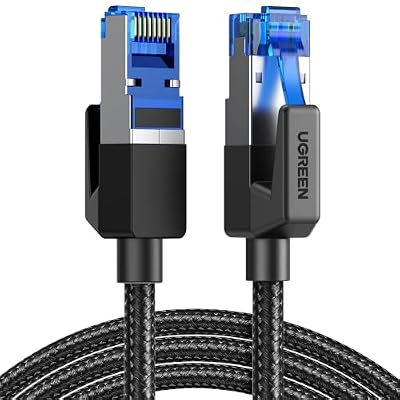
The UGREEN Cat 8 Ethernet Cable in the 6-foot length is the wired link between the dock and the router. It runs from the dock Ethernet port to the router or a nearby wall jack, giving the stream a consistent path instead of sharing airtime with phones, laptops, and smart televisions. Six feet reaches from a dock on a television stand to a nearby router or wall jack without pulling tight.
The cable is rated Cat 8 with up to 40 Gbps data transfer and 2000 MHz bandwidth, a braided and shielded build, and RJ45 connectors. That ceiling is far above the gigabit port on the dock, so the cable is not the limit here. Confirm the handheld reports a wired connection in Windows before opening a cloud service, since a loose cable fails quietly.
Specs
| Feature | Detail |
|---|---|
| Length | 6 feet |
| Category | Cat 8 Ethernet cable |
| Data transfer | Up to 40 Gbps |
| Bandwidth | 2000 MHz |
| Build | Braided and shielded |
Putting the Docked Session Together
Set the dock on the television stand first, then connect the HDMI cable to the television and the Ethernet cable to the router or a nearby wall jack. Plug the UGREEN charger into the dock power input, seat the Ally X in the dock using its USB4 port, and confirm Windows reports a wired connection and a charging battery before opening any game.
Next, set the television as the only display in Windows display settings, open the cloud app and sign in, then pair the 8BitDo controller and test it in the service menu before starting a game.
How to Choose
Choose the handheld first, by screen, battery, and controls rather than by processor, since the remote server renders the game. The Ally X suits players who want a compact Windows handheld with a large battery and a second USB-C port, while the Ayaneo, OneXPlayer, and GPD Win class suits players who prefer a different screen size or control layout, provided the dock lists that exact model as compatible.
Then choose the dock by its Ethernet port and its charging input, not by its video ceiling. A gigabit port and a 100W power input matter for every session, while a 4K at 144Hz output is headroom most cloud streams will not use. Then choose the charger to match the dock input, the controller by comfort and by a wired fallback, and the cable by length.
Who Should Skip
Skip a docked Windows handheld setup if the home network cannot hold a steady stream, because no dock can fix a connection that drops. Skip it if play happens mostly in short handheld bursts away from home, since a dock, a charger, a cable run, and a separate controller add bulk. Skip a second handheld if one Windows handheld already covers the household, and skip the full accessory list if the television is shared, since a docked handheld ties up the main television during play.
Frequently Asked Questions
Do I need a dock to play cloud games on a ROG Ally X?
No. The Ally X streams cloud games in handheld mode over wireless, using its built-in controls. A dock is worth adding for television play, a wired connection, a full-size controller, and charging.
Why does my Ally X show the game on its own screen instead of the television?
Windows is treating the television as a second display, or the handheld screen is still set as the main display. Open Windows display settings and choose to show the picture on the television only.
Does a docked Ally X need a stronger charger than the one in the box?
It needs a charger that meets the handheld power requirement, fed through the dock. The Ally X charges at 65W, so a 100W charger feeding a dock with a 100W input covers the handheld.
Final Verdict
A docked ROG Ally X is a convincing television cloud console when the setup respects what Windows needs: a dock with wired Ethernet and real charging, a television set as the only display, and a controller paired before play. The Ally X brings a large battery and a second USB-C port, the iVANKY dock supplies the wired link, the 8BitDo controller supplies couch comfort, the UGREEN charger keeps the chain powered, and a known Ethernet cable removes a common source of dropouts. Build that chain once, and cloud gaming on the television becomes a normal evening session.










