Black Myth: Wukong is one of the most demanding games you can install on a laptop. It is built on Unreal Engine 5, it fills 130 GB of storage, and developer Game Science published an unusually detailed requirements chart that splits its targets by resolution, preset, and ray tracing tier. That chart is the right anchor for buying a laptop: instead of guessing, you can match a machine to the exact tier you want to play at.

One caution applies to every tier below. Game Science states that its published specifications were tested with DLSS, FSR, or XeSS upscaling enabled, so the official targets describe upscaled performance rather than native rendering. Laptop GPUs also run at maker-set power limits, so two laptops with the same GPU name can perform differently. Every pick below uses a high power limit for its GPU class, and the specs quoted are the figures published by the maker or printed on the Amazon listing.
Disclosure: As an Amazon Associate we earn from qualifying purchases.
What Black Myth: Wukong asks for
Game Science’s official PC requirements, as published for the game’s launch, break down like this:
| Tier | CPU | GPU (desktop) | RAM | Storage |
|---|---|---|---|---|
| Minimum, Medium at 1080p | Core i5-8400 / Ryzen 5 1600 | GTX 1060 6GB / RX 580 | 16 GB | 130 GB, SSD preferred |
| Recommended, High at 1080p | Core i7-9700 / Ryzen 5 5500 | RTX 2060 / RX 5700 XT / Arc A750 | 16 GB | 130 GB SSD |
| Ultra, Very High at 4K | Core i7-9700 / Ryzen 5 5500 | RTX 4070 / RX 7800 XT | 16 GB | 130 GB SSD |
| Ray tracing Low, Medium at 1080p | Core i5-9400 / Ryzen 5 1600 | RTX 3060 | 16 GB | 130 GB SSD |
| Ray tracing Medium, at 1080p | Core i7-9700 / Ryzen 5 5500 | RTX 4060 | 16 GB | 130 GB SSD |
| Ray tracing Very High, High at 4K | Core i7-9700 / Ryzen 5 5500 | RTX 4080 Super | 32 GB | 130 GB SSD |
Translated into laptop terms: an RTX 4060 laptop at full power covers 1080p High and the ray tracing Medium tier, an RTX 4070 or newer midrange GPU handles 1080p at the Cinematic preset and 1440p High with upscaling, and only the RTX 4090 laptop GPU sits in the same performance class as the desktop card named for the 4K ray tracing tier. If you are shopping for a desktop build instead, our guide to the best GPU for Black Myth: Wukong matches the desktop cards to these same tiers.
The picks
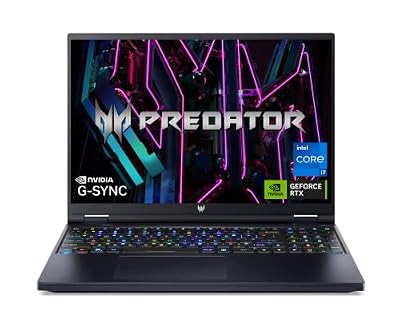
1. Acer Predator Helios 16 (PH16-71-74UU) — the 1080p High and ray tracing Medium pick
The Helios 16 pairs a Core i7-13700HX with an RTX 4060 laptop GPU that Acer’s listing describes as optimized for a maximum 140W power draw, the full-power version of this GPU rather than a cut-down variant. That matters for Black Myth: Wukong, because Game Science names the desktop RTX 4060 as its ray tracing Medium GPU at 1080p, and a 140W laptop 4060 is the closest mobile match. The 16-inch 2560 x 1600 panel runs at 165Hz with G-SYNC and Advanced Optimus, so at native resolution you will lean on DLSS; dropping to 1080p rendering with DLSS Quality is the sensible setting for the High preset and medium ray tracing. Acer fits 16 GB of DDR5 across two slots and a 1 TB Gen 4 SSD in one of two M.2 slots, which leaves a clear upgrade path on both fronts.
Specs
- CPU: Intel Core i7-13700HX
- GPU: NVIDIA GeForce RTX 4060 Laptop GPU, 8 GB GDDR6, up to 140W per Acer’s listing
- Display: 16-inch WQXGA 2560 x 1600, 165Hz, G-SYNC, Advanced Optimus
- RAM: 16 GB DDR5, two slots, 32 GB maximum per the listing
- Storage: 1 TB PCIe Gen 4 SSD, two M.2 slots with one free
- Ports: 2x Thunderbolt 4, USB 3.2 Type-A ports, HDMI 2.1, RJ-45 Ethernet
- Wireless: Intel Killer Wi-Fi 6E
- OS: Windows 11 Home
Upgradeability: both RAM slots are user-accessible (32 GB ceiling) and the second M.2 slot is empty, per Acer’s published internal specifications for this model.
2. HP OMEN 16 — the 1080p Cinematic pick
This OMEN 16 configuration combines a 20-core Core i7-14700HX with an RTX 4070 laptop GPU and a 16.1-inch Full HD panel at 165Hz. The pairing is honest: the RTX 4070’s 8 GB of VRAM is the practical limit in Black Myth: Wukong at higher resolutions, and a 1920 x 1080 screen lets this GPU aim at the game’s Cinematic preset with DLSS and frame generation instead of struggling at 1440p. HP ships it with 32 GB of DDR5 memory, double the game’s recommended figure, which also matches the memory figure Game Science lists for its top ray tracing tier. A 1 TB PCIe SSD covers the 130 GB install several times over.
Specs
- CPU: Intel Core i7-14700HX, 20 cores, up to 5.5 GHz per HP
- GPU: NVIDIA GeForce RTX 4070 Laptop GPU, 8 GB GDDR6
- Display: 16.1-inch Full HD 1920 x 1080, 165Hz
- RAM: 32 GB DDR5
- Storage: 1 TB PCIe SSD
- Wireless: Wi-Fi 6E
- Weight: 5.11 lb per the listing
- OS: Windows 11 Home
Upgradeability: HP’s OMEN 16 spec sheet configures memory as two SO-DIMM modules, so the memory can be serviced or swapped; confirm the exact slot layout for this configuration on the listing before planning a storage upgrade.
3. MSI Vector 16 HX AI — the 1440p and 1600p pick
The Vector 16 HX AI is the current-generation option in this group: an AMD Ryzen 9 8940HX with 16 cores drives an RTX 5070 Ti laptop GPU with 12 GB of GDDR7 memory. That extra VRAM over the RTX 4070 tier is what Black Myth: Wukong’s Cinematic textures want at 2560 x 1600, and the RTX 50 series adds DLSS 4 multi frame generation, which suits a game whose official targets already assume upscaling. The 16-inch QHD+ panel runs at 240Hz with 100% DCI-P3 coverage per the listing. Connectivity is a strength: two USB4 Type-C ports with DisplayPort and power delivery, HDMI 2.1, 2.5 GbE Ethernet, and an SD 7.0 card reader.
Specs
- CPU: AMD Ryzen 9 8940HX, 16 cores, up to 5.3 GHz
- GPU: NVIDIA GeForce RTX 5070 Ti Laptop GPU, 12 GB GDDR7
- Display: 16-inch QHD+ 2560 x 1600, 240Hz, IPS, 100% DCI-P3 per the listing
- RAM: 32 GB DDR5, 64 GB maximum per the listing
- Storage: 1 TB PCIe 4.0 NVMe SSD
- Ports: 2x USB4 Type-C (DisplayPort, PD 3.1), 2x USB 3.2 Gen 2 Type-A, HDMI 2.1, 2.5 GbE RJ-45, SD 7.0 reader
- Wireless: Wi-Fi 7, Bluetooth 5.4
- Battery: 90 Wh
- OS: Windows 11 Pro
Upgradeability: the listing states a 64 GB memory ceiling, so the 32 GB fitted here is not the end of the road; because this listing is a configured variant, confirm the GPU power limit and slot layout with the seller before ordering.
4. ASUS ROG Strix SCAR 18 (G834JY-XS97) — the ray tracing Very High pick

Game Science’s highest tier, High settings at 4K with ray tracing at Very High, names a desktop RTX 4080 Super and 32 GB of RAM. The SCAR 18 is the laptop that maps to it: its RTX 4090 laptop GPU runs at up to 175W (150W plus 25W Dynamic Boost, per ASUS) with 16 GB of GDDR6, and it is paired with a 24-core Core i9-13980HX and 32 GB of DDR5. The 18-inch Nebula display is 2560 x 1600 at 240Hz with G-SYNC and a MUX switch, so at the native panel you can push Cinematic settings with ray tracing, and the same GPU drives a 4K external display for the full top-tier target. ASUS fits a 2 TB PCIe SSD, so the 130 GB install is a non-issue.
Specs
- CPU: Intel Core i9-13980HX, 24 cores, up to 5.6 GHz
- GPU: NVIDIA GeForce RTX 4090 Laptop GPU, 16 GB GDDR6, up to 175W per ASUS
- Display: 18-inch QHD+ 2560 x 1600, 240Hz, 3ms, 100% DCI-P3, G-SYNC, MUX switch with Advanced Optimus
- RAM: 32 GB DDR5-4800, two SO-DIMM slots, 64 GB maximum per ASUS
- Storage: 2 TB PCIe SSD
- Wireless: Wi-Fi 6E
- Weight: 6.8 lb per the listing
- OS: Windows 11 Pro
Upgradeability: ASUS publishes two SO-DIMM slots (64 GB maximum) and two M.2 slots for this model, making it the most expandable machine here.
How to choose
Start from the tier, not the GPU name. Decide whether you want 1080p High, 1080p Cinematic, 1440p/1600p, or ray tracing at its highest settings, then buy the GPU class Game Science assigns to that tier. Paying for an RTX 4090 to play at 1080p leaves performance unused; buying an RTX 4060 for 4K ray tracing leads to disappointment.
Check the GPU power limit. Laptop GPU wattage is set by the maker and printed in the full specifications. The picks above use 140W for the RTX 4060 and 175W for the RTX 4090, the top of their classes. A low-wattage version of the same GPU can trail a full-power model from the class below.
Mind VRAM at higher resolutions. The game asks for 6 GB at minimum, but Cinematic textures at 1440p and above are where 8 GB cards feel the squeeze. The 12 GB RTX 5070 Ti and 16 GB RTX 4090 exist in this guide for that reason.
Plan storage and memory headroom. The install is 130 GB and Game Science requires an SSD at the recommended tier, so treat 1 TB as the sensible floor. 16 GB of RAM meets the standard tiers; 32 GB matches the top ray tracing tier and is fitted to three of the four picks.
Check the warranty line before you buy. Every laptop here is sold under its maker’s limited warranty, and terms and registration requirements differ by brand and by seller, especially on configured listings. Read the warranty entry on the product page and register the machine when it arrives.
Verdict
For most players, the Predator Helios 16 is the balanced buy: a full-power RTX 4060, a fast 1600p screen, and open RAM and SSD slots cover 1080p High and medium ray tracing without waste. The OMEN 16 suits players who prefer a native 1080p panel and want 32 GB of memory from the start. The Vector 16 HX AI is the pick for 1440p and 1600p play with the newest frame generation features, and the Strix SCAR 18 is the only laptop here built for the game’s highest ray tracing tier. Match the machine to the tier you will actually play at, keep DLSS on as Game Science’s own testing assumes, and any of the four will run Black Myth: Wukong the way its requirements chart intends.