

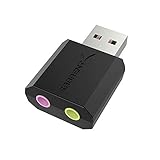
- Top Pick: SABRENT USB External Stereo Sound Card Adapter, Plug & Play (AU-MMSA) | USB audio adapter; no drivers needed; for Windows & Mac; 3.5mm headphone & mic jacks; usb to 3.5mm jack audio adapter
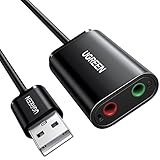
- Best Value: UGREEN UGREEN USB Sound Card Adapter with TRS 3.5mm Headphone & Mics | USB to Aux 3.5mm External Audio Converter for Windows Mac Linux PC Laptops Desktops PS5 Switch 2
- Premium Choice: VENTION USB Sound Card, External Stereo Sound Card with Volume Control, USB to 3.5mm Jack Audio Adapter for Windows, Mac, PC, Laptop, Desktop, Headset, Switch and More
An external USB sound card solves a specific kind of annoyance: a dead headphone jack, a front-panel port that hums, or a laptop that has dropped the 3.5mm socket altogether. The decision is mostly about which job you are hiring it for. Some units simply add one headphone and one microphone connector, while others offer 5.1 or 7.1 channels, an optical output or a higher sample rate for listening on good headphones.
This guide is for desktop owners fixing a noisy onboard port, laptop users who want a headset to work, and console players who plug a headset into a USB port. In 2026 most of these adapters are driver-free, so the real differences come down to jack layout, channel count and sample-rate claims stated in each title. All ten products below clearly belong to the category, and the comparisons stick to what the listings say.
Quick Picks
As an Amazon Associate we earn from qualifying purchases at no extra cost to you.




| Product | Best for | Key spec from the title |
|---|---|---|
| SABRENT AU-MMSA | Simple headset fix | No drivers, headphone and mic jacks |
| UGREEN TRS Adapter | Separate headphone and mic plugs | TRS 3.5mm, Windows, Mac, Linux, PS5 |
| VENTION USB Sound Card | Quick volume control | Volume control, 3.5mm output |
| Optimal Shop 5.1 | Surround with digital out | 6 channel 5.1, S/PDIF |
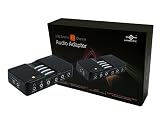
| VANTEC 7.1 | Virtual surround setups | 7.1 channel audio adapter |
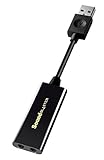
| Sound Blaster Play! 3 | Better listening quality | 24-bit 96kHz DAC |
| Cubilux 7.1 | Line-in and mic recording | 48KHz-384KHz, aluminum |
| Micolindun | Port expansion on a laptop | USB hub with audio jacks |
| ENVEL Dual TRS | Console and PC headsets | Dual 3-pole jacks, PS4/PS5 |
| UGREEN TRRS 2-in-1 | One-plug headsets | TRRS jack, aluminum body |
How to Choose
Know your headset plug
A TRRS plug, with four contacts, carries headphones and a microphone on one connector, which is what most phone-style and gaming headsets use. A TRS plug has three contacts and carries only audio, so a headset with separate green and pink plugs needs an adapter with two jacks. Match the adapter to the plug on your cable before anything else, because the wrong pairing yields sound with no microphone.
Channel count only matters with matching speakers
Stereo is enough for headphones and desktop speakers. The 5.1 and 7.1 models describe their output as surround, yet many of the extra channels on headphones are simulated rather than separate drivers. Buy a multichannel unit only if you own a speaker system that uses those outputs, or if you want the optical digital out.
Read sample-rate and bit-depth claims carefully
Specs such as 24-bit 96kHz or 384kHz describe the maximum audio format the chip handles. They matter most with lossless files and quality headphones. For voice chat and videos, a basic adapter sounds fine, so do not chase numbers you cannot hear or use.
Check compatibility and build
Plug and play models rely on operating system drivers, which keeps setup simple on Windows and Mac. Linux and console support is stated only on some titles. Metal housings tend to shrug off bends at the port, while light plastic units can feel fragile if the cable gets tugged. Skip any listing that does not state your operating system, and prefer a unit that names your console if you plan to use it there.
The 10 Best Options
SABRENT AU-MMSA
This stereo adapter is advertised as plug and play with no drivers for Windows and Mac, offering headphone and microphone jacks. It is a tidy fix for someone whose laptop or desktop audio port has failed.
- Strength: no driver installation is stated.
- Strength: separate headphone and mic jacks.
- Trade-off: stereo only, with no stated advanced formats.
Skip it if you need surround or Linux support, since the title names only Windows and Mac. Anyone who just wants a dead port replaced with a basic, familiar-looking dongle will find that plain scope an advantage rather than a limit.
UGREEN USB Sound Card Adapter with TRS Jacks
The listing names TRS 3.5mm jacks for headphones and mics and compatibility with Windows, Mac, Linux, PCs, laptops, desktops, PS5 and Switch. It suits households sharing one adapter across machines.
- Strength: broad system compatibility in the title.
- Strength: separate headphone and mic connections.
- Trade-off: no audio-quality figures are given.
Skip it if you want a spec-driven audio upgrade. The listing stays on connections rather than formats, so treat it as a compatibility fix for a family of devices, not as an audiophile step.
VENTION USB Sound Card
An external stereo card with volume control and a USB to 3.5mm jack, listed for Windows, Mac, PCs, laptops, desktops, headsets and Switch. The volume control makes it handy for people who change levels often.
- Strength: on-cable volume control.
- Strength: wide device list.
- Trade-off: no sample-rate details.
Skip it if you need multichannel output. People who keep headphones plugged in all day and just want to nudge loudness from the cable are the natural audience for this one.
Optimal Shop USB 2.0 5.1 Surround
A six-channel 5.1 adapter with S/PDIF for PCs. It is meant for people wiring a home-theater style speaker set to a computer that lacks multichannel output.
- Strength: 5.1 channels and S/PDIF digital connection.
- Strength: useful when the motherboard audio is limited.
- Trade-off: the title lists no operating systems.
Skip it if you only use a headset, because the extra channels and digital connector would sit unused. Match it to a receiver or speaker set with the right inputs before ordering.
VANTEC USB External 7.1
A 7.1-channel external audio adapter in a short listing. It targets users who want surround output options from a laptop or desktop without opening the case.
- Strength: 7.1 channel support.
- Strength: external design avoids opening a PC.
- Trade-off: the title gives few details about jacks or compatibility.
Skip it if you want documented formats. Because the title is brief, confirm the jack types on the product page and decide whether surround on headphones is something you would truly use.
Sound Blaster Play! 3
Listed as a USB DAC with 24-bit 96kHz audio, plug and play use on PC and Mac, and a portable build. It suits listeners who want a modest quality step for headphones.
- Strength: 24-bit 96kHz audio is stated.
- Strength: familiar audio brand and a portable form.
- Trade-off: stereo oriented, not a surround solution.
Skip it if you need 7.1 output. Listeners who care mainly about music through a good pair of headphones are the people this adapter is aimed at, as the listing leans on the DAC and the sample figures.
Cubilux 7.1 USB Surround
A full aluminum alloy unit with 7.1 channels, a 48KHz to 384KHz sample rate, line-in and a stereo mic input. It fits people who record or connect external gear.
- Strength: wide sample-rate range and line-in.
- Strength: aluminum construction.
- Trade-off: more features than a plain headset fix needs.
Skip it if you want the simplest adapter. Streamers and home recorders who plug in a mic or a line source will use the extra inputs, while casual listeners will not.
Micolindun External Sound Card Hub
This adapter combines a USB port with 3.5mm audio and microphone jacks for laptops and PCs, plug and play. It suits compact setups short on ports.
- Strength: adds a USB port alongside the audio jacks.
- Strength: plug and play.
- Trade-off: few audio specifications.
Skip it if you want listed audio formats. It makes the most sense on a thin laptop with one free port, where a single dongle can add both sound and another USB socket.
ENVEL USB to 3.5mm Adapter
A stereo adapter with dual TRS three-pole jacks for headphone and microphone, listed for PS4, PS5, PC and laptop with a built-in chip. It suits players using separate-plug headsets.
- Strength: dual jacks for separate plugs.
- Strength: console and PC listed together.
- Trade-off: no sample-rate figures.
Skip it if your headset has a single four-contact plug. Console players with older wired headsets that split into two plugs are the target buyer for this listing.
UGREEN USB to Audio Jack TRRS
A two-in-one aluminum adapter with a TRRS jack for headphones and mics, listed for PS5, PC, Windows, Mac and Linux. It is made for single-plug headsets.
- Strength: one TRRS connector handles both audio and mic.
- Strength: aluminum body and Linux support.
- Trade-off: it will not take separate headphone and mic plugs.
Skip it if your headset uses two plugs. Players on PS5 or PC with a modern one-cable headset get the cleanest match from this design, with the metal body adding some durability at the port.
Which One Fits Your Situation
Your laptop lost its headphone jack
Pick the SABRENT AU-MMSA for a driver-free fix on Windows or Mac, or the Vention if you want volume control on the adapter. Both keep things simple and avoid any software setup.
You have a gaming headset with one plug
The UGREEN TRRS 2-in-1 matches single-plug headsets, while the ENVEL fits a headset with separate plugs. Looking at the plug on your cable for ten seconds saves a return.
You want better listening
The Sound Blaster Play! 3 lists 24-bit 96kHz, and the Cubilux lists a sample rate up to 384KHz with line-in. Pair either with decent wired headphones, because the adapter cannot fix a poor driver.
You own a surround speaker set
The Optimal Shop 5.1 with S/PDIF and the VANTEC 7.1 are the multichannel choices here.
Common Mistakes
- Buying a TRS adapter for a single-plug headset and losing the microphone.
- Choosing a 7.1-channel unit while using ordinary stereo headphones.
- Expecting a USB card to fix a noisy cable or a weak headset; the adapter can only pass on what the connected gear delivers.
- Ignoring the operating system list in the title, especially for Linux and consoles.
- Assuming a higher sample rate is audible on built-in speakers or compressed streams, where the source limits the result before the adapter does.
Related guides
- Aio Liquid Coolers For High Performance Gaming
- How To Lower Input Delay In Competitive Shooters
- External Hard Drives For Music Production
Frequently Asked Questions
Do these cards need drivers?
Many are listed as plug and play and use the operating system drivers. Check the title for your system, and be careful with Linux or console use, where only some listings state support. If the listing is silent, look at the maker page before buying.
Can an external card reduce static?
It can, since the conversion happens outside the computer case, away from interference. A bad cable will still cause noise, and so will a headset with a worn plug. Moving the adapter to a rear port away from the graphics card can also help.
Will it work with a console?
Only listings that name your console do so with confidence. Several here mention PS4, PS5 or Switch. Even then, voice chat behavior can vary, so keep the return window in mind if you buy mainly for a console.
Is 7.1 better than stereo for headphones?
Not necessarily. Headphones have two drivers, so surround is simulated. Real benefits appear with multi-speaker systems, where each output feeds a separate speaker. For a headset, a clean stereo adapter is usually the more sensible choice.







