

Spend enough hours at a keyboard and your wrists, forearms and shoulders start to tell you about it. Ergonomic keyboards exist to fix that: a split or curved layout opens up your shoulders and lets your wrists sit in a more natural, neutral angle, while a built-in wrist rest or palm support takes the strain off the tendons that bend up to reach the keys. For anyone who types or games for long stretches, the right ergonomic board can make a real, daily difference to comfort. This guide rounds up the best ergonomic keyboards in 2026, led by the most genuinely ergonomic split design and followed by wrist-friendly and palm-support options.
- Best Ergonomic Keyboards at a Glance
- 1. Perixx PERIBOARD-512B Wired Ergonomic Keyboard, Split Keyboard with Wrist Rest, Natural
- 2. Logitech K350 Wireless Wave Keyboard with Unifying Wireless Technology
- 3. Logitech MK345 Wireless Keyboard and Mouse Combo with Palm Rest
- 4. Redragon S101-3 PRO Gaming Keyboard and Mouse Combo, RGB Backlit with Wrist Rest
- 5. Razer Ornata Chroma Gaming Keyboard, Hybrid Mechanical Switches, Magnetic Wrist Rest
- 6. Logitech K120 Wired Keyboard for Windows, Low-Profile, Spill-Resistant
- How to Choose an Ergonomic Keyboard
- Frequently Asked Questions
- Related Guides
- Related Articles
Our picks were chosen on what actually reduces strain: split or curved key layouts that respect natural hand angles, integrated wrist rests and palm supports, comfortable switch feel, and value. We have been honest about the range — a true split keyboard sits at the top, followed by a curved ‘wave’ board, comfort combos with palm rests, and a couple of comfortable everyday options — with prices from around $9 to around $200. Below is an at-a-glance comparison of all six, then a closer look at each and a buyer’s guide built around split layouts, wrist support and the typing posture that keeps you comfortable for the long haul.
As an Amazon Associate we earn from qualifying purchases at no extra cost to you.


🛒 Best Price Today on Amazon
Prime members get fast, free shipping on everything above, plus member-only deals. New members get a 30-day free trial — cancel anytime.
Best Ergonomic Keyboards at a Glance
| Keyboard | Best For | Standout Spec | Approx Price |
|---|---|---|---|
| Perixx PERIBOARD-512B | True split ergonomic typing | Split keys, wrist rest, natural angle | around $39 |
| Logitech K350 Wave | Curved wave comfort | Curved wave key layout, wireless | around $40 |
| Logitech MK345 Combo | Wrist-rest comfort combo | Integrated palm rest, wireless | around $37 |
| Redragon S101-3 PRO Combo | Wrist-rest gaming combo | Detachable wrist rest, RGB | around $39 |
| Razer Ornata Chroma | Cushioned wrist-rest gaming | Magnetic wrist rest, hybrid switches | around $200 |
| Logitech K120 Wired | Comfortable low-profile basics | Low-profile, quiet, spill-resistant | around $9 |
1. Perixx PERIBOARD-512B Wired Ergonomic Keyboard, Split Keyboard with Wrist Rest, Natural

Perixx PERIBOARD-512B Wired Ergonomic Keyboard - Split Keyboard, Wrist Rest, Natural Typing - Wired USB Connectivity - US English - Black




As an Amazon Associate we earn from qualifying purchases. Product prices and availability are accurate as of the date/time indicated.
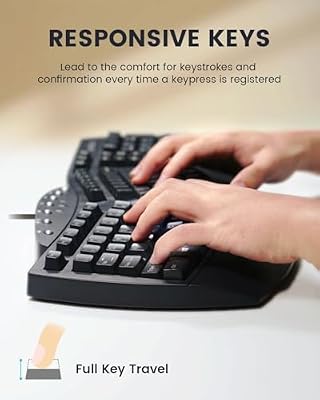
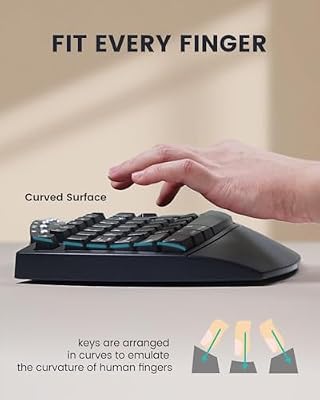
The Perixx PERIBOARD-512B is the pick for genuine ergonomic typing, and it leads this list because it is a true split keyboard. The keys are divided and angled into two halves with a natural slope, encouraging your wrists and forearms into a neutral, strain-reducing posture, and a built-in cushioned wrist rest supports your palms. At around $39 it is an affordable entry into proper ergonomic design.
This is the keyboard for anyone whose wrists ache after long days and who wants the real ergonomic fix rather than a cosmetic one. The split, angled layout opens the shoulders and aligns the wrists more naturally than a flat board, the integrated wrist rest cushions the heels of your hands, and the familiar one-piece split design avoids the steep learning curve of fully separated halves. For genuine, affordable strain relief during long typing sessions, the PERIBOARD-512B is the standout.
Pros: True split ergonomic layout, natural wrist angle, built-in cushioned wrist rest, affordable.
Cons: Split layout takes a short adjustment; wired and full-size footprint.
2. Logitech K350 Wireless Wave Keyboard with Unifying Wireless Technology

Logitech K270 Full Size Wireless Keyboard for Windows - Black | Full-size keyboard with number pad, 8 multimedia keys, includes USB-A receiver, 2-year battery, compatible with PC, laptop






As an Amazon Associate we earn from qualifying purchases. Product prices and availability are accurate as of the date/time indicated.
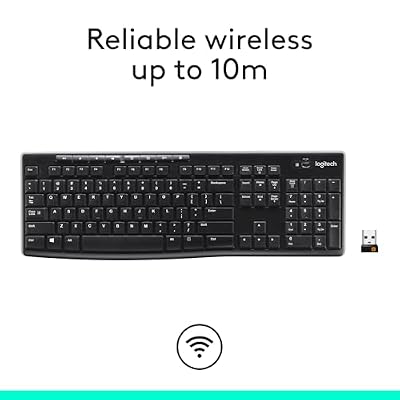
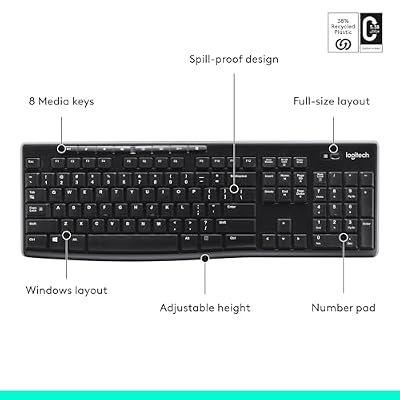
The Logitech K350 Wave is the curved-comfort pick. Rather than splitting the board, it uses Logitech’s signature ‘Wave’ key layout — a gentle, contoured curve and a constant wave shape — to guide your hands into a more comfortable position, and it adds an integrated cushioned palm rest. It connects wirelessly via Logitech’s Unifying receiver. Priced around the low-$40 range, it is a popular comfort board.
This is the keyboard for someone who wants ergonomic comfort with zero learning curve. The Wave layout keeps a standard single-piece shape — so every key is where you expect — while the curve and contour ease your hands into a more natural posture, and the built-in palm rest supports your wrists through long sessions. Wireless Unifying connectivity keeps the desk tidy and lets you share one receiver with a Logitech mouse. For familiar, wire-free ergonomic comfort, the K350 Wave is a long-standing favorite.
Pros: Curved Wave layout for natural hand position, cushioned palm rest, wireless Unifying, no learning curve.
Cons: Not a true split; the curve is gentler than a dedicated ergonomic board.
3. Logitech MK345 Wireless Keyboard and Mouse Combo with Palm Rest

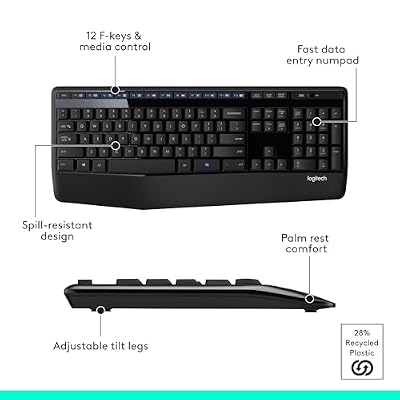
Logitech MK345 Full Size Wireless Keyboard and Mouse Combo - Black | Full size keyboard with integrated palm rest, compact right handed mouse, connect via single included USB-A Nano Receiver




As an Amazon Associate we earn from qualifying purchases. Product prices and availability are accurate as of the date/time indicated.
The Logitech MK345 is the wrist-rest comfort combo pick. It is a full-size 2.4GHz wireless keyboard with a generous integrated palm rest for all-day wrist support, bundled with a comfortable contoured mouse, all running off one USB receiver. At around $37 it is an affordable way to add wrist comfort and a matching mouse to a work-focused desk in a single purchase.
This is the set for someone who wants comfortable, supported typing without moving to a split or curved layout. The large fixed palm rest cushions your wrists through long working days, the standard layout means no adjustment period, and the included contoured mouse adds to the comfort story. Long battery life and tidy wireless round it out. It is not a true ergonomic split board, but for everyday wrist support and a complete, comfortable desk combo, the MK345 is a sensible, well-priced choice.
Pros: Generous integrated palm rest, comfortable contoured mouse included, wireless, long battery life.
Cons: Standard (non-split) layout; palm rest is fixed, not adjustable.
4. Redragon S101-3 PRO Gaming Keyboard and Mouse Combo, RGB Backlit with Wrist Rest

Redragon S101-3 PRO Gaming Keyboard and Mouse, RGB Backlit Programmable Keyboard Mouse with Software, Independent Macro Record Keys, Value Combo Set, New Update Version


As an Amazon Associate we earn from qualifying purchases. Product prices and availability are accurate as of the date/time indicated.
The Redragon S101-3 PRO is the wrist-rest gaming combo pick. It pairs a full-size RGB-backlit gaming keyboard — fitted with a detachable wrist rest for palm support — with a programmable gaming mouse, delivering comfort and a gaming aesthetic together. At around $39 it is an affordable bundle for a gamer who wants wrist support during long sessions without buying parts separately.
This is the keyboard for the gamer who feels the strain after marathon sessions but wants RGB and a matching mouse rather than a clinical ergonomic look. The detachable wrist rest props your palms and can be removed when you do not want it, the backlit keys add atmosphere and visibility, and the bundled mouse completes a budget gaming setup. It is a comfort-oriented combo rather than a true split board, but for wrist support on a gaming desk at a low price, it delivers.
Pros: Detachable wrist rest for palm support, RGB backlighting, gaming mouse included, great value.
Cons: Standard layout, not a split; wrist rest aids comfort but is not full ergonomics.
5. Razer Ornata Chroma Gaming Keyboard, Hybrid Mechanical Switches, Magnetic Wrist Rest
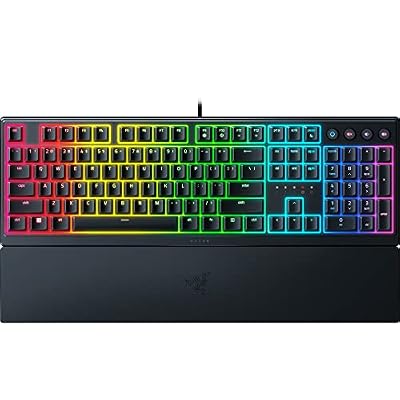
Razer Ornata V3 Gaming Keyboard, Low-Profile Keys, Black | Mecha-Membrane Switches, UV-Coated Keycaps, Backlit Media Keys, 10-Zone RGB Lighting, Snap Tap, Magnetic Wrist Wrest


As an Amazon Associate we earn from qualifying purchases. Product prices and availability are accurate as of the date/time indicated.
The Razer Ornata Chroma is the premium cushioned-wrist-rest pick. It is included here for its comfort focus rather than a split layout — its standout ergonomic feature is a plush magnetic wrist rest that snaps cleanly to the front edge to support your palms. It pairs that with Razer’s hybrid mecha-membrane switches, which offer a soft, cushioned keystroke, and full Chroma RGB. At around $200 it is the premium comfort option.
This is the keyboard for the Razer-ecosystem gamer who wants a comfortable, cushioned typing experience and a quality wrist rest, and is happy with a standard layout. The magnetic wrist rest is genuinely plush and easy to attach or remove, the mecha-membrane switches land softly to ease finger fatigue, and Chroma lighting ties into other Razer gear. It is not a true ergonomic split board, but for premium comfort and palm support on a gaming desk, the Ornata Chroma is a polished choice.
Pros: Plush magnetic wrist rest, soft cushioned hybrid switches, full Chroma RGB, premium build.
Cons: Standard layout, not split or curved; flagship price for a comfort board.
6. Logitech K120 Wired Keyboard for Windows, Low-Profile, Spill-Resistant

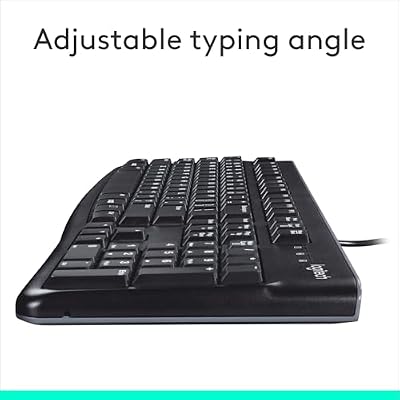
Logitech K120 Full Size Wired Keyboard USB Plug-and-Play Windows - Black | Full-size keyboard, spill-resistant, curved space bar, Windows PC and laptops compatible




As an Amazon Associate we earn from qualifying purchases. Product prices and availability are accurate as of the date/time indicated.
Rounding out the list is the Logitech K120, the comfortable low-profile basics pick. It is included honestly as a simple, comfortable everyday board rather than a dedicated ergonomic one — its comfort comes from a low-profile, quiet-keyed design that keeps your wrists from angling up too sharply, plus a gently curved key bed. At around $9 it is the cheapest option here and a no-frills comfortable typer.
This is the keyboard for someone on a tight budget who wants a comfortable, fuss-free board and is not ready to invest in a split or curved design. The low-profile keys reduce the height your wrists must bend over, the quiet keystrokes suit shared spaces, and the spill-resistant build adds durability. Pairing it with a separate wrist rest is an easy, cheap way to improve comfort further. It is the most basic pick here, but as an affordable, comfortable everyday keyboard, the K120 closes the list sensibly.
Pros: Comfortable low-profile keys, quiet typing, spill-resistant, lowest price, pairs with a wrist rest.
Cons: Not a true ergonomic board; no split, curve or built-in wrist rest.
How to Choose an Ergonomic Keyboard
Start by understanding what ‘ergonomic’ really means, because the term is used loosely. The genuinely ergonomic feature is a layout that respects your body’s natural angles — a split keyboard like the Perixx PERIBOARD-512B separates and angles the two halves so your wrists stay neutral and your shoulders open, while a curved ‘wave’ board like the Logitech K350 contours the keys more gently. These tackle the root cause of strain. Other boards add comfort through wrist support rather than layout, which is valuable but different.
Decide how far down the ergonomic path you want to go, and be realistic about the learning curve. A true split board delivers the most strain relief but takes a few days to adjust to as your hands learn the separated halves. A curved board like the K350 Wave keeps a standard single-piece shape, so there is essentially no adjustment while still easing posture. If you want benefit with zero relearning, a curved board or a wrist-rest board is the gentler entry; if you want maximum relief, commit to the split.
Wrist and palm support is the next pillar, and for many people it is the most noticeable comfort upgrade. A built-in wrist rest — fixed on the Perixx, K350 and Logitech MK345, detachable on the Redragon S101-3, plush and magnetic on the Razer Ornata — supports the heels of your hands so your tendons do not bend up to reach the keys. A detachable or magnetic rest lets you remove it when you prefer; even a budget board like the K120 becomes more comfortable paired with a separate rest.
Finally, weigh switch feel, connection and budget against your needs. Soft, cushioned switches like the Razer Ornata’s hybrid mecha-membrane ease finger fatigue over long sessions, while quiet low-profile keys reduce wrist angle. Wireless boards like the K350 and MK345 keep the desk tidy and let you position the keyboard for the best posture. Set your budget — genuine ergonomics start affordably with the Perixx — decide between a true split, a curve, or wrist-rest comfort, and pick the keyboard on this list that best protects your wrists for the way you type and play.
Frequently Asked Questions
What makes a keyboard truly ergonomic?
A genuinely ergonomic keyboard uses a layout that keeps your body in a natural posture — most often a split design like the Perixx PERIBOARD-512B that angles the two halves so your wrists stay neutral and your shoulders open, or a curved ‘wave’ layout like the Logitech K350. Wrist rests and palm supports add real comfort, but the layout itself is what addresses the root cause of typing strain.
Do I need a split keyboard, or is a wrist rest enough?
It depends on your level of discomfort. If you have real wrist or forearm strain, a true split board like the Perixx PERIBOARD-512B offers the most relief by changing your hand angle. If you just want more comfort for long sessions, a board with a good wrist rest — the Logitech MK345, Redragon S101-3 or Razer Ornata — or a gently curved K350 may be all you need, with no learning curve.
Are ergonomic keyboards hard to get used to?
True split boards like the Perixx take a few days as your hands learn the separated, angled halves, after which most people type comfortably and often faster. Curved boards like the Logitech K350 Wave keep a standard one-piece shape, so there is virtually no adjustment. Wrist-rest combos like the MK345 use a normal layout too, meaning the comfort benefit comes with no relearning at all.
Can ergonomic keyboards be good for gaming?
Yes, especially comfort-focused boards with wrist support. The Redragon S101-3 PRO and Razer Ornata Chroma pair gaming features and RGB with wrist rests that ease strain during long sessions. Dedicated split boards like the Perixx are more typing-focused, but if marathon gaming leaves your wrists sore, a board with a cushioned wrist rest is a worthwhile, comfortable upgrade.
Related Guides
- Best Mechanical Keyboards
- Best Wireless Keyboards
- Best Keyboards for Typing
- Best Keyboard Wrist Rests
- Best Office Chairs for Working From Home
- Best Budget Gaming Setup
Affiliate Disclosure: As an Amazon Associate, we earn from qualifying purchases. If you click a link and make a purchase, we may earn a small commission at no extra cost to you. Prices and availability are accurate as of publication and may change.










