

A streaming desk has a tougher job than an ordinary one. Beyond a monitor and keyboard, it has to find room for the gear that makes a stream look and sound good: a webcam or capture camera, a key light or two, a microphone on a boom arm, often a second monitor for chat and your scene software, and sometimes a stream deck and an audio interface. It also has to manage the cable spaghetti all of that creates, because a tidy desk reads as a professional setup on camera. This guide rounds up the best desks for streaming in 2026, chosen for surface space, multi-monitor and accessory room, and cable-friendly design.
- Best Desks for Streaming at a Glance
- 1. Mr IRONSTONE L-Shaped Gaming Desk Corner Computer Desk
- 2. SHW 55-Inch Commercial-Grade Office Computer Desk, Black
- 3. FLEXISPOT EN1 One-Piece Electric Standing Desk with 4 Memory Presets
- 4. SHW Mission 48-Inch Home Office Computer Desk, White
- 5. SHW Mission 48-Inch Home Office Computer Desk, Black
- 6. Coleshome 48 Inch Computer Desk, Modern Simple Style
- How to Choose a Desk for Streaming
- Frequently Asked Questions
- Related Guides
- Related Articles
Our picks were chosen on what genuinely matters for a streaming setup: enough surface for cameras, lights, a mic arm and one or more monitors; depth to keep screens at a good distance while gear sits in front; clamp-friendly edges for mounting arms and lights; and value. We have included a deliberate price spread — from around $40 to around $130 — because the best streaming desk is the one that fits your room and your kit. Whether you want a wraparound corner desk for a full multi-monitor studio, a clean surface for a focused setup, or a sit-stand option, there is a fit here. Below is an at-a-glance comparison, then a closer look at each desk and a buyer’s guide tailored to streamers.
As an Amazon Associate we earn from qualifying purchases at no extra cost to you.



🛒 Best Price Today on Amazon
Prime members get fast, free shipping on everything above, plus member-only deals. New members get a 30-day free trial — cancel anytime.
Start 30-Day Prime Free Trial →See Today’s Amazon DealsBest Desks for Streaming at a Glance
| Desk | Best For | Standout Spec | Approx Price |
|---|---|---|---|
| Mr IRONSTONE L-Shaped Corner Desk | Full multi-monitor studio | L-shape, separate gear + screen zones | around $60 |
| SHW 55-Inch Commercial-Grade (Black) | Heavy gear + clamp arms | 55-inch, sturdy clamp-friendly frame | around $130 |
| FLEXISPOT EN1 Standing Desk | Sit-stand on-camera setup | Electric adjust, 4 memory presets | around $110 |
| SHW Mission 48-Inch (White) | Clean, bright camera setup | 48-inch top, tidy profile | around $90 |
| SHW Mission 48-Inch (Black) | Compact dual-monitor stream | 48-inch top, neutral on camera | around $90 |
| Coleshome 48-Inch Computer Desk | Budget starter stream desk | 48-inch surface, simple build | around $40 |
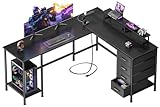
1. Mr IRONSTONE L-Shaped Gaming Desk Corner Computer Desk

Mr IRONSTONE L Shaped Gaming Desk Corner Computer Desk, Home Office Desks Writing Workstation with Large Monitor Stand, Easy to Assemble (Black,51 Inch)


As an Amazon Associate we earn from qualifying purchases. Product prices and availability are accurate as of the date/time indicated.
For a streaming studio, the Mr IRONSTONE L-Shaped is the standout, and the reason is layout. Streaming gear competes for desk space, and an L-shape lets you split it into zones: keep your main monitor, keyboard and camera on one wing, and dedicate the other wing to a second monitor for chat and your scene software, plus a key light, a stream deck or an audio interface. At around $60 it gives a streamer the most working area for the least money.
This is the desk to choose when your stream has grown beyond a single screen and you want everything reachable on camera. The two surfaces give you room for a multi-monitor setup without crowding your shot, the corner orientation keeps gear close at hand without one giant desk dominating a wall, and the sturdy metal frame holds the load steadily. If you are building a proper multi-monitor streaming station and space efficiency matters, the IRONSTONE L-shape is the best fit here.
Pros: Two zones for screens and gear, ideal for multi-monitor streaming, corner-efficient, cheap.
Cons: Corner layout only; clamp-mount space depends on which edge you use.
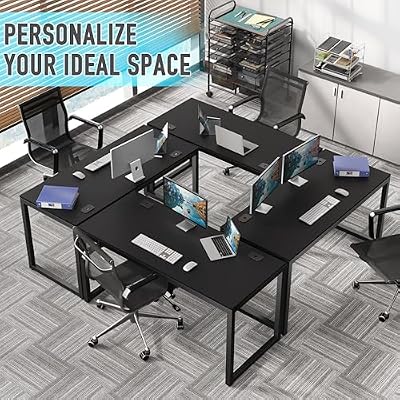
2. SHW 55-Inch Commercial-Grade Office Computer Desk, Black

SHW 55-Inch Commercial-Grade Office Computer Desk, Black | 10-Year Limited Warranty




As an Amazon Associate we earn from qualifying purchases. Product prices and availability are accurate as of the date/time indicated.
The SHW 55-inch Commercial-Grade in black is the pick for a gear-heavy stream with clamp-mounted accessories. Streamers love to clamp things to the desk — a microphone boom arm, a camera arm, key lights — and that needs a sturdy desk with a solid edge and a frame that will not wobble when you adjust them. This commercial-grade desk pairs a wide 55-inch surface with a reinforced steel frame built for exactly that kind of use, at around $130.
This is the desk for a streamer running a lot of mounted gear who wants stability on camera. The 55-inch top gives ample room for dual monitors plus a camera and lights, the robust frame keeps everything rock-steady when you reposition a clamped mic arm mid-stream, and the neutral black finish reads cleanly behind your setup. The wide single surface also makes cable runs along the back straightforward. For a stable, spacious base for a clamp-heavy streaming rig, this is the standout.
Pros: Wide 55-inch surface, sturdy clamp-friendly frame, very stable for mounted arms and lights.
Cons: Pricier and heavier; a straight desk gives less total area than an L-shape.
3. FLEXISPOT EN1 One-Piece Electric Standing Desk with 4 Memory Presets
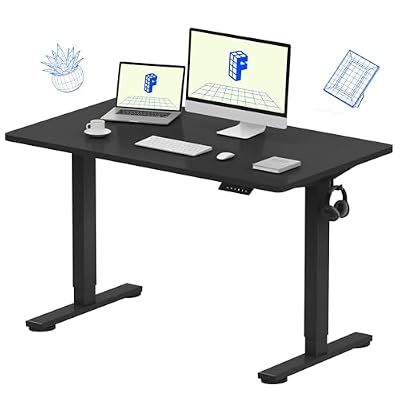
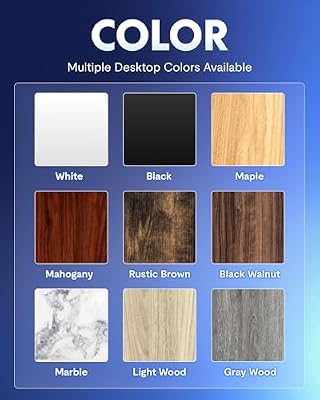
FLEXISPOT EN1 One-Piece Standing Desk, Electric Adjustable with 4 Memory Presets, 176 LBS Capacity, Stable & Quiet, Seamless Desktop for Home Office & Dual Monitors, 48"x24" Black





As an Amazon Associate we earn from qualifying purchases. Product prices and availability are accurate as of the date/time indicated.
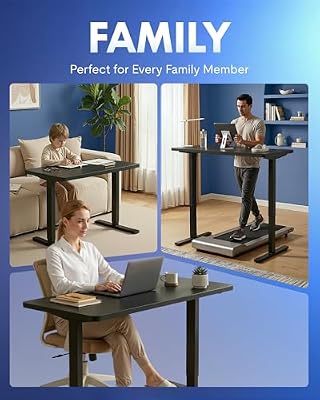
The FLEXISPOT EN1 is the sit-stand pick for streamers who appear on camera. It is an electric height-adjustable desk with four memory presets, letting you raise the whole surface — gear and all — to a standing position at the touch of a button. At around $110 it brings genuine sit-stand flexibility to a streaming setup, which matters when your sessions run long and you want to vary your posture and your on-camera framing.
This is the desk for a streamer who wants to alternate between sitting and standing without tearing down their setup. The four memory presets store your preferred heights so you can switch in seconds, standing can give a more dynamic on-camera presence for talking segments, and changing posture helps during marathon streams. Just route your cables with a little slack so they travel with the desk as it rises. For an adjustable, camera-friendly streaming desk that supports long sessions, the FLEXISPOT EN1 is the smart choice.
Pros: Electric sit-stand with 4 memory presets, flexible on-camera posture, good for long streams.
Cons: Cables need slack to travel with the lift; surface size is moderate.
4. SHW Mission 48-Inch Home Office Computer Desk, White



As an Amazon Associate we earn from qualifying purchases. Product prices and availability are accurate as of the date/time indicated.
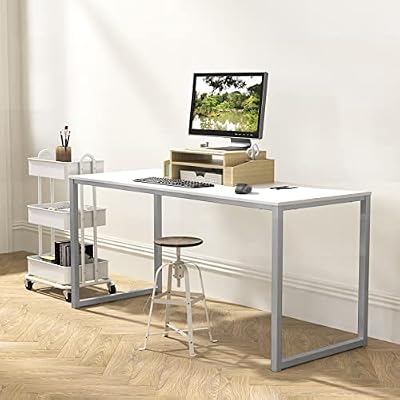
The SHW Mission 48-inch in white is the pick for a clean, bright streaming setup. A white desk reflects your lighting and keeps the area behind your gear looking fresh and uncluttered on camera, which suits a tidy, modern aesthetic. The 48-inch surface gives enough room for a monitor, keyboard, camera and a compact light, and at around $90 it is an affordable way to get a smart-looking stream desk.
This is the desk to choose for a focused, single-or-dual-monitor stream where look matters as much as space. The bright white finish photographs well and helps your lighting fill the scene, the 48-inch top fits a tidy core setup with a webcam and a key light, and the simple rectangular shape slots neatly against a wall for clean cable runs behind it. For a streamer who wants an attractive, well-lit, uncluttered desk without a large footprint, the white SHW Mission is an excellent fit.
Pros: Bright white finish flatters lighting, tidy 48-inch surface, clean look on camera, good value.
Cons: 48-inch top is tight for many clamped accessories; light finish shows marks.
5. SHW Mission 48-Inch Home Office Computer Desk, Black


As an Amazon Associate we earn from qualifying purchases. Product prices and availability are accurate as of the date/time indicated.
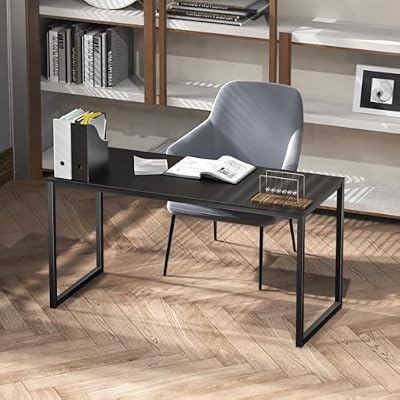
The SHW Mission 48-inch in black is the compact dual-monitor streaming pick with a neutral on-camera look. It offers the same 48-inch surface and clean profile as the white version, but the black finish recedes behind your gear and lighting, keeping attention on you and your content rather than the furniture. At around $90 it is a tidy, affordable base for a focused stream.
This is the desk for a streamer who wants a neat dual-monitor setup and a background that stays understated on camera. The 48-inch top has room for two smaller monitors or a monitor plus a camera and mic, the dark finish hides cable clutter and fingerprints better than light tones, and the straightforward shape makes it easy to run cables along the back wall. For a compact, camera-discreet streaming desk that keeps the focus on your stream, the black SHW Mission is a sensible, value-driven choice.
Pros: Neutral black finish recedes on camera, tidy 48-inch surface, hides cables well, affordable.
Cons: Compact top limits clamp-mounted gear; single straight surface.
6. Coleshome 48 Inch Computer Desk, Modern Simple Style

Coleshome 71 Inch Computer Desk with Power Outlet | Extra-long workspace • Fits dual monitors • Stable steel frame • Spacious legroom • Home office & gaming


As an Amazon Associate we earn from qualifying purchases. Product prices and availability are accurate as of the date/time indicated.
Rounding out the list is the Coleshome 48-inch, the budget starter pick for new streamers. It is a simple, modern 48-inch desk that covers the basics — a flat, stable surface for a monitor, keyboard, webcam and a small light — at around $40, the lowest price here. For someone setting up their first stream without spending much, it provides the essential foundation.
This is the desk to choose when you are just starting out and want a functional surface before investing in a larger studio setup. The 48-inch top holds a core streaming kit, the simple style suits a clean on-camera background, and the easy assembly gets you up and running quickly. It does not offer the clamp-mount sturdiness of the commercial-grade SHW or the dual-zone space of an L-shape, but as an affordable first streaming desk that handles a modest webcam-and-mic setup, the Coleshome does the essential job at a rock-bottom price.
Pros: Cheapest pick here, simple 48-inch surface, clean on-camera look, easy to set up.
Cons: Budget build; limited room and stability for heavy clamped streaming gear.
How to Choose a Desk for Streaming
Choosing a streaming desk starts with surface area, but specifically the room you need for gear beyond your screens. A stream usually adds a camera, one or two lights, a microphone arm and often a second monitor, so estimate how much of your desk that equipment will occupy and size up accordingly. A wide 55-inch surface, like the commercial-grade SHW, or an L-shaped desk, like the Mr IRONSTONE, gives you space for all of it; a 48-inch desk suits a tidier core setup. Depth helps too, letting you push monitors back while gear sits in front.
Layout and multi-monitor support are where streaming desks really differ from ordinary ones. Many streamers run a second monitor purely for chat, alerts and their broadcasting software, and an L-shaped desk shines here by giving you a dedicated wing for that second screen and your accessories, separate from your main playing area. If you want a true multi-monitor studio with everything in reach, prioritise the dual-zone layout of an L-shape; if your setup is more focused, a wide straight desk keeps things simple.
Stability and clamp-friendliness matter more for streamers than for typical desk users, because so much streaming gear clamps on. A microphone boom arm, a camera arm and key lights all mount to the desk edge, and a flimsy desk will wobble every time you adjust them — distracting on camera. A sturdy desk with a solid edge, like the commercial-grade SHW, holds clamped arms steady, while lighter budget desks are better for gear that simply sits on top. Check the edge thickness and frame rigidity if you plan to clamp.
Finally, plan for cables and think about how the desk looks on camera. Streaming generates a lot of wiring, so favour a desk where you can route cables tidily along the back, and remember that an electric standing desk like the FLEXISPOT EN1 needs slack so cables travel as it rises. Finish matters too: a white desk reflects light and looks fresh, while black recedes and hides clutter behind your setup. Set your size based on your gear, choose a layout that supports your monitors, prioritise a sturdy edge if you clamp, and pick the streaming desk on this list that fits your room and your kit.
Frequently Asked Questions
What do you need for a streaming desk setup?
A wide, sturdy desk with cable management, room for dual monitors, a mic arm and a key light, plus space for a stream deck and your camera. Depth matters so the camera and mic sit at the right distance; many streamers add a monitor arm to free up surface space.
How big should a desk be for a streaming setup?
Size it around your gear, not just your monitors. A stream typically adds a camera, one or two lights, a mic arm and often a second monitor, so a wide 55-inch desk like the commercial-grade SHW or an L-shaped desk like the Mr IRONSTONE gives room for all of it. A 48-inch desk works for a tidier core setup with a webcam and a small light. Favour extra depth so screens sit back while gear sits in front.
Is an L-shaped desk good for streaming?
Very — especially for multi-monitor streamers. An L-shape lets you put your main monitor, keyboard and camera on one wing and dedicate the other to a second monitor for chat and broadcasting software, plus lights and a stream deck. That dual-zone layout keeps everything reachable on camera without one huge desk. The Mr IRONSTONE is the pick here if you want a full multi-monitor studio.
Can I clamp a microphone arm or camera to these desks?
Yes, but stability varies. A sturdy desk with a solid edge, like the commercial-grade SHW 55-inch, holds clamped mic booms, camera arms and lights steady so they do not wobble on camera when adjusted. Lighter budget desks like the Coleshome are better suited to gear that sits on top. Check edge thickness and frame rigidity before relying on clamped accessories.
How do I keep cables tidy on a streaming desk?
Route cables along the back of the desk and group them with ties or a cable tray so they stay out of shot. A straight desk against a wall makes back-runs simple, while an L-shape gives you the rear edges of two wings to work with. If you use an electric standing desk like the FLEXISPOT EN1, leave slack so cables travel as the surface rises. Tidy cabling reads as a professional setup on camera.
Related Guides
- Best Large Desks
- Best Gaming Desks
- Best Standing Desks
- Best Microphones for Streaming
- Best Webcams for Streaming
- Best Budget Gaming Setup
Affiliate Disclosure: As an Amazon Associate, we earn from qualifying purchases. If you click a link and make a purchase, we may earn a small commission at no extra cost to you. Prices and availability are accurate as of publication and may change.










