

- Top Pick: msi MAG 341CQP QD-OLED X28 34" UWQHD Tandem QD-OLED Monitor,3440×1440,1800R,RGB Stripe,DarkArmor Film,Uniform Luminance,280Hz,0.03ms,AI Care Sensor,AMD FreeSync Premium Pro,NVIDIA G-SYNC Compatible
- Best Value: ASUS ProArt PA279CRV 27 Inch 4K UHD USB-C HDR Professional Monitor for Mac
- Premium Choice: Sceptre 27-inch Prime Gaming Monitor 100Hz 1ms DisplayPort HDMI x2 100% sRGB AMD FreeSync Build-in Speakers, Eye Care Frameless Machine Black 2025 (E275W-FW100T Series)
‘RGB monitor’ means different things to different people, so it is worth being clear up front. A handful of premium displays build addressable RGB lighting into the rear of the chassis, but most monitors marketed to gamers — including the ones on this list — are not RGB light shows in themselves. What they are is the centrepiece of an RGB setup: aggressively styled, high-refresh, often curved gaming panels with thin bezels that look the part surrounded by RGB keyboards, fans, light strips and ambient backlighting. This guide rounds up the best gaming monitors to build a glowing, color-coordinated battlestation around, and it is honest about where the lighting actually comes from.
- Best RGB Monitors at a Glance
- 1. KOORUI 27″ 4K QD-Mini LED Gaming Monitor, Dual-Mode UHD 160Hz / FHD 320Hz
- 2. SANSUI 34-Inch Curved Gaming Monitor UWQHD 3440×1440 up to 200Hz
- 3. SANSUI 32 Inch Curved 240Hz Gaming Monitor, FHD 1080P
- 4. SANSUI 27 Inch Curved 240Hz Gaming Monitor FHD 1080P, 1500R
- 5. Acer Nitro KG241Y Sbiip 23.8″ Full HD VA Gaming Monitor, FreeSync
- 6. Sceptre Curved 24-inch Gaming Monitor 1080p R1500, 98% sRGB
- How to Build a True RGB Monitor Setup
- Frequently Asked Questions
- Related Guides
- Related Articles
We picked these on what makes a monitor the heart of an RGB setup: a fast refresh rate and immersive design that match the energy of a lit rig, a thin-bezel aesthetic that disappears behind the glow, and the screen size and curvature that anchor a desk. Prices run from around $80 to around $500, spanning a value curved 24-inch up to a high-end QD-Mini LED panel whose backlight genuinely lifts color and brightness. Crucially, the most reliable way to get true RGB is to drive ambient lighting from your PC and sync it to what is on screen — more on that below. Here is the at-a-glance comparison, then each pick and an honest guide to lighting a setup.
As an Amazon Associate we earn from qualifying purchases at no extra cost to you.





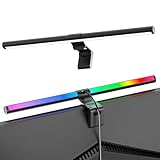

🛒 Best Price Today on Amazon
Prime members get fast, free shipping on everything above, plus member-only deals. New members get a 30-day free trial — cancel anytime.
Best RGB Monitors at a Glance
| Monitor | Best For | Standout Spec | Approx Price |
|---|---|---|---|
| KOORUI 27″ 4K QD-Mini LED Dual-Mode | Premium glow-and-brightness pick | 4K Mini-LED, UHD 160Hz / FHD 320Hz | around $500 |
| SANSUI 34-inch Curved UWQHD up to 200Hz | Ultrawide ambient-light canvas | 34-inch UWQHD, up to 200Hz | around $216 |
| SANSUI 32-inch Curved 240Hz FHD | Big-screen gamer-styled centrepiece | 32-inch, 240Hz, curved | around $180 |
| SANSUI 27-inch Curved 240Hz FHD | Fast curved RGB-setup anchor | 27-inch, 240Hz, 1500R curve | around $129 |
| Acer Nitro KG241Y 23.8″ FreeSync | Compact gamer-look value | 23.8-inch FHD VA, FreeSync | around $110 |
| Sceptre Curved 24-inch 98% sRGB | Budget battlestation starter | 98% sRGB, R1500 curve | around $80 |
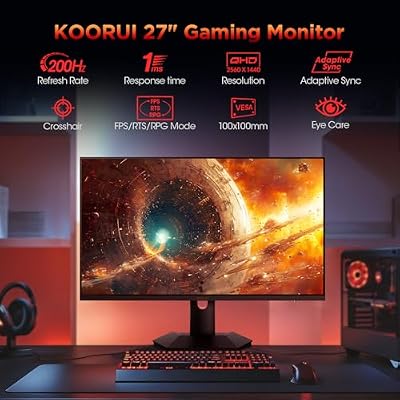
1. KOORUI 27″ 4K QD-Mini LED Gaming Monitor, Dual-Mode UHD 160Hz / FHD 320Hz

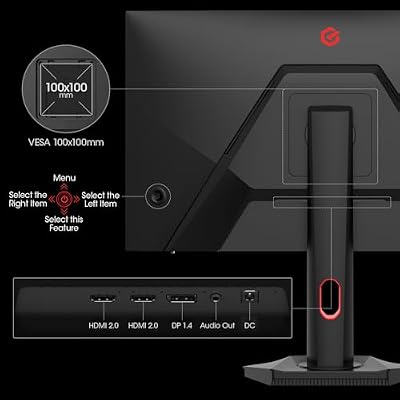
KOORUI 27 inch Mini-LED IPS Gaming Monitor, 200Hz 1ms, QHD 1440P HDR1000 | 97% DCI-P3, Adaptive Sync, PiP/PBP, Swivel/Pivot/Height Adjustable, HDMI and DisplayPort, Premium Gaming, Content Creation





As an Amazon Associate we earn from qualifying purchases. Product prices and availability are accurate as of the date/time indicated.
The KOORUI 27-inch 4K QD-Mini LED leads this list because, of all the picks, its lighting technology is the real deal — just not in the way ‘RGB monitor’ usually implies. Its QD-Mini LED backlight uses quantum dots and many local dimming zones to deliver vivid, saturated color and bright, punchy highlights, which is exactly the look that makes an RGB-themed setup pop. It is also a clever dual-mode panel, running 4K UHD at 160Hz or switching to FHD at a blistering 320Hz. At around $500 it is the premium choice here.
This is the monitor for the enthusiast building a high-end, color-rich battlestation who wants the screen itself to dazzle. The QD-Mini LED backlight produces the saturated, high-contrast image that complements RGB lighting beautifully, the 4K resolution keeps everything razor sharp, and the dual-mode trick lets you trade resolution for an extreme 320Hz refresh in competitive play. To be clear, the ‘color’ here is image quality, not rear chassis lighting — but as the visual anchor of a premium RGB setup, nothing else on the list matches it.
Pros: Vivid QD-Mini LED color and contrast, sharp 4K, clever 160Hz/320Hz dual mode.
Cons: By far the priciest pick; the lighting is in the image, not the chassis.
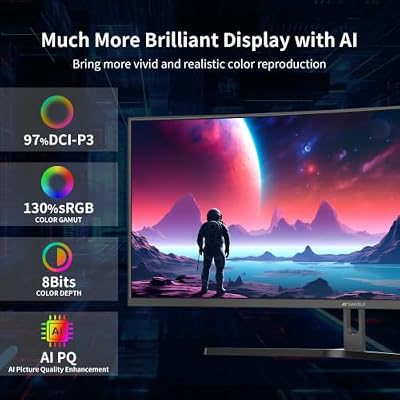
2. SANSUI 34-Inch Curved Gaming Monitor UWQHD 3440×1440 up to 200Hz

SANSUI 34-Inch Curved Gaming Monitor UWQHD 3440 x 1440P 200Hz Ultrawide | 34” Ultra Wide Gaming Computer Monitor-PBP, OD 1ms, HDR, 300nits, 130%sRGB, DCI-P3 97%,AI Crosshair,HDMI2.1x2,DP1.4




As an Amazon Associate we earn from qualifying purchases. Product prices and availability are accurate as of the date/time indicated.
The SANSUI 34-inch ultrawide is the pick for a sweeping, ambient-lit canvas. It is a 34-inch UWQHD (3440×1440) curved panel running at up to 200Hz, giving you a wide, high-resolution, fast-moving screen that fills your field of view — ideal as the broad backdrop for a setup lit with bias lighting and RGB strips behind it. At around $216 it is a lot of immersive screen for the money.
This is the monitor for the gamer who wants their battlestation dominated by one expansive display. The 21:9 ultrawide format and 1440p vertical resolution give cinematic width and crisp detail, the up-to-200Hz refresh keeps fast games fluid across that wide canvas, and the curve wraps the image around you for immersion. Mount an RGB light strip behind a screen this large and the ambient glow it casts on the wall is the centrepiece of the whole room — the panel sets the scene, your lighting supplies the color.
Pros: Expansive 34-inch UWQHD curve, fast up to 200Hz, immersive ambient-lighting backdrop.
Cons: No built-in RGB; ultrawide 1440p needs a capable GPU to drive.
3. SANSUI 32 Inch Curved 240Hz Gaming Monitor, FHD 1080P

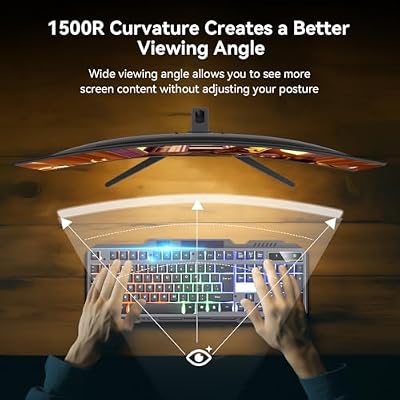
SANSUI 32 Inch Curved 240Hz Gaming Monitor High Refresh Rate, FHD 1080P | Gaming PC Monitor HDMI DP1.4, 1500R Curvature, 1Ms MPRT, HDR,Metal Stand,VESA Compatible(DP Cable Incl.)




As an Amazon Associate we earn from qualifying purchases. Product prices and availability are accurate as of the date/time indicated.
The SANSUI 32-inch curved 240Hz is the big-screen, gamer-styled centrepiece. It combines a large 32-inch curved FHD panel with a fast 240Hz refresh rate, delivering the bold, immersive, high-energy presence that suits a lit-up gaming desk. At around $180 it gives you maximum screen drama for the money, and its thin-bezel design melts into the surrounding glow of an RGB setup.
This is the monitor for the gamer who wants their rig built around one large, fast, dramatic screen. The 32-inch size makes the display the unmistakable focal point, the 240Hz refresh keeps even frantic shooters silky, and the curve adds depth and immersion. While the panel does not light up itself, its scale and aggressive styling are exactly what an RGB battlestation is built around — back it with synced fans, strips and a glowing keyboard and the effect is complete.
Pros: Big 32-inch curved screen, fast 240Hz refresh, bold gamer styling, thin bezels.
Cons: No integrated RGB lighting; 1080p across 32 inches softens detail.
4. SANSUI 27 Inch Curved 240Hz Gaming Monitor FHD 1080P, 1500R

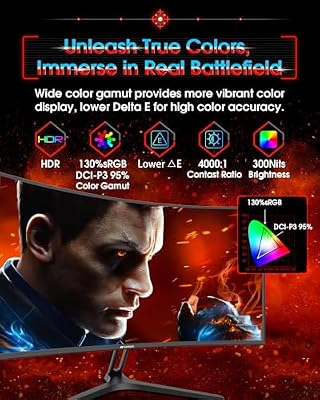
SANSUI 27 Inch Curved 240Hz Gaming Monitor FHD 1080P, 1500R Curve Computer Monitor, 130% sRGB, 4000:1 Contrast, HDR, FreeSync, MPRT 1Ms, Low Blue Light, HDMI DP Ports, Metal Stand, Cable Incl.




As an Amazon Associate we earn from qualifying purchases. Product prices and availability are accurate as of the date/time indicated.
The SANSUI 27-inch curved 240Hz is the fast, well-sized anchor for most RGB setups. It pairs a 27-inch FHD panel with a 1500R curve and a quick 240Hz refresh rate, hitting the sweet spot of immersion, speed and desk fit that most lit battlestations are built on. At around $129 it is a strong-value high-refresh centrepiece.
This is the monitor for the gamer who wants the classic curved, high-refresh look at a sensible size and price. The 27-inch panel is large enough to command the desk without overwhelming it, the 240Hz refresh keeps competitive play fluid, and the 1500R curve adds the wraparound immersion that pairs so well with ambient lighting behind the screen. It is the practical heart of an RGB setup — striking and fast — with the actual color supplied by the lighting you arrange around it.
Pros: Well-sized 27-inch curve, fast 240Hz refresh, immersive 1500R, excellent value.
Cons: Lighting must come from your setup, not the monitor; 1080p.
5. Acer Nitro KG241Y Sbiip 23.8″ Full HD VA Gaming Monitor, FreeSync

Acer Nitro 23.8in FHD 1920x1080 180Hz Gaming Monitor KG241Y Sbiip | 1ms, AMD FreeSync Premium, 2xHDMI, DisplayPort, VESA Mountable, Bluelight Filter, Flickerless Technology


As an Amazon Associate we earn from qualifying purchases. Product prices and availability are accurate as of the date/time indicated.
The Acer Nitro KG241Y is the compact, gamer-look value pick. It is a 23.8-inch Full HD VA gaming monitor with AMD FreeSync for tear-free play and Acer’s familiar Nitro styling, which carries the aggressive aesthetic that fits a lit-up desk. At around $110 it brings a recognised gaming brand and a clean, thin-bezel design to a smaller, RGB-friendly footprint.
This is the monitor for the gamer building a more compact battlestation who wants a known name and gamer styling without a big screen. The VA panel delivers deep contrast that looks great in a dim, RGB-lit room, FreeSync keeps motion smooth and tear-free with a compatible GPU, and the Nitro design sits comfortably among glowing peripherals. The lighting still comes from the rest of your setup, but as a tidy, stylish, brand-name anchor for a smaller RGB desk, the KG241Y fits well.
Pros: Gamer-styled Acer Nitro design, contrast-rich VA panel, FreeSync, compact and tidy.
Cons: No RGB lighting on the monitor; smaller 23.8-inch screen.
6. Sceptre Curved 24-inch Gaming Monitor 1080p R1500, 98% sRGB

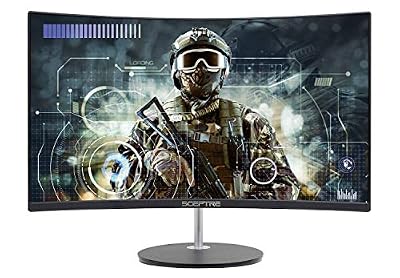
Sceptre Curved 24-inch Gaming Monitor 1080p R1500 98% sRGB HDMI x2 VGA Build-in Speakers, VESA Wall Mount Machine Black (C248W-1920RN Series)



As an Amazon Associate we earn from qualifying purchases. Product prices and availability are accurate as of the date/time indicated.
Rounding out the list is the Sceptre Curved 24-inch, the budget starter for a first RGB battlestation. It is a 24-inch curved 1080p panel with 98% sRGB coverage, an R1500 curve, dual HDMI plus VGA inputs and a thin-bezel look that blends into ambient lighting. At around $80 it is the most affordable way to get a curved, color-capable screen at the centre of a glowing setup.
This is the monitor for the gamer just beginning to build an RGB desk on a tight budget. The 98% sRGB coverage means colors look accurate and lively, the R1500 curve adds immersion that flat screens lack, and the slim bezels let surrounding light strips and synced peripherals take centre stage. It will not glow on its own, but as the affordable visual anchor you build your RGB lighting around, the Sceptre Curved 24-inch is an easy, low-cost place to start.
Pros: Affordable curved 24-inch, accurate 98% sRGB, R1500 immersion, thin-bezel look.
Cons: No built-in lighting; 1080p and standard refresh rate.
How to Build a True RGB Monitor Setup
The first thing to understand is where the ‘RGB’ in an RGB setup actually comes from. A small number of premium monitors include addressable lighting on the rear of the chassis, but most gaming monitors — including every panel on this list — do not. That is not a flaw; it is how the category works. The reliable, flexible way to get vivid, synced color is to add lighting around the screen and drive it from your PC, then choose a monitor whose size, speed and styling make the best centrepiece for that glow.
Ambient and bias lighting is the single most effective upgrade. An RGB light strip mounted behind your monitor casts color onto the wall, reduces eye strain in a dark room, and makes the screen appear to float in light — and on a large panel like the SANSUI 32-inch or the 34-inch ultrawide, that wash of color is dramatic. Software such as the lighting suites from major peripheral brands can even sync those strips and your fans, keyboard and mouse to the same palette, or react to what is on screen, for a fully coordinated effect.
When the monitor is the anchor rather than the light source, prioritise the traits that complement RGB. A fast refresh rate (the 200Hz, 240Hz and dual-mode 320Hz panels here) matches the high-energy feel of a lit rig, thin bezels let the surrounding glow take over, and a curve adds immersion. A panel with punchy, saturated image quality — the QD-Mini LED KOORUI is the standout — makes on-screen color pop in a way that visually harmonises with your lighting, even though that is image quality rather than chassis RGB.
Finally, build the look as a system and be honest about each part’s role. Pick the screen that fits your desk and play style, add bias lighting behind it, and extend the theme with synced fans, strips and peripherals so everything shares a palette. Spend where it counts: a striking, fast monitor plus affordable, well-placed RGB lighting usually beats chasing a rare monitor with built-in lights. The result — a fast, immersive panel framed by coordinated color — is the RGB battlestation most people actually want.
Frequently Asked Questions
Do these monitors have built-in RGB lighting?
Honestly, no — the panels on this list are gamer-styled, high-refresh gaming monitors rather than displays with addressable RGB on the chassis. That is normal for the category. The most reliable way to get true RGB is to add bias or ambient lighting behind the screen and drive it from your PC, choosing a monitor like these whose size, speed and styling make the best centrepiece for that glow.
What is the best way to get a real RGB effect at my desk?
Mount an RGB light strip behind your monitor for bias lighting, then sync it with your fans, keyboard and mouse using your peripheral brand’s lighting software. This casts coordinated color onto the wall and ties the whole setup together — far more flexible and dramatic than relying on a monitor’s own lights, especially behind a large panel like the SANSUI 32-inch or 34-inch ultrawide.
Does the KOORUI QD-Mini LED count as an RGB monitor?
Not in the lighting sense — its QD-Mini LED backlight produces exceptionally vivid, high-contrast color in the image itself, which makes it the perfect visual anchor for an RGB setup, but it does not have rear chassis lighting. Think of it as the panel that makes on-screen color pop, paired with ambient RGB lighting you add around it for the full effect.
Which monitor here is the best centrepiece for an RGB battlestation?
For most setups the SANSUI 27-inch or 32-inch curved 240Hz panels hit the sweet spot of size, speed and price, with thin bezels that let surrounding light take over. If you want maximum drama, the 34-inch ultrawide gives a huge ambient-light canvas, while the KOORUI QD-Mini LED is the premium pick for sheer on-screen color and brightness.
Related Guides
- Best RGB Keyboards
- Best RGB Case Fans
- Best RGB Mouse
- Best Gaming Monitors
- Best Gaming PC Builds
- Best Budget Gaming Setup
Affiliate Disclosure: As an Amazon Associate, we earn from qualifying purchases. If you click a link and make a purchase, we may earn a small commission at no extra cost to you. Prices and availability are accurate as of publication and may change.










