

- Top Pick: Dell 15.6 Laptop, FHD, Intel Core 3 100U, 8GB RAM, Windows 11 Home | 300 nits Anti-Glare WVA, Intel UHD Graphics, DDR5, 512GB SSD, Wi‑Fi 6, Bluetooth, Carbon Black, 3‑Cell 41WHr Battery, DC15250
- Best Value: Dell Latitude 5420 14" FHD Business Laptop Computer, Intel Quad-Core i5-1145G7, 16GB DDR4 RAM, 256GB SSD, Camera, HDMI, Windows 11 Pro (Renewed)
- Premium Choice: Dell 15.6 Laptop, FHD, Intel Core Ultra 5 225U, 16GB RAM, Windows 11 Home | Anti-Glare 300 Nits WVA, Intel Graphics, DDR5, 512GB SSD, Backlit Keyboard, Wi-Fi 6, Carbon Black, Business Ready, D15260
Choosing a Dell for school sounds simple until the listings pile up: some carry a Core 3 chip, some a Core Ultra 5, a few are touchscreens, and two are renewed business machines with a different badge on the lid. The real question for 2026 is how much laptop a student needs for the next four years of essays, spreadsheets, video lectures and group calls, and which Dell spec lines actually move that answer.
This guide is written for high school and college students, and for parents buying on their behalf. It sticks to what the listing titles state: processor, memory, storage, panel type, ports and wireless. Nine Dell models are compared below, with notes on who each one suits and where it falls short, so you can narrow the field before opening a single product page.
Quick Picks
As an Amazon Associate we earn from qualifying purchases at no extra cost to you.







| Product | Best for | Key spec from the title |
|---|---|---|
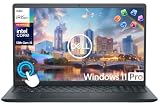
| Dell 15.6 Core 3 100U (DC15250) | Everyday coursework on a tight budget | 8GB DDR5, 512GB SSD, 300 nits anti-glare |
| Dell Latitude 5420 Core i5 | Compact 14-inch carry | i5-1145G7, 16GB RAM, renewed |
| Dell 15.6 Core Ultra 5 225U | Longest useful lifespan | 16GB DDR5, backlit keyboard |
| Dell 15.6 Core 3 100U (250 nits) | Lowest-spec entry choice | 8GB DDR4, IPS-type panel |
| Dell 15.6 Touchscreen Core i5-1334U | Note-taking and tapping through apps | 13th Gen i5, 1080p webcam |
| Dell Inspiron 15.6 Touchscreen i5-1155G7 | Roomy storage with a number pad | 16GB RAM, 1TB SSD |
| Dell Inspiron 15 10-Core i5 Bundle | Storage and software bundled in | 16GB, 512GB SSD plus 500GB external |
| Dell 15.6 Ryzen 5 7520U | Smooth scrolling and video | 120Hz IPS, LPDDR5, 512GB SSD |
| Dell Latitude 5420 Core i7 | Engineering and multitasking loads | i7-1185G7, Thunderbolt 4, 512GB NVMe |
How to Choose
Memory and processor
Treat 8GB of RAM as the floor and 16GB as the comfortable target. A student with a browser holding twenty tabs, a streaming lecture and a word processor open will feel the gap. Among the models here, the Core 3 100U and Core i5-1334U listings pair with 8GB, while the Core Ultra 5, both Latitudes and both Inspirons list 16GB. Newer chip families usually bring better efficiency, but memory capacity decides day-to-day smoothness more than the processor badge does.
Display brightness and panel type
All of these are 1920 x 1080 class screens, so compare brightness and coating. A 300-nit anti-glare panel is easier to read near a classroom window than a 250-nit one. IPS-type panels hold their color from side angles, which matters when a friend looks at your screen. A 120Hz refresh rate, listed on the Ryzen 5 model, makes scrolling feel smoother, but it is a comfort feature rather than a grade booster. Touchscreens add convenience for annotation and often add glare, so decide whether you will really use them.
Storage, ports and wireless
A 256GB drive fills quickly once large course software and downloaded video arrive. Aim for 512GB, or 1TB if you edit media. Check for an HDMI output so you can plug into a projector, and note that Thunderbolt 4, listed on the Core i7 Latitude, lets you drive an external monitor and fast drives through one cable. Wi-Fi 6 appears on most listings, while the Ryzen 5 model lists Wi-Fi 5, which is fine on a modest home connection but less future-proof on a busy campus network.
New versus renewed, Home versus Pro
The two Latitude 5420 units are labeled renewed, which means previously owned business hardware that has been refurbished. They bring business-class ports and Windows 11 Pro, but the processor generation is older, and buyers should read the return terms and battery notes carefully. Windows 11 Home covers nearly all student needs; Pro mainly adds management features such as drive encryption and domain joining, which matter only if a school or employer asks for them.
The 9 Best Options
Dell 15.6 Core 3 100U (DC15250)
This is the straightforward all-rounder for a student who needs a full-size screen without stretching the budget. The title lists an Intel Core 3 100U, 8GB of DDR5 memory, a 512GB SSD and a 300-nit anti-glare panel, plus Wi-Fi 6 and a 41WHr three-cell battery.
- Strength: DDR5 memory and a 512GB SSD on a budget-tier model.
- Strength: 300-nit anti-glare screen suits bright rooms.
- Trade-off: 8GB leaves little headroom for heavy multitasking.
Skip it if you plan to keep the laptop through a long degree with demanding software.
Dell Latitude 5420 Core i5 (Renewed)
A 14-inch business laptop in a smaller footprint, listed with a quad-core i5-1145G7, 16GB DDR4 RAM and a 256GB SSD. The camera and HDMI port are named in the title, and it ships with Windows 11 Pro.
- Strength: 16GB of RAM is generous for the budget tier.
- Strength: smaller 14-inch body fits crowded lecture desks.
- Trade-off: 256GB storage fills fast, and the renewed status means older hardware.
Skip it if you want a warranty-fresh machine or plan to store large project files. The 14-inch size also means less room for side-by-side windows than a 15.6-inch screen.
Dell 15.6 Core Ultra 5 225U
The newest processor family in this roundup. The listing names a Core Ultra 5 225U, 16GB of DDR5, a 512GB SSD, a backlit keyboard and an anti-glare 300-nit panel, with Wi-Fi 6 and a Carbon Black finish.
- Strength: 16GB and 512GB cover most majors without upgrades.
- Strength: backlit keyboard helps in dark dorms and libraries.
- Trade-off: it sits in the mid-range tier, above the entry Core 3 models.
Skip it if your coursework is light writing and browsing and you would rather stay in the budget tier. Students who only need a word processor and a browser can reach the same results with a simpler model.
Dell 15.6 Core 3 100U (250 nits)
A near twin of the first model with different memory and panel details: 8GB of DDR4, a 512GB SSD, Wi-Fi 6 with Bluetooth and an anti-glare IPS-type display rated at 250 nits.
- Strength: IPS-type panel keeps colors steady at wider angles.
- Strength: 512GB SSD gives room for a full semester of files.
- Trade-off: DDR4 and the dimmer 250-nit screen trail the first Core 3 listing.
Skip it if you can choose the DDR5, 300-nit version instead. It makes sense mainly when this exact configuration is the one in stock, since the two listings otherwise share the same processor and storage.
Dell 15.6 Touchscreen Core i5-1334U
This one adds touch to a 13th Gen Core i5-1334U, with 8GB of RAM, a 512GB PCIe SSD, Wi-Fi 6, a 1080p webcam, HDMI and a Copilot AI mention. The title frames it as business and study ready.
- Strength: 1080p webcam suits online classes and interviews.
- Strength: touch input helps with annotation and tapping through apps.
- Trade-off: only 8GB of memory beside a stronger processor.
Skip it if you never touch the screen and would rather have more RAM. Students running several apps at once may find the 16GB models above a better long-term fit.
Dell Inspiron 15.6 Touchscreen i5-1155G7
An Inspiron aimed squarely at business and student use, with a Core i5-1155G7, 16GB of RAM, a 1TB SSD, Windows 11 Pro and a Full HD IPS touchscreen. The title also notes a numeric keypad.
- Strength: 1TB of storage with 16GB of RAM is a rare pairing.
- Strength: numeric keypad speeds up accounting and data entry.
- Trade-off: the 11th Gen processor is older than several rivals here.
Skip it if you want the latest chip family or the lightest possible carry. A full-size 15.6-inch body with a number pad is bulkier in a backpack than the 14-inch Latitudes.
Dell Inspiron 15 10-Core i5 Bundle
This listing bundles a 15.6-inch Full HD touchscreen with a 10-core Intel i5, 16GB of RAM, a 512GB SSD plus a 500GB external drive, Windows 11 Pro and an office suite. The add-on bundle is assembled by a third-party seller rather than Dell.
- Strength: 1TB of combined storage and software in one box.
- Strength: 10-core processor named in the title.
- Trade-off: bundled extras come from the seller, so check what ships.
Skip it if you want a plain Dell-configured package with standard support terms. Confirm which office suite and external drive are included before relying on them for coursework.
Dell 15.6 Ryzen 5 7520U
The only AMD model here pairs a Ryzen 5 7520U with Radeon 610M graphics, LPDDR5 memory and a 512GB SSD. Its FHD IPS screen runs at 120Hz, which is unusual at this tier.
- Strength: 120Hz IPS display makes scrolling and video feel fluid.
- Strength: LPDDR5 memory and a 512GB SSD on a mid-range model.
- Trade-off: Wi-Fi 5 rather than Wi-Fi 6, and the memory size is not stated in the title.
Skip it if campus Wi-Fi is congested and you want the newer wireless standard. Buyers who like the 120Hz screen but need Wi-Fi 6 should look at the other mid-range Dell listings instead.
Dell Latitude 5420 Core i7 (Renewed)
The most capable renewed unit, listed with a Core i7-1185G7, 16GB of DDR4, a 512GB M.2 NVMe SSD, Thunderbolt 4, HDMI, a webcam and Windows 11 Pro on a 14-inch Full HD screen.
- Strength: Thunderbolt 4 supports external monitors and fast drives.
- Strength: Core i7 with 16GB suits engineering and coding.
- Trade-off: renewed hardware means older components and a business-style look.
Skip it if you want touch, a larger screen or a brand-new chassis. Remember that it carries the same older 11th Gen platform as the other Latitude, only with a faster chip tier.
Which One Fits Your Situation
Incoming freshman on a tight budget
Go with the Dell 15.6 Core 3 100U (DC15250). It has DDR5, a 512GB drive and a bright anti-glare panel, and it covers writing, research and video calls without extras.
Engineering or computer science major
The Dell Latitude 5420 Core i7 stands out for its Thunderbolt 4 port and 16GB of memory, while the Core Ultra 5 model is the newer-generation alternative if you prefer a fresh chassis.
Student who writes notes by hand
Choose the Dell 15.6 Touchscreen Core i5-1334U for its touch panel and 1080p webcam, and consider the Inspiron i5-1155G7 if you want 1TB of storage for scanned notes.
Parent buying for a media-heavy teen
The Ryzen 5 7520U model with the 120Hz display makes video and scrolling smoother, and it keeps the budget in the mid-range tier.
Common Mistakes
- Buying 8GB of RAM for a four-year degree plan when 16GB models sit in the same lineup.
- Ignoring the word “renewed” and expecting new-device warranty terms.
- Assuming a touchscreen is automatically better, even though it can add glare and weight.
- Confusing similar model numbers such as DC15250 and DC15255, which differ in processor and display.
- Choosing a 256GB drive and running out of room by the second semester.
Related guides
- Combination Smoke And Carbon Monoxide Detectors
- Aio Liquid Coolers For High Performance Gaming
- Graphics Cards For Low Wattage Power Supplies
Frequently Asked Questions
Is 8GB of RAM enough for a student laptop?
It handles writing, browsing and video calls, but it leaves little room for heavy multitasking. If the laptop must last several years, 16GB is the safer target.
Are renewed Latitude laptops a good idea for school?
They can be, since business-class ports and Windows 11 Pro are included. Read the seller’s return terms and expect an older processor generation than the newer models.
Does a 120Hz screen matter for studying?
It makes scrolling and cursor movement feel smoother, but it does not change how documents or lectures work. Treat it as a comfort feature, not a requirement.
Which Dell is best for programming classes?
Look for 16GB of RAM and a 512GB SSD at minimum. The Core i7 Latitude and the Core Ultra 5 model both meet that bar based on the listed specs.








