The real decision with laptop memory is not chasing the highest number printed on a box. It is whether a kit physically fits your machine, runs at a speed your processor actually supports, and matches the number of slots you really have. A desktop DIMM will never seat in a laptop, a DDR5 stick will never enter a DDR4 slot, and a fast kit can still fall back to a slower profile on a locked-down notebook.

This guide serves owners of DDR4-era gaming laptops, students reviving an older notebook, and mini PC users with SO-DIMM slots. Every pick below was chosen from the product name and specifications stated on its Amazon listing, so capacity, speed, latency, voltage, and pin count can all be checked against your exact model before ordering.
Quick Picks
As an Amazon Associate we earn from qualifying purchases
| Product | Best for | Key spec from title |
|---|---|---|
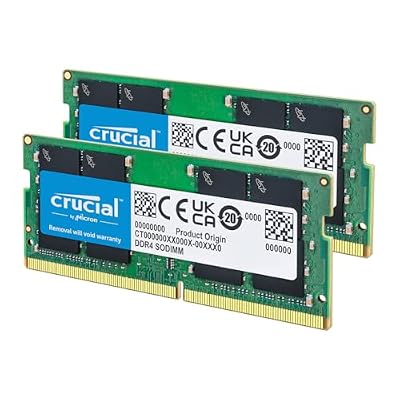
| Crucial 32GB DDR4 RAM Kit (2x16GB) 3200MHz | Two empty slots and a full matched upgrade | 3200MHz, CL22, 260-pin SO-DIMM |
| Kingston FURY Impact 32GB (2x16GB) 3200MT/s | Gaming laptops that can use tighter timings | 3200MT/s, CL20, Plug N Play |
| G.SKILL Ripjaws DDR4 SO-DIMM 32GB (2x16GB) | Notebooks, NUCs and mini PCs on JEDEC profiles | 3200MT/s, CL22-22-22-52, 1.20V |
| CORSAIR Vengeance SODIMM 16GB (1x16GB) | Filling one free slot beside existing memory | 3200MHz, CL22-22-22-53, 1.2V |
| Crucial 16GB DDR4 RAM Kit (2x8GB) 3200MHz | An 8GB laptop moving to proper dual channel | 3200MHz, CL22, 260-pin SO-DIMM |
How to Choose
Start with the slot: SO-DIMM, DDR4, and nothing else
A laptop takes a 260-pin SO-DIMM, a short module that looks nothing like the long 288-pin DIMM sold for desktops, and the two cannot be swapped with any adapter worth trusting. The generation matters just as much: a DDR4 slot has a notch placed so a DDR5 stick cannot seat, and DDR3 belongs to an older family again. Before reading any speed figures, open your laptop maker’s support page, confirm the machine lists DDR4 SO-DIMM slots, and count them. Some thin models solder memory to the board and offer one slot, or none at all, which ends the upgrade before it starts.
Buy the speed and latency your processor will actually run
Most DDR4 laptops top out at DDR4-3200, and many older Intel and Ryzen mobile chips are capped at 2933 or 2666, so a 3200 kit in those machines simply downclocks and runs at the lower rate. That fallback is normal and harmless, but it means paying for headline speed you never see. Latency splits the field: plain JEDEC kits run CL22 at any supported speed, while lower-latency CL20 kits reach their timings through automatic profiles that a few locked BIOS designs refuse. Desktop buyers face a different menu, covered in our guide to the best gaming RAM in DDR4, so keep laptop listings separate.
Check the voltage line before the brand name
Standard DDR4 laptop memory runs at 1.2V, and every kit in this guide states that figure on its listing. That number is a compatibility gate, not a detail. Kits built around 1.35V profiles are usually desktop parts or overclocking lines that expect a BIOS menu most laptops never expose; installed in a notebook limited to 1.2V, they either refuse to boot or drop to a slow default profile. If a listing leads with an XMP speed but buries the voltage, read the specification table until you find it. A kit that states 1.2V and a JEDEC profile asks nothing of your BIOS and is the safer default.
Match capacity to your slots, and keep channels paired
Capacity only helps when the layout makes sense. Two matched sticks run in dual channel, which feeds integrated graphics far better than a single stick of the same total size, so a 2x8GB kit usually beats one 16GB module in a two-slot machine used for gaming. Check the per-slot ceiling too: many DDR4 laptops accept 16GB per slot, some take 32GB, and a few older models stop at 8GB. If one slot holds soldered memory, buy a single stick that matches its size and speed, because the paired portion keeps dual-channel behaviour while the extra capacity runs beyond it.
The 5 Best Options
Crucial 32GB DDR4 RAM Kit (2x16GB) 3200MHz
This is the straightforward full replacement for a two-slot DDR4 laptop that arrived with 8GB or a mismatched pair. Because it follows the standard JEDEC profile at CL22 and 1.2V, it asks nothing from the BIOS and steps down cleanly to 2933 or 2666 in machines whose processor caps memory speed there. That makes it the lowest-drama route to 32GB for gaming, coursework, and heavy browser use, and the matched pair keeps both channels working at the same capacity for integrated graphics.
Specs
- Capacity: 32GB kit (2x16GB)
- Speed: 3200MHz, downclockable to 2933MHz or 2666MHz
- Rating: PC4-25600
- Latency: CL22
- Form factor: 260-pin SO-DIMM
- Voltage: 1.2 Volts
- Model: CT2K16G4SFRA32A
- Dimensions: 2.7 x 0.43 x 1.1 inches
Best for: A two-slot laptop getting a complete, matched 32GB upgrade in one step.
Watch out for: Confirm your model accepts 16GB in each slot; some older notebooks cap each slot at 8GB, and this kit replaces both existing sticks.
Kingston FURY Impact 32GB (2x16GB) 3200MT/s DDR4 CL20
The FURY Impact kit is the pick for a gaming laptop whose owner wants tighter timings without opening a BIOS menu that may not exist. Its listing describes Plug N Play automatic overclocking to the highest published frequency, XMP-ready profiles for machines that do expose them, and Ryzen readiness, all at a low 1.2V draw. At CL20 it runs two latency steps tighter than the JEDEC kits here, which suits Ryzen laptops in particular, where integrated graphics share system memory and feel latency more directly.
Specs
- Capacity: 32GB kit (2x16GB)
- Speed: 3200MT/s
- Latency: CL20
- Form factor: 260-pin SO-DIMM
- Voltage: 1.2 Volts
- Profiles: Intel XMP-ready, Plug N Play automatic overclocking
- Model: KF432S20IBK2/32
- Warranty: Lifetime, per the listing
Best for: Gaming laptops, especially Ryzen models, where CL20 timings at 3200MT/s can actually be used.
Watch out for: The listing’s own buyer feedback flags some Dell XPS models that only accept CL22 and above, so check your model’s latency requirements before choosing this kit over a JEDEC one.
G.SKILL Ripjaws DDR4 SO-DIMM 32GB (2x16GB) 3200MT/s

Ripjaws is the alternative matched 32GB kit for buyers whose machine is not a conventional laptop at all, or who simply prefer this maker’s configurator support. The listing names laptops and notebooks alongside all-in-one PCs, Intel NUCs, and mini PCs as compatible devices, states a JEDEC default profile so the kit boots at the SPD speed on compatible hardware, and warns plainly against mixing kits. Its full timing string is printed in the title, which makes cross-checking against a service manual unusually easy before you order.
Specs
- Capacity: 32GB kit (2x16GB)
- Speed: 3200MT/s
- Timings: CL22-22-22-52
- Form factor: 260-pin SO-DIMM, non-ECC, unbuffered
- Voltage: 1.20V
- Profile: JEDEC default included
- Model: F4-3200C22D-32GRS
- Warranty: Limited lifetime, per the listing
Best for: NUC and mini PC owners, plus laptop buyers who want the full timing string stated up front.
Watch out for: G.SKILL directs buyers to its QVL and RAM Configurator for validated hardware, so run your exact model through that check rather than assuming every DDR4 slot behaves the same.
CORSAIR Vengeance SODIMM DDR4 RAM 16GB (1x16GB) 3200MHz
A single 16GB module solves a different problem from the kits above: the laptop with one occupied or soldered slot and one genuinely free slot. Corsair’s listing says the module boosts speed automatically without BIOS reconfiguration, names 11th Generation Intel Core DDR4 notebooks and NUCs as its design target, and backs the stick with a limited lifetime warranty. Fitted beside a matching 16GB stick it completes a dual-channel pair; fitted beside an 8GB stick it still lifts total capacity while the first portion runs paired.
Specs
- Capacity: 16GB (1x16GB)
- Speed: 3200MHz
- Timings: CL22-22-22-53
- Form factor: 260-pin SO-DIMM
- Voltage: 1.2 Volts
- Model: CMSX16GX4M1A3200C22
- Warranty: Limited lifetime, per the listing
Best for: One free slot beside soldered or existing 8GB or 16GB memory that needs a partner.
Watch out for: Match the existing stick’s speed and voltage; a mismatched pair runs at the slower stick’s settings, and a single module alone gives no dual-channel benefit.
Crucial 16GB DDR4 RAM Kit (2x8GB) 3200MHz
Not every DDR4 laptop needs 32GB, and this matched 16GB pair is the sensible ceiling for an older machine used for esports titles, study, and everyday work. It carries the same JEDEC behaviour as the larger Crucial kit, running at 3200 and stepping down to 2933 or 2666 where a processor demands it, so compatibility reasoning stays simple. Moving from a single 8GB stick to this pair also turns on dual channel across the full capacity, which is the change integrated graphics notice most at this size.
Specs
- Capacity: 16GB kit (2x8GB)
- Speed: 3200MHz, downclockable to 2933MHz or 2666MHz
- Rating: PC4-25600
- Latency: CL22
- Form factor: 260-pin SO-DIMM
- Voltage: 1.2V
- Model: CT2K8G4SFRA32A
Best for: An 8GB laptop that needs dual channel and breathing room rather than maximum capacity.
Watch out for: If you already own one good 8GB DDR4-3200 stick, a single matching 8GB module may complete the pair for less; this kit makes most sense when both slots are being replaced.
Which One Fits Your Situation
Both slots are empty and you want this done once
Choose the Crucial 32GB kit. A matched pair at a standard JEDEC profile removes the two common failure points, mixed timings and unsupported profiles, and 32GB is enough headroom that a DDR4 laptop is unlikely to need its memory opened again. The Kingston kit becomes the better answer only if your model is known to accept its tighter CL20 timings.
One slot is free and the other is soldered or already filled
Take the Corsair Vengeance 16GB single module. Kits cannot help a machine with a single working slot, so the job becomes matching what is already there: same DDR4 generation, same 3200 speed class, same 1.2V operation. Fitted beside an existing 16GB stick it completes the pair, and beside an 8GB stick it still raises total capacity usefully.
Your laptop is older and capped below 3200
Either Crucial kit fits, because both listings state downclocking to 2933 and 2666 as a designed behaviour rather than a hope. Pick by capacity: the 2x8GB pair for a light-use machine, the 2x16GB pair if the model accepts it and you keep many applications open. The speed cap comes from your processor, so no faster-branded kit changes that ceiling.
You play on integrated graphics and want every timing gain
Look at the Kingston FURY Impact kit first. Integrated graphics borrow system memory, so tighter CL20 timings and a matched dual-channel pair both feed the graphics core better than a single loose stick. Confirm your exact model accepts CL20 before ordering, because a small number of notebooks, including some Dell XPS designs, insist on CL22.
Common Mistakes
- Ordering a desktop DIMM for a laptop: the 288-pin module cannot fit a 260-pin SO-DIMM slot, whatever the speed printed on it.
- Assuming a 3200 kit guarantees 3200 operation, when the processor in many DDR4 laptops caps memory at 2933 or 2666.
- Buying a 1.35V profile kit for a notebook that supplies only 1.2V and offers no BIOS setting to change it.
- Filling one slot with a large single stick and leaving the second empty, losing dual channel that integrated graphics rely on.
- Skipping the service manual check for slot count and per-slot capacity, then discovering soldered memory or an 8GB-per-slot ceiling after delivery.
Frequently Asked Questions
Can I mix a new stick with the memory already in my laptop?
Yes, provided the generation, speed class, and voltage match, and the machine will run both sticks at the slower one’s settings. A matched kit is still the safer route because its modules share timings by design. If one slot is soldered, match that fixed stick’s size and speed as closely as the listings allow.
Will DDR4-3200 memory work in a laptop rated for 2666?
Yes. Every Crucial and G.SKILL kit above states downclocking or a JEDEC default profile, so the modules run at the highest speed the processor supports instead of failing to boot. You gain capacity and dual channel, not the headline speed, so judge the upgrade on those terms rather than on the 3200 figure alone.
Is 16GB or 32GB the right target for a DDR4 gaming laptop?
Sixteen gigabytes in a matched pair covers esports titles and most older games comfortably. Thirty-two gigabytes suits newer releases played alongside voice chat, recording, or a browser full of guides, and it removes memory as the likely bottleneck for the rest of the machine’s life. Capacity beyond your slot and processor limits, though, buys nothing.
How do I check how many slots my laptop has before buying?
Read the model’s service or maintenance manual on the maker’s support site, which states slot count, memory generation, and maximum capacity per slot. A system information tool can show populated slots, but only the manual settles whether memory is soldered. Check before ordering, because that single fact decides between a kit and a single module.