

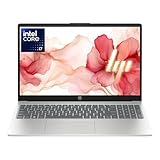
- Top Pick: HP New Core i7 15.6" Laptop | 2026 Edition | Intel High-Performance Core i7-1255U up to 4.7GHz | 16GB RAM – 1TB PCIe SSD | Webcam | FHD | Long Battery Life | Windows 11 | Business & Academic
- Best Value: Dell Inspiron 15.6" Touchscreen Business Laptop | 13th Gen Intel Core i7-1355U(10 Cores, Up to 5.0Ghz) | 16GB RAM | 512GB PCIe SSD | FHD Display | USB-C, HDMI, SD Card Reader | Windows 11
- Premium Choice: 17.3 Inch Laptop, Core i7 CPU (Up to 4.5 GHz), 16GB RAM, 512GB SSD, WIFI 6 | Win11 Home Expandable Storage Laptops Computer Backlit Keyboard Numeric Pad Business and Gaming
“Core i7” sounds like a single tier, but on a laptop it can mean a chip from 2018 or one from the last two years, a low-power ultrabook processor or a high-wattage one. That spread is the real decision behind a search for the best Core i7 laptops: you are choosing a generation, a form factor, and a condition (new or renewed) at least as much as a badge. A newer i7 in a mid-range chassis will often feel quicker for everyday work than an older i7 in a premium one.
The eight laptops below are mostly office and study machines, from 14-inch business notebooks to a 17.3-inch screen with a numeric pad. None of the titles mentions a dedicated graphics card, so think of them as capable all-rounders for documents, video calls, browsing, and light creative work rather than gaming rigs. Details come from the listing text only, and the shortlist ends with advice on matching a machine to your routine. Battery life, cooling headroom, and chassis quality also vary between a thin ultrabook and a bulky 17-inch model, so a spec sheet only gets you so far.
Quick Picks
As an Amazon Associate we earn from qualifying purchases at no extra cost to you.




| Product | Best for | Key spec from the title |
|---|---|---|
| HP 15.6″ Core i7 | Study and office with big storage | i7-1255U, 16GB RAM, 1TB SSD |
| Dell Inspiron 15.6″ Touchscreen | Touch-friendly everyday use | i7-1355U, 16GB, 512GB SSD |
| 17.3 Inch Core i7 Laptop | Large-screen spreadsheets | 16GB, 512GB SSD, numeric pad |
| Dell Inspiron 15 3530 | Newer chip with Pro OS | i7-1355U, 1TB SSD, Windows 11 Pro |
| Dell Latitude 5420 (i7-1185G7) | Business travel, ports | Thunderbolt 4, 512GB NVMe |
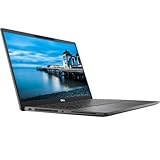
| Dell Latitude 7420 | Lightweight business notebook | 11th Gen i7, carbon fiber |
| Dell Latitude 7490 | Entry renewed workhorse | i7-8650U, 16GB, 512GB SSD |
| Dell Latitude 5420 (256GB) | Light storage needs | 16GB RAM, 256GB SSD |
How to Choose
Processor generation matters more than the i7 label
Read the full model string. A chip such as the i7-1355U belongs to the 13th generation, the i7-1255U to the 12th, the i7-1185G7 to the 11th, and the i7-8650U to the 8th. Newer generations bring better efficiency and stronger integrated graphics. The “U” suffix signals a low-power processor aimed at battery life, which suits thin laptops but will not match a high-wattage chip for sustained heavy loads. If the listing gives only “Core i7” with a vague speed, treat the generation as unknown and ask for the model before buying. As a rule, 12th Gen and newer is a reasonable floor for new machines, while older generations make sense only when the rest of the package is strong.
Memory and storage thresholds
All eight machines list 16GB of RAM, which is a comfortable baseline for many browser tabs plus office apps. For storage, 512GB is a sensible floor; 256GB fills quickly with a few large files, while a 1TB drive gives breathing room. Remember that a drive never runs at full capacity in practice, because the operating system and recovery files take a share, so a nominal 256GB leaves noticeably less than that for your own files. Look for NVMe or PCIe wording, which indicates a fast solid-state drive that makes boot and app launch times snappier than older SATA storage, and “expandable storage” if you expect to add a second drive later.
New versus renewed
Four of these laptops carry the Renewed label. Renewed business laptops can offer strong build quality and ports for the budget tier, but battery wear, warranty terms, and cosmetic condition vary, so read the seller’s conditions closely. Ask how long the return window lasts and whether the battery is covered, because a worn battery is the usual weak point on an older notebook. New models give a clean battery and a full warranty window, and they typically come with newer processor generations.
Screen, ports, and operating system
1920 x 1080 is the baseline resolution here. Touchscreens appear on the two newer Inspiron listings, while the larger 17.3-inch model adds a numeric keypad. For connectivity, look for HDMI, USB-C, and Thunderbolt 4 if you want to run external monitors or fast docks. Windows 11 Pro adds business features such as device encryption management, which matters in a work setting more than at home. Windows 11 Home is fine for most households, and a larger screen usually means a heavier machine, so decide whether you carry the laptop daily before choosing a 17.3-inch size.
The 8 Best Options
HP 15.6″ Core i7 Laptop
This new HP, listed as a 2026 Edition, pairs the i7-1255U, listed with a boost up to 4.7GHz, with 16GB RAM and a 1TB PCIe SSD. It is positioned for business and academic use, with a webcam, FHD screen, and Windows 11. The long-battery-life wording is the title’s own claim, so treat it as a selling point to verify rather than a measured figure.
- Strength: a generous 1TB drive with a fast PCIe interface.
- Strength: a 12th-generation chip in a new-condition machine.
- Trade-off: the title lists no ports beyond the webcam, so confirm the connectors.
Skip it if you need a touchscreen or Windows 11 Pro features.
Dell Inspiron 15.6″ Touchscreen Business Laptop
A 13th Gen Core i7-1355U with 10 cores and boost up to 5.0GHz, 16GB RAM, and a 512GB PCIe SSD. The title also lists USB-C, HDMI, and an SD card reader. The touchscreen and the ten-core count make it a good fit for someone who sketches, annotates documents, or multitasks heavily.
- Strength: a current-generation chip with a clear core count.
- Strength: a good port mix, including an SD card reader for photographers.
- Trade-off: 512GB is moderate for large media libraries.
Skip it if you want more built-in storage.
17.3 Inch Core i7 Laptop (WiFi 6)
The only large-screen model here, with a Core i7 up to 4.5 GHz, 16GB RAM, 512GB SSD, WiFi 6, backlit keyboard, numeric pad, and Windows 11 Home. The title mentions expandable storage and says it suits business and gaming. Because no graphics card appears in the title, set expectations for gaming accordingly. Its appeal is mostly the big canvas and the keypad for number work.
- Strength: a 17.3-inch display and numeric pad suit spreadsheets.
- Strength: backlit keyboard and expandable storage.
- Trade-off: no brand or exact processor model appears in the title, and no graphics card is named.
Skip it if you need to confirm the exact CPU model before purchase.
Dell Inspiron 15 3530
This Inspiron combines the i7-1355U with a 1TB SSD, 16GB RAM, a 15.6-inch FHD touchscreen, webcam, HDMI, WiFi 6, and Windows 11 Pro in black. Compared with the other Inspiron, this listing trades a smaller drive for a larger one and adds the Pro edition of the operating system.
- Strength: Windows 11 Pro and a 1TB drive on a 13th Gen chip.
- Strength: touchscreen and WiFi 6 in the same package.
- Trade-off: the listing shows no Thunderbolt or advanced docking port.
Skip it if you want a thin business notebook with docking support.
Dell Latitude 5420 (i7-1185G7)
A 14-inch business laptop with 1920 x 1080 display, 16GB DDR4, a 512GB M.2 NVMe drive, Thunderbolt 4, HDMI, a webcam, and Windows 11 Pro. It is sold Renewed, which usually means a refurbished unit rather than factory-fresh stock.
- Strength: Thunderbolt 4 supports fast docks and external monitors.
- Strength: compact 14-inch format with a Pro operating system.
- Trade-off: an 11th-generation chip in a renewed unit, so condition varies.
Skip it if you need a brand-new warranty.
Dell Latitude 7420
A renewed business notebook with an 11th Gen Core i7, 16GB RAM, 512GB SSD, WiFi and Bluetooth, and Windows 11 Pro in a carbon fiber finish. It reads like a premium business notebook in the Latitude 7000 family, though the listing keeps the details brief.
- Strength: the carbon fiber design is a business-class touch.
- Strength: 16GB and 512GB are a balanced setup.
- Trade-off: the title doesn’t list ports or the exact chip.
Skip it if you require a listed Thunderbolt port.
Dell Latitude 7490
This renewed Latitude uses the i7-8650U, an 8th-generation chip, with 16GB RAM, a 512GB SSD, and Windows 11 Pro. It is the oldest design in the group, which is exactly why it sits at the entry tier for buyers who mostly need documents, email, and browsing.
- Strength: full 16GB and 512GB at a lower tier.
- Strength: Windows 11 Pro is included.
- Trade-off: an older processor and a thinner listing than the others.
Skip it if you want recent efficiency gains.
Dell Latitude 5420 (256GB)
A renewed 14-inch Latitude with Core i7, 16GB RAM, a 256GB SSD, and Windows 11 Pro. It shares a chassis family with the other 5420 above but trims the drive to keep the entry point low.
- Strength: 16GB RAM and Windows 11 Pro at the lower tier.
- Strength: the 14-inch size travels easily.
- Trade-off: only 256GB of storage, and the exact CPU model is not stated.
Skip it if you store large files locally.
Which One Fits Your Situation
A student with lots of files
The HP 15.6-inch with a 1TB SSD, or the Dell Inspiron 15 3530 with its 1TB drive and Pro operating system. Both give room for coursework, downloads, and a few media files without immediate cleanup.
A traveling professional
The Dell Latitude 5420 with Thunderbolt 4 offers docking flexibility in a compact 14-inch body. It also fits the common habit of working from cafes, hotels, and client offices.
Spreadsheet-heavy desk work
The 17.3 Inch Core i7 laptop’s numeric pad and large screen suit data entry, accounting work, and long reading sessions where a larger display reduces scrolling.
The tightest budget
The Dell Latitude 7490 gives 16GB and 512GB at the entry tier, with the usual renewed-unit caveats. A buyer on a very tight budget can also treat the 256GB Latitude as a stopgap and add external storage later.
Common Mistakes
- Assuming every Core i7 is equally fast regardless of generation.
- Skipping the exact model string when the listing says only “Core i7.”
- Choosing 256GB of storage and running out within a year.
- Buying a renewed unit without reading the condition and warranty terms.
- Expecting gaming performance from a machine with no named graphics card.
Frequently Asked Questions
Is a Core i7 better than a Core i5?
Usually, within the same generation, an i7 offers more cores or higher speeds. A newer i5 can still beat an older i7 in daily tasks, which is why the generation number deserves as much attention as the i5 or i7 label.
Is 16GB RAM enough?
For office, study, and browsing, yes. Heavy video editing or large virtual machines may call for more, and some thin models solder the memory in place, so check upgrade options before you buy.
Are renewed laptops worth considering?
They can suit buyers who want business-grade hardware on a smaller budget, as long as the warranty and battery condition are clear. Business-class lines such as the Latitude family are designed for office fleets, which is why they turn up so often in the renewed market with solid ports and keyboards.
Do I need Windows 11 Pro?
Not at home. It matters mostly for work setups that need domain joining and encryption management. Home users can usually upgrade later if a need appears, so it should not decide the purchase on its own.









