

- Top Pick: Bingfu Dual Band WiFi 2.4GHz 5GHz 5.8GHz 3dBi MIMO RP-SMA Male Bluetooth Antenna (2-Pack) for PC Computer WiFi Router Wireless Network Card USB Adapter Security IP Camera Video Surveillance Monitor
- Best Value: Eightwood WiFi 6E Tri-Band Antenna 6GHz 5GHz 2.4GHz Gaming WiFi Antenna | RP-SMA Magnetic Base Antenna with 6.5ft Extension Cable for PC Desktop Computer PCIe WiFi 6E Card, Router
- Premium Choice: Bingfu Dual Band WiFi 2.4GHz 5GHz 5.8GHz 3dBi MIMO RP-SMA Male Antenna (4-Pack) for WiFi Router Wireless Network Card USB Adapter Security IP Camera Video Surveillance Monitor
Swapping the stubby antennas on a router, or adding a longer one to a desktop Wi-Fi card, is one of the simplest wireless upgrades available, needing no tools beyond a hand twist, yet most buyers pick on a single number: dBi. A higher figure does not mean a stronger signal everywhere. It means the antenna squeezes its energy into a flatter or narrower pattern, which helps in one direction and hurts in another. The real decision for 2026 is which band, which connector, and which pattern your room layout actually needs.
This guide is for gamers and home-office users with an RP-SMA jack on a router or a PCIe Wi-Fi card, plus anyone running a cellular gateway in an RV or a rural home. The listings span plain dual-band stick antennas, Wi-Fi 6E tri-band magnetic units, a directional outdoor panel, and a 4G/5G external antenna. A consumer router that merely ships with its own antennas was left out, because it is a router rather than an antenna.
Quick Picks
As an Amazon Associate we earn from qualifying purchases at no extra cost to you.


| Product | Best for | Key spec from the title |
|---|---|---|
| Bingfu 2-Pack 3dBi | Simple router swap | 2.4GHz/5GHz/5.8GHz, 3dBi MIMO, RP-SMA |
| Eightwood WiFi 6E Tri-Band | Desktop with a 6E card | 6GHz/5GHz/2.4GHz, magnetic base, 6.5ft cable |
| Bingfu 4-Pack 3dBi | Several devices at once | Four antennas, dual band, 3dBi MIMO |
| Eifagur WiFi 6/6E Magnetic | Motherboard or PCI card | Tri-band /6GHz, magnetic base |
| Slinkdsco 4×4 MIMO | Cellular gateways | 4G LTE/5G, omnidirectional, low profile |
| Rydocyee 2-Pack | Mini PCIe or M.2 cards | Dual band, 3dBi, RP-SMA male (no pin) |
| Eifagur 15dBi Panel | Long outdoor link | 15dBi directional, 10ft cable |
| Eightwood Dual Band | Older PCIe card | 2.4GHz/5GHz, 6.5ft extension cable |
| Bingfu 9dBi Magnetic | Longer reach on one floor | 9dBi, magnetic base, 4-pack |
How to Choose
Match the band to your hardware
A tri-band antenna that lists 6GHz only matters if the router or card is Wi-Fi 6E. On a dual-band device the 6GHz element sits unused, so a plain 2.4GHz/5GHz antenna does the same job. The reverse is safe: a tri-band unit still covers 2.4 and 5GHz, which makes it a reasonable hedge if you plan to upgrade the card or router later.
Check the connector and the cable
Every pick here uses RP-SMA except the cellular one, so confirm the jack on your device before ordering. Count the jacks too: a router with three or four external connectors needs that many antennas. For a desktop, a magnetic base with an extension cable of roughly 6.5 feet lets you move the antenna from behind the case to the top of the desk, which usually matters more than the gain figure.
Read dBi as a shape, not a score
A 3dBi stick gives a wide, round pattern that suits a multi-floor home. A 9dBi omni flattens that pattern, so it can reach farther across one floor but may miss rooms above or below. Anything near 15dBi is a directional panel and must be aimed at its target, like a flashlight rather than a lamp.
Where budget packs cut corners
Budget multipacks often include extra antennas you cannot use, thin cables, and loose hinges. Ignore camera and surveillance wording in titles unless that is your use. If a listing does not state the cable length or the exact band list, assume the simplest version and verify before you rely on it for a distant desk. Mid-range and premium kits mostly differ by adding a cable, a magnetic base, or a third band, so decide which of those three you will actually use and ignore the rest.
The 9 Best Options
Bingfu 2-Pack 3dBi
This pair suits a router or a wireless card that has two RP-SMA jacks and needs nothing exotic. The title lists 2.4GHz, 5GHz, and 5.8GHz coverage with a 3dBi MIMO design, and it names routers, network cards, and USB adapters as targets, so it works as a basic stock-antenna replacement.
- Strength: a matched pair covers both jacks on a typical dual-antenna device.
- Strength: the broad 3dBi pattern suits mixed-floor homes.
- Trade-off: no 6GHz listing, so Wi-Fi 6E owners gain nothing extra.
Skip it if your router has three or more external jacks or you want a magnetic base.
Eightwood WiFi 6E Tri-Band
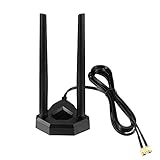
A strong match for a gaming desktop with a Wi-Fi 6E PCIe card. The title lists 6GHz, 5GHz, and 2.4GHz support, a magnetic RP-SMA base, and a 6.5ft extension cable, which together solve the common problem of a card antenna trapped behind a metal tower.
- Strength: the extension cable lets you raise the antenna above the case.
- Strength: the tri-band listing covers 6E hardware.
- Trade-off: the 6GHz benefit disappears on a dual-band card.
Skip it if you are replacing fixed antennas on a router with no room for a magnetic base.
Bingfu 4-Pack 3dBi
Four antennas in one pack make sense for a router with several jacks or a house with a spare adapter waiting for a better antenna. It carries the same 3dBi MIMO dual-band listing as the pair, with the same RP-SMA male connector and the same router, card, and USB adapter targets.
- Strength: enough units for a router plus a second device.
- Strength: dual-band coverage across 2.4 and 5GHz.
- Trade-off: extra antennas are wasted on a two-jack device.
Skip it if you only need two and would rather have a cable or magnetic base.
Eifagur WiFi 6/6E Magnetic
This one targets desktop builders. The title lists tri-band 2.4GHz, 5GHz, and 6GHz operation, a magnetic base, and use with a gaming motherboard, router, or PCI card, so it covers the same ground as the Eightwood 6E kit from a different brand.
- Strength: the tri-band listing suits current Wi-Fi 6E cards.
- Strength: the magnetic base sticks to a metal case or shelf.
- Trade-off: the title does not state cable length, so check the listing before buying for a distant desk.
Skip it if you run a dual-band card and want to keep things simple.
Slinkdsco 4×4 MIMO
The odd one out: an external antenna for 4G LTE and 5G routers, gateways, and hotspots. The title lists omnidirectional, low-profile, wide-band design with 4×4 MIMO, and names carriers and RV or home internet use, so it belongs to a different job than the Wi-Fi sticks above.
- Strength: 4×4 MIMO suits cellular gateways with multiple ports.
- Strength: the low profile helps for RV or vehicle mounting.
- Trade-off: it does nothing for a Wi-Fi router.
Skip it if your gateway has no external cellular jacks.
Rydocyee 2-Pack
A small-card option. The title lists dual-band 2.4GHz and 5GHz coverage, 3dBi gain, an RP-SMA male connector described as having no pin, and use with Mini PCIe or M.2 wireless cards, motherboards, and RV cameras. It is a fit for compact builds.
- Strength: aimed at compact cards and mini PCs.
- Strength: two units come in the pack.
- Trade-off: the no-pin detail means it fits only certain jacks, so compare connectors first.
Skip it if your jack needs a center pin.
Eifagur 15dBi Panel
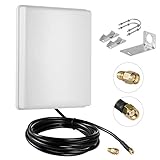
A directional outdoor panel with a 10ft cable, built for pointing at one target such as an outbuilding or a distant access point. The title lists dual-band 2.4GHz and 5GHz coverage, 15dBi gain, and compatibility with routers and wireless network cards, so it is a link tool rather than a room-filler.
- Strength: high gain narrows the beam toward a single spot.
- Strength: the 10ft cable lets you mount it away from the router.
- Trade-off: the narrow beam leaves other rooms with weak coverage.
Skip it if you want whole-house coverage from a central router.
Eightwood Dual Band
The plain version of the desktop kit. The title lists 2.4GHz and 5GHz coverage, RP-SMA connection, a 6.5ft extension cable, and use with PCI or PCIe Wi-Fi and Bluetooth cards and motherboards. For a dual-band card, it brings the cable benefit without paying for a band you cannot use.
- Strength: the extension cable moves the antenna out from behind the tower.
- Strength: it covers Bluetooth cards too, per the listing.
- Trade-off: no 6GHz, so it cannot serve a 6E card at full range.
Skip it if your card is Wi-Fi 6E.
Bingfu 9dBi Magnetic
The highest-gain stick style in this group. The title lists 9dBi, a magnetic base, MIMO, and a 4-pack for routers, wireless cards, and USB adapters. It is meant for someone whose router sits on the same floor as most of the devices and needs a little more reach.
- Strength: higher gain can stretch reach across a single level.
- Strength: the magnetic base sits on a router top or a metal shelf.
- Trade-off: stronger gain flattens the pattern, so upper and lower floors may lose coverage.
Skip it if your home has stairs between the router and the devices.
Which One Fits Your Situation
A Wi-Fi 6E gaming desktop
The Eightwood WiFi 6E Tri-Band is the cleanest fit, with its 6GHz listing and long cable. The Eifagur 6/6E unit is the alternative if you prefer that brand or already own its gear.
Replacing stock router antennas
Begin with the Bingfu 2-Pack 3dBi for a two-jack router, or step up to the Bingfu 4-Pack 3dBi if your router has more external connectors or you want spares.
Cellular home internet or an RV
The Slinkdsco 4×4 MIMO is the only listing built for 4G and 5G gateways, so it is the one to choose when the gateway has external cellular ports.
Reaching a garage or shed
The Eifagur 15dBi Panel is the pick for a single outdoor target, aimed carefully along a clear line with the 10ft cable run to the router. Plan the cable path first, since the 10ft length decides how far from the router the panel can sit.
A compact mini PC or small-form-factor build
The Rydocyee 2-Pack is written for Mini PCIe and M.2 cards, so it fits tiny builds better than the full-size desktop kits, provided the jack matches its no-pin connector.
Common Mistakes
- Buying on gain alone and ignoring that a higher figure narrows the vertical pattern.
- Choosing a tri-band antenna for a router that has no 6GHz radio.
- Ordering the wrong connector type without checking the jack on the device.
- Leaving the antenna behind a metal case when an extension cable would fix the placement.
- Aiming a directional panel without a clear line to the target.
Related guides
- Combination Smoke And Carbon Monoxide Detectors
- Aio Liquid Coolers For High Performance Gaming
- Graphics Cards For Low Wattage Power Supplies
Frequently Asked Questions
Will a bigger antenna always improve my signal?
No. Higher gain reshapes the pattern rather than adding power. It helps along one plane and can reduce coverage above and below the router.
Do I need a 6GHz antenna?
Only if your router or card supports Wi-Fi 6E. Otherwise a dual-band antenna covers every band the hardware can use.
Can I mix antennas on one router?
Matching antennas are the safer choice. Mixed gain levels can leave one radio chain favoring a different direction than the others.
Are these safe to use on a cellular gateway?
Only the 4G/5G listing is made for that. Wi-Fi sticks use different bands and will not help a cellular modem. Check that your gateway has external cellular connectors before shopping, because many sealed units do not.











