Our Short List of 3

- Best for: A first full-size combo with RGB backlighting on both devices
- Full-size keyboard with number pad and RGB backlighting
- Mouse includes adjustable weights, a rare combo feature
- Both devices work plug-and-play with no required software
- Keyboard is membrane rather than mechanical

- Best for: Players who want a faster, programmable mouse in their combo
- Mouse reaches 10,000 DPI with a 1,000Hz polling rate
- 25-key anti-ghosting covers real gaming key combinations
- Programmable buttons and software support included
- Keyboard remains a membrane design

- Best for: A simple LED combo for a shared or family gaming PC
- True plug-and-play with no software or drivers
- Full-size layout suits gaming and everyday typing alike
- Seven-button mouse with adjustable sensitivity levels
- LED backlighting is not full RGB
All 4 Picks at a Glance
| Product | Specs | Action |
|---|---|---|
| Redragon S101 Gaming Keyboard and Mouse Combo (ASIN: B00NLZUM36) |
| Check price on Amazon |
| Redragon S107 Gaming Keyboard and Mouse Combo (ASIN: B0DWMQRK3M) |
| Check price on Amazon |
| HAVIT Gaming Keyboard and Mouse Combo (ASIN: B00USNEBGS) |
| Check price on Amazon |
 FELICON 65 Percent Mechanical Keyboard and Mouse Combo (ASIN: B094XDLPHJ) |
| Check price on Amazon |
Disclosure: As an Amazon Associate, we may earn from qualifying purchases made through links on this page, at no additional cost to you.
Best Affordable Gaming Keyboard and Mouse
Buying a keyboard and mouse as a matched combo is the fastest way to finish a first gaming setup, and at the affordable end of the market it is also the smartest way to spend. A combo guarantees the two devices share a design language, a lighting scheme and a single box on the doorstep, and it avoids the common trap of overspending on one device and pairing it with something miserable. The catch is that combo quality varies enormously: some sets hide a decent keyboard beside a mouse you will replace within months, while others are genuinely balanced. Every set in this guide is sold as a true keyboard and mouse combo, and each half of each set is judged on its own merits.
The comparisons below use the specifications on each Amazon product page: keyboard type (membrane or mechanical), key count and anti-ghosting, mouse sensor range and button count, lighting, and what else arrives in the box. The shortlist covers the main shapes an affordable combo takes. Redragon’s S101 is the long-running full-size value set, its S107 sibling updates the formula with a faster mouse, HAVIT’s bundle keeps things simple and plug-and-play, and the FELICON set shrinks everything into a compact mechanical layout with a mouse pad included. The buying sections explain where combos cut corners, how to tell whether the mouse half will last, and how to set a new combo up properly.
Quick Picks
| Product | ASIN | Best For |
|---|---|---|
| Redragon S101 Gaming Keyboard and Mouse Combo | B00NLZUM36 | A first full-size combo with RGB backlighting on both devices |
| Redragon S107 Gaming Keyboard and Mouse Combo | B0DWMQRK3M | Players who want a faster, programmable mouse in their combo |
| HAVIT Gaming Keyboard and Mouse Combo | B00USNEBGS | A simple LED combo for a shared or family gaming PC |
| FELICON 65 Percent Mechanical Keyboard and Mouse Combo | B094XDLPHJ | Small desks that want a real mechanical keyboard in the set |
Redragon S101 Gaming Keyboard and Mouse Combo (ASIN: B00NLZUM36)
- Best for: A first full-size combo with RGB backlighting on both devices
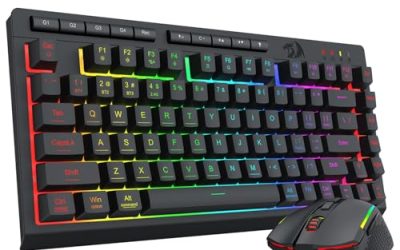
- Full-size keyboard with number pad and RGB backlighting
- Mouse includes adjustable weights, a rare combo feature
- Both devices work plug-and-play with no required software
- Keyboard is membrane rather than mechanical
A first full-size combo with RGB backlighting on both devices
The S101 is the combo that defined this category: a full-size RGB backlit keyboard paired with Redragon’s M601 gaming mouse in one box. The keyboard offers multiple backlight modes and brightness levels, multimedia controls through the function row, and a standard layout with a number pad, which matters if the same desk handles school or office work between sessions. Construction is plastic, as expected at this level, but the layout and key feel are aimed at gaming rather than adapted from an office board.
The M601 mouse is the half that surprises people: it offers adjustable sensitivity up to 3,200 DPI, six buttons, a weight tuning system in the base so you can add or remove mass to taste, and backlighting that matches the keyboard. Both devices connect by USB and work without software, while Redragon’s tools add programming for players who want it. As a complete, coherent first setup that asks nothing else of you, the S101 remains the reference point other affordable combos are measured against.
Highlights
Considerations
Redragon S107 Gaming Keyboard and Mouse Combo (ASIN: B0DWMQRK3M)
- Best for: Players who want a faster, programmable mouse in their combo
- Mouse reaches 10,000 DPI with a 1,000Hz polling rate
- 25-key anti-ghosting covers real gaming key combinations
- Programmable buttons and software support included
- Keyboard remains a membrane design
Players who want a faster, programmable mouse in their combo
The S107 updates the Redragon combo formula where it matters most: the mouse. This set pairs an RGB gaming keyboard with a mouse rated up to 10,000 DPI with a 1,000Hz polling rate, programmable buttons and software support for macros and sensitivity stages. That mouse specification is a clear step above the basic mice bundled in most sets, and it shows in fast games where the S107’s mouse tracks quick turns more faithfully than a typical combo mouse.
The keyboard half keeps the essentials in order: RGB backlighting, 25-key anti-ghosting so busy combinations of movement and ability keys register together, and plug-and-play USB connection for both devices. Anti-ghosting is the keyboard figure that actually affects play — it decides whether sprinting, strafing and jumping at once produces three inputs or two — and 25 keys of rollover covers realistic gaming combinations comfortably. For a player whose games are getting faster, the S107 is the combo here that delays the itch to upgrade the mouse.
Highlights
Considerations
HAVIT Gaming Keyboard and Mouse Combo (ASIN: B00USNEBGS)
- Best for: A simple LED combo for a shared or family gaming PC
- True plug-and-play with no software or drivers
- Full-size layout suits gaming and everyday typing alike
- Seven-button mouse with adjustable sensitivity levels
- LED backlighting is not full RGB
A simple LED combo for a shared or family gaming PC
HAVIT’s combo takes the opposite approach to Redragon’s: keep everything simple, sturdy and immediately usable. The keyboard is a full-size LED backlit board with a standard layout that anyone in the house can sit down to, and the mouse is a seven-button design with adjustable sensitivity levels for switching between desktop precision and in-game speed. Both connect over USB with no drivers or software required, which makes this set a sensible choice for a shared PC, a younger player’s first setup, or a spare desk that needs to work the moment it is plugged in.
That simplicity is also the honest limitation. The backlighting is LED rather than per-key RGB, the keyboard is a membrane design, and there is no macro software layer to grow into. What you get instead is a matched pair that feels considered rather than bundled at random: the mouse shape is a conventional ergonomic form that suits most hands, and the keyboard’s multimedia shortcuts handle volume and playback without leaving a game. For undemanding games and mixed use, it covers the brief completely.
Highlights
Considerations
FELICON 65 Percent Mechanical Keyboard and Mouse Combo (ASIN: B094XDLPHJ)
- Best for: Small desks that want a real mechanical keyboard in the set
- Real mechanical switches, unusual in an affordable combo
- Compact layout frees space for wide mouse movement
- Mouse pad included, completing the desk in one box
- No number pad for productivity-heavy users
Small desks that want a real mechanical keyboard in the set
Most affordable combos use membrane keyboards; this FELICON set is the exception, built around a compact 68-key mechanical keyboard with blue switches and RGB backlighting. The 65 percent layout drops the number pad and function row to free desk space for mouse movement — a trade that FPS players actively prefer — while arrow keys are retained for menus and everyday navigation. Blue switches give a pronounced click and tactile bump, which typists enjoy and housemates should be warned about before late-night sessions.
The mouse is a lightweight honeycomb design with RGB lighting and an optical sensor, and the box also includes a mouse pad, so the set genuinely completes a small desk in one purchase. The listing notes compatibility across PC, laptop, Mac and console systems. The compromises are the missing number pad for spreadsheet-heavy work and the click volume of blue switches in shared rooms. For a compact gaming corner, though, this is the only set here whose keyboard would still satisfy you after the novelty of the combo wears off.
Highlights
Considerations
How to Choose
Judge a combo by its weaker half, because that is the half you will replace first and a replacement breaks the value of the set. In most affordable combos the mouse is the risk: check its sensor range, polling rate and button count on the product page, and be wary of sets that describe the keyboard in detail and the mouse in adjectives. The S107 earns its place here precisely because its mouse carries real figures — 10,000 DPI and 1,000Hz polling — while the S101’s mouse offers the weight tuning that players actually use to make a bundled mouse feel right.
Keyboard type is the second decision. Membrane keyboards, used by the Redragon and HAVIT sets, are quieter, lighter and perfectly serviceable for most games; what matters more than the membrane itself is anti-ghosting, since dropped inputs lose fights. Look for explicit anti-ghosting or rollover figures. Mechanical keyboards, like the FELICON set’s, give firmer feedback and longer switch life, and in a combo they are rare enough to be a genuine selling point — just match the switch to your space, because clicky blue switches in a bedroom shared with a light sleeper are a domestic problem, not a gaming feature.
Finally, consider the desk the combo lands on. Full-size boards with number pads suit mixed gaming and work desks; compact layouts suit small desks and low-sensitivity aim that needs mouse room. Check what else the box includes — a bundled mouse pad, as in the FELICON set, or weight kits, as in the S101, can be worth more than a lighting mode. And confirm both devices connect the way you expect: every set here is wired USB, which means no charging and no wireless interference, at the cost of two cables to manage.
Key Specifications Explained
Anti-ghosting describes how many keys the keyboard can register at once before inputs are dropped or blocked. Gaming combinations are demanding — moving diagonally while sprinting, jumping and holding an ability key can mean five simultaneous inputs — so a stated figure like the S107’s 25-key anti-ghosting tells you the board was designed with those combinations in mind. Keyboards that list no figure at all are usually limited to a handful of keys in the gaming cluster, which is where problems appear.
Mouse DPI in combo sets ranges from about 3,200 to 10,000 in this guide. Higher is not automatically better — most players use 400 to 1,600 DPI in shooters — but a higher ceiling usually signals a more capable optical sensor underneath, with cleaner tracking at speed. Polling rate matters alongside it: 1,000Hz means the mouse reports its position every millisecond, the standard dedicated gaming mice use, while unlisted rates in basic sets are often lower and can feel steppy in fast pans.
Switch type and layout define the keyboard’s daily feel. Membrane keys press a rubber dome and feel soft and quiet; mechanical keys actuate individual switches and feel precise and, depending on the switch colour, sound loud. Layout percentages describe size: full-size keeps the number pad, tenkeyless drops it, and 65 percent boards like the FELICON’s compress everything into a block that needs a function layer for the missing keys. None is objectively best — the right answer is the one that fits your desk, your games and your tolerance for noise.
Setup and Settings Tips
Unbox the combo as a system and set it up in order: keyboard first, then mouse sensitivity, then lighting. Set the mouse DPI in hardware or software to a sensible base — 800 is a good all-round figure — then adjust sensitivity inside each game rather than changing DPI per title, so your muscle memory stays consistent. If the mouse has removable weights, change them once, play for a few days, and only then decide; judging weight in the first ten minutes is unreliable.
Learn the keyboard’s lighting and media controls from the manual before your first session, since affordable sets often hide brightness and mode controls behind function-key combinations that are not printed clearly. Set a brightness you can live with in a dark room, and if the set offers per-device software, save one profile for gaming and one plain profile for work or school so the desk can calm down when it needs to.
Manage the two cables properly from day one. Route them separately rather than twisting them together, leave enough slack at the mouse for your full range of movement, and keep the mouse cable from dragging on the desk edge — a strip of tape as a temporary anchor or an inexpensive bungee transforms how a wired combo mouse feels. These small physical details decide whether a wired set feels tidy or tangled far more than any specification does.
Common Mistakes to Avoid
The most common mistake is buying a combo for the keyboard’s looks and discovering the mouse cannot track your games. Read the mouse specifications first, not last, and treat vague mouse descriptions as a warning sign. A combo is only good value if both halves survive your first year of play; a mouse replaced in month two means the set was not affordable at all.
A second mistake is assuming mechanical is automatically better and buying the loudest switch available. Mechanical feel is a preference, and membrane boards are quieter, lighter and entirely adequate for most players. If you share a room or play late, a membrane set like the S101 or the HAVIT bundle may genuinely serve you better than a clicky mechanical board, whatever enthusiast forums say.
Finally, do not throw away the packaging or skip registering what the set includes. Combo boxes often hide weight kits, spare parts or the mouse pad in compartments, and the S101’s tuning weights in particular are small and easy to lose. Keep the extras in one place, and photograph your preferred lighting and sensitivity settings once they are dialled in, so a future reinstall does not mean rebuilding them from memory.
FAQ
Is a keyboard and mouse combo better than buying separately?
For a first or affordable setup, usually yes: the set is matched, arrives together and costs less than equivalent separate purchases. Separate devices win when you have specific demands — a particular switch type or an esports mouse — but for most players a balanced combo like the S107 covers everything until those demands appear.
What should I check first in an affordable combo?
The mouse. Confirm its sensor range and polling rate are actually stated, count its buttons, and check whether it offers anything extra like tuning weights. Then check the keyboard’s anti-ghosting figure and whether it is membrane or mechanical. Sets that hide mouse figures usually hide a weak mouse.
Are membrane keyboards good enough for gaming?
For most games, yes. Membrane boards handle gaming inputs well when they include proper anti-ghosting, and they are quieter than mechanical boards. Mechanical keyboards feel more precise and last longer, which is why the FELICON set stands out here, but the difference is preference and durability rather than permission to play.
Can I use these combos with a console or Mac?
The FELICON set lists console and Mac compatibility, and basic USB keyboards and mice generally work on Macs and supported console titles. Full feature software, where offered, is usually Windows-based, so expect core functions everywhere and programming features mainly on Windows PCs.
When should I upgrade from a combo to separate devices?
When you can name the specific thing the combo cannot do: a mouse sensor that loses tracking at your sensitivity, a keyboard layout that cramps your desk, or a switch feel you actively dislike. Upgrading one half at a time is fine — the other half of a good combo remains useful as a spare.
Final Verdict
The Redragon S101 is still the safest first combo: a full-size RGB keyboard, a mouse with rare weight tuning, and nothing else required. Step up within the same family and the S107’s faster, programmable mouse makes it the better choice for players whose games are speeding up. The HAVIT bundle is the honest plug-and-play option for shared PCs and younger players, and the FELICON set is the one to pick for a small desk, because a real mechanical keyboard at this level changes how the whole setup feels. Judge any combo by its mouse, match the keyboard to your space and noise tolerance, and any of these four will finish a setup properly.