Our Short List of 3

- Product type: Wireless gaming keyboard and mouse combo, sold as one set
- Mac support: Win/MAC stated in the listing title
- Keyboard layout: 75 percent, portable
- Keyboard type: Quiet rechargeable macro membrane keyboard, RGB backlit

- Product type: Wireless gaming keyboard and mouse combo, sold as one set
- Mac support: Win/MAC stated in the listing title; Mac listed among supported devices for tri-mode connection
- Keyboard layout: 60 percent, portable
- Keyboard type: Quiet rechargeable macro membrane keyboard, RGB backlit

- Product type: Wireless gaming keyboard and mouse combo, sold as one set
- Mac support: PC/Mac stated in the listing title
- Keyboard: G715, tenkeyless, mechanical, GX linear switches in this version, LIGHTSYNC RGB, palm rest included
- Mouse: G705, compact contoured wireless gaming mouse, LIGHTSYNC RGB
All 4 Picks at a Glance
| Product | Specs | Action |
|---|---|---|
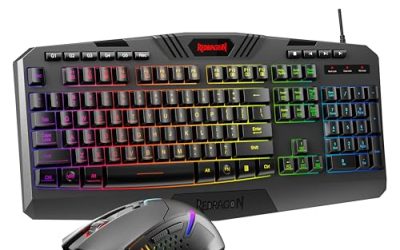
| 1. Redragon Wireless Gaming Keyboard and Mouse Combo, 75 Percent (S155-PRO) |
| Check price on Amazon |
| 2. Redragon Wireless Gaming Keyboard and Mouse Combo, 60 Percent |
| Check price on Amazon |
| 3. Logitech G Wireless Gaming Combo, G715 Keyboard Linear plus G705 Mouse |
| Check price on Amazon |
 4. BlueFinger Wireless Gaming Keyboard and Mouse Combo, 87 Keys |
| Check price on Amazon |
As an Amazon Associate we earn from qualifying purchases.
Gaming on a Mac starts with a compatibility problem that Windows players rarely face. Many gaming keyboard and mouse combos are built and labelled for Windows only. Their software, macro tools, and even their printed key legends assume a Windows layout, so a set that looks ideal in a photo can leave a Mac owner with missing Command and Option legends, no supported configuration app, and function keys that do not behave as expected. The safest way to shop is to insist on one clear rule: the combo itself, sold as a single set, must state macOS or Mac support in its own listing.
That rule shapes every pick in this guide. Each product below is a genuine keyboard and mouse combo sold together in one listing, not a separate keyboard and mouse paired up after the fact. Each listing also names Mac or macOS support directly, whether through a Win/MAC title, a Bluetooth connection described for Mac, or a PC/Mac designation. If a popular Windows-only combo is missing here, that absence is deliberate.
Mac gaming also has practical quirks worth planning for. Most current Macs offer very few ports, so a combo that shares a single 2.4GHz receiver, or that connects over Bluetooth with no receiver at all, saves a port and avoids a hub on the desk. USB-C wired fallback matters too, because it connects directly to modern MacBooks without an adapter. Layout matters just as much: a board that can switch between Windows and Mac modes will place Command in the position your fingers expect, which makes everyday shortcuts feel normal outside games as well.
This guide compares four Mac-compatible gaming combos across layout size, connection type, mouse sensor, and switch or key type. The right choice depends on whether you want a compact board that leaves room for wide mouse movement, a full mechanical tenkeyless setup, or a simple rechargeable set for a mixed work and play desk.
Quick Picks
- Best compact all-rounder: Redragon Wireless Gaming Keyboard and Mouse Combo, 75 percent (S155-PRO) — Tri-mode Bluetooth, 2.4GHz, and USB-C connection, a space-saving 75 percent layout, and a mouse listed up to 12,800 DPI, with Win/MAC support in the title.
- Best for maximum mouse room: Redragon Wireless Gaming Keyboard and Mouse Combo, 60 percent — The smallest layout here, tri-mode connection including Bluetooth 5.0, and the same 12,800 DPI mouse specification in a portable set for Win/MAC.
- Best mechanical combo: Logitech G Wireless Gaming Combo, G715 Keyboard Linear plus G705 Mouse — A mechanical tenkeyless keyboard with linear switches and a compact contoured mouse, sharing LIGHTSPEED wireless and Bluetooth, listed for PC and Mac.
- Best simple rechargeable set: BlueFinger Wireless Gaming Keyboard and Mouse Combo, 87 Keys — An 87-key backlit board and ergonomic mouse over a single 2.4GHz connection, rechargeable, and listed for Mac laptops and computers.
1. Redragon Wireless Gaming Keyboard and Mouse Combo, 75 Percent (S155-PRO)
- Product type: Wireless gaming keyboard and mouse combo, sold as one set
- Mac support: Win/MAC stated in the listing title
- Keyboard layout: 75 percent, portable
- Keyboard type: Quiet rechargeable macro membrane keyboard, RGB backlit
The Redragon S155-PRO is the most balanced starting point for most Mac players. Its 75 percent keyboard keeps the function row and arrow keys while trimming the number pad and navigation cluster, so the board takes up far less desk width than a full-size model. That reclaimed space is not cosmetic on a Mac desk. It gives the mouse a wider sweep area, which helps in games that use low sensitivity and large arm movements, and it keeps a laptop, notebook, or coffee within reach during longer sessions.
The listing states Win/MAC support in the product title itself, and the connection options suit Mac hardware well. Bluetooth lets the set pair without using a port at all, the 2.4GHz mode uses a shared 2-in-1 receiver for both devices, and USB-C wired mode provides a direct fallback for a modern MacBook. The keyboard is described as a quiet, rechargeable macro membrane board with RGB backlighting, and the mouse is listed with software support and a maximum of 12,800 DPI. For a player who moves between a MacBook and a desktop Mac, being able to switch connection modes without changing hardware is a genuine convenience.
The trade-offs follow from the membrane design. Membrane keys feel softer and less defined than mechanical switches, so players who type heavily or who strongly prefer a crisp mechanical bottom-out may want the Logitech set below instead. The 75 percent layout also removes the dedicated number pad, which matters if your non-gaming work depends on fast numeric entry.
Pros
Cons
2. Redragon Wireless Gaming Keyboard and Mouse Combo, 60 Percent
- Product type: Wireless gaming keyboard and mouse combo, sold as one set
- Mac support: Win/MAC stated in the listing title; Mac listed among supported devices for tri-mode connection
- Keyboard layout: 60 percent, portable
- Keyboard type: Quiet rechargeable macro membrane keyboard, RGB backlit
This 60 percent Redragon combo takes the space-saving idea further. A 60 percent board removes the function row as a separate row, the arrow cluster, and the number pad, leaving the smallest footprint in this guide. For Mac gamers who play at a small desk, on a laptop tray, or with a very low mouse sensitivity, that extra mouse room is the main reason to choose this set over its 75 percent sibling.
Compatibility is again explicit rather than implied. The listing describes tri-mode connection with Bluetooth 5.0, 2.4GHz wireless, and USB-C wired modes, and states that the set can connect with PC and Mac among other devices. The upgraded 2-in-1 2.4GHz receiver controls both the keyboard and the mouse at the same time, which keeps a Mac setup tidy. The keyboard is a quiet, rechargeable macro membrane board with RGB backlighting, and the mouse carries the same headline specification as the larger set, listed up to 12,800 DPI.
Living with a 60 percent layout requires adjustment. Arrows and function keys sit on a secondary layer, so shortcuts take practice, and players who use those keys constantly in strategy games or in daily work may find the 75 percent model easier. As a travel-friendly or small-desk Mac combo, though, this is the most portable option here, and it does not ask you to give up wireless flexibility to get that size.
Pros
Cons
3. Logitech G Wireless Gaming Combo, G715 Keyboard Linear plus G705 Mouse
- Product type: Wireless gaming keyboard and mouse combo, sold as one set
- Mac support: PC/Mac stated in the listing title
- Keyboard: G715, tenkeyless, mechanical, GX linear switches in this version, LIGHTSYNC RGB, palm rest included
- Mouse: G705, compact contoured wireless gaming mouse, LIGHTSYNC RGB
The Logitech G combo is the premium mechanical option in this guide, and it is a true combo: the listing is for the G715 wireless gaming keyboard and G705 wireless gaming mouse together, in White Mist, designated for PC, Mac, and laptop use. That PC/Mac designation in the title is the compatibility evidence that matters for this guide, and the hardware backs it up with two connection routes that suit Macs well, LIGHTSPEED wireless over a USB receiver and Bluetooth.
The G715 is a compact tenkeyless mechanical keyboard, and this version uses linear GX switches, which travel smoothly without a tactile bump. Linear switches are a popular gaming choice because repeated presses feel consistent, and they also keep typing comparatively quiet for a mechanical board. The keyboard includes a palm rest and LIGHTSYNC RGB lighting. The G705 mouse is deliberately smaller and contoured, shaped for smaller hands that many full-size gaming mice overwhelm, and the listing describes it as lightweight with a compact fit. Logitech states that LIGHTSPEED can connect the two devices over a single receiver, with the mouse connecting through the keyboard’s receiver, which is exactly the port-saving arrangement a Mac desk benefits from.
Consider the fit and the colour before choosing it. The White Mist finish is a strong aesthetic commitment, the smaller mouse will feel cramped for large hands or palm-grip players who prefer a big shell, and a tenkeyless board still omits the number pad. For a Mac player who wants mechanical keys, established wireless, and a matched set designed to work together, this is the most complete package here.
Pros
Cons
4. BlueFinger Wireless Gaming Keyboard and Mouse Combo, 87 Keys
- Product type: Wireless gaming keyboard and mouse combo, sold as one set
- Mac support: Listed for Mac laptop and computer use in the title; Mac OS listed in operating system details
- Keyboard layout: 87 keys, tenkeyless, RGB rainbow backlit
- Mouse: Ergonomic gaming mouse with backlighting
The BlueFinger combo is the straightforward option: an 87-key tenkeyless keyboard and an ergonomic gaming mouse, connected over 2.4GHz wireless, rechargeable, and listed for Mac laptops and computers as well as PC. The title itself names Mac as a target platform, which is the evidence this guide requires, and the operating system details in listing records include Mac OS alongside Windows.
The keyboard offers RGB rainbow backlighting across a tenkeyless layout, so you keep dedicated arrow keys and a function row, unlike the 60 percent Redragon set, while still saving space compared with a full-size board. The mouse uses an ergonomic shape rather than a flat ambidextrous one, which many players find easier to hold during longer sessions. A single USB receiver drives the connection, described in listing material as a plug-and-play link with a range of up to 33 feet, and both devices use rechargeable batteries rather than disposables, with listing material citing more than 40 hours of continuous use for this combo family.
The compromises are simplicity related. There is no Bluetooth mode, so a Mac without a free USB-A port will need an adapter or hub for the receiver, which is a real consideration on current MacBooks. The backlighting is a rainbow scheme rather than per-key customisation, and the set targets casual and mixed use more than competitive play. For a shared family Mac, a student desk, or a first gaming combo that also handles homework and office work, those trade-offs are reasonable.
Pros
Cons
How to Choose
Start with the listing, not the photos. For a Mac combo, require the words Mac, macOS, or Win/MAC in the combo’s own title or specifications. A keyboard that works on a Mac when plugged in is not the same as a combo whose maker supports macOS, and software for remapping keys or recording macros is the feature most often limited to Windows. If macros matter to you, check what the listing promises for Mac specifically, and favour combos whose core functions work over Bluetooth or a receiver without software.
Choose the layout by desk and by game. A 60 percent board maximises mouse room and portability. A 75 percent board restores the function row in a still-compact frame. A tenkeyless board keeps arrows and function keys in their familiar places. Full-size boards with number pads were not needed for this guide’s Mac combos, and most Mac gaming desks benefit from the space a smaller board returns to the mouse.
Match the connection to your Mac. Bluetooth uses no port and suits MacBooks. A shared 2.4GHz receiver gives both devices one stable link and one small dongle to keep track of. USB-C wired mode is the dependable fallback and the lowest-latency route, and it charges rechargeable devices at the same time. A combo offering all three, like the two Redragon sets, adapts to the widest range of Macs.
Finally, decide how much the key feel matters. Mechanical switches, as in the Logitech G715, give a defined, durable press and replaceable-style customisation culture, while the membrane boards here are quieter and softer, which housemates and late-night players may prefer. Neither is automatically better for gaming on a Mac; your hands and your household decide.
FAQs
Can I use a Windows gaming combo on a Mac instead?
Some Windows combos will type and click when connected, but that is not the same as supported Mac compatibility. Key legends, mode switching, and configuration software may be Windows only. Every combo in this guide states Mac or macOS support in its own listing, which is the safer basis for a purchase.
Is Bluetooth fast enough for gaming on a Mac?
Bluetooth is convenient and port-free, and it handles casual and moderate gaming well. For fast-paced competitive play, the 2.4GHz receiver mode or a USB-C wired connection is the more latency-focused choice, which is why the tri-mode combos here are useful: they let you pick per game rather than per purchase.
Why do these combos avoid full-size keyboards?
Smaller layouts return desk space to the mouse, which matters for low-sensitivity aiming and for compact Mac desks. Tenkeyless and smaller boards keep the keys games actually use while removing the number pad most players rarely touch during play.
Will one receiver really run both the keyboard and the mouse?
For the combos that describe a 2-in-1 or shared receiver, yes, that is how the listing presents them. The Redragon sets describe a single 2.4GHz receiver controlling both devices, and Logitech describes the G705 connecting through the G715’s LIGHTSPEED receiver. That leaves other Mac ports free.
Do I need software to use these combos on macOS?
Basic typing, clicking, and the listed connection modes work without extra software. Advanced remapping, macros, and lighting control depend on each maker’s macOS software support, so check the listing for the specific combo if those features are central to your setup.
Conclusion
The best gaming keyboard and mouse for Mac is the combo that proves its Mac support in writing and fits the way you actually play. Choose the Redragon S155-PRO 75 percent set for the most balanced compact desk, the Redragon 60 percent set when mouse room and portability come first, the Logitech G715 plus G705 combo for mechanical keys and single-receiver LIGHTSPEED wireless, or the BlueFinger 87-key set for a simple rechargeable tenkeyless setup. Any of the four respects the rule that matters most on this platform: Mac compatibility stated by the listing itself, in a genuine combo sold as one set.
Disclosure: This article contains affiliate links. If you buy through links on this page, we may earn a commission at no additional cost to you.