

27 inches at 1440p is the sweet spot that most people land on eventually, usually after a detour through a 24 inch 1080p panel that felt cramped or a 32 inch 4K screen that needed scaling adjustments to read text comfortably. At 27 inches, 1440p gives you about 109 pixels per inch, which is sharp enough that you stop noticing individual pixels at normal desk distance, and 144Hz is the point where motion clarity makes a real difference without needing a GPU that costs more than the rest of your PC combined.
This isn’t about chasing the highest spec sheet. It’s about matching panel type, response time, and refresh rate to what you actually play and what your graphics card can actually push.
As an Amazon Associate we earn from qualifying purchases at no extra cost to you.
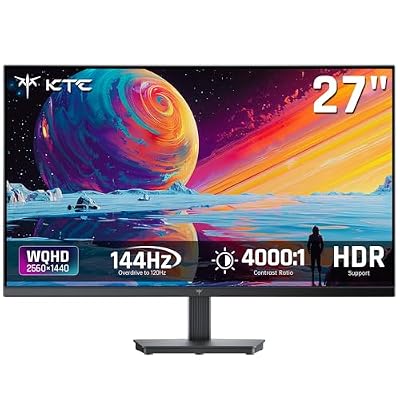


Panel types: the decision that matters most
Panel type affects your experience more than almost any other spec, including refresh rate. There are three you’ll run into at this size and resolution.
IPS panels dominate the 27 inch 1440p 144Hz category now, and for good reason. Color accuracy is strong out of the box, viewing angles don’t shift the image when you lean sideways, and modern fast-IPS variants have closed most of the response time gap with other panel types. The trade-off is black levels. IPS panels have a native contrast ratio around 1000:1, so dark scenes look more gray than black, and IPS glow (a hazy brightening in the corners when viewing off-axis) shows up in dark rooms.
VA panels push contrast ratios of 3000:1 to 4000:1, which makes a real visible difference in dark games like horror titles or anything with a lot of shadow detail. The cost is response time consistency. VA panels can suffer from black smearing, a dark trailing ghost behind fast-moving objects on dark backgrounds, even when the panel’s quoted response time looks competitive on paper. If you play a lot of competitive shooters, this is the panel type most likely to annoy you.
TN panels still exist in this category but are fading out. They have the fastest raw response times and are usually the cheapest, but color accuracy and viewing angles are noticeably worse, and most buyers who want 144Hz now get it on IPS without a price penalty.
| Panel type | Contrast ratio | Response time feel | Best for |
|---|---|---|---|
| IPS | ~1000:1 | Consistent, minor overshoot possible | Mixed gaming, content work, color accuracy |
| VA | ~3000-4000:1 | Fast but prone to black smearing | Single-player, atmospheric, dark-scene games |
| TN | ~700-1000:1 | Fastest, least overshoot | Budget competitive setups, rarely needed now |
Is 144Hz actually enough, or should you go higher?
144Hz is a real step up from 60Hz, cutting frame time from 16.7ms to 6.9ms, and it’s the point of diminishing returns for most players. Going from 144Hz to 240Hz drops frame time further to 4.2ms, which is a smaller absolute gap than the 60-to-144 jump. Competitive players in fast shooters notice it; most people playing a mix of genres don’t feel like they’re missing much.
The more practical question is whether your GPU can hit 144fps at 1440p in the games you actually play. A midrange GPU can comfortably hit 144fps in esports titles like competitive shooters or MOBAs, but struggles to sustain that in demanding single-player titles with ray tracing enabled. If your card tops out around 90-100fps in your main games, a 165Hz or 180Hz panel gives you headroom for the future without paying the premium that true 240Hz 1440p panels command, but a straightforward 144Hz monitor is not wasted money just because your GPU can’t max it out constantly. Variable refresh sync (G-Sync or FreeSync) smooths out the gap between your actual framerate and the panel’s max, so you don’t need to hit 144fps on the nose to get a good experience.
Response time specs and why the number on the box lies a little
Manufacturers list gray-to-gray response times, usually 1ms, but that number is measured under ideal conditions with overdrive settings pushed aggressively, which can introduce overshoot (a bright halo trailing fast-moving objects) if left on the wrong setting. In practice, a well-tuned IPS panel at 144Hz with moderate overdrive looks clean for nearly everyone outside of competitive esports players scrutinizing frame-by-frame footage. Don’t pick a monitor based on the response time number alone; check independent review footage of actual motion blur if you’re sensitive to it.
Also check the VRR range. A monitor advertising FreeSync Premium typically supports variable refresh from around 48Hz up to its max, which matters if your framerate dips below that floor during demanding scenes, since some panels show flickering below their minimum VRR threshold.
What to actually buy
For most people, a 27 inch 1440p 144Hz IPS panel is the right default. It’s not exciting advice, but it’s correct for the majority of use cases: good color, good motion clarity, no major weaknesses. Browse 27 inch 1440p 144Hz IPS monitors and you’ll find most current options cluster in a similar price band with similar specs, which makes this a low-risk category to shop by price and brand warranty rather than agonizing over small spec differences.
If you mostly play atmospheric single-player games and value deep blacks over perfect motion clarity, it’s worth looking at 27 inch 1440p 144Hz VA monitors instead, just go in knowing the smearing trade-off.
If you’ve already confirmed your GPU can push well past 144fps in your main games and you want headroom, step up to 27 inch 1440p 165Hz monitors, which often cost barely more than standard 144Hz models since many panels are binned from the same production lines.
Don’t overspend chasing 240Hz at this resolution unless you’re playing competitively and can actually hit those framerates. The money is usually better spent on the GPU that gets you closer to maxing out 144Hz in the first place.














