Aloft is Astrolabe Interactive’s co-op sandbox survival game, published by Funcom and in Early Access on Steam since 15 January 2025. Set among floating islands, it has you claim one, build it into a skyship that becomes your home in the clouds, and sail and glide between islands gathering materials, farming, keeping animals, curing the fungal corruption and restoring the ecosystem, alone or in online co-op.
The Linux answer splits in two. On desktop there is a genuinely strong route in, because the Windows build carries a Platinum community record under Proton. On Valve’s handheld the answer is a flat no for now: the Steam Deck sheet reads Unsupported. What follows works through the records behind both halves: Steam’s flags, tabs and depots, the add-on family, the DRM and anti-cheat records, ProtonDB’s summary file, Valve’s Deck paperwork and GOG’s catalogue.
As an Amazon Associate, we earn from qualifying purchases.
Quick answer
Aloft has no native Linux build: Steam flags the game Windows-only, its Linux requirements tab is an empty shell, and its only content depot is a Windows one. Desktop Linux players get a strong fallback, a Platinum ProtonDB file, but Valve rates the Steam Deck Unsupported, and no GOG edition exists.
The Steam record: Windows only, at every layer
Aloft’s own store record is unambiguous. Steam’s platform flags for app 1660080 read Windows true, Mac false and Linux false. The Linux requirements field is an empty shell, Minimum and Recommended headings over empty lists, and the Mac field reads the same under its false flag. SteamDB’s depot table then settles the question the flags open: it lists exactly one content depot, a Windows English build. There is no Linux depot behind the flag, so this is not the split-record shape where a build ships unlisted: all three layers agree the game is Windows-only.
The published Windows minimum is a modern mid-range specification: Windows 10 or later in 64-bit form, an Intel Core i5-8600K or AMD Ryzen 5 3600, 16 GB of RAM, a GeForce GTX 1060 6GB, Radeon RX 580 or Intel Arc A750, DirectX 11 and 12 GB of storage. The category list is the feature set a Linux player uses: single-player, multi-player, co-op and online co-op, full controller support, Steam Workshop, Steam Cloud and Family Sharing. The genre list still carries the Early Access label, which matters for expectations: the record describes a game still being built.
The add-on family adds no Linux flag
Store search returns three Aloft apps, each read individually. The game app’s record lists two pieces of downloadable content: the Supporter Pack (app 3352580) and the Earth Appreciation Glider Free Pack (app 4394250). Both flag Windows only, with empty Linux requirements fields of their own. No soundtrack app and no demo app exist under this name, so the family’s Linux-flag count is zero of three including the game itself. There is no music album to misread here. The native question rests entirely on the game app’s own record.
DRM and accounts: the record names neither
Steam’s record for Aloft carries no drm_notice and no external account notice: no DRM product is named anywhere on it, and no third-party account or launcher layer either. That silence reads in one direction only: it is a gap in the paperwork, not a certification that the build is free of either layer. Nothing on it announces an activation limit, a launcher requirement or an account link between a Linux buyer and the game, and the co-op categories carry no account condition.
Anti-cheat, kept in three separate columns
Three sources speak to this question, reported separately because they measure different things. Steam’s own record names no anti-cheat at all: there is no notice and no category for one, despite the published online co-op categories. SteamDB’s detected technologies for the app are the Unity Engine with its Mono, Burst and URP components, the Photon SDK, SteamworksNET, the Wwise audio SDK and cURL. Photon is the networking layer the co-op sessions run on; nothing in that list is an anti-cheat system. Are We Anti-Cheat Yet, the community tracker, carries no entry for this game: its full dataset was read directly and searched by name and app id, with zero hits. Valve’s Deck sheet carries no anti-cheat deduction either, so the desktop and Deck positions agree: no record names a gate in front of co-op.
ProtonDB: Platinum across the board, on a small file
ProtonDB’s summary record for app 1660080 reads Platinum on the headline, best-reported and trending tiers, across 16 reports, with confidence reading good. That is the strongest shape a summary file can take. The honest caveat is the pool: sixteen reports is thin for an Early Access game whose build changes with every update, so the tier judges the builds those reporters ran, not the next one. The figures come from the summary record itself; no claim is made about page-level tags either way.
Steam Deck: Unsupported, in Valve’s own paperwork
Valve’s compatibility record, read from Valve’s own endpoint, resolves to category 1, Unsupported, and its single item is the support line: Valve is still working on adding support for this game on Steam Deck. SteamOS separately reads Unsupported on the same record, so no consolation verdict hides in the second column. SteamDB’s republication of Valve’s record supplies the paperwork: a test dated 24 August 2026 on build 22215259, with a Proton 11 release candidate as the recommended runtime. Its configuration fields list supported input as other, flag small in-game text and non-Deck glyphs, and record no internet requirement for setup or single-player play.
Hold the two verdicts apart, because they answer different questions. The Platinum file says the Windows build runs well on desktop Linux under Proton. The Unsupported badge says Valve has not certified that build on its handheld, and for a Deck buyer the badge, not the community file, is the document that counts. Until Valve retests and lifts the category, Aloft is a desktop game for Linux players, and the picks below are framed for a desk, not a dock.
GOG sells no edition of Aloft
GOG’s storefront returns no product for this title: its searches come back empty, and the address a product page would occupy redirects to the general games catalogue, that storefront’s behaviour for a game it does not sell. Its only presence there is a Dreamlist wishlist entry, which is not an edition anyone can buy. The Steam copy is the only PC edition on sale, and the exact build both compatibility records describe.
Five picks for the desktop route
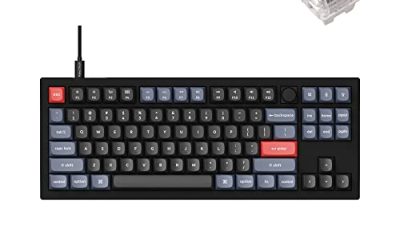
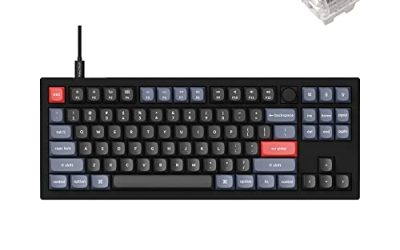
Keychron V3

Aloft’s crafting lists, storage runs and skyship refits are keyboard work. A tenkeyless board with QMK and VIA support lets you remap keys at the keyboard level, which keeps working across every Linux install you plug it into.
Specs
- Tenkeyless layout with rotary knob
- QMK and VIA remapping support
- Hot-swappable K Pro Brown switches
- Wired USB-C connection
- Maker-rated 1,000 Hz polling
8BitDo Ultimate 2 Bluetooth Controller

Steam lists full controller support, and for the gliding and sailing hours a pad is the natural shape of play. This one covers the desktop case with modern sticks and triggers, plus back buttons for repeated inputs.
Specs
- Connectivity: Bluetooth wireless and USB-C wired
- Joysticks: TMR electromagnetic, anti-drift design
- Triggers: Hall effect, with mode switching
- Extras: two remappable back buttons, motion control
- In the box: charging dock included
Xbox Wireless Controller, Carbon Black

The safest guest pad in PC gaming: Steam Input support is universal, the glyphs match what most games display, and it pairs over Bluetooth or its own wireless standard, which suits a co-op island with a second local player.
- Connectivity: Xbox Wireless and Bluetooth
- Port: USB-C for wired play
- Controls: hybrid D-pad, dedicated Share button
- Power: AA batteries or optional rechargeable pack
Logitech G502 HERO

Placing walls, sails and farm plots is pointer work, and a precise wired mouse turns building sessions and inventory trips into single clicks. Eleven programmable buttons cover the confirm, cancel and camera inputs a session repeats.
Specs
- HERO optical sensor, up to 25,600 DPI
- 11 programmable buttons
- Adjustable weight system
- Wired USB connection
- On-board memory profiles
Samsung T9 Portable SSD 2TB

An Early Access library moves around: between desktop and laptop, or into an offline backup before a large update lands. A fast USB-C drive is the simple answer. The headline figure needs a Gen 2×2 host port; on a lesser port the drive runs at that ceiling.
Specs
- Capacity: 2 TB portable SSD
- Interface: USB 3.2 Gen 2×2, USB-C connector
- Maker-rated speeds: up to 2,000 MB per second read, 1,950 MB per second write
- Features: Dynamic Thermal Guard, maker-rated drop resistance
How to choose
Choose the Steam copy, because it is the only PC edition on sale and the exact build both records describe. On desktop, install under Proton and start with the default compatibility tool; the Platinum file says current builds run at the community’s top tier. Measure your machine against the published Windows minimum: a GTX 1060 6GB class card and 16 GB of RAM is the developer’s line. For co-op, no record names an anti-cheat gate, so nothing documented separates a Linux host from Windows friends. Treat the Deck as out of scope until Valve lifts the Unsupported category, and put your hardware money into the desk setup instead.
Who should skip
Skip Aloft if you are shopping for a native Linux survival game: the flag, the empty shell and the depot table all say this is not one. Skip it if your only machine is a Steam Deck, because Valve’s Unsupported badge is the current word. Skip it if you want a DRM-free offline installer, since no GOG edition exists to buy. And skip it for now if Early Access itself is the problem: the genre list still carries the label, and every record here will keep moving as the build changes.
FAQ
Is Aloft native on Linux?
No. Steam flags app 1660080 Windows-only, the Linux requirements field is an empty shell, and SteamDB’s depot table lists a single Windows English content depot; no native build exists at any layer.
How well does Aloft run under Proton?
ProtonDB’s summary record reads Platinum on all three tiers across 16 reports, with confidence rated good. The pool is small and the game is in Early Access, so read it as a verdict on recent builds, not a promise about future ones.
Is Aloft Steam Deck Verified?
No, it is rated Unsupported. Valve’s record gives the game its lowest category with a single note, that Valve is still working on adding support for this game on Steam Deck, in paperwork dated 24 August 2026; SteamOS reads Unsupported too.
Can I buy Aloft on GOG instead?
No. GOG’s searches return no product for the game and the would-be product address redirects to its general catalogue; its only presence there is a Dreamlist wishlist entry, which is not an edition. The Steam copy is the only PC edition on sale.
Final verdict
Aloft gives Linux players a split answer, and unusually, both halves are well documented. There is no native build and no prospect of one hiding in the paperwork: the flag, the empty shell tab, the depot table and the add-on family all read Windows-only, and no record names a DRM product or anti-cheat system in the way. What the Windows build does under Proton is the good half, a Platinum community file on desktop, set against a Deck sheet that withholds certification entirely. Buy the Steam copy for a Linux desktop, keep it off the Deck until Valve retests, and expect the record to keep moving while Early Access lasts.
Product and ASIN Reference
| Product | ASIN |
|---|---|
| Keychron V3 | B0B2DMMMG2 |
| 8BitDo Ultimate 2 Bluetooth Controller | B0F194QFT2 |
| Xbox Wireless Controller, Carbon Black | B08DF248LD |
| Logitech G502 HERO | B07GBZ4Q68 |
| Samsung T9 Portable SSD 2TB | B0CHFS9K14 |