HumanitZ is Yodubzz Studios’ isometric zombie survival game, published by indie.io: scavenge a ruined world, build a base, farm, fight the infected, solo or with friends. After a long Early Access stretch from September 2023, it reached full release on 6 February 2026 — and its Steam record has only ever pointed at one operating system. This page reads that record in full: platform flags, add-on family, anti-cheat, the ProtonDB file, Valve’s Deck sheet and the GOG question.
The short version is a split record: a healthy Proton case on the Linux desktop, and an Unsupported badge on the Steam Deck.
As an Amazon Associate, we earn from qualifying purchases.
Quick answer
HumanitZ has no native Linux build: Steam flags the game Windows-only and its Linux requirements tab is an empty shell. On desktop Linux it runs through Proton, where ProtonDB rates it Gold across 28 reports with strong confidence. The Steam Deck is a different story — Valve lists the game as Unsupported, tested 13 February 2026. There is no GOG edition; Steam is the only PC copy.
What Steam’s own record says
The game app is 1766060, read directly from Steam’s store record. The platform flags read windows true, mac false, linux false. The Linux requirements field is the empty shell: Minimum and Recommended headings over empty lists, and the Mac field reads the same way. There is no split to resolve: flag, tab and store listing all agree the game ships for Windows alone.
The published Windows minimum: a 64-bit Windows 10 system, an Intel Core i5-8600K processor, 16 GB of RAM, an Nvidia GTX 1060 graphics card and 20 GB of storage. The categories are published in full: Single-player, Multi-player, PvP, Online PvP, Co-op, Online Co-op, Steam Achievements, Partial Controller Support and Family Sharing. The online categories are real, and controller support is partial, not full — which frames the pad picks below.
The record is silent in two places where silence itself is the finding. There is no drm_notice, so Steam names no DRM product for this game, and this article names none either — a gap, not a certification that the build is free of protection. Nor is there any external account notice: no launcher, no third-party account layer.
The family sweep: a demo and nothing else
Some games hide their platform story in the add-on family, so every related app was read individually. The family here is the smallest in this series: the record lists no DLC array at all. The only other app is the HumanitZ Demo, app 1773210, which flags Windows true and Mac and Linux false, with the same empty-shell Linux field as the parent game.
No music-type app exists in the family, so the soundtrack trap — a soundtrack album flagging Linux and making a Windows-only game look supported — cannot form here. The Linux-flag count for the whole family is zero of two, and nothing in the family’s paperwork softens the game app’s own verdict.
Anti-cheat, source by source
The anti-cheat question matters because the game publishes Online PvP and Online Co-op; the three sources are kept separate. Steam’s own record names no anti-cheat system: no notice, no anti-cheat category. SteamDB’s detected-technologies list is engine and middleware plumbing — Unreal Engine, the Epic Online Services SDK, Intel and Nvidia SDK libraries, plus audio and cloth components. The Epic entry is a services SDK — the accounts, friends and session layer — and no anti-cheat product appears anywhere in the list. Are We Anti-Cheat Yet’s published dataset carries no entry for the game, by name or app id.
So the desktop position is: no anti-cheat gate is named by any source — an absence stated as an absence, not a promise about future updates. Valve’s Deck sheet carries no anti-cheat deduction either; its Unsupported ruling rests on a different item, covered below. Desktop and handheld agree on the question.
The Proton file
ProtonDB’s summary record for this app answered in full, and the split is: headline Gold, best-reported Platinum, trending Gold, across 28 reports, with strong confidence.
One element of ProtonDB’s presentation needs naming: its page for the game carries a “Natively Supports” header that Steam’s record contradicts — the flag reads Linux false, the tab an empty shell. The header is a known stray label on that site; this article follows Steam throughout. HumanitZ is a Proton game on Linux, not a native one, whatever the tag says.
The texture behind the Gold headline is mixed. Desktop reports describe the game launching and running on current Proton builds, with part of the file complaining about performance rather than failure to start. The Deck reports are rougher: several describe a freeze when starting a new game after the 1.0 update, and long settings sessions to get play running at reduced detail. The file supports the desktop case strongly and the handheld case weakly — exactly what Valve’s own sheet says next.
The Steam Deck sheet
Valve’s compatibility record for this app — read through SteamDB’s republication of Valve’s data, after Valve’s own endpoint returned an unreadable response this session — places HumanitZ in the Unsupported category for the Steam Deck; SteamOS reads Unsupported as well. The sheet’s display line is the platform-support one: Valve is still working on adding support for this game on Steam Deck — the mildest form of Unsupported, a not-yet ruling rather than a finding that the game can never run.
The paperwork is recent: the sheet is dated 13 February 2026, a week after the full release, against build 21859537, with proton-stable as the recommended runtime. Supported input is listed as gamepad, text entry requires manually invoking the keyboard, the game shows non-Deck glyphs and small text, and no internet is required for setup or single-player. None of those items causes the badge; it rests on the support line alone. The picks below are therefore framed for the desktop.
The storefront ruling
GOG’s records were checked directly rather than by search alone, because that storefront’s search has a known blind spot. Its embedded search returns no product for this title, and the game’s would-be product address redirects to the general games catalogue — GOG’s behaviour for a title it does not sell. Only a Dreamlist wishlist entry exists there, which is not an edition. The ruling: no GOG edition exists. The Steam copy is the only PC edition.
Gear for a desktop-only game
The record supports desktop play, so the picks below are desktop gear: a keyboard, two pads for the partial-controller-support case, a mouse, and library storage.
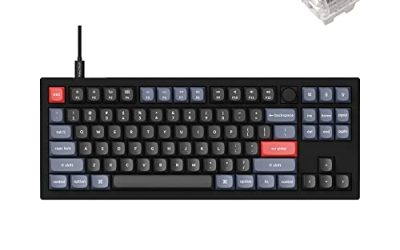
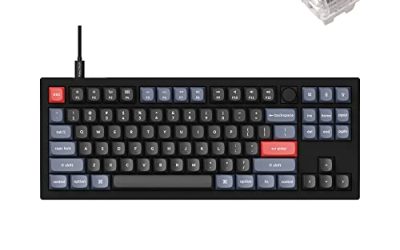
Keychron V3

The keyboard pick for desktop sessions: a tenkeyless board with QMK and VIA support lets you remap keys at the keyboard level, working across every Linux install you plug it into.
Specs
- Tenkeyless layout with rotary knob
- QMK and VIA remapping support
- Hot-swappable K Pro Brown switches
- Wired USB-C connection
- Maker-rated 1,000 Hz polling
8BitDo Ultimate 2 Bluetooth Controller

The desktop pad pick. Steam lists partial controller support, and this pad covers the couch case with modern sticks, triggers and back buttons for the inputs a survival session repeats.
Specs
- Connectivity: Bluetooth wireless and USB-C wired
- Joysticks: TMR electromagnetic, anti-drift design
- Triggers: Hall effect, with mode switching
- Extras: two remappable back buttons, motion control
- In the box: charging dock included
Xbox Wireless Controller, Carbon Black

The safest guest pad: Steam Input support is universal, the glyphs match what most games display, and it pairs over Bluetooth or its own wireless standard. For a partial-controller-support game, it is the pad most likely to behave as the menus expect.
- Connectivity: Xbox Wireless and Bluetooth
- Port: USB-C for wired play
- Controls: hybrid D-pad, dedicated Share button
- Power: AA batteries or optional rechargeable pack
Logitech G502 HERO

An isometric camera and constant inventory menus make a precise wired mouse the natural desk tool: looting and base work become single clicks. Eleven programmable buttons cover the confirm, cancel and camera inputs a long session repeats.
Specs
- HERO optical sensor, up to 25,600 DPI
- 11 programmable buttons
- Adjustable weight system
- Wired USB connection
- On-board memory profiles
Samsung T9 Portable SSD 2TB

For moving a Linux game library between machines, a fast USB-C drive is the simple answer. The headline figure needs a Gen 2×2 host port; on a lesser port the drive runs at that ceiling.
Specs
- Capacity: 2 TB portable SSD
- Interface: USB 3.2 Gen 2×2, USB-C connector
- Maker-rated speeds: up to 2,000 MB per second read, 1,950 MB per second write
- Features: Dynamic Thermal Guard, maker-rated drop resistance
How to choose
Choose the desktop route first: install through Steam, let Steam Play apply a current Proton build, and treat the ProtonDB file — Gold headline, Platinum best-reported, 28 reports, strong confidence — as the realistic expectation for how the game behaves. If your hardware sits near the published Windows minimum, expect the performance complaints in part of that file to apply to you; the highest-rated reports run comfortably above it. For co-op, no source names a gate in front of the published online modes. For input, plan around partial controller support — mouse and keyboard is the primary setup, a pad the supplement.
Who should skip
Skip this one for now if the Steam Deck is your only machine: Valve’s sheet says Unsupported, the paperwork is current, and the community workarounds in the ProtonDB file involve older Proton versions and reduced settings rather than a clean handheld experience. Skip it if you need a native Linux build on principle — there is none, and no family app hints at one. Skip it if you buy only from GOG, because no edition exists there. And skip it on modest hardware if performance headroom matters: the desktop file is Gold, not Platinum, with performance complaints in its lower half.
FAQ
Is HumanitZ native on Linux?
No. Steam’s record flags the game Windows-only, its Linux requirements tab is an empty shell, and the demo — the only other app in the family — flags the same way. ProtonDB’s “Natively Supports” header is a stray label Steam’s record contradicts; the game runs through Proton.
Does HumanitZ work on Steam Deck?
Valve’s compatibility sheet lists the game as Unsupported, tested 13 February 2026, with the note that Valve is still working on adding support. ProtonDB reporters do run it on Deck hardware with older Proton versions and reduced settings — community tinkering, not a Valve verdict.
Does HumanitZ use anti-cheat that blocks Linux?
No source names one. Steam’s record carries no anti-cheat notice or category, SteamDB’s detected-technologies list is engine and services middleware with no anti-cheat product in it, and Are We Anti-Cheat Yet carries no entry for the game. The published online modes have no named gate.
Can I buy HumanitZ on GOG instead?
No. GOG sells no edition of the game — its search returns no product and the product address redirects to the general catalogue; only a Dreamlist wishlist entry exists, which is not a purchasable copy. Steam is the only PC storefront for this game.
Final verdict
HumanitZ on Linux is a desktop story. The native question is closed by a tidy record: Windows-only flag, empty-shell tab, a two-app family with no Linux flag anywhere and no soundtrack trap to misread. What remains is a Proton case the community file rates Gold with a Platinum ceiling and strong confidence, and an anti-cheat position silent across all three sources. Against that, the Steam Deck sheet is Unsupported on current paperwork, and no GOG edition exists as an alternative. Buy it on Steam for a Linux desktop and the record supports you; buy it for the handheld and you are arguing with Valve’s own test sheet.
Product and ASIN Reference
| Product | ASIN |
|---|---|
| Keychron V3 | B0B2DMMMG2 |
| 8BitDo Ultimate 2 Bluetooth Controller | B0F194QFT2 |
| Xbox Wireless Controller, Carbon Black | B08DF248LD |
| Logitech G502 HERO | B07GBZ4Q68 |
| Samsung T9 Portable SSD 2TB | B0CHFS9K14 |