

The short answer
If you’re choosing between a 500GB hard drive and a 500GB SSD for the same money, buy the SSD. At the 500GB capacity point, prices have converged enough that there’s rarely a good reason to pick spinning rust unless you already own the drive or need it for a very specific bulk-storage role. The real question most people should be asking is what they’re using it for, since that changes the answer more than the raw spec sheet does.
What’s actually different
A hard drive stores data on spinning magnetic platters read by a moving arm. A 500GB SSD stores data in flash memory chips with no moving parts. That mechanical difference is the root of every other difference you’ll feel day to day: speed, noise, power draw, and how the drive fails.
As an Amazon Associate we earn from qualifying purchases at no extra cost to you.
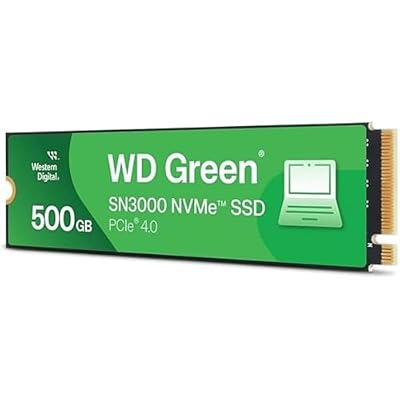
A 500GB HDD will typically read and write in the range of 80-160 MB/s sequentially, and random access (opening lots of small files, loading game levels, booting an OS) is where it really struggles, often dropping to single-digit MB/s with noticeable lag. A 500GB SATA SSD runs 450-560 MB/s sequentially and, more importantly, handles random reads/writes dramatically faster. If you’ve ever waited 90 seconds for Windows to boot versus 10 seconds, that’s this difference.
Price and cost per GB
This is where the comparison has shifted a lot over the last five years. A 500GB (or 1TB, since true 500GB drives are getting harder to find new) HDD costs very little per gigabyte, but 500GB SATA SSDs have dropped enough that the gap in absolute dollars is often just $10-20. At 500GB specifically, that’s not a lot of money to save in exchange for a much slower drive.
Where HDDs still win decisively on cost per GB is at larger capacities, 2TB, 4TB, 8TB and up, where SSD pricing per terabyte stays meaningfully higher. If your actual need is “I have 3TB of video files to store,” that’s a different conversation than “I need a 500GB drive.”
| Factor | 500GB HDD | 500GB SSD |
|---|---|---|
| Typical price | $30-45 | $35-55 |
| Sequential speed | 80-160 MB/s | 450-560 MB/s |
| Boot time (OS drive) | 30-90 sec | 8-15 sec |
| Noise/vibration | Audible clicking/whirring | Silent |
| Power draw (active) | ~6-7W | ~2-3W |
| Shock sensitivity | High (moving parts) | Low |
| Typical lifespan | 3-5 years (mechanical wear) | 5-10 years (write endurance) |
How they fail, and why that matters
HDDs tend to fail mechanically. You’ll hear clicking, grinding, or the drive just stops being detected, often with some warning via SMART attributes if you’re monitoring them. Data recovery from a mechanically failed HDD is possible but expensive, sometimes requiring a cleanroom.
SSDs fail differently. Flash memory has a finite number of write cycles, but for a typical desktop user doing normal work, you’d need to rewrite the entire drive’s capacity daily for years to hit that limit. In practice, SSDs are more likely to fail suddenly and with less warning than HDDs, going from fine to completely dead rather than degrading audibly first. Neither drive type is a backup strategy. Whichever you choose, keep anything irreplaceable backed up elsewhere, cloud or a second physical drive.
When the HDD is still the right call
Don’t let anyone tell you HDDs are obsolete. They’re still the correct choice in a few situations:
If you need a secondary bulk drive for media, backups, or archives that don’t need fast random access, an HDD’s cost per GB wins and the drive will happily sit there for years doing sequential reads. If you’re building a NAS or adding storage to an older PC that already boots fine off another drive, there’s no reason to pay SSD prices just to store files you access occasionally. And if your budget is genuinely tight and 500GB of slow storage beats 250GB of fast storage for your use case (lots of large media files, for instance), that’s a legitimate call.
What doesn’t make sense anymore is using a 500GB HDD as your only or primary drive in a modern PC, running Windows or your main applications off it. The system will feel sluggish in ways that have nothing to do with your CPU or RAM, and it’s one of the most common reasons an otherwise decent PC feels old.
When the SSD is the right call
If this 500GB drive is going to be your boot drive, where your OS, applications, and anything you want to open quickly lives, get the SSD. The jump in responsiveness isn’t subtle; it’s the single biggest upgrade you can make to an aging PC, often more noticeable than a CPU or RAM upgrade. Gamers in particular benefit: level load times, texture streaming, and general stutter are all improved by moving off a mechanical drive.
For most people shopping at this capacity, a 500GB SATA SSD is the sensible default, it fits any PC with a SATA port and costs little more than the HDD equivalent. If your motherboard has an open M.2 slot and supports NVMe, a 500GB NVMe SSD costs only a bit more and is considerably faster still, though at 500GB capacity you often won’t notice the NVMe-vs-SATA gap outside of large file transfers.
Practical recommendation
If you’re setting up a new or rebuilt PC and 500GB is your only drive, buy the SSD without overthinking it. If you need extra storage alongside an existing SSD boot drive and that storage is for media, backups, or anything that doesn’t need instant access, a 500GB hard drive or a larger-capacity HDD still earns its keep. The mistake to avoid is spending SSD money on a drive you’re going to use as bulk storage, or spending HDD money on a drive you expect to run your operating system from.














