STAR WARS: The Old Republic is the long-running online role-playing game that arrived on Steam in July 2020, almost a decade after its original December 2011 launch, and is still developed today by Broadsword for publisher Electronic Arts. Linux players meet it in a specific shape: free to play with an optional subscription, a separate game account linked to Steam, and a record written for one operating system.
That shape decides the Linux question before Proton even enters it. This article reads the record layer by layer: the platform flags and requirements fields, the depot census underneath them, the five add-on apps, Valve’s Steam Deck test sheet, the community compatibility file, and the anti-cheat documentation. It also keeps this game strictly separate from Knights of the Old Republic and its sequel.
As an Amazon Associate, we earn from qualifying purchases.
Quick answer
STAR WARS: The Old Republic is not native on Linux: Steam flags the game Windows only, its Linux requirements field is empty, and every depot in the census is Windows-configured. The route is Proton. ProtonDB’s settled tier is Platinum across 285 reports, and Valve rates the game Playable on Steam Deck.
What Steam’s record actually ships
The platform flags are the blunt layer: windows true, mac false, linux false. The requirements fields underneath agree. The Windows tab is genuinely populated, leading with Windows 10 or later in 64-bit form, while the mac and linux requirements fields come back as empty arrays. A populated field under a false flag is a known trap shape on this store; here there is no field to misread.
The depot census closes the question. SteamDB’s listing for app 1286830 shows five content depots, all Windows-configured: a launcher depot of 232.31 MiB, the client and shared movies depot at 46.35 GiB, and English, French and German movie depots between 15 and 17 GiB each. The redistributables are the Windows set, Visual C++ 2008 and 2019 plus the June 2010 DirectX package. There is no Linux, Mac or shared depot in the census, the osextended field is empty, and the registered assets are clienticon, clienttga, icon and logo only: no LinuxClientIcon. Every layer points the same way, so the ruling is not native, with no split to disclose.
The family sweep agrees. The add-on array holds five apps, each read individually: Master the Fight: Prepare for Battle, Rejoin the Fight: Welcome Home, Continue the Fight, Enter the Fight and the Galactic Leisure Bundle. All five flag Windows only, and no soundtrack app sits in the family, so the usual trap, where an album carries the family’s only Linux flag, cannot fire: the count is zero of six records. The store record also carries no controller-support field at all, so this article makes no store-level controller claim; the only input evidence is Valve’s Deck sheet, covered below.
The Proton file
ProtonDB’s game page for app 1286830 carries a settled Platinum headline across 285 reports, one of the deeper files an online game of this age can show. One honesty note belongs here: ProtonDB’s summary endpoint returned an error for this app during this session, so the best-reported tier, trending tier and confidence score behind that headline could not be read. This article claims the settled tier and the report count, which the game page itself displays, and nothing finer.
The same page carries a stray heading worth naming. Above its requirements block, ProtonDB prints a “Natively Supports:” heading for this game, the generated label that appears whenever a requirements field exists on the record. Steam’s record contradicts it on every layer just read, so the heading is wrong and the article follows Steam: the Platinum file describes the Windows build under Proton, not a native port.
The filings behind the headline fit a mature Proton title: recent reports describe logging in and playing with no tinkering, and the caveats are narrow, a launcher that asks for its licence agreement again on each start and occasional trouble on the newest Proton branch that an older branch avoids.
The Steam Deck sheet
Valve’s own compatibility record, read directly from the publisher’s endpoint, resolves this game to Playable, category 2, and SteamOS separately to Compatible. The test metadata, read through SteamDB’s republication of Valve’s sheet, dates the test to 3 February 2022 against build 7339197, with proton-stable as the recommended runtime. The public branch has moved far past that build, so the badge grades a superseded build: evidence the game passed Valve’s bar, not a fresh measurement of the current client.
The sheet’s items explain the Playable grade rather than a Verified one. Three items pass outright: all functionality is accessible with the default controller configuration, interface text is legible, and the default graphics configuration performs well. Three carry the caution marker: the launcher may require the touchscreen or virtual keyboard, the game sometimes shows non-Steam-Deck controller icons, and entering text requires manually invoking the on-screen keyboard. A final note adds that the game does not default to external controllers.
Accounts, anti-cheat and the documentation silence
Online games live or die on Linux by their anti-cheat, so the record was read for it directly. The Steam record names no anti-cheat anywhere: there is no drm notice on the app record, and SteamDB’s detected-technology list names the AMD GPU Services SDK, the Bink Video SDK and the CEF framework behind the launcher, with no anti-cheat detected. The Are We Anti-Cheat Yet database was then read in full, all 1,167 entries at the repository root, matched by store ID rather than by name, and it holds no entry for app 1286830 in either direction. That is documentation silence, reported as exactly that: the practical evidence is the ProtonDB file above, where multiplayer filings form the bulk of a Platinum record.
The account layer is the one friction the record states plainly. The store page’s terms require the game’s own account, linked to Steam, before the client will play, and the launcher is a separate CEF-based program in front of the game proper, the part where the Deck sheet’s warnings concentrate.
The storefront ruling
There is no second storefront copy to weigh. GOG’s natural product address for this title resolves to its general catalogue rather than a product page, and no GOG catalogue record exists for the game: an online title bound to its publisher’s own account system is not part of GOG’s DRM-free catalogue. The Steam copy is the only PC edition.
Gear that fits the record
The gear below follows the record’s shape: the handheld the badge was written for, two pads, a mouse for a menu-heavy client, and library storage.
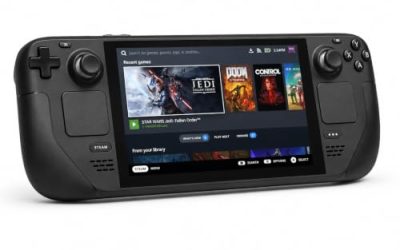
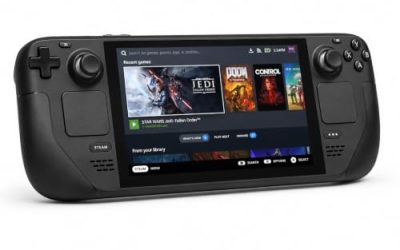
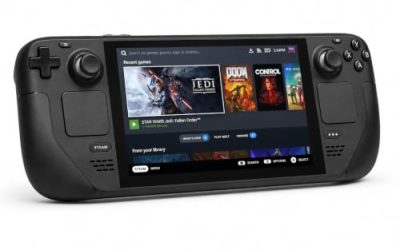
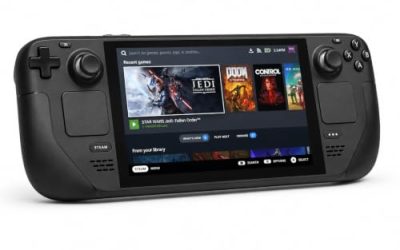
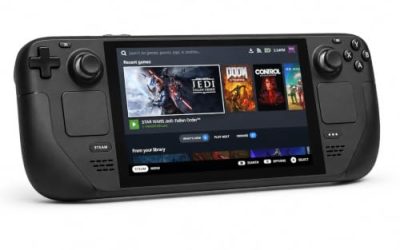
Valve Steam Deck OLED 512GB

The handheld the Playable badge was written for. Valve’s test sheet rates the Windows build Playable under proton-stable, with the launcher named as the friction point.
Specs
- Display: 7.4-inch HDR OLED, 1280 by 800, up to 90 Hz
- Processor: AMD Zen 2 and RDNA 2 custom APU
- Memory: 16 GB LPDDR5
- Storage: 512 GB NVMe, plus a microSD slot
- Wireless: Wi-Fi 6E and Bluetooth
- Channel note: Valve sells the Deck mainly through its own store, so Amazon listings are third-party sellers
8BitDo Ultimate 2 Bluetooth Controller
The docked and desktop pad pick. Valve’s Deck sheet records gamepad as the supported input, and this pad covers the couch case with modern sticks and triggers plus back buttons.
Specs
- Connectivity: Bluetooth wireless and USB-C wired
- Joysticks: TMR electromagnetic, anti-drift design
- Triggers: Hall effect, with mode switching
- Extras: two remappable back buttons, motion control
- In the box: charging dock included
Xbox Wireless Controller, Carbon Black
The safest guest pad in PC gaming: Steam Input support is universal and it pairs over Bluetooth or its own wireless standard. On the handheld, the test sheet’s note applies: an external pad may need a manual Quick Access switch before it takes over.
- Connectivity: Xbox Wireless and Bluetooth
- Port: USB-C for wired play
- Controls: hybrid D-pad, dedicated Share button
- Power: AA batteries or optional rechargeable pack
Logitech G502 HERO
The client is menu- and hotbar-driven, and at a desk a precise wired mouse turns inventory and shop trips into single clicks. Eleven programmable buttons cover the inputs a long session repeats.
Specs
- HERO optical sensor, up to 25,600 DPI
- 11 programmable buttons
- Adjustable weight system
- Wired USB connection
- On-board memory profiles
Samsung T9 Portable SSD 2TB
For moving a Linux game library between machines, a fast USB-C drive is the simple answer. The headline figure needs a Gen 2×2 host port; on a lesser port the drive runs at that ceiling.
Specs
- Capacity: 2 TB portable SSD
- Interface: USB 3.2 Gen 2×2, USB-C connector
- Maker-rated speeds: up to 2,000 MB per second read, 1,950 MB per second write
- Features: Dynamic Thermal Guard, maker-rated drop resistance
How to choose
Choose the Steam copy, because it is the only PC edition and the exact build both records describe. On a desktop or laptop, install under Proton and start with the current stable branch; the Platinum headline says the Windows build is a known quantity, and the filings suggest an older branch only if the newest misbehaves at the launcher. On a Steam Deck, the Playable badge means known caveats rather than configuration work: expect the launcher and text entry to ask for the touchscreen and on-screen keyboard. For input, plan around keyboard and mouse at a desk, since the store record makes no controller claim of its own, and treat a pad as the Deck and couch option the test sheet describes. Leave real storage headroom: the English install is the largest single-language footprint in the census.
Who should skip
Skip this one if you are shopping for a native Linux client: this game is not it, and no layer of its record points at one arriving. Skip it if a second account and a linked launcher are a hard refusal, because the terms make that account a condition of play on every platform. Skip the Deck route if launcher friction and manual keyboard calls would sour a handheld session, since Valve’s sheet flags both. And skip it if you wanted the single-player Knights of the Old Republic instead: a different game, covered separately.
FAQ
Is Star Wars: The Old Republic native on Linux?
No. Steam flags the game Windows only, the Linux requirements field is an empty array, every depot in the census is Windows-configured, and no LinuxClientIcon is registered. Linux play runs the Windows build through Proton instead.
How well does it run under Proton?
ProtonDB’s settled tier is Platinum across 285 reports. The summary endpoint failed during this session, so no best-reported tier or confidence score is claimed. Recent filings describe play with little tinkering, the launcher’s repeated licence prompt being the common caveat.
Is it Playable on Steam Deck?
Yes, on Valve’s own record: Playable, tested on 3 February 2022 against build 7339197 with proton-stable recommended. The public build has advanced well past the tested one, and the sheet flags launcher interaction, non-Deck glyphs and manual keyboard entry as the caveats.
Can I buy it on GOG instead?
No. No GOG edition of this game exists; the natural product address resolves to the general catalogue and no catalogue record exists. The Steam copy is the only PC edition, and it is free to play.
Final verdict
STAR WARS: The Old Republic is a clean Windows-only case with an unusually strong community file behind it. Steam flags Windows only with empty Mac and Linux requirement fields, the five depots are all Windows-configured, the five add-on apps repeat the same flags, and the one apparent counter-signal, ProtonDB’s generated “Natively Supports” heading, is a label artefact the record refutes. ProtonDB rates the Windows build Platinum across 285 reports, Valve rates it Playable on Steam Deck on admittedly dated paperwork, and no anti-cheat stands named on the record or in the tracker database. Install the free Steam copy, link the account the terms require, and play under Proton on desktop or Deck alike.
Product and ASIN Reference
| Product | ASIN |
|---|---|
| Valve Steam Deck OLED 512GB | B0CQ3RWQQZ |
| 8BitDo Ultimate 2 Bluetooth Controller | B0F194QFT2 |
| Xbox Wireless Controller, Carbon Black | B08DF248LD |
| Logitech G502 HERO | B07GBZ4Q68 |
| Samsung T9 Portable SSD 2TB | B0CHFS9K14 |