

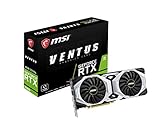
- Top Pick: msi Gaming GeForce RTX 2080 8GB GDRR6 256-bit HDMI/DP/USB Ray Tracing Turing Architecture Graphics Card (RTX 2080 Ventus 8G)
- Best Value: GIGABYTE GeForce RTX 4060 Ti WINDFORCE OC 8G Graphics Card, 2X WINDFORCE Fans, 8GB 128-bit GDDR6, GV-N406TWF2OC-8GD Video Card (Renewed)
- Premium Choice: MSI GeForce RTX 4060 Ti Ventus 3X 16G OC Graphics Card -NVIDIA RTX 4060 Ti, 16GB GDDR6 Memory, 18Gbps, PCIe 4.0, DLSS3
For most RTX 2080 owners, the RTX 4060 Ti is a weak upgrade: it is only around 15-25% faster in rasterized games, keeps the same 8 GB of VRAM and can lose some of that gain on PCIe 3.0 boards, so it is worth it mainly if you want DLSS Frame Generation and lower power draw. If the goal is a clear performance jump, an RTX 5070 or a 16 GB card such as the RTX 5060 Ti 16GB is the better target.
As an Amazon Associate we earn from qualifying purchases at no extra cost to you.


A Former High-End Card vs a Newer Mid-Ranger
The RTX 2080 launched in September 2018 at $699 as one of NVIDIA’s first Turing cards, with 2944 CUDA cores, 8 GB of GDDR6 on a 256-bit bus and 448 GB/s of bandwidth. The RTX 4060 Ti arrived in May 2023 at $399 on Ada Lovelace. It has more CUDA cores (4352) and much higher clocks, but a narrow 128-bit bus with 288 GB/s of bandwidth, offset by a large 32 MB L2 cache.
Both cards are older than the current RTX 50 series in 2026. The comparison matters most to RTX 2080 owners eyeing a discounted or used 4060 Ti as a cheap way to modernize their PC.
Spec Comparison
| Specification | RTX 2080 | RTX 4060 Ti |
|---|---|---|
| Architecture | Turing | Ada Lovelace |
| Release date | 20 September 2018 | 18 May 2023 |
| Launch MSRP | ||
| CUDA cores | 2944 | 4352 |
| Boost clock | 1710 MHz | 2535 MHz |
| Process | 12 nm | 5 nm |
| VRAM | 8 GB GDDR6 | 8 GB GDDR6 |
| Bus / bandwidth | 256-bit / 448.0 GB/s | 128-bit / 288.0 GB/s |
| L2 cache | 4 MB | 32 MB |
| Interface | PCIe 3.0 x16 | PCIe 4.0 x8 |
| Board power | 215 W | 160 W |
| Power connectors | 1x 6-pin + 1x 8-pin | 1x 16-pin |
| Length / width | 267 mm / 2-slot | 240 mm / 2-slot |
| Outputs | 1x HDMI 2.0, 3x DP 1.4a, 1x USB-C | 1x HDMI 2.1, 3x DP 1.4a |
How Much Faster, Really?
Hardware Unboxed/TechSpot and TechPowerUp’s RTX 4060 Ti reviews placed the card roughly 10% ahead of the RTX 3060 Ti at 1080p, with the margin shrinking at higher resolutions because of the 128-bit memory bus. The RTX 2080 sits a little below the RTX 3060 Ti/2080 Super class in those same charts. Aggregated benchmark data broadly agrees, putting the 4060 Ti roughly 15-25% ahead of the RTX 2080, with some newer games showing bigger leads and some older titles showing smaller ones.
- 1080p: the 4060 Ti’s strongest resolution, often around 18-25% ahead. A game at around 70 FPS on the 2080 might land around 83-88 FPS.
- 1440p: the lead narrows to roughly 15-20%, as the narrower bus starts to matter.
- 4K: the gap shrinks further; the RTX 2080’s 448 GB/s of bandwidth helps it hang closer, and neither card is a natural 4K choice.
All numbers are approximate and depend on settings, CPU, driver and game patch. In short, this is roughly one performance tier, not the kind of jump most people expect after five years.
What the Upgrade Adds Beyond Raw Speed
DLSS Frame Generation
This is the 4060 Ti’s real headline feature for an RTX 2080 owner. Both cards support DLSS super resolution, including the DLSS 4 transformer upscaling model NVIDIA brought to all RTX GPUs. Only the 4060 Ti supports DLSS Frame Generation, which can raise displayed frame rates substantially in supported games. It does not support DLSS 4 Multi Frame Generation, which is exclusive to RTX 50 cards. Frame Generation works best when the base frame rate is already reasonable, around 50-60 FPS, and it adds some latency, so it suits single-player games more than competitive shooters.
Ray tracing
Ada’s third-generation RT cores are much faster than Turing’s first-generation units, so the 4060 Ti’s lead in ray-traced games is generally larger than its raster lead. Combined with DLSS and Frame Generation, ray tracing at 1080p becomes far more usable.
Efficiency and media
Board power drops from 215 W to 160 W, which means less heat and quieter operation. The Ada encoder also adds AV1 hardware encoding for streaming and recording, and HDMI 2.1 replaces HDMI 2.0 for high-refresh TVs.
The Problems: VRAM and PCIe
The RTX 4060 Ti in this comparison has 8 GB of VRAM, exactly the same as the RTX 2080. If your 2080 already runs short of memory in new games, stuttering or blurry textures at high settings, the 4060 Ti will hit the same wall. Frame Generation also uses extra memory, which can make the problem worse at 1440p. Hardware Unboxed specifically criticized 8 GB versions of this card for these issues.
The second issue is the PCIe link. The 4060 Ti uses PCIe 4.0 x8. Many RTX 2080 systems run on PCIe 3.0 motherboards, where an x8 card gets only half the bus bandwidth. When the game fits in VRAM, the penalty is small, but when an 8 GB card overflows its memory, PCIe 3.0 x8 can cause noticeably worse stutter. The RTX 2080 runs at full x16 and is not affected the same way.
A 16 GB 4060 Ti variant exists and avoids most of the VRAM problem, but it costs more, which weakens the value argument further.
Power and PSU
The upgrade lowers power demand, so your existing PSU will be fine:
- RTX 2080: 215 W + ~125 W CPU + ~150 W headroom = about 490 W
- RTX 4060 Ti: 160 W + ~125 W CPU + ~150 W headroom = about 435 W
A quality 550 W PSU covers the 4060 Ti comfortably. The reference spec lists a 16-pin connector; the Founders Edition includes an adapter, and many partner cards use a standard 8-pin. At 240 mm the 4060 Ti is shorter than the 267 mm RTX 2080, so case fit is not a concern.
Value: Net Cost per Percent Gained
A used RTX 2080 usually sells for around $150-$200, and a used RTX 4060 Ti 8GB for around $250-$300. Assuming a sale at $170 and a purchase at $280:
- Net spend: about $110
- Gain: roughly 20% at 1080p
- Cost: about $5.50 per percent gained, plus Frame Generation and lower power
That is not terrible for the money, but compare it with a bigger step. A new RTX 5070 is in a much higher performance class, roughly matching an RTX 3080 Ti, with 12 GB of VRAM and DLSS 4 Multi Frame Generation. The net spend is higher, but the gain over an RTX 2080 is several times larger, which often makes the cost per percent gained similar or better.
Upgrade Decision Table
| Your situation | Recommendation |
|---|---|
| Happy with 2080 frame rates, want Frame Generation and lower power | 4060 Ti is a reasonable cheap swap |
| RTX 2080 running out of VRAM | Skip the 8 GB 4060 Ti; get a 12-16 GB card |
| PCIe 3.0 motherboard | Avoid 8 GB x8 cards; prefer x16 or 16 GB models |
| 1440p high-refresh | RTX 5070 or higher |
| Ray tracing at 1080p | 4060 Ti helps; RTX 5060 Ti 16GB is better long-term |
| 4K gaming | Neither card; look at RTX 5070 Ti or above |
Verdict
The RTX 4060 Ti is newer and more efficient than the RTX 2080 and adds DLSS Frame Generation, but its real gaming uplift is modest and it brings no extra VRAM. For an RTX 2080 owner, the upgrade makes sense only at a low net cost or when features and power efficiency are the main goals. For a meaningful step up in frame rates and memory, the RTX 5060 Ti 16GB or RTX 5070 is the safer choice.
Frequently Asked Questions
Is the RTX 4060 Ti faster than the RTX 2080?
Yes, but not by much. Published review placements and aggregated benchmarks put it roughly 15-25% ahead in rasterized games, with the largest gains at 1080p and smaller gains at 1440p and 4K.
Is upgrading from an RTX 2080 to an RTX 4060 Ti worth it?
Only for a small net cost or if DLSS Frame Generation and lower power use matter to you. The 8 GB model has the same VRAM as the 2080, so it does not fix memory-related stutter in new games.
Does the RTX 2080 support DLSS 4?
The RTX 2080 supports the DLSS 4 transformer upscaling model available to all RTX cards. It does not support DLSS Frame Generation, which requires RTX 40 or RTX 50, or Multi Frame Generation, which is RTX 50 only.
Will an RTX 4060 Ti lose performance on PCIe 3.0?
Slightly in most games, and more when the 8 GB of VRAM runs out and data must cross the bus. The 16 GB variant is less affected because it rarely overflows its memory.
What is a better upgrade than the RTX 4060 Ti for an RTX 2080 owner?
An RTX 5070 delivers a much larger performance jump with 12 GB of VRAM and Multi Frame Generation. The RTX 5060 Ti 16GB is a more budget-friendly option with far more memory headroom.

















