Once Human, Starry Studio’s free-to-play survival game published with NetEase Games, launched on Steam in July 2024 with a Windows build and nothing else. Steam’s record is plain: the platform flags read Windows true, Mac false, Linux false, and the Linux requirements field is an empty list, so no Linux tab exists in any form. There is no native build to install, and none is promised anywhere on the record.
So the Linux question splits in two, with opposite answers. On a desktop or laptop, the route is Proton, backed by a deep community file: hundreds of reports, a Gold headline, and an anti-cheat listing that reads Running rather than Broken. On Steam Deck, Valve’s own test sheet closes the door with an Unsupported verdict. This piece reads each record separately: the flags, the add-ons, the anti-cheat listings, the Proton file, the Deck sheet and the storefront ruling.
As an Amazon Associate, we earn from qualifying purchases.
Quick answer
Once Human is not native on Linux: Steam flags the game Windows only and its Linux requirements field is an empty list. The desktop route is Proton: ProtonDB rates the Windows build Gold across 408 reports, and the tracker lists its NEAC Protect as Running. Valve rates it Unsupported on Steam Deck.
The status at a glance
| Question | Answer from the record |
|---|---|
| Native Linux build | No — Steam flags read Windows only |
| Linux requirements tab | Absent — the field is an empty list |
| Add-on apps | Three packs, all Windows only; no demo or soundtrack |
| ProtonDB record | Gold headline, Platinum best, 408 reports |
| Anti-cheat | NEAC Protect, listed Running for this Steam app |
| Steam Deck verdict | Unsupported, tested July 2026 |
| GOG edition | None |
What Steam’s own record says
Steam’s appdetails record for Once Human (app 2139460, established from Steam’s own store search) lists the platforms as Windows true, Mac false, Linux false. No Mac or Linux build hides beside the Windows one.
The Linux requirements field is an empty list outright — not the empty shell of headings over empty lists, but no headings at all, so the store page carries no Linux tab a reader could mistake for a requirements list.
What the record does publish is a Windows minimum: Windows 10 64-bit, an Intel Core i5-4460 processor, 8 GB of RAM, an Nvidia GTX 750 Ti or AMD Radeon RX550 graphics card, DirectX 11, a broadband internet connection and 100 GB of storage, with a solid-state drive noted as highly recommended. The category list describes an online game throughout: multi-player, MMO, PvP, online PvP, co-op and online co-op, alongside full controller support, in-app purchases and Family Sharing. Steam’s genre list labels the game free to play.
Two absences matter. The record carries no drm_notice field, so it names no DRM product; that is a gap in the record, not a claim that no protection exists. There is likewise no external account notice. Whatever account and protection layers the game runs sit below the store record’s waterline, which is why the anti-cheat section reads the other records separately.
The add-on apps: three packs, no traps
The game’s record lists exactly three add-on apps, and each was read individually. The Ocean Expansion: Isles of Abyss Bonus Pack (app 5423670) flags Windows only, and its Linux requirements field is the empty shell, headings over empty lists. The Ascend Daily Theme Pack (app 3816110) and the Double Agent Theme Pack (app 3379260) are downloadable content apps too, both Windows only, both with an empty-list Linux field.
That is the whole family: Steam’s store search for the title returns four apps in total, the game and the three packs. There is no demo app and no music-type app anywhere in the family, so the soundtrack trap this series watches for cannot fire here — the Linux-flag count across the game and all three add-ons is exactly zero.
Anti-cheat, record by record
Anti-cheat decides online games on Linux, and the records that speak to it do not all say the same thing, so they are kept separate here.
Steam’s own record names no anti-cheat at all: no notice, no category entry and no sidebar line on the record read here identifies a protection system.
SteamDB’s detected-technologies list names the NeoX Engine, CEF, Discord, Intel XeSS, the NVIDIA DLSS suite, OpenSSL, Qt and cURL. No anti-cheat system appears in that detected list either.
The tracker Are We Anti-Cheat Yet is the one record that names a system. Its entry for this Steam app, filed as Once Human (ROW/INTL) against app 2139460, lists NEAC Protect with the status Running, last changed in September 2024. A separate entry for the China edition, not tied to this Steam app, names NEAC Protect and NetEase Anti-Cheat Expert with the status Broken; it does not describe the copy sold here. The desktop reading is that the one tracker naming the game’s anti-cheat records it as running under Proton.
The Steam Deck position is stated separately below, because Valve’s sheet answers a different question; nothing here should be read as a Deck claim. Tools that tamper with anti-cheat are terms violations carrying ban risk, not routes.
What the ProtonDB file says
ProtonDB’s summary record for app 2139460 reads Gold on the headline tier, Platinum on the best-reported tier and Gold on the trending tier, across 408 reports, with the confidence marker at strong.
Read plainly, that is a healthy desktop file: headline and trend agree at Gold, the best reports reach Platinum, and the pool is deep enough that the rating rests on hundreds of machines rather than a handful. It is not a unanimous file, but for a large online survival game with an anti-cheat layer, it is the shape of a route that works for most players who try it.
Steam Deck: an Unsupported verdict
Valve’s compatibility record was read through SteamDB’s republication of Valve’s data, after Valve’s own endpoint returned an empty response; the path is disclosed because the verdict matters. The record gives the game the category Unsupported on Steam Deck, with SteamOS marked Unsupported alongside it. The sheet records a test dated 22 July 2026 against build 24241834, and its configuration block lists the tested input as other and names a Proton 11 beta runtime: a tested sheet, not an untested one.
This is a verdict, not an absence of one: Valve has tested the game and published the lowest category. And the sheet publishes no reason in the data read here, so the desktop anti-cheat listing above should not be borrowed to explain it; the records are separate. The consequence is simple: the gear below is framed for a desktop or laptop, and the Steam Deck OLED that anchors the standard set in this series is replaced by a desktop keyboard.
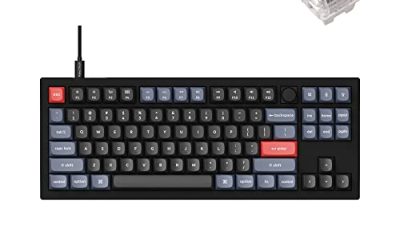
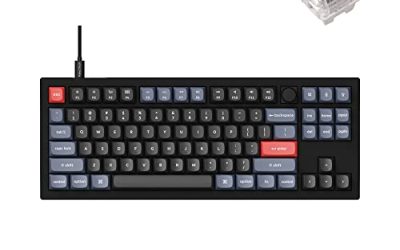
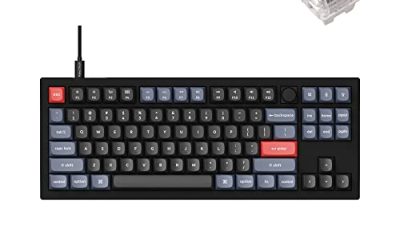
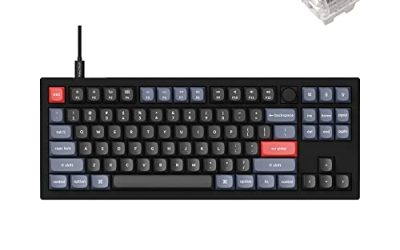
Keychron V3

The desktop substitute for the Deck in this set. Once Human’s building and inventory screens are dense keyboard-and-mouse work, and this board’s QMK and VIA support lets you remap keys at the keyboard level, so the layout follows you across every Linux install.
Specs
- Tenkeyless layout with rotary knob
- QMK and VIA remapping support
- Hot-swappable K Pro Brown switches
- Wired USB-C connection
- Maker-rated 1,000 Hz polling
8BitDo Ultimate 2 Bluetooth Controller

The desktop pad pick. Steam lists full controller support for the game, and this pad covers long sessions with modern sticks, triggers and back buttons for the interact and build shortcuts the game repeats constantly.
Specs
- Connectivity: Bluetooth wireless and USB-C wired
- Joysticks: TMR electromagnetic, anti-drift design
- Triggers: Hall effect, with mode switching
- Extras: two remappable back buttons, motion control
- In the box: charging dock included
Xbox Wireless Controller, Carbon Black

The safest guest pad in PC gaming: Steam Input support is universal, the glyphs match what most games display, and it pairs over Bluetooth or its own wireless standard.
- Connectivity: Xbox Wireless and Bluetooth
- Port: USB-C for wired play
- Controls: hybrid D-pad, dedicated Share button
- Power: AA batteries or optional rechargeable pack
Logitech G502 HERO

At a desk, a precise wired mouse turns aiming, building placement and inventory trips into single clicks. Eleven programmable buttons cover the interact, build and map inputs a session repeats.
Specs
- HERO optical sensor, up to 25,600 DPI
- 11 programmable buttons
- Adjustable weight system
- Wired USB connection
- On-board memory profiles
Samsung T9 Portable SSD 2TB

For moving a Linux game library between machines, a fast USB-C drive is the simple answer. The headline figure needs a Gen 2×2 host port; on a lesser port the drive runs at that ceiling. The game itself needs 100 GB per the published minimum.
Specs
- Capacity: 2 TB portable SSD
- Interface: USB 3.2 Gen 2×2, USB-C connector
- Maker-rated speeds: up to 2,000 MB per second read, 1,950 MB per second write
- Features: Dynamic Thermal Guard, maker-rated drop resistance
How to choose
Choose the Steam copy: it is the only PC edition available and the exact build every record above describes. On a desktop or laptop, install under Proton and start from the default compatibility tool; the Gold headline across 408 reports says the route is well worn, and the tracker’s Running listing is the second half of that reassurance. Keep the halves apart: the desktop file is the strongest part of this game’s Linux story, and nothing in it rescues the Deck verdict. For input, full controller support makes a pad a complete control scheme; a keyboard and mouse earn their place for building and inventory work. Plan storage around the published 100 GB minimum, on a solid-state drive as the record recommends.
Who should skip
Skip this one if the Steam Deck is your only Linux machine: Valve’s verdict is Unsupported, it comes from a completed test rather than an empty file, and no accessory in the set above changes it. Skip it if you are shopping for a native Linux survival game, because this record has no Linux build in any form. Skip it if you want a DRM-free offline installer, because no GOG edition exists. And skip it if an always-online design is a deal-breaker: the category list is online throughout, the published minimum requires a broadband connection, and no offline mode appears on the record.
FAQ
Is Once Human native on Linux?
No. Steam’s record for app 2139460 flags Windows only, and the Linux requirements field is an empty list, so no Linux tab exists in any form. Desktop Linux play runs through Proton.
How well does Once Human run under Proton?
ProtonDB’s summary record reads Gold on the headline and trending tiers and Platinum on the best-reported tier, across 408 reports with strong confidence. The tracker lists the game’s NEAC Protect as Running for this Steam app.
Can I play Once Human on Steam Deck?
Valve’s record rates the game Unsupported on Steam Deck, from a test dated 22 July 2026; SteamOS carries the same mark. The rating was read through SteamDB’s republication of Valve’s data. Desktop Linux is the route this record supports.
Can I buy Once Human on GOG instead?
No. GOG’s catalogue returns no product for the game, and the only matches its records surface are wishlist entries for unrelated titles. The Steam copy is the only PC edition and the build the compatibility records describe.
Final verdict
Once Human on Linux is two records wearing one name. The desktop record is genuinely encouraging: a Windows-only flag with no tab to misread, three add-ons with not one Linux flag among them, a Gold ProtonDB file across 408 reports, and the one tracker naming its anti-cheat calling it Running. The handheld record is a closed door: a tested Unsupported verdict from Valve. Install the Steam copy on a desktop or laptop, play it under Proton, and leave the Deck out of the plan.
Product and ASIN Reference
| Product | ASIN |
|---|---|
| Keychron V3 | B0B2DMMMG2 |
| 8BitDo Ultimate 2 Bluetooth Controller | B0F194QFT2 |
| Xbox Wireless Controller, Carbon Black | B08DF248LD |
| Logitech G502 HERO | B07GBZ4Q68 |
| Samsung T9 Portable SSD 2TB | B0CHFS9K14 |