Dragon Quest Heroes arrived on PC in December 2015 as the Slime Edition, a full-scale action RPG built by Koei Tecmo’s Omega Force team and published by Square Enix. It is the first game in the series, subtitled The World Tree’s Woe and the Blight Below, and it has spent a decade as a Windows-only Steam listing. This guide reads the live Steam record, the ProtonDB file, the Deck sheet and the GOG catalogue to rule on any native Linux route.
Two records disagree: the community file under Proton is respectable, the Deck badge is a flat refusal, and the store carries a small listing puzzle to settle first. Everything below comes from records read directly for this article.
As an Amazon Associate, we earn from qualifying purchases.
Quick answer
Dragon Quest Heroes is not native on Linux. Steam lists Windows only, with no Linux tab and no DLC or soundtrack apps attached. ProtonDB reads Gold on the headline and Platinum on its best and trending tiers across fifteen reports, so the Windows build runs well under Proton on a desktop. Valve rates the game Unsupported on Steam Deck, so the desktop is the only sensible route.
At a glance
| Question | Answer |
|---|---|
| Native on Linux | No, Windows only |
| Steam app | 410850, Slime Edition |
| ProtonDB | Gold headline, Platinum best and trending, 15 reports |
| Steam Deck | Unsupported, SteamOS does not support |
| GOG edition | None, Dreamlist entry only |
What Steam’s record actually says
The live Steam listing is app 410850, DRAGON QUEST HEROES Slime Edition, released 3 December 2015. Its description names the game plainly: Dragon Quest Heroes, The World Tree’s Woe and the Blight Below. Koei Tecmo Games developed it, Square Enix published it, and the platform flags read Windows true, Mac false, Linux false, with the Linux requirements field an empty list. There is no Linux tab in any form.
The category record lists single-player, Steam Achievements, full controller support, Steam Cloud and Family Sharing. Full controller support matters for a musou-style action game where a pad is the natural input. The Windows minimum asks for a 64-bit Windows 7 or later, a Core i7 870 at 2.8 GHz, 4 GB of memory, a GeForce GTS 450 or Radeon HD 5770, DirectX 11 and 20 GB of storage — requirements any modern desktop clears without thought.
Steam’s record carries no DRM notice. That is a gap, not a finding: Steam’s record supplies nothing to cite, the same position the Final Fantasy XVI and Final Fantasy VII Rebirth articles took. No anti-cheat is named, and no third-party launcher or account is required.
The listing puzzle, explained
A reader searching Steam may notice something odd. Store search returns the Slime Edition, the sequel and a newer Torneko spin-off, but no plain listing titled DRAGON QUEST HEROES. An older app number returns no data from Steam’s record endpoint, and its store address redirects to the store home. That listing is gone.
The Slime Edition is not a different game. It is the Steam edition of the first Dragon Quest Heroes, the one whose description carries the full subtitle, and the only purchasable Steam listing for this game. Every verdict here is read against app 410850.
The family sweep: one app, zero flags
The soundtrack trap that has caught so many games in this series cannot fire here, because there is no family to sweep. The game app’s record carries no DLC list at all, and a store search for a soundtrack returns zero results. No album, no art book and no add-on is attached. Across the whole family, one app, the Linux-flag count is zero. The game is Windows-only, stated once, with no footnote to argue about.
ProtonDB: Gold over Platinum, fifteen reports
ProtonDB’s summary feed for app 410850 reads headline Gold, best-reported Platinum and trending Platinum, across fifteen reports at moderate confidence. The split is the honest shape of the file: the most common recent experience is Platinum, the headline tier sits one step below it, and fifteen reports is the whole census rather than a sample.
Fifteen reports is a modest file, and the article carries that thinness rather than dressing it up. A Gold headline with a Platinum trend on a small pool is a workable signal, not a guarantee. What the file establishes is that the Windows build has a real, reported history of running under Proton. The game page loads as a small application shell with no tier data in its readable markup, so the recurring header question could not be settled here, and the article makes no claim about any page header.
For a desktop reader the reading is straightforward. The game is old, its requirements are light, and the community record says the Windows build runs under Proton. The risk is the ordinary one for a small pool: a thin file deserves a refund-window test rather than blind trust.
Steam Deck: Unsupported, and why
Valve’s compatibility record for app 410850 is the sharpest result in this audit, and it runs against the ProtonDB file rather than with it. The Deck verdict is Unsupported, read from Valve’s own compatibility data embedded in the game’s store page. Valve’s endpoint returned an empty results list for this app, and the usual republication routes were all closed: SteamDB would not answer, tuxDB has no page for the app, and Steam Hunters returned a block.
The record’s resolved category is 1, which is Unsupported, and its single stated reason is that SteamOS does not support this game. The SteamOS and Steam Machine verdicts read the same way, and the Steam Frame row carries no verdict at all. No test date is published on the record, and none is claimed here.
That is why the gear section below is desktop-only. A Gold ProtonDB headline does not overrule a Valve Unsupported badge. Readers who own only a Deck should not buy this game for the handheld.
GOG: no edition, only a Dreamlist vote
GOG sells no edition of this game. The embed search returns zero products, and the catalogue search returns zero purchasable products. The would-be product address for a Slime Edition redirects to the general catalogue.
What GOG does carry is a Dreamlist entry for the exact game, under the full title and dated 26 February 2015. A Dreamlist entry is a voting page, not a purchasable edition, and it carries no operating-system claim. The sequel has one too, and so do several older Dragon Quest titles: the series is wished for on GOG, not sold there. The Steam copy is the only PC edition.
Desktop gear for a desktop-only game
Valve’s Unsupported badge takes the handheld out of the picture, so this gear section is built for the desktop where the game runs.
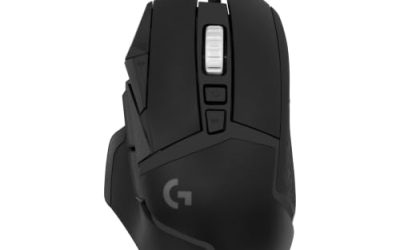
Logitech G502 HERO

A musou game lives or dies on its camera and menus, and at a desk a precise wired mouse turns both into single clicks.
Specs
- HERO optical sensor, up to 25,600 DPI
- 11 programmable buttons
- Adjustable weight system
- Wired USB connection
- On-board memory profiles
8BitDo Ultimate 2 Bluetooth Controller

The desktop pad pick. Steam lists full controller support, and this pad covers the couch case with modern sticks, triggers and back buttons for menu shortcuts.
Specs
- Connectivity: Bluetooth wireless and USB-C wired
- Joysticks: TMR electromagnetic, anti-drift design
- Triggers: Hall effect, with mode switching
- Extras: two remappable back buttons, motion control
- In the box: charging dock included
Xbox Wireless Controller, Carbon Black

The safest guest pad in PC gaming: Steam Input support is universal, the glyphs match what most games display, and it pairs over Bluetooth or its own wireless standard.
Specs
- Connectivity: Xbox Wireless and Bluetooth
- Port: USB-C for wired play
- Controls: hybrid D-pad, dedicated Share button
- Power: AA batteries or optional rechargeable pack
Keychron V3

A tenkeyless board for the player who keeps a second screen open. QMK and VIA remapping works at the keyboard level, across every Linux install you plug it into.
Specs
- Tenkeyless layout with rotary knob
- QMK and VIA remapping support
- Hot-swappable K Pro Brown switches
- Wired USB-C connection
- Maker-rated 1,000 Hz polling
Samsung T9 Portable SSD 2TB

For moving a Linux game library between machines, or keeping an offline backup of installers, a fast USB-C drive is the simple answer. The headline figure needs a Gen 2×2 host port.
Specs
- Capacity: 2 TB portable SSD
- Interface: USB 3.2 Gen 2×2, USB-C connector
- Maker-rated speeds: up to 2,000 MB per second read, 1,950 MB per second write
- Features: Dynamic Thermal Guard, maker-rated drop resistance
How to choose
Start from the machine, not the store page. If your only gaming device is a Steam Deck, stop here: Valve’s Unsupported badge is a direct answer, and the ProtonDB file does not overrule it. On a Linux desktop, the route is the Steam copy under Proton, and the fifteen-report file says that route works, with the usual thin-file caution.
Buy the Slime Edition, app 410850, the only live Steam listing for this game. Do not chase the older listing number; its store address redirects to the store home and its record returns nothing.
For input, trust Steam’s full controller support line and pick a pad first, a mouse second. The combat is built for a controller, and both pads above are recognised as native devices under Steam Input.
Who should skip
Skip this game if the Steam Deck is your only device. Valve’s record is explicit that SteamOS does not support it, and no community workaround is presented here as a route around a Valve verdict.
Skip it if you want a native Linux build. There is none, and there is no sign of one coming: the game is a decade old, its publisher has not announced a Linux version, and GOG carries only a Dreamlist vote. Skip it too if a fifteen-report ProtonDB pool feels too thin; the file is honest but small, and deeper files exist elsewhere in the series, such as the Builders games or Dragon Quest XI S.
FAQ
Is Dragon Quest Heroes native on Linux?
No. Steam lists Windows only, with Mac and Linux both false and an empty Linux requirements field. The verdict rests on the game app alone, and no DLC or soundtrack app anywhere in the family could change it.
Does it run under Proton?
ProtonDB reads Gold on the headline and Platinum on its best and trending tiers, across fifteen reports at moderate confidence. That is a workable desktop record, but the pool is small, so treat the first session as a test.
Can I play it on Steam Deck?
No, not by Valve’s own ruling. The compatibility record embedded in the store page reads Unsupported, with the stated reason that SteamOS does not support the game. The ProtonDB file describes desktop Proton, not the handheld.
Is there a GOG version?
No. GOG sells no edition of this game, and its catalogue search returns no purchasable product. A Dreamlist entry exists for the full title, but that is a voting page, not a store listing.
Final verdict
Dragon Quest Heroes on Linux is a desktop-only story with a clean paper trail. The game is Windows-only on Steam, sold as the Slime Edition, with no native build, no DLC family and no soundtrack app to complicate the verdict. ProtonDB’s fifteen-report file reads Gold over Platinum, enough to recommend the desktop route with the ordinary caution a thin pool deserves. Valve’s Unsupported badge closes the handheld route outright, and GOG offers only a Dreamlist vote. Buy the Steam copy for a Linux desktop and play it with a pad.
Product and ASIN Reference
| Product | ASIN |
|---|---|
| Logitech G502 HERO | B07GBZ4Q68 |
| 8BitDo Ultimate 2 Bluetooth Controller | B0F194QFT2 |
| Xbox Wireless Controller, Carbon Black | B08DF248LD |
| Keychron V3 | B0B2DMMMG2 |
| Samsung T9 Portable SSD 2TB | B0CHFS9K14 |