3D modeling, CAD, and rendering work is a different beast from gaming – these apps lean on sustained, stable performance over long sessions rather than peak frame rates, and professional software (SolidWorks, Revit, Maya, AutoCAD) is often built and validated against specific “workstation” GPUs rather than consumer gaming cards. Buying the wrong GPU class doesn’t just cost performance, it can mean viewport instability or rendering glitches in software vendors haven’t certified against. We checked real mobile workstation laptops currently sold on Amazon, from a renewed budget option to a $5,392 flagship.
Quick List
- Dell Precision 3561 (Renewed) ($489.99) – Best Budget Pick – genuine ISV-certified workstation at the lowest price.
- HP ZBook Power ($1,499.99) – Best Entry-Level Current-Gen – RTX A1000, 32GB RAM.
- Dell Precision 3490 ($1,999.99) – Best for Portability – 14″ chassis, 64GB RAM.
- HP ZBook 8 G1i ($2,599.99) – Best Mid-Tier Balance – RTX 500 Ada, 16″ touchscreen, 64GB RAM.
- Lenovo ThinkPad P16v Gen 2 ($2,999.99) – Best Build Quality – RTX 2000 Ada 8GB, ThinkPad chassis.
- Dell Precision 7780 ($3,099.99) – Best Desk-Replacement – RTX 2000 Ada 8GB, 17.3″ screen.
- Dell Pro Max 18 Plus ($5,392.21) – Best Overall / Flagship – 64GB RAM, 18″ QHD+, for the heaviest workloads.
See All Picks


Which One Is Right for You?
If you’re a student or hobbyist getting started with CAD software and need a genuinely certified workstation without spending much, the renewed Dell Precision 3561 is the obvious entry point – an older CPU generation, but real workstation credentials at under $500. If you’re doing architectural or product CAD work (Revit, SolidWorks, Fusion 360) rather than heavy rendering, the entry-tier RTX A1000 on the HP ZBook Power is usually enough, since these apps are more CPU/RAM-bound than GPU-bound for most modeling tasks. If you specifically do GPU-accelerated rendering (Blender Cycles, Octane, V-Ray GPU) or complex simulation work, step up to the RTX 2000 Ada-equipped picks – the ThinkPad P16v if you value build quality, the Precision 7780 if you want the biggest screen, or the Dell Pro Max 18 Plus if budget isn’t the constraint and you need the most headroom available.
All Picks in Detail
1. Dell Pro Max 18 Plus – Best Overall
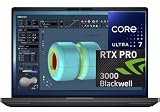
At $5,392.21, this is the flagship of the lineup – an Intel Core Ultra 7-265HX paired with 64GB of RAM and an 18″ QHD+ display, built for the heaviest rendering and simulation workloads where you genuinely need the headroom. It’s a desk-replacement machine in every sense, not something you’ll want to carry daily, but for studios running complex scenes or simulations it earns its price.
2. Lenovo ThinkPad P16v Gen 2 – Best Build Quality
At $2,999.99, this pairs a genuine RTX 2000 Ada workstation GPU with ThinkPad’s renowned chassis durability and keyboard quality – a real consideration if this laptop is traveling to job sites or client meetings regularly rather than staying on a desk.
3. Dell Precision 7780 – Best Desk-Replacement
At $3,099.99, the same RTX 2000 Ada GPU tier as the ThinkPad above, in a 17.3″ chassis with 32GB of LPCAMM2 DDR5 – the biggest screen in this list below the flagship, genuinely useful if you spend long sessions in detailed viewport work.
4. HP ZBook 8 G1i – Best Mid-Tier Balance
At $2,599.99, this balances an RTX 500 Ada GPU, a 16″ touchscreen, and 64GB of RAM – more memory than either Dell Precision option below it, at a lower price than the ThinkPad or Precision 7780. The touchscreen is a genuine extra for sketch-based CAD workflows that some modeling software supports.
5. Dell Precision 3490 – Best for Portability
At $1,999.99, this is the only genuinely compact option in the lineup – a 14″ chassis with 64GB of RAM, more memory than several larger and pricier options here. The tradeoff for that portability is a less powerful integrated/entry GPU tier than the dedicated workstation-GPU picks above.
6. HP ZBook Power – Best Entry-Level Current-Gen
At $1,499.99, this is the cheapest current-generation workstation GPU (RTX A1000) on the list, paired with 32GB DDR5 and a Core i7. The right pick if you need genuine workstation driver certification without spending flagship money, for modeling-heavy rather than rendering-heavy work.
7. Dell Precision 3561 (Renewed) – Best Budget Pick
At $489.99, this is an older Core i7-11800H generation workstation, sold renewed, but it’s still a genuine ISV-certified Precision-line machine with 32GB of RAM. For students or anyone needing real CAD certification on a strict budget, this is the only realistic option under $1,000 on this list.
Specs Compared
| Laptop | Price | CPU | GPU | RAM | Screen |
|---|---|---|---|---|---|
| Dell Precision 3561 (Renewed) | $489.99 | Core i7-11800H | NVIDIA (entry workstation) | 32GB | 15.6″ |
| HP ZBook Power | $1,499.99 | Core i7 | RTX A1000 4GB | 32GB DDR5 | 15.6″ FHD |
| Dell Precision 3490 | $1,999.99 | Intel Ultra 5 135H | Integrated/entry | 64GB DDR5 | 14″ FHD |
| HP ZBook 8 G1i | $2,599.99 | Intel Ultra 7 255H | RTX 500 Ada | 64GB | 16″ FHD+ touch |
| Lenovo ThinkPad P16v Gen 2 | $2,999.99 | Intel Ultra 7 165H | RTX 2000 Ada 8GB | — | 16″ |
| Dell Precision 7780 | $3,099.99 | — | RTX 2000 Ada 8GB | 32GB LPCAMM2 | 17.3″ FHD |
| Dell Pro Max 18 Plus | $5,392.21 | Core Ultra 7-265HX | NVIDIA RTX (flagship) | 64GB | 18″ QHD+ |
How We Chose These
We specifically filtered for laptops marketed as “Precision,” “ZBook,” or “ThinkPad P-series” – the established mobile workstation lines from Dell, HP and Lenovo – rather than consumer gaming laptops with similar raw GPU specs, since the ISV driver certification is the actual differentiator for professional CAD and DCC software. We excluded several non-workstation listings the search surfaced that used “3D” or “CAD” only in marketing copy (a 3D mouse peripheral, a GPU extension cable, and several 3D-printing-themed novelty laptop sleeves) that weren’t actual workstation laptops.
What to Look For
- Workstation GPU vs. gaming GPU. Workstation-class GPUs (RTX A-series, RTX Ada-series) are driver-certified against professional CAD/DCC software; gaming GPUs often run the same software but without that validation.
- RAM for assembly/scene complexity. 32GB is a reasonable baseline; 64GB matters more for large assemblies, complex scenes with many objects, or simulation work.
- Match GPU tier to your actual software. CAD/modeling (Revit, SolidWorks, Fusion 360) is more CPU/RAM-bound; GPU-accelerated rendering (Blender Cycles, Octane, V-Ray GPU) is much more GPU-tier dependent.
- Screen size vs. portability. Bigger screens genuinely help detailed viewport work but turn the laptop into more of a desk machine.
Questions
Can I use a gaming laptop for CAD or 3D rendering instead?
Yes, technically – consumer RTX GPUs run most CAD and 3D software and often have more raw compute per dollar. The tradeoff is you lose the driver certification workstation GPUs have against specific professional software, which matters most for stability in demanding, long-running professional workflows rather than casual hobbyist use.
Is a renewed workstation laptop a reasonable buy?
For budget-conscious buyers, yes, as long as it comes with a seller warranty – the Dell Precision 3561 here is an older-generation CPU but still has genuine workstation certification and 32GB RAM, which covers a lot of real CAD work despite the lower price.
How much RAM do I need for 3D modeling and CAD?
32GB is a reasonable baseline for most modeling and CAD work. 64GB matters more for large assemblies, complex scenes with many objects, or simulation work that needs to hold more data in memory at once.
What’s the difference between RTX A1000, RTX 500 Ada, and RTX 2000 Ada?
These are ascending tiers of NVIDIA’s professional workstation GPU line – RTX A1000 is entry-level, RTX 500/2000 Ada are current-generation successors with more VRAM and compute. Higher tiers matter most for GPU-accelerated rendering and larger, more complex scenes; for lighter CAD/modeling work, the entry tier is often enough.
Update History
Published October 2026 with current live Amazon listings and pricing.
Sources
Product specifications, pricing and availability sourced directly from live Amazon product listings as of October 2026.