

The real decision at this end of the wireless market is not which sensor tops a specification sheet, because every pick here tracks accurately enough for ranked shooters. What actually separates them is how the mouse is powered, how the shell fits your hand, and what gets traded away to reach this budget: swappable AA or AAA cells against an internal rechargeable pack, a full-size ergonomic body against a travel-size one, and extra programmable buttons against the lowest possible weight for fast flicks.

This guide is for competitive players who want a light mouse for shooters, palm-grip players who want support through long sessions, and laptop gamers who need one mouse that works at a desk and in a bag. Every pick was chosen from the product name and specification details published on its Amazon page, so the figures quoted below match what you will see when you open the listing.
Quick Picks
As an Amazon Associate we earn from qualifying purchases
| Product | Best for | Key spec from title |
|---|---|---|
| Razer Basilisk V3 X HyperSpeed | Long sessions in a palm grip with spare buttons to bind | Up to 535 hours of battery life |
| Razer Orochi V2 | One small mouse carried between a desk and a laptop bag | Up to 950 hours of battery life |
| Corsair Harpoon RGB Wireless | Moving a single mouse between a gaming PC and a second machine | 10,000 DPI optical sensor with SLIPSTREAM wireless |
| HyperX Pulsefire Haste 2 Core Wireless | Lightweight shooter play powered by a swappable AAA cell | Up to 100 hours on a single AAA battery |
| SteelSeries Rival 3 Wireless | Set-and-forget battery life that runs for months | 400+ hour battery life |
How to Choose
Decide how the mouse is powered
Battery design changes daily use more than any sensor figure. Mice with swappable cells, such as the Orochi V2, Rival 3 Wireless and Haste 2 Core Wireless, never wait on a cable: a flat battery is a ten-second swap, and a spare AAA in a drawer ends battery anxiety for good. The trade-off is ongoing cell purchases and extra weight. A rechargeable mouse removes that errand but ties you to a charging routine, and its sealed battery slowly loses capacity over the years you own it. Pick the system that matches your habits, not the bigger hour count.
Match the shape to your grip and hand size
A mouse that fights your grip will feel wrong no matter how good its sensor is. Palm-grip players with medium or large hands usually settle best on a sculpted right-handed shell like the Basilisk V3 X HyperSpeed, which supports the whole hand. Fingertip and claw players, and anyone with smaller hands, tend to aim more freely with a short, low body such as the Orochi V2 or the symmetrical Haste 2 Core Wireless. Before ordering, measure your current mouse and compare its length with the dimensions on the listing, because shape is the one thing no setting can fix later.
Check the wireless modes you actually need
Every mouse here connects over a 2.4GHz USB dongle, and that is the mode to game on: it polls at the full rate and keeps latency at wired levels. Bluetooth is the useful second mode for a laptop, a tablet or a work machine, and the Basilisk V3 X HyperSpeed, Orochi V2, Harpoon RGB Wireless and Rival 3 Wireless all offer it. Bluetooth usually polls more slowly, so treat it as the convenience connection rather than the competitive one. If your setup has one computer only, dual-mode support matters far less than shape and battery design.
Read the sensor and switch details that matter
Ignore headline DPI races: nobody plays at 18,000 DPI, and every sensor in this guide tracks without spin-outs at realistic settings. What matters more is polling rate, where 1,000Hz over the dongle is the standard to expect, and switch type. Mechanical switches, fitted to both Razer picks, feel crisp and are simple to replace at the factory level, while the TTC Gold switches in the Haste 2 Core Wireless are tuned for a light, fast click. Shoppers able to stretch further will find higher polling rates and optical switches in the next tier of wireless gaming mice.
The 5 Best Options
Razer Basilisk V3 X HyperSpeed
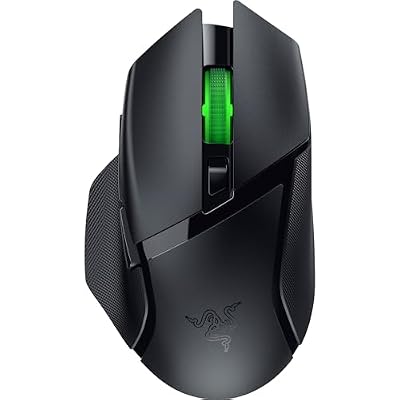
This is the comfort pick of the group: a full-size right-handed shell with a thumb rest, nine programmable controls and a single AA cell that runs for months between swaps. It suits palm and relaxed claw players who bind abilities, push-to-talk or inventory keys to the mouse and play long sessions in story games, MMOs and shooters alike. The HyperSpeed dongle covers competitive play while Bluetooth handles a laptop, and the Gen-2 mechanical switches keep clicks firm and consistent. Check the weight first, because with its battery fitted this is the heaviest mouse here.
Specs
- Sensor: Razer 5G Advanced 18K optical sensor
- Max sensitivity: 18,000 DPI
- Connectivity: Razer HyperSpeed 2.4GHz wireless and Bluetooth
- Battery: 1 AA battery (included)
- Battery life: up to 285 hours on HyperSpeed, up to 535 hours on Bluetooth
- Switches: Razer Mechanical Mouse Switches Gen-2
- Programmable controls: 9
- Lighting: Razer Chroma RGB
- Dimensions: 5.12 x 2.96 x 1.67 inches
- Weight: 3.88 ounces
Best for: Palm-grip players who want extra buttons and months of battery life
Watch out for: At 3.88 ounces with its battery, it is heavy for low-sensitivity arm aiming, and the tall shell can crowd smaller hands
ASIN: B0BXBC26X8
Razer Orochi V2
The Orochi V2 is the travel specialist: a compact symmetrical shell that disappears into a laptop sleeve, yet still carries a flagship-grade 18K sensor and full HyperSpeed wireless for proper gaming at the other end. It fits fingertip and claw players with small to medium hands, and anyone splitting time between a desktop and a laptop. Battery life is the headline, stretching to 950 hours over Bluetooth, and the shell accepts either an AA or an AAA cell, so you can trade a little weight for runtime or the other way round.
Specs
- Sensor: Razer 5G Advanced 18K optical sensor
- Max sensitivity: 18,000 DPI
- Connectivity: Razer HyperSpeed 2.4GHz wireless and Bluetooth
- Battery life: up to 950 hours on Bluetooth
- Battery: 1 AA or AAA battery (included)
- Switches: Razer Mechanical Mouse Switches Gen-2
- Color: Black
Best for: Laptop gamers and fingertip players who want one tiny mouse for desk and travel
Watch out for: The short, low shell gives palm-grip players little to rest on, so large hands may find it cramped over long sessions
ASIN: B0916N2LPZ
Corsair Harpoon RGB Wireless

The Harpoon RGB Wireless is the flexible connector of the five. Corsair’s SLIPSTREAM link handles gaming over the dongle, Bluetooth pairs with a second machine, and a USB cable turns it into a wired mouse while the internal battery charges, so it never has to sit out a session. Six programmable buttons and onboard storage for a profile make it a sensible single mouse for a gaming PC plus a work laptop. The compact contoured shape suits small to medium hands in claw or fingertip grips, and at 99 grams it stays easy to lift and reposition.
Specs
- Sensor: 10,000 DPI optical sensor
- Connectivity: SLIPSTREAM 2.4GHz wireless, Bluetooth and USB wired
- Buttons: 6 programmable buttons
- Lighting: RGB backlighting
- Weight: 0.22 pounds (99 g)
- Color: Black
Best for: Players sharing one mouse between a gaming PC and a second computer
Watch out for: Its 10,000 DPI ceiling and older sensor design trail the newer picks on paper, and the small shell will not fill a large palm
ASIN: B07KQWR72Z
HyperX Pulsefire Haste 2 Core Wireless

This is the lightweight shooter pick that keeps the swappable-battery convenience: a symmetrical 70-gram shell running on a single AAA cell for up to 100 hours over its 2.4GHz dongle. The HyperX Custom Core sensor polls at a full 1,000Hz on that connection, and the mouse is validated for NVIDIA Reflex setups, which suits players chasing low system latency in competitive titles. Bluetooth 5.2 covers a second device, TTC Gold switches keep clicks light, and the two-year warranty is longer than most at this level. It is the easiest recommendation here for fast, low-sensitivity flicks on a strict budget.
Specs
- Sensor: HyperX Custom Core Sensor
- Max sensitivity: 12,000 DPI
- Polling rate: up to 1,000Hz on 2.4GHz
- Connectivity: 2.4GHz wireless and Bluetooth 5.2
- Battery: 1 AAA battery (user replaceable)
- Battery life: up to 100 hours in 2.4GHz mode
- Weight: 70 g operating weight with battery
- Buttons: 6
- Switches: TTC Gold micro switches
- Warranty: 2 years
Best for: Competitive shooter players who want a light mouse and instant battery swaps
Watch out for: Bluetooth mode polls below the 2.4GHz rate, so keep the dongle in for ranked play, and budget for spare AAA cells
ASIN: B0D2BJTX1L
SteelSeries Rival 3 Wireless
The Rival 3 Wireless is built around one idea: stop thinking about battery life. Two AAA cells deliver more than 400 hours of play, and the mouse can also run on a single cell, which trims weight when you want a lighter feel. The TrueMove Air sensor tracks up to 18,000 CPI, the main switches are rated for 60 million clicks, and Quantum 2.0 dual wireless covers both a gaming dongle connection and Bluetooth for a second device. The safe, gently shaped shell suits medium hands in any grip, which makes it a dependable first wireless mouse.
Specs
- Sensor: TrueMove Air optical sensor
- Max sensitivity: 18,000 CPI
- Connectivity: Quantum 2.0 Dual Wireless, 2.4GHz and Bluetooth 5.0
- Battery life: 400+ hours
- Batteries: 2 AAA (included); can run on a single AAA
- Switches: 60 million click mechanical switches
- Weight: 106 g with two AAA batteries
- Model: 62521
Best for: Players who want months of battery life and a safe, durable all-round shape
Watch out for: With both cells fitted it is one of the heavier picks here, so check the weight if you play low-sensitivity shooters
ASIN: B08GB2PF71
Which One Fits Your Situation
You play ranked shooters and aim with your whole arm
Choose the HyperX Pulsefire Haste 2 Core Wireless. At 70 grams with its battery fitted, it asks the least effort per flick and per reset, its dongle connection polls at 1,000Hz, and a dead battery is a quick AAA swap rather than a charging break. The Orochi V2 is the alternative if your hands are small and you prefer a shorter shell.
You split time between a gaming PC and a laptop
Choose the Corsair Harpoon RGB Wireless. SLIPSTREAM covers the gaming rig, Bluetooth pairs with the laptop, and the wired mode keeps it working while it charges, so one mouse genuinely covers both machines. The Orochi V2 also works well here if portability matters more than the wired fallback, since its tiny shell was designed to travel.
You hate charging routines and battery warnings
Choose the SteelSeries Rival 3 Wireless or the Razer Basilisk V3 X HyperSpeed. Both run on swappable cells for hundreds of hours, so a low-battery warning simply means a quick battery change. The Rival 3 lasts longer per set of cells; the Basilisk adds a bigger ergonomic shell, a thumb rest and more programmable buttons for the same convenience.
Your hands are large or you rest your whole palm on the mouse
Choose the Razer Basilisk V3 X HyperSpeed. It is the only full-size ergonomic shell in this group, with the height and length to support a relaxed palm grip through long sessions. The other four are compact shapes that larger hands tend to grip with the fingertips whether they mean to or not, which can ache over time.
Common Mistakes
- Choosing by the biggest DPI number, when shape, weight and battery design change how a mouse feels far more than a sensor ceiling you will never use.
- Ignoring the battery system: buying a swappable-cell mouse without keeping spare AA or AAA cells at the desk, or buying a rechargeable mouse and never building a charging habit.
- Gaming over Bluetooth because it paired first, when the 2.4GHz dongle in the box polls faster and is the connection these mice are designed to compete on.
- Copying a professional player’s sensitivity and grip with a shell that does not fit your hand, instead of matching the shape to your own grip first.
- Leaving the wireless dongle plugged into the back of a PC case under a desk, where the signal weakens, instead of using a front port or a short USB extension.
Frequently Asked Questions
Is 2.4GHz wireless fast enough for competitive shooters?
Yes. On the dongle connection, every mouse in this guide polls at up to 1,000Hz, the same rate as a wired gaming mouse, and modern 2.4GHz links from Razer, Corsair, HyperX and SteelSeries are built to keep latency at wired levels. Bluetooth is the slower mode, so save it for laptops and casual play.
Is a swappable battery better than a rechargeable one?
Neither is better for everyone. Swappable AA or AAA cells, used by the Orochi V2, Rival 3 Wireless and Haste 2 Core Wireless, give instant swaps and no ageing internal pack, at the expense of buying cells. A rechargeable mouse removes that errand but needs a charging routine and its battery fades slowly over years of use.
How much does mouse weight actually matter?
Weight matters most for low-sensitivity shooter players who lift and reset the mouse constantly: the 70-gram Haste 2 Core Wireless will feel noticeably easier across a long session than the Basilisk V3 X HyperSpeed at about 110 grams with its battery. For palm-grip play in slower games, the heavier ergonomic shell often feels steadier and more comfortable.
Can one of these mice connect to two computers?
Yes, if it has both wireless modes. The Basilisk V3 X HyperSpeed, Orochi V2, Harpoon RGB Wireless and Rival 3 Wireless each pair over a 2.4GHz dongle and Bluetooth, so one connection can stay with a gaming PC while the other pairs with a laptop. The Harpoon RGB Wireless adds a wired mode on top, which also works while its battery charges.

















