

- Top Pick: Logitech MK270 Full Size Wireless Keyboard and Mouse Combo – Off White
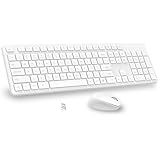
- Best Value: Wireless Keyboard and Mouse Combo, Full Size Silent Ergonomic Keyboard and Mouse, Long Battery Life, Optical Mouse, 2.4G Lag-Free Cordless Mice Keyboard for Computer, Mac, Laptop, PC, Windows(White)
- Premium Choice: Gaming Keyboard and Mouse Combo, K1 RGB LED Backlit Keyboard with 104 Key for PC/Laptop(White)
A white keyboard is, first and foremost, a styling choice — the centrepiece of the bright, minimalist, all-white desk aesthetic that has become hugely popular. The colour does not make a keyboard type better or worse; it makes the setup look clean, airy and cohesive. This guide rounds up the best white keyboards in 2026 with that honesty front and centre: every pick is chosen for delivering an attractive white finish at a fair price, and the write-ups judge each board’s actual function separately from its looks. Most here are white keyboard-and-mouse combos, the easiest way to colour-match a whole desk.
- Best White Keyboards at a Glance
- 1. Logitech MK270 Wireless Keyboard and Mouse Combo, 2.4 GHz Wireless
- 2. Redragon Programmable White Gaming Keyboard and Mouse Combo, RGB
- 3. K1 RGB LED Backlit Gaming Keyboard and Mouse Combo, 104 Key
- 4. Logitech MK295 Wireless Mouse and Keyboard Combo, SilentTouch
- 5. Vssoplor Rechargeable Wireless Keyboard and Mouse Combo, Quiet Full-Size
- 6. Slim Wireless Keyboard and Mouse Combo, Full-Size Thin Light Set
- How to Choose a White Keyboard
- Frequently Asked Questions
- Related Guides
- Related Articles
Our picks were chosen on the aesthetic goal — a genuinely clean white-or-light design that fits a bright setup — alongside everyday function and value. We are explicit that white is cosmetic: a white wireless combo and a white gaming board can look equally good while differing in features, so we describe what each actually does rather than implying the colour adds performance. Prices run from around $26 to around $41, all combos or value boards. Below is an at-a-glance comparison, then a closer look at each and a buyer’s guide for building a white setup without overpaying or being misled by looks.
As an Amazon Associate we earn from qualifying purchases at no extra cost to you.





🛒 Best Price Today on Amazon
Prime members get fast, free shipping on everything above, plus member-only deals. New members get a 30-day free trial — cancel anytime.
Best White Keyboards at a Glance
| Keyboard | Best For | Standout Spec | Approx Price |
|---|---|---|---|
| Logitech MK270 Combo | Reliable white wireless combo | 2.4GHz wireless keyboard + mouse | around $29 |
| Redragon White Combo | White RGB gaming look | RGB backlit keyboard + mouse | around $41 |
| K1 RGB Combo | Bright RGB on a budget | 104-key RGB backlit + mouse | around $26 |
| Logitech MK295 Silent Combo | Quiet white desk | SilentTouch wireless combo | around $32 |
| Vssoplor Rechargeable Combo | Rechargeable quiet white | Rechargeable, full-size, quiet | around $35 |
| Slim Wireless Combo | Minimalist slim white | Slim full-size wireless set | around $34 |
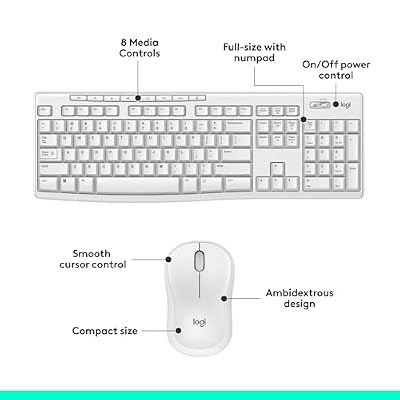
1. Logitech MK270 Wireless Keyboard and Mouse Combo, 2.4 GHz Wireless

Logitech MK270 Full Size Wireless Keyboard and Mouse Combo - Off White | Full size keyboard with spill-resistant design, compact ambidextrous mouse, connect via single included USB-A Nano Receiver




As an Amazon Associate we earn from qualifying purchases. Product prices and availability are accurate as of the date/time indicated.
The Logitech MK270 leads the white list as the reliable wireless-combo pick. It is a full-size 2.4GHz wireless keyboard and mouse set in a clean light finish, built around Logitech’s dependable wireless and long battery life, and at around $29 it pairs a trusted brand with the bright look you want. A single tiny USB receiver runs both devices for a tidy, cable-free desk.
For a white setup its appeal is looks plus rock-solid everyday function: you get the clean, cohesive aesthetic of a matched light keyboard and mouse, with Logitech’s reliable wireless connection, comfortable full-size layout and excellent battery life behind it. The colour is purely cosmetic — this is a capable, no-fuss productivity combo that simply happens to look great on a bright desk. If you want a white set you can trust for daily work, the MK270 is the dependable starting point.
Pros: Clean light finish, reliable Logitech wireless, full-size combo, long battery life, single receiver.
Cons: Membrane keys for everyday use, not gaming-grade; colour adds looks, not performance.
2. Redragon Programmable White Gaming Keyboard and Mouse Combo, RGB

Redragon Updated Programmable Gaming Keyboard and Mouse, RGB Backlit Keyboard Mouse with Software, Independent Macro Record Keys, Value Combo Set, White - S101-3 PRO


As an Amazon Associate we earn from qualifying purchases. Product prices and availability are accurate as of the date/time indicated.
The Redragon white combo is the RGB gaming-look pick. It pairs a white programmable keyboard with vivid RGB backlighting and a matching mouse, so the lighting glows through and around the light keycaps for a striking effect on an all-white desk. At around $41 it is the priciest set here and the most overtly gamer-styled.
For a white setup its strength is visual drama: the RGB backlighting reads especially well against white keycaps and a light chassis, giving the bright, colourful glow that defines many aesthetic gaming desks, and the programmable keys add some shortcut convenience. As ever the white finish is cosmetic — it is the look, not a performance feature — and this is a value gaming combo rather than a premium mechanical board. If your white setup is also a gaming station and you want RGB to pop, the Redragon combo is the most eye-catching choice on the list.
Pros: White RGB backlighting that pops, programmable keys, matching mouse, gamer-styled look.
Cons: Priciest here; value-grade gaming combo; RGB and colour are aesthetic, not performance.
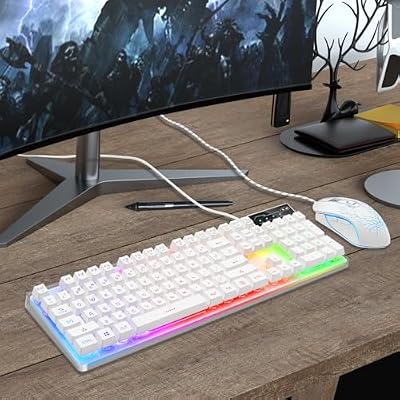
3. K1 RGB LED Backlit Gaming Keyboard and Mouse Combo, 104 Key

Gaming Keyboard and Mouse Combo, K1 RGB LED Backlit Keyboard with 104 Key for PC/Laptop(White)


As an Amazon Associate we earn from qualifying purchases. Product prices and availability are accurate as of the date/time indicated.
The K1 RGB combo is the bright-RGB-on-a-budget pick, and at around $26 it is the cheapest set on this list. It offers a full 104-key RGB backlit keyboard with a light, clean look and an included mouse, delivering colourful illumination and a complete desk kit for very little money. It is the value entry point into an aesthetic lit-up white setup.
For a white desk its appeal is maximum visual impact for minimum spend: the RGB backlighting brightens a light keyboard nicely, the full-size layout covers everything, and bundling a matching mouse makes colour-coordinating the desk easy and affordable. As with every pick here, the finish and lighting are cosmetic rather than performance features, and the build is firmly budget-grade. But if you want the bright, RGB-lit white aesthetic at the lowest possible price, the K1 combo is the obvious value choice.
Pros: Lowest price here, full-size RGB backlit board, included mouse, bright budget aesthetic.
Cons: Budget build and switches; lighting and finish are cosmetic, not performance.
4. Logitech MK295 Wireless Mouse and Keyboard Combo, SilentTouch

Logitech MK295 Full Size Silent Wireless Keyboard Mouse Combo - Off White | Full size keyboard with SilentTouch technology, compact ambidextrous mouse with silent click switches, Windows compatible





As an Amazon Associate we earn from qualifying purchases. Product prices and availability are accurate as of the date/time indicated.
The Logitech MK295 is the quiet white pick, built around Logitech’s SilentTouch technology for dramatically reduced click and keystroke noise. It is a full-size wireless keyboard and mouse combo in a clean light colourway, and at around $32 it pairs near-silent operation with a tidy, cable-free, bright-desk look. One receiver drives both devices.
For a white setup its appeal is calm as well as colour: SilentTouch makes typing and clicking noticeably quieter, which is ideal for shared rooms, late nights, video calls or recording, while the light finish keeps the desk looking clean and minimal. Logitech’s reliable wireless and long battery life round it out. The white colour is cosmetic, as always — this is a quiet, dependable productivity combo whose finish suits a bright aesthetic. If you want your white desk to be peaceful too, the MK295 is the standout.
Pros: Quiet SilentTouch operation, clean light finish, reliable wireless, full-size, single receiver.
Cons: Productivity combo, not gaming-grade; quiet and white are the draws, not raw performance.
5. Vssoplor Rechargeable Wireless Keyboard and Mouse Combo, Quiet Full-Size

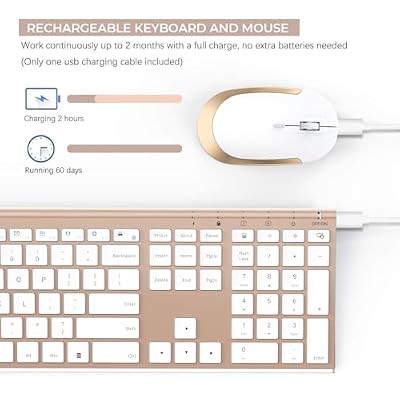
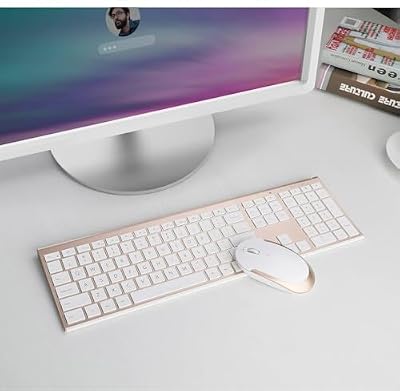
Vssoplor Wireless Keyboard and Mouse, Rechargeable Ultra Slim, White Gold | Quiet Full-Size Keyboard and Mouse Combo Set, for Laptop, PC, Notebook, Desktop, 2.4GHz Stable Connection, Ideal for Office




As an Amazon Associate we earn from qualifying purchases. Product prices and availability are accurate as of the date/time indicated.
The Vssoplor combo is the rechargeable quiet-white pick. It is a full-size wireless keyboard and mouse set with a clean light finish, built-in rechargeable batteries and quiet keys, and at around $35 it removes the recurring cost and hassle of disposable batteries. A USB receiver links both devices for a cable-free, bright desk.
For a white setup its appeal is low-maintenance convenience alongside the look: the rechargeable design means you simply top it up over USB instead of buying batteries, the quiet keys keep typing calm, and the full-size light keyboard and matching mouse give a tidy, coordinated aesthetic. As with the rest of the list, the white finish is purely cosmetic and the set is an everyday productivity combo rather than a gaming board. If a rechargeable, fuss-free white wireless set appeals, the Vssoplor is a sensible, well-priced option.
Pros: Built-in rechargeable batteries, quiet keys, clean light full-size combo, cable-free convenience.
Cons: Everyday productivity combo, not gaming-grade; finish is cosmetic, not a performance feature.
6. Slim Wireless Keyboard and Mouse Combo, Full-Size Thin Light Set

Rounding out the list is this slim wireless combo, the minimalist white pick. It is a full-size yet thin, low-profile wireless keyboard and mouse set in a clean light finish, and at around $34 it delivers the understated, modern look that suits a tidy minimalist desk. A single USB receiver keeps the setup wireless and uncluttered.
For a white setup its appeal is sleek simplicity: the slim, low-profile keyboard sits flat and unobtrusive for a clean, contemporary aesthetic, the light finish matches a bright desk, and the matching mouse completes the coordinated look. The thin profile also gives a soft, laptop-like typing feel some users prefer. As with every board here, the colour is cosmetic rather than a performance feature, and this is an everyday productivity set. If your goal is a minimal, slim white desk, this combo fits the brief neatly.
Pros: Slim low-profile design, clean light finish, full-size wireless combo, minimalist look.
Cons: Thin keys suit everyday typing, not gaming; the white finish is cosmetic only.
How to Choose a White Keyboard
The most important thing to keep in mind when buying a white keyboard is that the colour is cosmetic. A white finish makes a desk look clean, bright and cohesive, but it does not improve typing feel, switch quality, wireless reliability or response. So shop the way you would for any keyboard — judge the function on its merits — and treat the white look as the styling bonus it is, not as a feature you are paying a performance premium for.
Decide first whether you want a combo or a standalone board. Most white sets, including five of the six here, are keyboard-and-mouse combos, which is the easiest and cheapest way to colour-match an entire desk in one purchase and run both devices from a single receiver. If you already own a mouse you love, a combo means a spare pointer, but for building a coordinated white setup from scratch, a matched combo like the Logitech MK270 or MK295 is the simplest route.
Next, choose the function that matters to you, since the white picks differ in what they actually do. Want a striking lit-up gaming desk? The RGB combos like the Redragon or the budget K1 make the lighting pop against white keycaps. Want a calm room? Logitech’s SilentTouch MK295 is near-silent. Want low maintenance? The Vssoplor is rechargeable. Want minimalism? The slim combo sits flat and understated. Pick the feature set that fits your use, then enjoy that it comes in white.
Finally, set a budget and a couple of practical expectations. White sets at this price are value combos and budget boards, not premium mechanical keyboards, so expect everyday-grade typing rather than enthusiast feel — and know that light keycaps can show grime over time, so easy-clean surfaces help. With prices here from around $26 to around $41, the white aesthetic is affordable. Decide combo or standalone, pick the function you need, accept that the colour is the look and not the performance, and choose the white keyboard on this list that completes your setup.
Frequently Asked Questions
Does a white keyboard perform differently from a black one?
No. Colour is purely cosmetic and has no effect on typing feel, switch quality, wireless reliability or responsiveness. A white keyboard simply suits a bright, minimalist desk aesthetic. Choose based on the features and build you actually want — wireless, quiet, RGB, rechargeable or slim — and treat the white finish as the styling bonus, not as something that changes how the keyboard works.
Are these white keyboards good for gaming?
They are aesthetic and value-oriented rather than gaming-grade. The RGB combos like the Redragon and K1 give a colourful, lit-up gaming look that suits a white battlestation, but these are budget combos, not premium mechanical gaming boards. If you want a serious white gaming keyboard, treat these as casual or style-first picks and weigh a dedicated mechanical board if competitive performance is your priority.
Do white keyboards get dirty more easily?
Light keycaps can show grime, dust and finger marks more visibly than dark ones over time — that is the main practical trade-off of the look. It is manageable: wipe the keys regularly and favour smooth, easy-clean surfaces. None of this affects how the keyboard works; it is simply something to expect when you choose a white finish for the bright aesthetic it gives your desk.
Should I buy a white combo or just a white keyboard?
For building a coordinated white desk from scratch, a combo is usually the easiest and most affordable route — five of the six picks here are keyboard-and-mouse sets that colour-match in one purchase and share a single receiver. If you already own a mouse you like, a combo leaves you with a spare, but the matched look and lower combined price still make sets like the Logitech MK270 or MK295 appealing.
Related Guides
- Best Mechanical Keyboards
- Best Wireless Gaming Mouse
- Best RGB Keyboards
- Best Gaming Desks
- Best White Gaming PCs
- Best Gaming Monitors
Affiliate Disclosure: As an Amazon Associate, we earn from qualifying purchases. If you click a link and make a purchase, we may earn a small commission at no extra cost to you. Prices and availability are accurate as of publication and may change.










