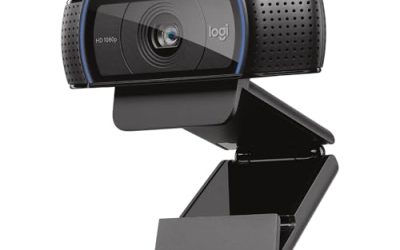
- Top Pick: Logitech Brio 101 Full HD 1080p Webcam for PC, Built-in Mic, Black | Full HD 1080p resolution, auto-light balance, privacy shutter, USB plug-and-play setup for Zoom, Teams, Google Meet
- Best Value: Logitech C920x HD Pro PC Webcam with Microphone, Full HD 1080p/30fps Video | Stereo Audio, HD Light Correction, Works with Microsoft Teams, Google Meet, Zoom, Nintendo Switch, Mac/Tablet- Black
- Premium Choice: EMEET C960 1080P Webcam with Microphone, 2 Mics, 90° FOV, Computer Camera | USB Type-A & A-to-C Adapter, Fixed Focus, Plug&Play for Zoom/Teams/Facetime/YouTube/Google Meet/Switch 2 Camera, 2025 Version
A Mac mini or a MacBook parked on a stand above an external monitor has one awkward problem: the built-in camera is either missing or pointed at the ceiling. A USB webcam solves that, but only if it works with macOS without a pile of driver downloads and if its cable fits the ports on your machine. Most modern webcams follow the plug-and-play standard, so the real decision is resolution, microphone quality, and how well the lens handles a dim home office. Budget models tend to cut corners on sensor quality and microphones first, so the listed features matter more than the logo.
This guide is for remote workers, teachers, and streamers who use a Mac and want a clearer picture than an old laptop camera gives. Seven webcams made the cut for 2026, each because its title names Mac or Apple FaceTime use. Everything below sticks to what each title states, and it points out where a listing leaves something unsaid.
Quick Picks
As an Amazon Associate we earn from qualifying purchases at no extra cost to you.




| Product | Best for | Key spec from the title |
|---|---|---|
| Logitech C270 | Basic video calls | 720p, auto-light correct |
| Logitech C920x HD Pro | Reliable everyday calls | 1080p/30fps, stereo audio |
| EMEET C960 | USB-C Macs | 1080P, 2 mics, A-to-C adapter |
| Anker PowerConf C200 | Sharper image and room audio | 2K, low-light correction |
| TRAUSI 1080P | Privacy-minded desks | Privacy cover, wide angle |
| Generic 1080P (Black-Gray) | Simple home setups | 1080P, noise cancellation, privacy cover |
| Acer A640 4K | Streaming and detail | 4K, PDAF autofocus, 1080P/60fps |
How to Choose
Resolution and Frame Rate
For video calls, 1080p at 30 frames per second is the sensible baseline, since most meeting apps compress video anyway. A 720p camera works for casual calls but looks soft on a large monitor, and anything below it is not worth considering. A 4K sensor adds detail for streaming or recording, but only if your app and connection can carry it. A 60fps mode helps smooth motion for streamers. Ignore megapixel claims; a sensor with good light handling matters more than a bigger number on the box.
Connector and Adapter
Most webcams use a USB-A plug, and many recent Macs only have USB-C. Titles that mention an A-to-C adapter, like the EMEET and Acer listings, save you a separate purchase. Check the cable length as well, since a monitor-top camera needs a few feet of reach. If the camera sits on a tripod behind a keyboard, a longer cable or a powered hub becomes worth considering.
Focus, Light, and Field of View
Fixed focus is fine if you sit at a consistent distance, roughly an arm’s length from the screen; autofocus helps if you lean in to show documents. A 90-degree field of view frames one person; wider angles fit two people but add distortion at the edges. Auto light correction brightens a dim room, but no software replaces a lamp pointed at your face. A window behind you will darken your image, so face the light source if you can.
Microphone and Privacy
A built-in mic is a convenience, and two mics usually pick up voice better than one. A privacy cover is a low-tech way to guarantee the camera is off, and it needs no software at all. Ignore claims about “noise cancelling” as a guarantee, because room acoustics matter more, and remember macOS asks permission before any app can use the camera, so a one-time approval is normal on first launch.
The 7 Best Options
Logitech C270
The C270 is the simplest camera on the list. The title lists 720p, widescreen video, auto light correction, and a noise-reducing mic, with PC and Mac compatibility and use with Zoom, Teams, and Skype. It suits a student or a casual caller who needs a clear step up from a failing laptop camera.
- Plug-and-play with Mac and PC
- Auto light correction in the title
- Trade-off: only 720p, which looks soft on a large display
Skip it if you stream or present to clients, where more resolution matters. It is the entry point, and the rest of the group builds on that foundation. It also lists Nintendo Switch 2 GameChat support, which helps if the same camera moves between a desk and a living room.
Logitech C920x HD Pro
The C920x is the familiar all-rounder. The title lists Full HD 1080p at 30fps, stereo audio, HD light correction, and use with Teams, Meet, Zoom, and Mac, plus Nintendo Switch. It suits remote workers who want a dependable, widely known model.
- 1080p at 30fps with stereo audio
- Mac named in the title
- Trade-off: the title mentions no privacy cover or 60fps mode
Skip it if you want a built-in shutter or a higher frame rate for streaming. It is a safe, familiar pick for office calls. The stereo audio wording means two microphone channels, which can capture a room better than a single mic. Pair it with a monitor-top clip or a tripod to avoid an awkward angle, and keep a USB-C adapter handy if your Mac lacks a rectangular port.
EMEET C960
Built around a USB-A plug with an A-to-C adapter, which makes it handy for modern MacBooks. The title lists 1080P, two mics, a 90-degree field of view, fixed focus, and use with Zoom, Teams, FaceTime, and YouTube.
- A-to-C adapter solves the port problem
- Two mics and FaceTime named in the title
- Trade-off: fixed focus, so leaning in blurs the image
Skip it if you want autofocus for showing papers or products. It suits a seated desk setup. The 90-degree view frames one person without much background, which helps if your desk faces a busy room. Two mics are listed, though room echo still matters more than the count.
Anker PowerConf C200
The C200 steps up to 2K resolution. The title lists low-light correction, a conference microphone with 360-degree voice coverage, smart voice enhancement, and use with PC, laptop, and Mac. It fits small meeting rooms and home offices alike.
- 2K image for crisper video
- Voice coverage in all directions, per the title
- Trade-off: the title does not mention a privacy cover
Skip it if you need a built-in shutter. It is a good fit when sound matters as much as the picture. Small teams gathering around one desk will like the wide voice coverage the title describes. Because it lists a Mac-compatible plug-and-play setup, there is little to configure before your first meeting.
TRAUSI 1080P Full HD Webcam
This listing leads with privacy and framing. The title lists 1080P, a noise-canceling mic, auto light correction, a privacy cover, a wide-angle lens, and USB plug-and-play for laptop, desktop, PC, and Mac with Zoom and Teams.
- Privacy cover included
- Wide-angle lens for two people in frame
- Trade-off: a lesser-known brand with limited detail in the title
Skip it if you prefer a name brand with established support. It suits shoppers in the budget tier who still want a shutter. Both the privacy cover and the wide lens help in shared spaces such as a dorm or a kitchen table. Confirm the return terms, since a lesser-known maker may offer a shorter window than the big brands.
1080P HD Webcam (Black-Gray)
This unbranded listing offers 1080P, a microphone with noise cancellation, a privacy cover, a wide-angle lens, and auto light correction. The title names Mac, PC, Zoom, Skype, and streaming.
- Privacy cover and wide-angle lens
- Works with Mac and Windows
- Trade-off: no brand in the title, so support is less clear
Skip it if you want a recognized manufacturer. It is a basic, practical camera for everyday calls. The wide-angle lens helps when you want a couch or a second person in the frame, and the cover gives peace of mind between meetings. Treat the noise cancellation wording as a basic feature, not a studio-grade promise.
Acer A640 4K Webcam
The most capable listing here. The title lists 4K, an AI noise-canceling mic, a Sony 1/2.8-inch sensor, PDAF autofocus, a 1080P/60fps mode, and an A-to-C adapter, with FaceTime, Teams, and Zoom named.
- PDAF autofocus keeps you sharp when you move
- Sony sensor and 60fps mode for streaming
- Trade-off: it sits in the premium tier, and 4K needs capable software
Skip it if you only make plain video calls. It rewards streamers and creators. Mac users who record tutorials or live streams get the most from the autofocus and the higher frame rate, while meeting-only users can save the extra resolution for later. It is also the only listing here with a named camera sensor.
Which One Fits Your Situation
You Have a USB-C-Only MacBook
The EMEET C960 and the Acer A640 both list an A-to-C adapter in the title, which spares you a dongle hunt. Anyone with a Mac mini and an older monitor may also like that either one sits neatly on a display top.
You Present or Stream Regularly
The Acer A640 lists 4K, autofocus, and 60fps. The Anker C200 is the quieter step up if 2K is enough, and its conference microphone suits a talk-heavy stream. Creators who film tutorials will value the autofocus on the Acer when they lean toward the screen.
You Want a Reliable, Familiar Model
The Logitech C920x is the safe all-rounder, with Mac named in the title and 1080p at 30fps. It is the option to choose when the camera will be shared across a family and nobody wants to learn new software or settings.
You Care About Privacy
The TRAUSI and the generic 1080P listing both mention a privacy cover. A cover is especially handy on a desk that doubles as a living area, where a camera is often in view when no call is running.
Common Mistakes
- Forgetting that many Macs need a USB-A to USB-C adapter, or buying one with a cable too short to reach a monitor top.
- Choosing 4K for a connection or app that cannot carry it, then wondering why nothing looks different.
- Mounting the camera below eye level, which gives an unflattering angle.
- Relying on auto light correction in a dark room instead of adding a lamp.
- Skipping the macOS camera permission check when an app shows a black screen.
Related guides
- Aio Liquid Coolers For High Performance Gaming
- How To Lower Input Delay In Competitive Shooters
- Wireless Gaming Headsets Under 100 For Pc
Frequently Asked Questions
Do webcams need drivers on a Mac?
Most USB webcams work as standard devices, so macOS recognizes them with no driver. Optional software may unlock extra settings such as zoom or color, but a camera should work for calls without it.
Is 4K worth it for video calls?
Rarely. Meeting apps compress video, so 1080p looks nearly the same on most calls. 4K benefits streaming and recording more, where the extra detail survives.
Why does the camera show a black screen?
Check System Settings under Privacy and Security, then Camera, and allow the app. Also confirm the privacy cover is open.
Should I use my iPhone instead?
That works for some Macs and apps, but a dedicated webcam stays mounted and ready without moving a phone, and it leaves your phone free for notes or messages during a call.