

- Top Pick: Logitech Brio 101 Full HD 1080p Webcam for PC, Built-in Mic, Black | Full HD 1080p resolution, auto-light balance, privacy shutter, USB plug-and-play setup for Zoom, Teams, Google Meet
- Best Value: Logitech C920x HD Pro PC Webcam with Microphone, Full HD 1080p/30fps Video | Stereo Audio, HD Light Correction, Works with Microsoft Teams, Google Meet, Zoom, Nintendo Switch, Mac/Tablet- Black
- Premium Choice: EMEET C960 1080P Webcam with Microphone, 2 Mics, 90° FOV, Computer Camera | USB Type-A & A-to-C Adapter, Fixed Focus, Plug&Play for Zoom/Teams/Facetime/YouTube/Google Meet/Switch 2 Camera, 2025 Version
A webcam with a built-in microphone is the one-cable answer to video calls, classes, and casual streaming. You plug it into a USB port and the picture and the voice both arrive at once, with no separate mic stand, no extra driver hunt, and one less item on a crowded desk. That convenience is the whole appeal, and it is also the compromise: a mic sitting a few inches from a monitor picks up fans, keyboard clatter, and room echo that a headset mic would mostly ignore.
This guide is for remote workers, students, and gamers who stream or chat now and then in 2026 and want a single-device solution. The ten cameras below range from a long-running 720p model to a 4K option, and every judgment comes strictly from what the listing titles state. Where a title says nothing about the microphone type, the field of view, or the lens, the entry says so rather than guess, and points to the detail worth confirming on the full product page.
Quick Picks
As an Amazon Associate we earn from qualifying purchases at no extra cost to you.






| Product | Best for | Key spec from the title |
|---|---|---|
| Logitech Brio 101 | Simple office calls | 1080p, privacy shutter, built-in mic |
| Logitech C920x HD Pro | Streaming and calls | 1080p at 30fps, stereo audio |
| EMEET C960 | Dual-mic call clarity | 1080P, 2 mics, 90-degree FOV |
| NexiGo N60 | Adjustable image settings | 1080P, privacy cover, software control |
| NIVEOLI 1080P Webcam | Gaming and live streaming | Privacy cover, auto light correction |
| Logitech C270 | Basic video calling | 720p, noise-reducing mic |
| Logitech C920e | Managed office fleets | Zoom and Teams certified, TAA compliant |
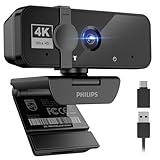
| Philips 4K Webcam | Sharper meetings | 4K, privacy cover |
| Shcngqio 1080P Webcam | Wide-angle framing | Noise cancellation, wide-angle lens |
| AIRHUG 3 in 1 Webcam | Classes with a built-in speaker | Microphone and speaker, privacy cover |
How to Choose
Resolution and Frame Rate
1080p is the practical standard for calls and light streaming. The C920x states 1080p at 30fps, which is a smooth baseline for meetings. The C270 is 720p, enough for basic calls but softer on a large monitor. The Philips lists 4K, which only pays off if your call software and upload connection can carry it, and many meeting apps downscale the picture anyway.
Microphone Details That Matter
Count the mics and read the audio wording. The EMEET lists 2 mics, the C920x lists stereo audio, the C270 lists a noise-reducing mic, and the Shcngqio lists noise cancellation. A built-in mic suits a quiet room, but in a noisy one a headset still wins. Treat noise-cancellation wording as a feature description rather than a measured result, and remember that a mic close to your keyboard will pick up typing.
Field of View, Focus, and Light
The EMEET lists a 90-degree FOV and fixed focus, a good frame for one person at a desk. The Shcngqio advertises a wide-angle lens, which helps include a second person but can introduce edge distortion. Auto light correction, listed on several titles, brightens dim rooms to a degree, but a lamp placed beside the screen does more than any software setting. Budget webcams often cut corners on low-light handling.
Privacy, Mounting, and Compatibility
A privacy cover or shutter, listed on the Brio 101, NexiGo, NIVEOLI, Philips, Shcngqio, and AIRHUG, blocks the lens when you are not on a call. Check the connection type: the EMEET includes a USB Type-A to Type-C adapter for newer laptops. Platform lines matter too, since the C920x and C270 titles mention Nintendo Switch support, and the C920e lists TAA compliance for organizations with purchasing rules.
The 10 Best Options
Logitech Brio 101 Full HD 1080p Webcam
A black 1080p webcam with a built-in mic, auto-light balance, a privacy shutter, and USB plug-and-play setup for Zoom, Teams, and Google Meet. It reads as the modern, uncomplicated entry in the Logitech lineup and fits home office desks that need a camera that simply works without extra software or a long setup.
- Strength: A privacy shutter is listed.
- Strength: Plug-and-play USB setup for common meeting apps.
- Trade-off: No microphone count or field of view is stated.
Skip it if you want stereo audio or a wider frame spelled out in the title.
Logitech C920x HD Pro Webcam
A long-standing 1080p model at 30fps with a mic, stereo audio, and HD light correction. The title lists Teams, Google Meet, Zoom, Nintendo Switch, and Mac or tablet use, which makes it a flexible all-rounder for people who move between work calls, family chats, and the occasional console session.
- Strength: Stereo audio and 30fps are both stated.
- Strength: A wide list of compatible platforms.
- Trade-off: No privacy cover is mentioned.
Skip it if a built-in lens cover is a requirement, since you would need a separate clip-on cap.
EMEET C960 1080P Webcam
A 1080P camera with 2 mics, a 90-degree FOV, fixed focus, and plug-and-play use, shipping with a USB Type-A connector and an A-to-C adapter. The listing names Zoom, Teams, FaceTime, YouTube, Google Meet, and Switch 2 camera use, so it is a good fit for mixed work and entertainment setups.
- Strength: Two microphones are listed.
- Strength: Includes an A-to-C adapter for newer laptops.
- Trade-off: Fixed focus means no manual adjustment.
Skip it if you need to focus on close-up items such as products, sketches, or documents.
NexiGo N60 1080P Webcam
A 1080P webcam with a microphone, software control, and a privacy cover, plug and play for Zoom, Skype, and Teams. The software control hints at adjustable image settings beyond the default picture, which appeals to people who like to fine-tune brightness or framing before an important call.
- Strength: Software control is listed.
- Strength: A privacy cover is included.
- Trade-off: The title gives no field of view.
Skip it if you want a completely driverless setup with no companion software to install. Remote workers who adjust framing between a standing and a seated desk are the likeliest to use the software controls often.
NIVEOLI 1080P Webcam
A 1080P camera with a mic, a privacy cover, auto light correction, and plug-and-play use for video calls, live streaming, gaming, and online meetings. It speaks to the streaming and gaming crowd more directly than many office-centered titles, so it suits a bedroom or den setup.
- Strength: Auto light correction and a privacy cover are listed.
- Strength: Explicitly marketed for live streaming and gaming.
- Trade-off: No microphone count or noise-handling detail.
Skip it if you want the reassurance of a long-established brand ecosystem and support. The title does not say how many mics it carries, so a quiet room is the safer place to use its built-in audio.
Logitech C270 720p Webcam
A 720p webcam with a widescreen view, auto-light correction, and a noise-reducing mic. The title lists Zoom, Teams, Skype, Mac and PC use, and Nintendo Switch 2 GameChat mode, so it doubles as a simple console add-on for family chats and online play.
- Strength: A noise-reducing mic is listed.
- Strength: Console GameChat mode compatibility is named.
- Trade-off: 720p is softer than the 1080p options.
Skip it if image sharpness matters for streaming or if you present to a large audience. It remains a sensible entry-level pick for a spare bedroom computer, a child’s online class, or a travel laptop.
Logitech C920e HD 1080p Webcam
A 1080p webcam with an enabled mic, certified for Zoom and Microsoft Teams, and TAA compliant. The certifications position it for business buyers and IT departments that must check boxes before approving equipment for staff.
- Strength: Certified for Zoom and Teams.
- Strength: TAA compliance is stated.
- Trade-off: Few features are spelled out beyond certifications.
Skip it if you want a privacy cover or audio detail in the title; home users get little extra from the paperwork. Its value lies in procurement rather than in a longer feature list, so compare it with the C920x if you are shopping for yourself.
Philips 4K Webcam with Microphone
A 4K USB webcam with a microphone and a privacy cover, plug and play for Zoom, Teams, Skype, conferencing, and streaming on laptops and desktops. It is the resolution leader of the group for anyone who wants a sharper picture and has a screen and connection to take advantage of it.
- Strength: 4K resolution is stated.
- Strength: A privacy cover is included.
- Trade-off: Microphone details are not given.
Skip it if your call software or internet connection will not carry 4K video anyway.
Shcngqio 1080P HD Webcam
A black 1080P webcam with noise cancellation, a privacy cover, a wide-angle lens, and auto light correction for laptops, desktops, PCs, and Macs. It is a generic listing with a long feature list, aimed at buyers who value included extras over brand recognition.
- Strength: A wide-angle lens and noise cancellation are listed.
- Strength: A privacy cover is included.
- Trade-off: Brand details are limited in the title.
Skip it if you prefer an established brand or a stated field-of-view number. Wide lenses can stretch the edges of the frame, so sit near the center of the picture if you use it for a headshot.
AIRHUG 3 in 1 1080P Webcam
A 1080P camera that combines a microphone and a speaker with a built-in privacy cover, intended for conferencing, online classes, and gaming streams. The speaker makes it convenient for a student or a shared room where no headset is wanted.
- Strength: Speaker and microphone in one device.
- Strength: A privacy cover is built in.
- Trade-off: Speaker quality is not described.
Skip it if you already use a headset or good desktop speakers for call audio. A speaker built into a camera sits close to the mic, so confirm how echo is handled before using it in a quiet meeting room.
Which One Fits Your Situation
You Work from Home Daily
Start with the Logitech Brio 101 for its privacy shutter and simple setup, or the C920x if you want stereo audio and 30fps stated plainly. Either one handles the usual run of meetings.
You Need Better Room Audio
The EMEET C960 lists 2 mics, the strongest audio claim on this list. The C270 lists a noise-reducing mic for a basic setup and a lower-resolution picture.
You Stream or Play Games
NIVEOLI is marketed for live streaming and gaming, while the C270 and C920x both mention Nintendo Switch support. Pick by whether you want 720p simplicity or 1080p detail.
You Manage Business Equipment
The Logitech C920e states Zoom and Teams certification and TAA compliance, which simplifies approval for organizations with purchasing rules.
Common Mistakes
- Choosing 4K when meeting software caps the picture at a lower size.
- Assuming a built-in mic replaces a headset in a noisy room.
- Ignoring the lens cover when the camera sits on a bedroom monitor.
- Placing the camera below eye level and shooting upward at the chin.
- Forgetting the USB port type on a newer laptop and buying without an adapter.
Related guides
- Battery Operated Smoke And Carbon Monoxide Detectors
- Combination Smoke And Carbon Monoxide Detectors
- Aio Liquid Coolers For High Performance Gaming
Frequently Asked Questions
Is a built-in webcam mic good enough?
For quiet rooms, yes. In a noisy room, a headset mic isolates your voice better because it sits closer to your mouth.
Is 4K necessary for calls?
Rarely. 1080p covers most calls and light streaming, and many meeting apps lower the picture size regardless of the camera.
What does a privacy cover do?
It physically blocks the lens when you are not on a call, which is a simple safeguard that no software setting can match.
Will these work on a Mac?
Several titles list Mac support, including the C920x, the C270, and the Shcngqio, but check the one you pick before ordering because other titles name only PC or laptop use.







