

The coffee table pile of remotes is a reliable sign that a universal remote is overdue. One handset can control the TV, a streaming player, a soundbar and a Blu-ray player, but only if its code library actually covers your brands and you match the remote’s design to how you watch. The listing headlines are long strings of brand names, so the real work is reading them with care.
This guide is for living rooms and gaming setups where a TV, a soundbar and a streaming box share one couch. The three trade-offs that matter most are brand coverage, whether you want a simple replacement-style remote or a programmable all-in-one with macros, and comfort features such as backlighting. Everything below is judged from titles, so confirm the exact model support on each full listing.
Quick Picks
| Product | Best for | Key spec from the listing |
|---|---|---|
| Universal TV Remote for Samsung, LG, Vizio, Roku, TCL | Wide TV brand coverage | Lists Samsung, LG, Vizio, Roku, TCL, Hisense, Sony and more |
| Universal TV Remote for Samsung, LG, TCL, Philips | LCD, LED and HDTV sets | Lists Panasonic, Toshiba, Insignia, Sharp, Sanyo and others |
| GE Universal Remote Control | TVs plus soundbars and players | Smart TVs, soundbars, streaming players, Blu-ray |
| SofaBaton U3 All-in-One Smart Remote | Complex home theater and macros | Global macro, active multi-link Bluetooth, air mouse |
| Backlit GE Universal Remote Control | Dark rooms and movie nights | Backlit, lists Roku and Apple TV, streaming players |
| Philips Universal Companion Remote | Fire TV users | Flip and slide design, lists Fire TV, Roku, Apple TV |
How to Choose
Check brand and device coverage first
Brand lists in titles show intended coverage, but they do not promise that every model works. Look for your TV brand and also your soundbar, streaming player and disc player. Find the model number on the back or in the settings menu of your TV, and look for a code list or compatibility page that names it. A remote that covers the brand but not your device type will leave you with two handsets.
Decide between simple replacement and programmable control
Basic universal remotes are code-based: you enter a code, then press buttons that mimic the original. Smart universal remotes, like the all-in-one type, can store multi-step macros that turn on the TV, switch an input and start a stream with one press. Think about how many devices and rooms you manage, and whether anyone else in the house will be confused by a more advanced handset, before taking on the extra complexity, and read the setup steps on the listing to see whether an app is required.
Consider the connection type
Infrared remotes require a line of sight to the device. Bluetooth or radio-frequency remotes can work from behind a cabinet door or from across a room, as long as the target device supports it. Streaming boxes often use Bluetooth for their own remotes, so check whether a universal remote lists Bluetooth control as well as infrared. If your devices sit inside a closed cabinet, confirm this before buying.
Look at comfort and layout features
Backlighting makes buttons visible in a dark room, and a clear layout with dedicated buttons for volume, input and streaming apps cuts down on hunting. A flip or slide design hides rarely used keys. Check the listing images for button size, spacing and any dedicated shortcut keys for the services you use most.
The 6 Best Options
Universal TV Remote for Samsung, LG, Vizio, Roku and TCL

This universal TV remote names Samsung, LG, Vizio, Roku, TCL, Hisense and Sony in its title, with a second list including Onn, Element, Insignia, Philips, Sharp, Westinghouse, Sanyo and Emerson. It suits households with a mix of TV brands, such as a main set plus a bedroom set from a different maker.
- Strength: very broad brand list in the title.
- Strength: covers both major and lesser-known TV brands.
- Limit: the title is cut off, so check the full spec sheet for supported device types.
Skip it if you need to control a soundbar or console as well.
Universal TV Remote for Samsung, LG, TCL, Philips and Vizio

This remote lists Samsung, LG, TCL, Philips, Vizio, Hisense, Sharp, Sony, Panasonic, Sanyo, Insignia, Toshiba and other brands for LCD, LED and 3D HDTV sets. It suits readers who simply need a working TV handset. That also makes it a handy spare for a rental, a guest room or a TV whose original remote went missing, as long as the brand is on the list.
- Strength: wide brand list that includes Panasonic and Toshiba.
- Strength: aimed at LCD and LED HDTV sets.
- Limit: the title is cut off, so check the full spec sheet for smart TV features.
Skip it if you want a handset that also learns macros for other devices.
GE Universal Remote Control
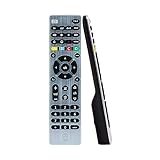
The GE remote lists Samsung, LG, Roku TV, Vizio, Sony, Philips, Sharp, RCA, Sanyo and Element smart TVs, plus soundbars, streaming players and Blu-ray players. The device list is the main draw, because it signals one remote for several boxes. In a living room with a soundbar and a disc player, that cuts the pile of handsets on the coffee table.
- Strength: names soundbars, streaming players and Blu-ray players.
- Strength: one handset aimed at the TV and the boxes around it.
- Limit: the title is cut off, so check the full spec sheet for code coverage.
Skip it if your gear is mostly newer Bluetooth-only devices.
SofaBaton U3 All-in-One Smart Universal Remote

The SofaBaton U3 is a programmable remote with global macro, active multi-link Bluetooth and an air mouse. It targets complicated home theaters where one button should start an activity across several devices. For a gamer who switches between a console, a PC and a streaming player, that single-button approach can replace three or four separate steps.
- Strength: global macro and multi-link Bluetooth in the title.
- Strength: air mouse for navigating smart interfaces.
- Limit: it is more involved to set up, so check the full spec sheet for app requirements.
Skip it if you only need a quick code-entry remote.
Backlit GE Universal Remote Control

This GE remote is backlit and names Samsung, Vizio, TCL, Hisense, Sony, RCA, Panasonic, Roku, Apple TV, smart TVs and streaming players. Backlighting is the main upgrade, which suits movie nights and bedrooms. If you often fumble for the volume key in the dark, a lit keypad is more helpful than a longer brand list.
- Strength: backlit buttons for dark rooms.
- Strength: Apple TV and Roku named in the title.
- Limit: the title is cut off, so check the full spec sheet for supported device types.
Skip it if you want macro control across multiple devices.
Philips Universal Companion Remote
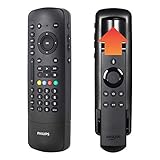
The Philips flip-and-slide remote names Fire TV, Samsung, Vizio, LG, Sony, Roku, Apple TV, RCA and Panasonic. As a companion remote, it suits households that want a second handset for a streaming box or a backup. The slide-out design keeps the main controls compact on the couch cushion, which can be easier for kids and guests to use.
- Strength: flip and slide design tucks away extra keys.
- Strength: names Fire TV and Apple TV among supported players.
- Limit: it is a companion remote, so check the full spec sheet for how it pairs with each device.
Skip it if you need the remote to replace every handset in the room.
Which One Fits Your Situation
A bedroom with one TV
The Universal TV Remote for Samsung, LG, TCL and Philips covers many brands for a simple setup. The backlit GE is a good alternative if you watch in the dark.
A living room with a soundbar and a Blu-ray player
Go with the GE Universal Remote Control, which names soundbars, streaming players and Blu-ray in its title. This keeps one remote for the whole stack.
A gaming or streaming rig with many devices
The SofaBaton U3 is built for macros and multi-device control, which helps if you use a console, a PC and a streaming player on one TV. Expect extra setup time, and plan a quiet evening to program the activities instead of rushing it before a game night.
A household with Fire TV or Apple TV
The Philips Universal Companion Remote names Fire TV and Apple TV, and the backlit GE names Apple TV and Roku. Pick based on whether you want backlight or a flip design, and confirm on each listing how the remote pairs with a streaming player.
Common Mistakes
- Trusting a brand list without confirming the model support on the listing.
- Forgetting to include the soundbar, streaming player and disc player in the compatibility check.
- Choosing an infrared-only remote for gear inside a closed cabinet.
- Skipping the setup steps and expecting plug-and-play behavior from a code-based remote.
- Buying a replacement-style remote when you need macros for multiple devices.
Frequently Asked Questions
Will a universal remote control a gaming console?
Only if the listing names the console or lists a compatible device type. Check the full spec sheet, and expect the console’s own controller to remain the main input.
Why does my remote work for some buttons but not others?
Different code sets cover different functions. Try other codes for your brand, or check the instructions for the closest match to your model.
Do universal remotes need batteries or an app?
Basic models usually use batteries only, while smart remotes may need an app for setup. Read the listing for power and setup details.
Is a smart universal remote worth the extra setup?
If you control several devices with macros, yes. If you only need a TV handset, a simple code-based remote is easier.











