

Data analysis lives and dies by how fast you can get a dataset off the disk and into memory. Whether you are loading multi-gigabyte CSVs, scanning columnar parquet files, reading model checkpoints or working through a large database dump, sequential read speed and raw capacity are the two specs that shape your day. A fast SSD turns a coffee-break load into a few seconds, and enough capacity means you can keep whole datasets on local storage instead of constantly shuffling files. This guide rounds up the best SSDs for data analysis in 2026, leading with the drives that pair large capacity with quick reads.
- Best SSDs for Data Analysis at a Glance
- 1. SAMSUNG 970 EVO Plus SSD 2TB NVMe M.2 Internal Solid State Drive
- 2. SANDISK 4TB Extreme Portable SSD – Up to 1050MB/s, USB-C, USB 3.2 Gen 2
- 3. SANDISK 2TB Extreme Portable SSD – Up to 1050MB/s, USB-C, USB 3.2 Gen 2
- 4. Samsung 870 EVO SATA III SSD 1TB 2.5″ Internal Solid State Drive
- 5. SANDISK 2TB SSD Plus 2.5″ SATA SSD Internal, Read up to 545 MB/s
- 6. Kingston 480GB A400 SATA 3 2.5″ Internal SSD – HDD Replacement
- How to Choose an SSD for Data Analysis
- Frequently Asked Questions
- Related Guides
- Related Articles
Our picks were chosen on what genuinely matters for data work: sequential read speed for pulling large files quickly, capacity to hold sizeable datasets locally, the NVMe-versus-SATA interface trade-off, and value per gigabyte. We flag the interface clearly on every drive — NVMe M.2 for the fastest internal transfers, SATA for broad compatibility and capacity value, and USB portable for carrying datasets between machines — because the right choice depends entirely on how you work. Prices run from around $106 up to around $486, and the list spans 480GB scratch drives through 4TB dataset libraries. Below is an at-a-glance comparison of all six, then a closer look at each and a buyer’s guide built around read speed, capacity and interface.
🛒 Best Price Today on Amazon
Prime members get fast, free shipping on everything above, plus member-only deals. New members get a 30-day free trial — cancel anytime.
Quick answer: For most people in 2026, the best ssds for data analysis is the Samsung 970 EVO Plus 2TB NVMe M.2 — our #1 rated choice. See the full ranked comparison, alternatives and buying advice below.
Best SSDs for Data Analysis at a Glance
| SSD | Best For | Standout Spec | Approx Price |
|---|---|---|---|
| Samsung 970 EVO Plus 2TB NVMe M.2 | Fastest dataset loading | NVMe M.2, 2TB, V-NAND | around $365 |
| SanDisk 4TB Extreme Portable SSD | Largest portable dataset library | 4TB, up to 1050MB/s USB-C | around $450 |
| SanDisk 2TB Extreme Portable SSD | Fast portable datasets | 2TB, up to 1050MB/s USB-C | around $294 |
| Samsung 870 EVO 1TB SATA III | Reliable internal SATA capacity | 1TB SATA, mature V-NAND | around $486 |
| SanDisk 2TB SSD Plus 2.5″ SATA | Budget bulk internal storage | 2TB SATA, up to 545MB/s | around $399 |
| Kingston A400 480GB SATA 2.5″ | Cheap scratch/working drive | 480GB SATA, HDD replacement | around $106 |
1. SAMSUNG 970 EVO Plus SSD 2TB NVMe M.2 Internal Solid State Drive
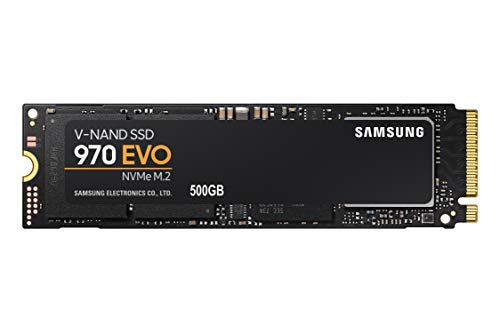
SAMSUNG (MZ-V7E500BW) 970 EVO SSD 500GB - M.2 NVMe Interface Internal Solid State Drive with V-NAND Technology, Black/Red


As an Amazon Associate we earn from qualifying purchases. Product prices and availability are accurate as of the date/time indicated.
The Samsung 970 EVO Plus 2TB is the speed pick for data analysis, and it earns the lead spot because of its interface. As an NVMe M.2 drive it connects directly to the PCIe bus rather than the older SATA channel, delivering sequential read speeds several times higher than any SATA SSD can manage. Paired with Samsung’s mature V-NAND and a generous 2TB capacity, it loads large datasets, parquet files and checkpoints dramatically faster. At around $365 it is the drive to beat for serious local data work.
This is the SSD to choose when read speed is your bottleneck — pulling multi-gigabyte files into a dataframe, scanning columnar data, or repeatedly reading training data. The NVMe interface keeps loads snappy, the 2TB capacity holds substantial datasets without constant housekeeping, and Samsung’s reliability reputation gives confidence for a working drive you depend on. For anyone whose analysis stalls waiting on disk, the 970 EVO Plus is the clear, high-performance recommendation.
Pros: Fast NVMe M.2 interface for quick dataset loads, 2TB capacity, proven Samsung V-NAND.
Cons: Requires an M.2 NVMe slot; pricier per GB than SATA bulk drives.
2. SANDISK 4TB Extreme Portable SSD – Up to 1050MB/s, USB-C, USB 3.2 Gen 2
The SanDisk 4TB Extreme Portable is the capacity pick, and it is the one to reach for when your datasets are simply too big to live comfortably on an internal drive. It offers a huge 4TB of space in a pocketable, rugged enclosure, with read speeds up to 1050MB/s over USB-C (USB 3.2 Gen 2) — far faster than a portable hard drive and quick enough to work with large files directly off the drive. At around $450 it is the premium portable option here.
This is the SSD for the analyst who carries datasets between machines — a laptop and a workstation, the office and home, or one project box and another. The 4TB capacity holds an entire data library, the up-to-1050MB/s reads make loading sizeable files off external storage genuinely usable, and the durable, compact build survives life in a bag. When portability and sheer capacity matter more than the absolute peak speed of internal NVMe, the 4TB Extreme is the standout.
Pros: Huge 4TB capacity, up to 1050MB/s portable reads, rugged USB-C enclosure.
Cons: USB portable is slower than internal NVMe; highest price here.
3. SANDISK 2TB Extreme Portable SSD – Up to 1050MB/s, USB-C, USB 3.2 Gen 2
The SanDisk 2TB Extreme Portable brings the same fast, rugged formula in a more affordable 2TB size. It delivers read speeds up to 1050MB/s over USB-C (USB 3.2 Gen 2) in a compact, drop-resistant body, making it a quick and convenient way to move and work with datasets away from a fixed machine. At around $294 it is the value portable pick for data work on the go.
This is the SSD for the analyst who needs portable speed but does not require the full 4TB library. The 2TB capacity comfortably holds working datasets and project files, the up-to-1050MB/s reads keep loading large files off external storage fast, and the rugged USB-C design travels easily between laptop and desktop. For flexible, fast portable storage at a sensible price, the 2TB Extreme is a practical, well-judged choice for fieldwork and hot-desking alike.
Pros: Fast up-to-1050MB/s portable reads, 2TB capacity, rugged compact USB-C drive.
Cons: Portable USB speeds trail internal NVMe; capacity smaller than the 4TB model.
4. Samsung 870 EVO SATA III SSD 1TB 2.5″ Internal Solid State Drive

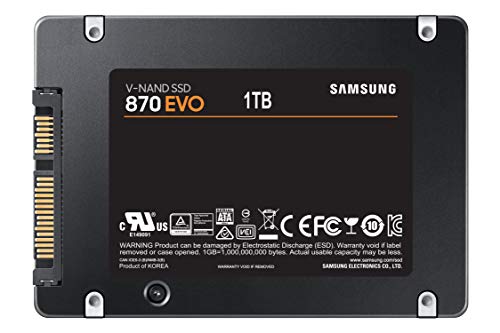
Samsung SSD 870 EVO SATA III 2.5” 1TB, Read Speeds Up to 560MB/s




As an Amazon Associate we earn from qualifying purchases. Product prices and availability are accurate as of the date/time indicated.
The Samsung 870 EVO 1TB is the reliable internal SATA pick. It is a 2.5-inch SATA III drive built on Samsung’s mature V-NAND, prized for consistent performance and dependable endurance over years of use. SATA tops out around 550MB/s — well below NVMe — but for many analysis tasks that is plenty, and the 870 EVO’s reliability makes it a trustworthy home for datasets you do not want to lose. At around $486 it is positioned as a premium SATA option.
This is the SSD to choose when you want proven dependability and broad compatibility on the SATA interface, which fits virtually any desktop or laptop with a 2.5-inch bay. The 1TB capacity suits a focused working set, the consistent SATA performance is fine for loading moderate datasets, and Samsung’s track record gives peace of mind for a drive you rely on daily. For a steady, well-regarded internal SATA SSD, the 870 EVO is a classic, low-risk pick.
Pros: Mature, reliable SATA V-NAND, broad 2.5″ compatibility, consistent performance.
Cons: SATA caps around 550MB/s — far slower reads than NVMe; 1TB only.
5. SANDISK 2TB SSD Plus 2.5″ SATA SSD Internal, Read up to 545 MB/s
The SanDisk 2TB SSD Plus is the budget bulk pick for internal storage. It is a 2.5-inch SATA drive with read speeds up to 545MB/s and a roomy 2TB capacity, aimed at holding plenty of data affordably rather than chasing peak speed. At around $399 it offers a generous amount of dependable SATA storage for keeping datasets local without an NVMe slot.
This is the SSD for the analyst who needs to keep a lot of data on hand and values capacity and compatibility over raw transfer rate. The 2TB of SATA storage holds large collections of datasets, logs and project files, the up-to-545MB/s reads are a huge step up from any spinning hard drive, and the standard 2.5-inch SATA form factor drops into almost any system. For cost-effective bulk local storage to complement a faster boot or scratch drive, the SSD Plus is a sensible workhorse.
Pros: Roomy 2TB SATA capacity, broad 2.5″ compatibility, far faster than a hard drive.
Cons: SATA read speed up to 545MB/s only; not for read-intensive NVMe workloads.
6. Kingston 480GB A400 SATA 3 2.5″ Internal SSD – HDD Replacement

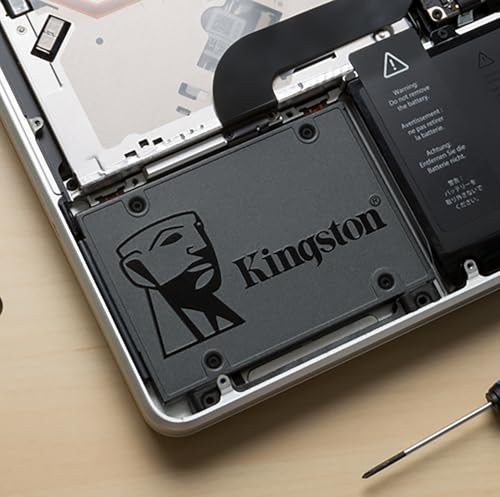
Kingston 480GB A400 SATA 3 2.5" Internal SSD SA400S37/480G - HDD Replacement for Increase Performance



As an Amazon Associate we earn from qualifying purchases. Product prices and availability are accurate as of the date/time indicated.
Rounding out the list is the Kingston A400 480GB, the cheap scratch-and-working-drive pick. It is a 2.5-inch SATA SSD designed as an affordable hard-drive replacement, and at around $106 it is the lowest-cost drive here. Capacity and speed are both modest by data-analysis standards, but as a low-cost scratch disk, OS drive or temporary working space, it does a useful job for very little money.
This is the SSD to choose as an inexpensive secondary or scratch drive rather than your main dataset store — somewhere to stage intermediate files, hold a working subset, or run the operating system while bigger datasets live on a faster, larger drive. The SATA interface ensures it fits almost any machine, the SSD speed easily beats a mechanical hard drive for everyday access, and the rock-bottom price makes it an easy add-on. For a cheap, dependable supporting drive in a data workflow, the A400 fits the role.
Pros: Very affordable, SATA compatibility, useful as a scratch or OS drive, beats a HDD.
Cons: Small 480GB capacity and entry-level SATA speed; not a primary dataset drive.
How to Choose an SSD for Data Analysis
For data analysis, sequential read speed is the spec to scrutinise first, because loading datasets off disk is where you spend your waiting time. This is where the interface matters most: an NVMe M.2 drive like the Samsung 970 EVO Plus connects over PCIe and reads several times faster than any SATA SSD, so if your workflow is dominated by pulling large files into memory, NVMe is the clear choice. SATA drives top out around 550MB/s, which is still vastly quicker than a hard drive but a real bottleneck for read-heavy work.
Capacity is the other half of the equation, and it should reflect how much data you keep local. A 480GB or 1TB drive suits a focused working set or a scratch disk, while 2TB and 4TB options hold whole dataset libraries so you are not constantly deleting and re-downloading files. Generous capacity also helps an SSD sustain performance, since drives kept very full can slow down. Match the size to your real datasets plus headroom, and consider pairing a fast NVMe working drive with a larger SATA or portable drive for bulk storage.
The NVMe-versus-SATA decision comes down to your machine and your priorities. NVMe needs an M.2 slot and rewards you with the fastest reads — ideal for a primary analysis drive. SATA fits virtually any desktop or laptop with a 2.5-inch bay, offers excellent capacity value, and is perfect for bulk storage or older systems without a spare M.2 slot. Drives like the Samsung 870 EVO and SanDisk SSD Plus show how much dependable SATA capacity you can get, while the 970 EVO Plus shows what NVMe speed unlocks.
Finally, decide whether you need the data to travel. A portable SSD like the SanDisk Extreme series connects over USB-C and lets you carry a dataset library between machines, reading up to around 1050MB/s — slower than internal NVMe but far quicker than a portable hard drive and fast enough to work off directly. If you move between a laptop and a workstation, or between sites, portable is worth the small speed trade-off. Put read speed and capacity first, choose the interface that suits your hardware, add portability if you need it, and pick the SSD on this list that matches how you handle your data.
Frequently Asked Questions
Is NVMe or SATA better for data analysis?
NVMe is faster for reading large datasets — an NVMe M.2 drive like the Samsung 970 EVO Plus reads several times quicker than SATA because it uses the PCIe bus. If loading files is your bottleneck, choose NVMe. SATA drives such as the Samsung 870 EVO are slower (around 550MB/s) but offer broad compatibility and great capacity value, making them ideal for bulk storage or systems without a spare M.2 slot.
How much SSD capacity do I need for working with datasets?
It depends on your data. A 1TB drive suits a focused working set, while 2TB or 4TB drives like the SanDisk Extreme portables hold entire dataset libraries so you are not constantly shuffling files. A common approach is a fast NVMe drive for active work plus a larger SATA or portable drive for bulk storage. Leave some headroom, since very full SSDs can lose performance.
Are portable SSDs fast enough for loading data?
Yes, for many tasks. Portable drives like the SanDisk Extreme read up to around 1050MB/s over USB-C — slower than internal NVMe but far faster than a portable hard drive, and quick enough to work with large files directly off the drive. They are ideal when you need to carry datasets between machines. For the absolute fastest repeated reads, an internal NVMe drive still wins.
Does read speed or write speed matter more for analysis?
For most analysis work, read speed matters more, because you spend your time loading datasets into memory rather than writing them out. That is why this guide prioritises fast-reading drives, led by the NVMe Samsung 970 EVO Plus. Write speed becomes more important if you frequently save large intermediate files or checkpoints, but for read-dominated workflows, prioritise sequential read performance and capacity.
Related Guides
- Best NVMe SSDs
- Best External SSDs
- Best SATA SSDs
- Best Workstation PCs
- Best RAM for Your Build
- Best Budget Gaming Setup
Affiliate Disclosure: As an Amazon Associate, we earn from qualifying purchases. If you click a link and make a purchase, we may earn a small commission at no extra cost to you. Prices and availability are accurate as of publication and may change.
Ready to decide? Our #1 pick for 2026 is the Samsung 970 EVO Plus 2TB NVMe M.2.
Live price & availability on Amazon.


