

🛒 Best Price Today on Amazon
Prime members get fast, free shipping on everything above, plus member-only deals. New members get a 30-day free trial — cancel anytime.
- Top Low Light Webcams Picks for 2026
- Best Low Light Webcams at a Glance
- 1. Logitech 4K Webcam (Brio Ultra HD Pro)
- 2. Logitech C920x HD Pro PC Webcam, Full HD 1080p/30fps
- 3. Logitech C922x HD Pro PC Webcam, 1080p/30fps or 720p/60fps
- 4. Logitech HD Pro Webcam C920, 1080p
- 5. Lenovo HD 1080p Webcam (300 FHD) with 95° Wide Angle, Pan & Tilt
- 6. NexiGo N60 1080P Webcam with Microphone, Privacy Cover
- How to Choose a Low Light Webcam
- Frequently Asked Questions
- Related Guides
- Related Articles
Top Low Light Webcams Picks for 2026
Here are our current top low light webcams picks, compared on real Amazon owner reviews, price, and features. Live prices update below.
As an Amazon Associate we earn from qualifying purchases at no extra cost to you.







Most webcams look fine in a bright office and fall apart the moment the sun goes down. In a dim room, a small sensor starves for light, so the image turns grainy, washed-out, and laggy as the camera hunts for exposure. A good low-light webcam fights back with a larger or more sensitive sensor, smarter automatic light correction, and processing that keeps your face clear and natural rather than noisy and dark. This guide rounds up the best low light webcams in 2026, judged specifically on how they hold up when the lighting is poor — for late-night calls, evening streams, and rooms that never get much daylight.
Our picks were chosen on what genuinely matters after dark: sensor capability, the quality of the automatic exposure and light-correction, and how clean the image stays in a dim room, balanced against value. We have kept a deliberate price spread, from around $28 up to around $118, because the best low-light webcam is the one that suits your room and your budget. We avoid quoting invented test numbers and instead describe how each camera behaves in low light and who it is for. Below is an at-a-glance comparison of all six, then a closer look at each and a buyer’s guide built around sensor size, exposure control and lighting — the things that decide whether you look good when the room is dark.
Best Low Light Webcams at a Glance
| Webcam | Best For | Standout Spec | Approx Price |
|---|---|---|---|
| Logitech 4K Webcam (Brio) | Best low-light detail | 4K sensor, HDR, RightLight 3 | around $118 |
| Logitech C920x HD Pro | Reliable dim-room 1080p | Glass lens, RightLight auto-correction | around $91 |
| Logitech C922x HD Pro | Low light + flexible framerate | 1080p30/720p60, RightLight 2 | around $105 |
| Logitech HD Pro C920 | Budget proven low-light pick | 1080p, automatic light correction | around $68 |
| Lenovo HD 1080p (300 FHD) | Dim room on a budget | Wide angle, pan/tilt, auto-exposure | around $40 |
| NexiGo N60 1080P | Cheapest usable low-light cam | 1080p, light-correction software | around $28 |
1. Logitech 4K Webcam (Brio Ultra HD Pro)

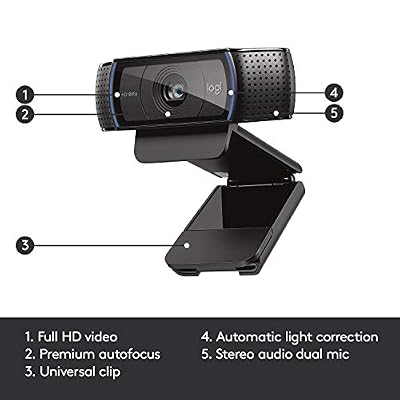
Logitech HD Pro Webcam C920, Widescreen Video Calling and Recording, 1080p Camera, Desktop or Laptop Webcam




As an Amazon Associate we earn from qualifying purchases. Product prices and availability are accurate as of the date/time indicated.
The Logitech 4K Webcam, better known as the Brio, is the best low-light performer on this list, and it gets there with hardware as much as software. Its larger, higher-resolution 4K sensor gathers more light than the smaller sensors found in most 1080p cameras, and it pairs that with HDR and Logitech’s RightLight 3 technology, which works to expose your face correctly even when the surroundings are dark or backlit. At around $118 it is the premium pick here, and the extra sensor is exactly why.
For a dim room this is the camera to beat. The combination of a light-hungry sensor, HDR and aggressive automatic light correction keeps your face bright and natural when a budget webcam would render you as a dark, grainy silhouette. Even if you only output 1080p, downscaling from a 4K sensor produces a cleaner, less noisy low-light image than a native 1080p chip. If your priority is looking good after dark and you can stretch the budget, the Brio is the standout low-light webcam.
Pros: Large 4K sensor gathers more light, HDR plus RightLight 3, cleanest dim-room image.
Cons: Most expensive here; benefits most with a USB 3.0 port.
2. Logitech C920x HD Pro PC Webcam, Full HD 1080p/30fps

Logitech C920x HD Pro PC Webcam Full 1080p/30fps Video - Black | 30fps Video, Clear Audio, Light Correction, Works with Teams, Meet, Zoom, Nintendo Switch 2, Mac, Tablet




As an Amazon Associate we earn from qualifying purchases. Product prices and availability are accurate as of the date/time indicated.
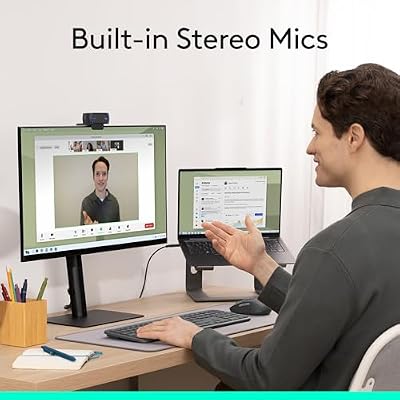
The Logitech C920x is the reliable dim-room workhorse. It uses a glass lens and a proven 1080p sensor paired with Logitech’s RightLight automatic light correction, which adjusts exposure to brighten your face in less-than-ideal lighting. At around $91 it is the dependable, well-supported choice for anyone who wants consistently usable image quality in a normally-lit-to-dim room.
This is the camera for the person whose room is rarely bright but not pitch black — a home office with one lamp, an evening of calls, or a study with limited daylight. RightLight does a genuinely good job of lifting your face out of the gloom and balancing exposure, the glass lens keeps the image sharp, and Logitech’s long track record means broad software and platform support. It will not match the Brio’s larger sensor in the very darkest rooms, but for everyday low-light reliability the C920x is a smart, safe pick.

Pros: Effective RightLight auto-correction, sharp glass lens, dependable 1080p in dim rooms.
Cons: Smaller 1080p sensor than the Brio; struggles in near-total darkness.
3. Logitech C922x HD Pro PC Webcam, 1080p/30fps or 720p/60fps

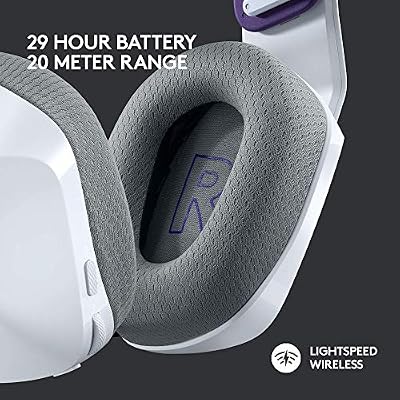
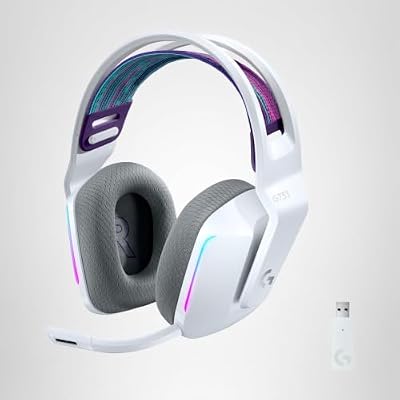
Logitech G733 Lightspeed Wireless Gaming Headset - White | Suspension headband, LIGHTSYNC RGB, Blue VO!CE mic technology, PRO-G audio drivers



As an Amazon Associate we earn from qualifying purchases. Product prices and availability are accurate as of the date/time indicated.
The Logitech C922x builds on the C920 formula and adds flexibility that helps in low light. It offers the same RightLight automatic light-correction approach and a 1080p30 mode, plus a 720p60 option, and it includes background-replacement software. At around $105 it is the pick for someone who wants dependable dim-room exposure with the option to trade resolution for a smoother frame rate.
In a dark room, frame rate and exposure interact: cameras often slow their shutter to gather light, which can make motion look smeared. The C922x’s 720p60 mode gives you a faster-framerate fallback when you would rather keep movement crisp than hold maximum resolution, while RightLight still works to brighten your face. For a creator or caller who values that flexibility alongside solid automatic light correction, the C922x is a versatile low-light option that extends the proven C920 platform.
Pros: RightLight auto-correction, flexible 1080p30 or 720p60, useful when light is scarce.
Cons: Same sensor class as the C920x at a higher price; not a true low-light specialist.
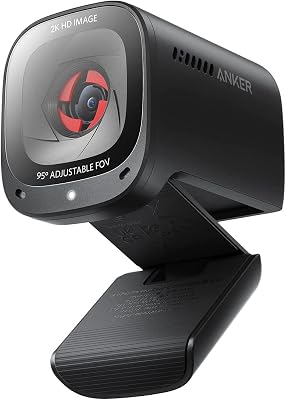
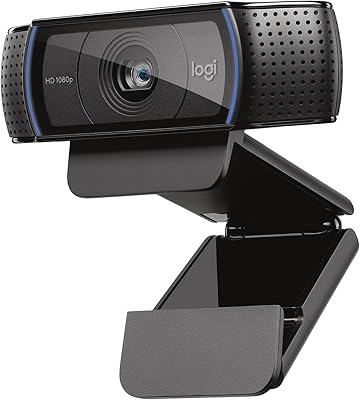
4. Logitech HD Pro Webcam C920, 1080p
Logitech HD Pro Webcam C920, Widescreen Video Calling and Recording, 1080p Camera, Desktop or Laptop Webcam
As an Amazon Associate we earn from qualifying purchases. Product prices and availability are accurate as of the date/time indicated.
The Logitech HD Pro C920 is the budget proven pick for low light. It is the classic, enormously popular C920 that established the formula the C920x and C922x refine: a 1080p sensor with glass optics and automatic light correction that lifts your face in dim conditions. At around $68 it is the most affordable way to get Logitech’s well-regarded low-light handling.
This is the camera to choose when you want dependable dim-room performance without paying for the newest variant. The automatic light correction does the heavy lifting in a room with modest or uneven lighting, brightening your face and balancing exposure, and the 1080p glass-lens image remains clear and natural. It shares the same sensor class as the pricier C920x, so in most low-light situations the results are very close. For value-focused buyers who want a trusted low-light webcam, the original C920 is a long-standing favorite.
Pros: Automatic light correction, sharp 1080p glass lens, excellent low-light value.
Cons: Older model; lacks the very latest firmware tweaks of the C920x.
5. Lenovo HD 1080p Webcam (300 FHD) with 95° Wide Angle, Pan & Tilt

Lenovo HD 1080p Webcam (300 FHD) - Monitor Camera with 95° Wide Angle, 360° Rotation Pan & Tilt, Dual Microphones – Attachable Desktop Cam with Privacy Shutter for Remote Work, Streaming & Gaming


As an Amazon Associate we earn from qualifying purchases. Product prices and availability are accurate as of the date/time indicated.
The Lenovo 300 FHD is the budget dim-room pick with extra framing flexibility. It is a 1080p webcam with a 95-degree wide-angle lens, 360-degree rotation and pan-and-tilt adjustment, plus automatic exposure that works to keep your face visible in lower light. At around $40 it is an affordable camera that adds physical positioning options most budget webcams lack.
This is the camera for someone in a dimly lit room who also needs to frame a wider scene or reposition the view easily — a desk against a dark wall, or a space where you move around. The wide-angle lens captures more of the room, the pan-and-tilt lets you aim the camera at the best-lit angle, and the automatic exposure brightens the image in modest light. It is honest to say it relies on auto-exposure rather than a large sensor, so it will not rival the Brio in deep darkness, but for budget low-light use with flexible framing it is a practical choice.
Pros: Affordable, 95° wide angle, pan/tilt and rotation, auto-exposure for dim rooms.
Cons: Relies on auto-exposure not a large sensor; weaker in very dark rooms.
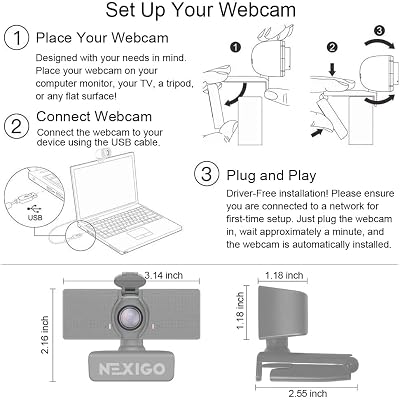
6. NexiGo N60 1080P Webcam with Microphone, Privacy Cover

NexiGo N60 1080P Webcam with Microphone, Software Control & Privacy Cover, USB HD Computer Web Camera, Plug and Play, for Zoom/Skype/Teams, Conferencing and Video Calling




As an Amazon Associate we earn from qualifying purchases. Product prices and availability are accurate as of the date/time indicated.
Rounding out the list is the NexiGo N60, the cheapest usable low-light option here. It is a 1080p USB webcam with a built-in microphone, a physical privacy cover, and accompanying software that includes light-correction adjustments to help in dimmer conditions. At around $28 it is by far the most affordable camera on this list and a sensible entry point.
This is the camera to choose on the tightest budget, or as a reliable backup, when you need acceptable image quality in a normally-lit room that occasionally gets dim. Its software lets you nudge brightness and exposure to compensate for lower light, the 1080p sensor is fine for everyday calls, and the privacy cover and built-in mic add convenience. Be realistic about its limits — a small budget sensor cannot match a large-sensor camera in genuine darkness — but for light-correction on a shoestring, the N60 punches above its price.
Pros: Lowest price here, software light-correction, 1080p with built-in mic and privacy cover.
Cons: Small budget sensor; software correction only, limited in true darkness.
How to Choose a Low Light Webcam
Choosing a webcam for low light starts with the sensor, because no amount of software can fully replace the light a chip physically captures. A larger, more sensitive sensor — like the 4K sensor in the Logitech Brio — gathers more light and produces a cleaner, less noisy image in a dim room, even when you downscale the output to 1080p. The smaller sensors in budget 1080p cameras can be lifted by good processing, but in genuinely dark conditions the sensor is the ceiling, so prioritise it if low light is your main concern.
Automatic light correction is the second pillar, and it is where Logitech’s RightLight technology earns its reputation. Features like RightLight and HDR analyse the scene and adjust exposure to keep your face bright and correctly lit even when the background is dark or you are backlit by a window. The C920, C920x and C922x all use this approach, and it makes a real difference in a normally-lit-to-dim room. When comparing cameras, look for explicit automatic light-correction or HDR support rather than assuming any webcam will cope.
Be aware of the trade-off between exposure and motion. In low light, cameras tend to slow their shutter to gather more light, which can make movement look smeared or laggy. A camera that offers a higher-framerate mode, like the C922x’s 720p60, lets you keep motion crisp when you would rather not hold maximum resolution. If you move a lot on camera or stream in a dim room, that flexibility is worth having alongside good auto-exposure.
Finally, remember that the cheapest and most reliable low-light upgrade is often light itself. Even the best low-light webcam benefits enormously from a small key light or a well-placed lamp, and adding light will do more than stepping up a camera tier in many rooms. Set your budget, decide whether you need a large sensor for genuine darkness or just solid auto-correction for a dim room, consider adding a light, and pick the webcam on this list that fits your space. The best low-light webcam keeps you looking natural when the room is anything but bright.
Frequently Asked Questions
What makes a webcam good in low light?
Two things above all: a larger, more sensitive sensor that physically captures more light, and effective automatic light-correction that brightens your face without making the image noisy. The Logitech Brio leads on sensor size with its 4K chip, while the C920, C920x and C922x rely on Logitech’s RightLight auto-correction. In a genuinely dark room the sensor matters most; in a normally-dim room, good light-correction often does the job.
Will a 4K webcam look better than a 1080p one in a dark room?
Usually yes, even if you only output 1080p. A 4K sensor like the Brio’s gathers more light than a smaller 1080p sensor, so downscaling its image produces cleaner, less grainy results in low light. Resolution is not the point here — the larger, more light-hungry sensor is what gives a 4K camera its low-light advantage over typical budget 1080p webcams.
Can software fix a webcam’s low-light image?
It helps, but only up to a point. Automatic light-correction such as Logitech’s RightLight and the adjustment software on cameras like the NexiGo N60 can brighten your face and balance exposure noticeably. However, software cannot create light that the sensor never captured, so in very dark rooms a small budget sensor will still struggle. Pair good software with a capable sensor for the best result.
Do I still need a lamp if I buy a good low-light webcam?
Adding light is the single most effective low-light upgrade, even with a strong camera. A small key light or a well-placed lamp gives any webcam more to work with and will often improve your image more than moving up a camera tier. A good low-light webcam reduces how much extra light you need, but a little deliberate lighting still makes every camera on this list look its best.
Related Guides
- Best Webcams for Streaming
- Best Microphones for Streaming
- Best Key Lights for Streaming
- Best Gaming Headsets
- Best Capture Cards
- Best Budget Gaming Setup
Affiliate Disclosure: As an Amazon Associate, we earn from qualifying purchases. If you click a link and make a purchase, we may earn a small commission at no extra cost to you. Prices and availability are accurate as of publication and may change.










