Our Short List of 3
All 4 Picks at a Glance
| Product | Specs | Action |
|---|---|---|
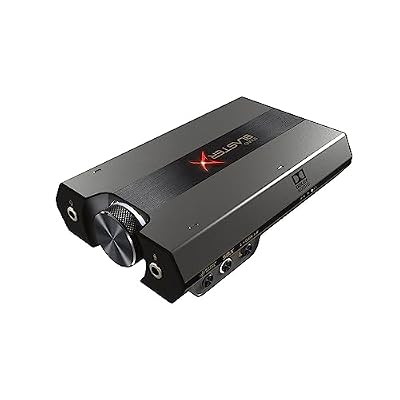 Creative Sound BlasterX G6 | Check price on Amazon | |
 Creative Sound Blaster Play! 4 | Check price on Amazon | |
 UGREEN USB Audio Adapter | Check price on Amazon | |
 Sabrent USB External Stereo Sound Adapter (AU-MMSA) | Check price on Amazon |
A Toshiba laptop running Windows 10 cannot take an internal PCIe sound card, so every sensible upgrade for this machine is external. A USB sound card plugs into a spare USB port, appears in Windows as a new playback and recording device, and bypasses the built-in audio hardware entirely. That matters when the headphone jack has become loose or noisy, when the onboard output sounds flat, or when a headset microphone sounds muffled.
The five products below are all the same type: an external USB sound card or desktop computer. At one end are simple UGREEN and Sabrent adapters that restore headphone and microphone connections with no drivers on Windows 10. In the middle are the Creative Play! 3 and Play! 4, which add a proper converter and amplifier for cleaner playback. At the top sits the Sound BlasterX G6, a gaming DAC with surround sound. Each entry lists its published specifications, including its ASIN.
As an Amazon Associate, we earn from qualifying purchases.
How to Choose
Start with the port on the laptop. Most Toshiba laptops from the Windows 10 era offer USB Type-A ports, so a USB-A adapter such as the Sabrent, UGREEN, Play! 3, or G6 connects directly. The Sound Blaster Play! 4 uses USB-C, so on a model with only Type-A ports it needs a USB-C to USB-A adapter, while a newer Toshiba or Dynabook model with a USB-C port takes it directly. Checking the side of the machine before ordering avoids the most common buying mistake in this category.
Next, consider what will be plugged in. A basic adapter with separate headphone and microphone jacks suits a two-plug headset, a standalone microphone, or powered speakers. A four-pole combo jack suits a single-plug headset or earbuds with an inline microphone. The Play! 3 provides both, removing the need for a splitter cable. Anyone recording voice should also check the microphone input specification, because the Play! 3 records at up to 24-bit and 48 kHz.
Playback quality is described by two published figures. The first is the maximum sample rate and bit depth: the Play! 3 reaches 24-bit and 96 kHz, the Play! 4 reaches 24-bit and 192 kHz, and the G6 reaches 32-bit and 384 kHz. The second is the signal-to-noise or dynamic range rating in decibels, where a higher number points to a quieter background with less hiss. The G6 publishes 130 dB, the Play! 4 publishes 110 dB, and the Play! 3 publishes 93 dB, a clear ladder from everyday listening to enthusiast gaming.
Headphone drive is the final factor. Earbuds and most gaming headsets run happily from any adapter here. Larger over-ear headphones with higher impedance need a real amplifier stage: the Play! 3 supports headphones up to 300 ohms, and the G6 uses a discrete Xamp amplifier rated for 16 to 600 ohms. An owner who only needs sound working again can choose the simplest adapter, while a listener with demanding headphones should move up the range.
Creative Sound BlasterX G6
The Sound BlasterX G6 is the performance pick in this guide and the only product here built specifically around gaming audio. It is an external USB sound card and DAC amplifier in a small desktop-style enclosure, with a headphone output, a microphone input, and optical connections that also make it useful with game consoles. For a Toshiba laptop used for gaming at a desk, it replaces the onboard audio with a converter rated at 32-bit and 384 kHz playback and a published dynamic range of 130 dB, the strongest figures in this roundup.
The amplifier is the other half of its appeal. Creative’s discrete Xamp design gives each audio channel its own amplification stage and supports headphones from 16 to 600 ohms, from sensitive in-ear monitors to studio-style over-ear headphones that a laptop jack would leave sounding thin and quiet. It also decodes Dolby Digital, provides virtual 7.1 surround sound for positional cues in games, and includes sidetone control so a player can hear their own voice through the headset. Physical controls handle volume and profile switching without opening software mid-game.
On Windows 10, the G6 works as a USB audio device and gains its full feature set, including Scout Mode and SBX processing, through Creative’s software. It is the natural choice for a Toshiba gaming setup where the laptop stays on a desk and audio quality is a priority.
Who It Suits
The G6 suits Toshiba laptop owners who game with good headphones, use demanding high-impedance models, or want virtual surround and sidetone from one device. It is more than a casual listener needs, and its desk-bound size makes it less convenient for a laptop that travels daily, where a stick-style adapter below is easier to carry.
Creative Sound Blaster Play! 4
The Sound Blaster Play! 4 is a compact USB-C sound card aimed at calls and meetings as much as entertainment. It is a small stick-style adapter with a single four-pole 3.5 mm jack for a headset, converting audio at up to 24-bit and 192 kHz with a published signal-to-noise ratio of 110 dB. Those figures place it well above a basic dongle for music playback, while its size keeps it practical for a laptop that moves between rooms.
Its distinguishing features are built for voice. VoiceDetect automatically mutes and unmutes the microphone based on whether the user is speaking, and two-way noise cancellation works on both the outgoing microphone signal and the incoming audio. Bass Boost and Dynamic EQ modes round out a feature set that fits remote work and online classes on a Windows 10 laptop well. Creative lists the Play! 4 for video calls on Windows PC, so a Toshiba laptop running Windows 10 is squarely within its intended use.
The one point to confirm before ordering is the connector: a Toshiba model with a USB-C port connects directly, while an older model with only USB Type-A ports requires a small adapter. With that checked, it is the strongest middle option here for anyone whose laptop time is split between calls and media.
Who It Suits
The Play! 4 suits Toshiba laptop owners who spend much of the day on calls and want cleaner microphone audio without a separate recording interface. Owners of older models with no USB-C port should factor in an adapter, and listeners who want surround sound or a stronger amplifier should step up to the G6.
Creative Sound Blaster Play! 3
The Sound Blaster Play! 3 is the long-running value pick in Creative’s USB range and a straightforward upgrade over a Toshiba laptop’s built-in audio. It is a USB Type-A stick adapter that adds a proper DAC and headphone amplifier, playing audio at up to 24-bit and 96 kHz with a published signal-to-noise ratio of 93 dB. Creative lists Windows 10 among its supported operating systems, and the adapter works as a plug-and-play device, with optional Control Panel software adding SBX Pro Studio processing.
Its connector layout is unusually flexible for its size. One 3.5 mm jack is a four-pole headphone and headset connection, and a second 3.5 mm jack is a dedicated microphone input, so separate-plug headsets, single-plug headsets, and standalone microphones all connect without a splitter cable. The microphone input records at up to 24-bit and 48 kHz, and the built-in amplifier supports headphones up to 300 ohms, covering gaming headsets and many enthusiast over-ear models.
For a Toshiba laptop with a failing or noisy onboard jack, the Play! 3 restores sound and improves on the original hardware at the same time. It lacks the voice features of the Play! 4 and the surround processing of the G6, but as a general-purpose playback and headset upgrade it covers the needs of most laptop owners.
Specs
| Specification | Detail |
|---|---|
| Brand | Creative |
| Model | Sound Blaster Play! 3 (SB1730) |
| Connection | USB Type-A to the laptop |
| DAC playback | Up to 24-bit / 96 kHz |
| Microphone input | Up to 24-bit / 48 kHz |
| Signal-to-noise ratio | 93 dB |
| Headphone support | Up to 300 ohms |
| Jacks | One 3.5 mm four-pole headphone jack and one 3.5 mm microphone jack |
| Operating system | Windows 10, 8.1, 8, and 7 listed |
| ASIN | B073KTPNDR |
Who It Suits
The Play! 3 suits Toshiba laptop owners who want a clear step up in playback quality and a flexible headset connection. Anyone needing USB-C should choose the Play! 4, and anyone driving very demanding headphones or wanting virtual surround should choose the G6.
UGREEN USB Audio Adapter
The UGREEN USB Audio Adapter is the simplest repair-style fix in this guide. It is a small USB Type-A adapter on a short cable, with two separate 3.5 mm jacks: a stereo headphone output and a mono microphone input. UGREEN positions it as a replacement for a faulty sound card or audio port, and that is the job it does well on a Toshiba laptop. When the built-in jack crackles, drops one channel, or stops recognizing a microphone, this adapter adds a fresh pair of connections through USB.
Setup on Windows 10 is as undemanding as the hardware. The adapter uses the standard USB audio support built into Windows, so it is plug-and-play with no driver installation, and UGREEN lists compatibility across Windows, Mac, and Linux as well as game consoles. The short cable also keeps the jacks from blocking neighboring USB ports on compact Toshiba models.
What the UGREEN adapter does not attempt is high-resolution playback or headphone amplification beyond standard output. Its published listing focuses on connection and compatibility rather than converter figures. Judged on that basis, it is an honest, practical product: it restores the connections the laptop lost and keeps working without software or maintenance.
Who It Suits
The UGREEN adapter suits Toshiba laptop owners whose main problem is a broken or unreliable audio jack and who use ordinary headphones or a headset with separate plugs. Listeners who want higher-resolution playback or stronger headphone drive should choose one of the Creative models above.
Sabrent USB External Stereo Sound Adapter (AU-MMSA)
The Sabrent AU-MMSA is the other classic plug-and-play repair adapter in this guide. It is a small black USB Type-A dongle with color-coded 3.5 mm jacks, green for headphones or speakers and pink for a microphone, following the convention used on desktop computers for decades. Plug it into the Toshiba laptop, connect the headset, and select it in Windows.
Sabrent lists the AU-MMSA as a plug-and-play adapter for Windows and Mac with no drivers needed, a good fit for Windows 10 and for owners who do not want vendor software on an older machine. It provides stereo output and a microphone input, covering calls, classes, video, and casual gaming, and its compact body makes it easy to leave permanently in a USB port as a standing replacement for a worn-out onboard jack.
Like the UGREEN adapter, the Sabrent makes no claim to high-resolution conversion or amplified output, and it should be bought as a connection fix rather than an audio upgrade. Between the two, the choice comes down to form factor: the UGREEN places its jacks on a short cable, while the Sabrent keeps them on the dongle body itself.
Who It Suits
The AU-MMSA suits Toshiba laptop owners who want the fastest possible fix for a dead audio jack, with no software and no setup decisions. Owners who want better playback quality than the laptop originally offered should look at the Play! 3 or Play! 4.
FAQ
Will a USB sound card work on any Toshiba laptop running Windows 10?
In general, yes. A USB sound card does not depend on the laptop’s internal audio hardware, so it works on Toshiba and Dynabook models with a free USB port of the right type. USB Type-A models such as the Play! 3, UGREEN, Sabrent, and G6 fit most Toshiba laptops directly, while the USB-C Play! 4 needs a USB-C port or an adapter. Selecting the device as the default playback and recording device in Windows sound settings completes the setup.
Does a USB sound card fix a broken headphone jack?
Yes, because it bypasses the jack entirely. Sound leaves the laptop through the USB port and is converted inside the external adapter, so a loose, crackling, or silent onboard jack no longer sits in the signal path. A basic adapter such as the UGREEN or Sabrent restores the connections, while a Creative Play! model also improves conversion quality. The one fault it cannot fix is damage to the USB port itself, so the adapter should be tried in a known working port.
Do these sound cards need drivers on Windows 10?
The basic adapters do not. The UGREEN and Sabrent models are plug-and-play devices that run on the USB audio support built into Windows 10, and the Play! 3 also works as a plug-and-play device for standard playback and recording. Vendor software becomes relevant higher up the range: Creative’s control software unlocks the processing, EQ, and surround options on the Play! 3, Play! 4, and G6, and is only necessary when the owner wants those extra features.
Which sound card is best for gaming on a Toshiba laptop?
The Creative Sound BlasterX G6 is the gaming pick in this guide. It publishes the strongest converter figures here, at up to 32-bit and 384 kHz with a 130 dB dynamic range, adds virtual 7.1 surround sound and Dolby Digital decoding, and uses a discrete Xamp amplifier supporting headphones from 16 to 600 ohms. For lighter gaming with a standard headset, the Play! 3 is a reasonable smaller alternative.
Final Verdict
For most Toshiba laptop owners running Windows 10, the Creative Sound Blaster Play! 3 is the balanced recommendation: it connects by USB Type-A, plays at up to 24-bit and 96 kHz, accepts both single-plug and separate-plug headsets, and lists Windows 10 support directly. Owners who live on calls should choose the Play! 4 for its voice features, checking the USB-C connection first, and gamers with good headphones should choose the Sound BlasterX G6. When the only problem is a broken jack, the UGREEN USB Audio Adapter and the Sabrent AU-MMSA both restore sound with no drivers and no fuss. Every option here is external and reversible, which is why USB sound cards remain the standard fix for this class of machine.
Product and ASIN Reference
| Product | ASIN |
|---|---|
| Creative Sound BlasterX G6 | B07FY45F2S |
| Creative Sound Blaster Play! 4 | B08T9LM3LM |
| Creative Sound Blaster Play! 3 | B073KTPNDR |
| UGREEN USB Audio Adapter | B01N905VOY |
| Sabrent USB External Stereo Sound Adapter (AU-MMSA) | B00IRVQ0F8 |