Our Short List of 3
All 3 Picks at a Glance
| Product | Specs | Action |
|---|---|---|
 JBL Professional 305P MkII 5-Inch 2-Way Powered Studio Monitor | Check price on Amazon | |
 PreSonus Eris E5 XT 2-Way Active Studio Monitor | Check price on Amazon | |
 ADAM Audio T5V Studio Monitor | Check price on Amazon |
The best 5-inch powered studio monitors for desktop mixing give a home studio honest sound without taking over the desk. A 5-inch woofer is the sweet spot for a small room: large enough to reproduce bass guitar, kick drums and low synths with authority, yet compact enough to sit on either side of a computer monitor at arm’s length. Each monitor below has its own amplifier built in, so there is no separate amp to buy, wire up or find space for.
Desktop mixing lives or dies on translation. A mix that sounds balanced on flat, accurate monitors tends to hold up on headphones, car speakers and earbuds, while a mix built on flattering speakers often falls apart elsewhere. That is why near-field studio monitors are tuned for accuracy rather than excitement. The three models in this guide are all two-way powered designs with balanced inputs, rear tuning controls and a 5-inch class woofer, and each one is sold as a single unit, so a stereo pair means buying two.
What to Look For
Woofer size and low-end reach come first. A 5-inch monitor typically reaches down to the high 40 Hz range, which covers most musical bass but not the deepest sub-bass. If you mix electronic music or film-style low end, plan on adding a matched subwoofer later rather than expecting a small cabinet to do everything.
Voicing matters as much as specifications. Studio monitors aim for a flat frequency response so problems in a mix stay audible instead of being hidden. Look for a design described by its maker as a reference or near-field monitor, with a waveguide around the tweeter that keeps the stereo image stable when you move your head slightly.
Connectivity should match your audio interface. Balanced XLR or quarter-inch TRS inputs reject hum and interference over longer cable runs, which is the standard way to connect an interface. RCA inputs are handy for a second source, such as a phone or a turntable preamp, but unbalanced connections are more prone to noise.
Placement controls are essential on a desk. Rear-panel high-frequency trim and boundary EQ let you compensate when a monitor sits close to a wall or in a corner, where bass builds up.
Finally, check how the monitor is packaged. Most studio monitors in this class are sold singly, not as a matched pair, so confirm the listing quantity before ordering. Also measure your desk: a 5-inch monitor is roughly 7 to 8 inches wide and about 11 inches tall, and it needs an isolation pad or stand to keep desk vibrations out of the sound.
The 3 Best 5-Inch Powered Studio Monitors for Desktop Mixing
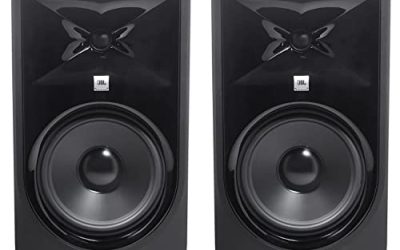
JBL Professional 305P MkII 5-Inch 2-Way Powered Studio Monitor
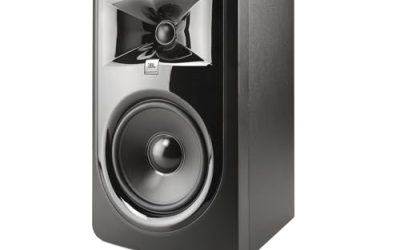
The JBL 305P MkII pairs a 5-inch woofer with a 1-inch tweeter in a two-way design driven by 82 watts of Class D amplification. JBL lists a frequency response of 49 Hz to 20 kHz, and the patented Image Control Waveguide around the tweeter is designed to widen the sweet spot so the stereo image stays stable across a normal seating position. Balanced XLR and quarter-inch TRS inputs sit on the rear panel next to high-frequency trim and boundary EQ switches, and a front slot port keeps low-end output consistent when the cabinet is close to a wall.
This monitor suits producers and editors who want a widely used near-field reference with detailed highs and a controlled low end. One consideration is packaging: the listing is for a single monitor, so a stereo setup requires two units and a pair of balanced cables.
PreSonus Eris E5 XT 2-Way Active Studio Monitor
The PreSonus Eris E5 XT uses a 5.25-inch woven composite woofer and a 1-inch silk-dome tweeter, powered by 80 watts of Class AB bi-amplification. Its frequency response is listed at 48 Hz to 20 kHz, and the elliptical EBM waveguide is designed to create a wide, even listening window. Inputs cover balanced XLR, balanced quarter-inch TRS and unbalanced RCA, and the rear panel carries acoustic tuning controls for gain, low cutoff, mid frequency, high frequency and acoustic space. A front-firing port helps when the monitors sit near a wall.
This monitor suits desktop mixers who want flexible connections and thorough room tuning in one cabinet. The RCA input is convenient for a secondary source, and the mid-frequency control is unusual at this size and helps tame boxy-sounding rooms. One consideration is that the E5 XT is sold as a single monitor, so budget for two units, and its Class AB amplifier runs warmer than the Class D designs in this guide.
ADAM Audio T5V Studio Monitor
The ADAM Audio T5V combines a 5-inch woofer with ADAM’s U-ART ribbon tweeter and HPS waveguide, driven by 70 watts of total amplification. The listed frequency response runs from 45 Hz to 25 kHz, the widest top end in this guide, which suits engineers who want extra air and detail in the highs. Inputs are balanced XLR and unbalanced RCA, and the rear panel provides high-shelf and low-shelf EQ controls plus a level knob. A rear bass reflex port extends the low end, so the T5V benefits from a few inches of clearance behind the cabinet.
This monitor suits mixers who prioritize treble detail and a wide, open stereo image, including vocal and acoustic work where the ribbon tweeter shows its strengths. The extended high-frequency response also makes it a strong choice for checking harshness in cymbals and sibilance. One consideration is the rear port: if your desk sits flush against a wall, leave space behind the monitors or consider a front-ported alternative.
Comparison Table
| Product | Woofer | Tweeter | Amplification | Frequency Response | Inputs | Sold As |
|---|---|---|---|---|---|---|
| JBL 305P MkII | 5-inch | 1-inch dome | 82 watts Class D | 49 Hz to 20 kHz | XLR, TRS | Single |
| PreSonus Eris E5 XT | 5.25-inch woven composite | 1-inch silk dome | 80 watts Class AB | 48 Hz to 20 kHz | XLR, TRS, RCA | Single |
| ADAM Audio T5V | 5-inch | U-ART ribbon | 70 watts | 45 Hz to 25 kHz | XLR, RCA | Single |
FAQ
Do I need to buy two monitors?
Yes. All three models in this guide are sold as single units, so a stereo pair for mixing requires two identical monitors. Buying a matched pair from the same production run keeps the left and right channels consistent.
Can I connect studio monitors directly to a laptop?
You can connect through the headphone output with the right cable, but an audio interface is the better route. An interface provides balanced outputs, a proper volume control and lower noise, and it keeps the signal path clean between your computer and the monitors.
Do 5-inch monitors need a subwoofer?
For most music mixing, no. These monitors reach into the high 40 Hz range, which covers bass guitar, kick drums and most synth bass. A subwoofer becomes useful for sub-bass heavy genres, film work or rooms where you need to check content below 40 Hz.
How far should I sit from desktop studio monitors?
Near-field monitors are designed for listening at roughly arm’s length, about 3 to 5 feet away. Set the monitors and your head in an equilateral triangle, with the tweeters at ear level and angled slightly inward, and keep the monitors away from corners where bass builds up.
Conclusion
The best 5-inch powered studio monitors for desktop mixing balance honest sound, compact size and practical connections. The JBL 305P MkII is the dependable all-rounder with its waveguide and front port, the PreSonus Eris E5 XT brings the most flexible inputs and tuning controls, and the ADAM T5V stands out for treble detail through its ribbon tweeter.
Disclosure: As an Amazon Associate, we earn from qualifying purchases.