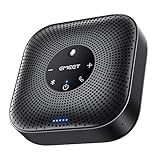
- Top Pick: EMEET M0 Plus Conference Speaker and Microphone, 4 Mics 360° Voice Pickup | Noise Reduction, USB C&C-to-A Adapter, Bluetooth Speakerphone for 8 People w/Daisy Chain for 16, Works with Leading Software
- Best Value: Lenovo Speakerphone, Conference Speaker, Wireless Speakerphone, Teams Certified Bluetooth Conference Call Device, AI Noise Cancellation Office Meeting Speaker, Hybrid Work
- Premium Choice: Jabra Speak 510 (2025 Edition) Portable, USB or Wireless Bluetooth Speaker Meetings and Calls with Crystal-Clear Sound, Works with Microsoft Teams, Black
Nothing sinks a meeting faster than a laptop speaker that echoes, a microphone that only hears the person in front of it, or a remote colleague who keeps asking everyone to repeat themselves. A dedicated conference speaker fixes the problem by combining a speaker, a microphone array and echo cancellation in one puck that sits in the middle of the table. The choice that matters is room size: a solo home office, a two-person desk and an eight-person huddle space call for different hardware.
This guide is for remote workers, small-office managers and anyone setting up a meeting corner in 2026. It covers ten speakerphones that connect by USB, Bluetooth or both, and compares them using only the facts in their listings, such as microphone coverage, wireless range, certification and chaining support. No claims are made about how they sound in a room.
Quick Picks
As an Amazon Associate we earn from qualifying purchases at no extra cost to you.





| Product | Best for | Key spec from the title |
|---|---|---|
| EMEET M0 Plus | Groups up to 16 | 4 mics, 8 people, daisy chain for 16 |
| Lenovo Speakerphone | Teams-based offices | Teams certified, AI noise cancellation |
| Jabra Speak 510 | Portable use | USB or Bluetooth, Teams compatible |
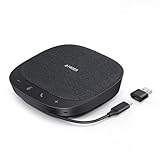
| Yealink SP92 | Small meeting rooms | Teams certified, 20H call time |
| Anker PowerConf S330 | Home office desks | USB, plug and play, 360 coverage |
| RayBit Conference Speaker | Chained room setups | Daisy chain, wireless dongle support |
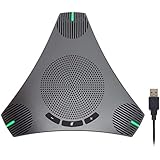
| USB Speakerphone with Hub | Desks needing extra ports | 360 pickup, built-in USB hub |
| Cyber Acoustics SP-2000 | Wireless roaming | 66ft range, 12-hour battery |
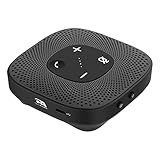
| RayBit USB Speakerphone | Simple home calls | Echo cancellation, 360 pickup |
| AIRHUG Speakerphone | USB-C laptops | Bluetooth and USB, USB-C plug and play |
How to Choose
Match the unit to the room size
For one or two people at a desk, a compact USB model is plenty. Once four or more people share a table, look for a larger microphone array, such as four mics, or a model that supports daisy chaining so two units can cover a long table. Remote colleagues will notice the difference quickly when a speakerphone is sized well. Listings that mention chaining or a stated headcount are easier to size correctly than those with no capacity information. A rough rule is one compact unit for a desk of two, and a larger array or a chained pair once the table seats six or more.
Connection options
USB gives the most dependable plug-and-play route for a laptop or desktop, and USB-C versions avoid adapters on modern machines. Bluetooth helps when you want to join a call from a phone. Dual-mode devices cover both, and some include a wireless dongle for a stable link with a PC. Confirm the plug type on your computer before you buy, and keep in mind that a wireless link adds one more thing to pair and one more battery to charge.
Audio processing
Look for echo cancellation and noise reduction, which stop the far end hearing their own voices bounce back. Terms such as full duplex mean both sides can talk at once without clipping, which matters in lively discussions where people interrupt each other. Be careful with “AI” labels that give no further detail, since they describe a feature, not a measured result.
Software certification and battery life
If your company standardizes on Microsoft Teams, a Teams certified listing removes compatibility doubts. For portable use, a stated battery figure, such as 12 hours or 20 hours of call time, tells you how often you will recharge. Budget models often skimp on speaker volume and may not state battery life at all, so absence of a figure in the title is a prompt to read the full listing before relying on it.
The 10 Best Options
EMEET M0 Plus
Built for groups, this speakerphone lists four microphones with 360-degree voice pickup, noise reduction, USB-C with a C-to-A adapter, and Bluetooth. The title says it suits 8 people and can daisy chain for 16, which makes it the easiest one here to size for a shared table.
- Strength: the stated capacity removes guesswork when choosing for a team room.
- Strength: the included adapter covers both USB-C and USB-A computers.
- Trade-off: reaching the 16-person figure takes a second unit.
Skip it if you only ever call alone, since the group features go unused. It earns its place in a huddle room or around a dining table turned office, where several voices need to be heard clearly.
Lenovo Speakerphone
This wireless Bluetooth speakerphone is described as Teams certified, with AI noise cancellation aimed at hybrid work and office meetings. It reads as a natural fit for companies that already run Microsoft tools.
- Strength: the Teams certification suits a Microsoft-based workplace.
- Strength: wireless connectivity keeps the table free of extra cables.
- Trade-off: the title gives no room capacity or battery figure.
Skip it if you need a defined headcount before you buy. It suits an office that wants a tidy, cable-light desk and already trusts Microsoft’s certification program for approved meeting hardware.
Jabra Speak 510
A portable pick that connects by USB or wireless Bluetooth. The title promises clear sound for meetings and calls and compatibility with Microsoft Teams, in a compact form that suits people who carry a speakerphone between locations.
- Strength: dual USB and Bluetooth modes suit moving between home and office.
- Strength: a long-established brand name signals a mature product line.
- Trade-off: no microphone count or battery figures appear in the title.
Skip it if a large meeting room is the target. It is better matched to the solo traveler or the hybrid worker who joins calls from a kitchen table one day and a hotel desk the next.
Yealink SP92
Aimed at small meeting rooms, this unit is Teams certified, lists AI noise cancelling and quotes 20 hours of call time. It connects by USB and Bluetooth, so it works with a laptop at the table or a phone in a pinch.
- Strength: 20 hours of call time means fewer charging interruptions across a week of meetings.
- Strength: Teams certification and Bluetooth suit shared rooms.
- Trade-off: the title frames it as a small-room device, so larger groups may need more.
Skip it if you need to chain several units across a long table. For a team huddle of a few people, the long call time and shared-room certification are the main reasons to shortlist it.
Anker PowerConf S330
A home-office oriented USB speakerphone. The listing mentions plug-and-play use, 360-degree voice coverage, smart voice enhancement and powerful sound, and it doubles as a desktop PC speaker for everyday audio.
- Strength: plug-and-play USB means no software setup.
- Strength: the speaker also handles ordinary desktop sound between calls.
- Trade-off: the title mentions neither Bluetooth nor a battery, so it stays tethered.
Skip it if you want to carry it from room to room. It is a good match for a permanent desk setup where the same cable stays plugged into the same computer every day.
RayBit Conference Speaker
This Bluetooth speakerphone supports daisy chaining and lists AI noise cancellation, voice enhancement, USB connection and wireless dongle support for meeting rooms, giving it more connection routes than most simple desk models.
- Strength: chaining and a dongle option extend its use beyond a single desk.
- Strength: it lists several connection routes, so one unit can fit different computers.
- Trade-off: the title does not give a room capacity.
Skip it if you want a Teams certified label. Small offices that expect to grow into larger rooms may appreciate being able to add a second unit down the line.
USB Speakerphone with USB Hub
This unbranded model combines a conference speaker and microphone with a built-in USB hub. It lists 360-degree omnidirectional voice pickup and noise reduction for business conferences, online meetings and home offices.
- Strength: the hub adds ports, useful on a crowded laptop-only desk.
- Strength: omnidirectional pickup suits a central position on the table.
- Trade-off: the title says little about certification, battery or wireless options.
Skip it if Bluetooth is a requirement. It fits a cramped home office where one cable to the laptop should also bring a keyboard dongle or a flash drive within easy reach.
Cyber Acoustics SP-2000
A USB and Bluetooth speakerphone with a 360-degree microphone, a 66ft wireless range and a 12-hour battery, along with full duplex audio so both sides can speak without clipping each other.
- Strength: the stated range and battery figures make planning around a day of calls easy.
- Strength: full duplex lets conversation flow more naturally.
- Trade-off: no room capacity or chaining option is stated.
Skip it if you need to cover a long conference table. It works for the person who wanders to the sofa or the kitchen during a call and does not want to drag the laptop along.
RayBit USB Speakerphone
A simple USB option for home office calls. The title lists 360-degree enhanced voice pickup, noise reduction, echo cancellation and compatibility with Zoom, Teams and Skype, covering the apps most remote workers use.
- Strength: echo cancellation is named alongside noise reduction.
- Strength: broad app compatibility is spelled out.
- Trade-off: the title mentions only USB, so there is no phone pairing.
Skip it if you want Bluetooth or battery-powered use. It keeps things simple for anyone who just wants better sound than laptop speakers without learning a new app or pairing routine.
AIRHUG Speakerphone
This conference speaker pairs Bluetooth and USB, with USB-C plug-and-play, 360-degree voice pickup and advanced noise reduction with echo cancellation, for Zoom and Teams calls on modern laptops.
- Strength: USB-C plug and play avoids adapters on newer machines.
- Strength: Bluetooth adds phone connectivity for calls away from the computer.
- Trade-off: no battery or capacity figures appear in the title.
Skip it if you need a defined group size or an older USB-A computer without an adapter. It suits a thin-and-light laptop owner who wants one device for both desk calls and quick phone calls.
Which One Fits Your Situation
You run meetings of six to eight people
The EMEET M0 Plus gives a stated capacity and a way to expand later by chaining, so the same purchase can grow with the team instead of being replaced.
Your company lives in Microsoft Teams
Pick the Yealink SP92 for a small room or the Lenovo Speakerphone if you prefer a wireless desk device.
You split time between home and office
The Jabra Speak 510 or the Cyber Acoustics SP-2000 can move with you, with the Cyber Acoustics listing stating a 12-hour battery.
You work alone at a desk
The Anker PowerConf S330 or the RayBit USB Speakerphone keeps the setup simple without wireless features you will not use. Both keep the desk tidy and put the call, not the hardware, at the center of the day.
One last tip applies to every option here: place the unit on a flat, clear surface in the middle of the group, away from laptop fans and paper shuffling, and keep the cable or dongle path short so the connection stays dependable through a long call.
Common Mistakes
- Buying a single-person speakerphone for a table of six.
- Overlooking the port type on a laptop, then needing an adapter.
- Reading “AI noise cancellation” as a guarantee against room echo.
- Placing the unit at the end of a table instead of the center, which leaves the far seats poorly covered.
- Ignoring battery life for a device that will be used wirelessly all day, then finding it dead before the last meeting.
Frequently Asked Questions
Do I need a Teams certified speaker?
Only if your organization requires it. Standard USB speakerphones work with most video apps, but certification simplifies support and gives IT staff a clear standard to approve.
Is Bluetooth better than USB?
USB is generally the more stable choice for a computer, while Bluetooth is convenient for a phone. Models with both give you the choice.
How many people can one unit handle?
Only a few listings state a headcount, so treat unlisted capacity as a reason to ask the seller. Based on the specs, the EMEET lists 8 and 16 with chaining, while others describe small rooms or desk use.
Can I use one as a regular speaker?
Some can, since the Anker listing calls out desktop PC speaker use, but a conference unit is tuned for voice, not music, so keep a proper desk speaker if you listen to a lot of audio.