- Top Pick: Sanyun SW208 3" Active Bluetooth 5.0 Bookshelf Speakers, Built-in 24bit DAC | 60W Carbon Fiber Speaker, USB and 3.5mm AUX Input, Dynamic 3D Surround Sound, 2.0 Computer PC Monitor Gaming (Pair, White)
- Best Value: Edifier M60 Multimedia Speaker, 66W RMS Computer Speaker, Black | Bluetooth 5.3, Hi-Res Audio with LDAC, 3" Mid Bass & 1" Tweeter, USB-C AUX Inputs, Compact Desktop Speaker
- Premium Choice: Logitech G560 PC Gaming Speaker System with 7.1 DTS X – Black | 7.1 DTS:X Ultra Surround Sound, Bluetooth, USB, Subwoofer + 2 Satellite Speakers, LIGHTSYNC RGB
Calling a desktop speaker “audiophile” is really a claim about three things: how cleanly it handles the signal before the amplifier, how honestly the drivers reproduce midrange and treble, and how little the cabinet colors the sound. Most computer speakers miss at least one of those goals on paper, which is why a buyer chasing better sound at a desk should read the spec line rather than the box art. This guide sorts eight active speaker systems by what their listings actually state, so you can see which ones lean toward fidelity and which lean toward spectacle.
The audience here is the person who listens to music on a PC for hours, wants a stereo image that holds up at arm’s length, and does not want a tangle of adapters. If you mainly want rainbow lighting and a loud subwoofer for games, some of these still fit, but the notes below are written for listeners first. Wireless codecs, digital inputs, driver size, and a separate subwoofer output matter more in 2026 than headline wattage, and the rest of the page is organized around that.
Quick Picks
As an Amazon Associate we earn from qualifying purchases at no extra cost to you.



| Product | Best for | Key spec from the title |
|---|---|---|
| Edifier M90 | Desk plus living-room flexibility | 100W RMS, LDAC, HDMI eARC, optical, SUB out |
| Edifier M60 | Compact hi-res desktop listening | 66W RMS, Bluetooth 5.3, 3″ mid bass, 1″ tweeter |
| MEVOSTO bookshelf pair | Larger drivers on a tight budget | 5-inch drivers, dual 1-inch silk-dome tweeters |
| Sanyun SW208 | Small desks and DAC-based setups | Built-in 24bit DAC, Bluetooth 5.0, 60W |
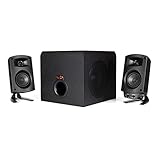
| Klipsch ProMedia 2.1 | Classic subwoofer-plus-satellites sound | THX Certified 2.1 system |
| Logitech G560 | Gaming with positional audio | 7.1 DTS:X, subwoofer plus two satellites |
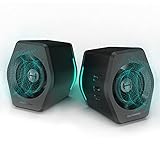
| Edifier G2000 | Entry-level 2.1 with a woofer | 32W, Bluetooth, USB and 3.5mm inputs |
| Basics Stereo 2.0 | Simple wired stereo for a laptop | USB-powered pair, 3.5mm aux, volume control |
How to Choose
Start With the Input Path, Not the Wattage
Fidelity begins before the amplifier. A USB or optical connection lets the speaker handle digital-to-analog conversion itself, bypassing a noisy motherboard headphone jack. Look for USB audio, optical, or HDMI eARC in the listing, and for a stated DAC bit depth such as 24bit. A plain 3.5mm aux cable works, but it leaves the conversion to your PC, and onboard audio is often the weakest link in the chain.
Driver Size and Tweeter Type
A 3-inch mid-bass driver is the common floor for desktop stereo; 5-inch drivers move more air and reach lower without help. Separate tweeters, particularly silk-dome designs like the 1-inch units in one listing, tend to sound smoother than full-range cones. Be skeptical of “3D surround” labels on two-speaker pairs, since that is a processing effect rather than a hardware feature.
Wireless Codecs and Bluetooth Versions
Bluetooth 5.0 and newer improve range and stability, but sound quality depends on the codec. LDAC and other hi-res codecs only work when your phone or PC also supports them, and plain SBC is the fallback. If most of your listening happens from the PC, prefer a wired digital path and treat Bluetooth as a convenience for phones.
Where Budget Models Cut Corners
Quoted wattage is not a quality measure; continuous (RMS) figures are more meaningful than peak figures. Cheaper pairs often skip tone controls, a subwoofer output, or a remote, and some rely on a small USB power draw that limits headroom. RGB lighting adds nothing to the sound, so ignore it unless you want it. Match the speaker footprint to your desk before anything else.
The 8 Best Options
Edifier M90
The M90 is the most connection-rich model in this group. Its listing shows 100W RMS, Hi-Res Audio with LDAC, Bluetooth 6.0, and a spread of inputs including HDMI eARC, optical, USB-C and AUX, plus a SUB out and a remote for TV or PC. It suits a listener who wants one pair of speakers to serve a monitor and a television.
- Strength: HDMI eARC and optical inputs keep the signal digital end to end.
- Strength: A subwoofer output leaves room to grow the system later.
- Trade-off: The white finish and wider feature set make it a larger commitment than a basic pair.
Skip it if you only need a single 3.5mm connection and a small footprint.
Edifier M60
This compact pair lists 66W RMS, Bluetooth 5.3, Hi-Res Audio with LDAC, and a 3″ mid-bass driver paired with a 1″ tweeter. USB-C and AUX inputs cover the PC, and the black finish suits most desks. It is aimed at someone who wants separate driver types in a small cabinet.
- Strength: A dedicated tweeter alongside the mid-bass driver is the layout that favors clarity.
- Strength: Bluetooth 5.3 with LDAC support gives a good wireless path from compatible phones.
- Trade-off: Three-inch drivers will not reach deep bass without a separate subwoofer.
Skip it if you want HDMI or optical inputs or a bass-heavy sound.
MEVOSTO Active Bookshelf Speakers
MEVOSTO takes a different route with 5-inch wired stereo drivers and dual 1-inch silk-dome tweeters, plus bass and treble adjustment. The listing mentions USB audio for PCs and BT5.4, RCA and AUX for TVs and other devices. It targets buyers who want a bookshelf-style presentation rather than a tiny desktop cube.
- Strength: Silk-dome tweeters and larger woofers point toward a fuller, smoother sound.
- Strength: RCA and USB inputs cover both PC and TV hookups.
- Trade-off: Bookshelf-sized cabinets need real desk or stand space.
Skip it if your monitor sits close to the wall with no room on either side.
Sanyun SW208
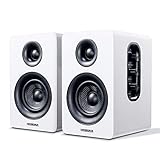
The SW208 is a pair of 3″ active Bluetooth 5.0 bookshelf speakers with a built-in 24bit DAC, 60W of carbon fiber speaker output, and USB and 3.5mm AUX inputs. The white finish and small size make it a natural fit for a minimalist setup where tidy cabling matters.
- Strength: The stated 24bit DAC reduces reliance on your PC’s onboard audio.
- Strength: Carbon fiber drivers and a compact footprint suit small desks.
- Trade-off: Bluetooth 5.0 with no named hi-res codec means wired is the better path for serious listening.
Skip it if you need optical or HDMI inputs or a subwoofer connection.
Klipsch ProMedia 2.1 THX Certified
The ProMedia 2.1 is the traditional answer: a subwoofer plus two satellites with THX certification. The title gives few other specifications, so the draw is the brand’s reputation and the certification rather than a feature list. It suits a listener who wants separated low-frequency duties and a familiar speaker layout.
- Strength: A dedicated subwoofer frees the satellites to focus on mids and highs.
- Strength: THX certification signals a defined performance standard.
- Trade-off: The listing mentions no Bluetooth or digital inputs, so expect a wired setup.
Skip it if you want wireless streaming or a small, subwoofer-free desk layout.
Logitech G560
The G560 is gaming-first: 7.1 DTS:X surround, Bluetooth, USB, a subwoofer, two satellites, and LIGHTSYNC RGB lighting. It is for the player who wants directional cues and a big sound from a system that also plays music acceptably, and who will happily let the lighting react to on-screen action. Placing the two satellites behind and beside the monitor is how the surround processing is meant to be used.
- Strength: DTS:X processing places effects around the listener.
- Strength: Subwoofer plus satellites gives a wide frequency spread.
- Trade-off: Its emphasis is spectacle rather than purist stereo, and the lighting is part of the package whether you want it or not.
Skip it if you listen mostly to two-channel music, dislike lighting, or have a desk too shallow for a subwoofer underneath.
Edifier G2000
The G2000 lists 32W output, a woofer, Bluetooth, USB and 3.5mm AUX inputs, and RGB lighting in black. It is for a first upgrade from monitor speakers when you want some low-end weight without a large system. Because it accepts both USB and 3.5mm connections, the same pair can follow you from a desktop to a laptop or a phone with a short cable swap.
- Strength: Multiple input options cover PC, laptop and phone.
- Strength: A small footprint with built-in woofer keeps things simple.
- Trade-off: Modest output and gaming styling place it below the others for critical listening, and the wattage figure is lower than most of this list.
Skip it if fidelity is the priority and you can step up to one of the Edifier M-series pairs or the bookshelf models above.
Basics Stereo 2.0
This pair is the plainest option here: USB-powered stereo speakers with volume control and a 3.5mm aux input, in black. It suits a laptop user who needs something clearly fuller than built-in speakers with almost no setup, or a second desk that needs a pair for background music. Nothing in the listing suggests extras, which is also the appeal: plug in, set the volume, and listen.
- Strength: Simple USB power and aux hookup means nothing to configure.
- Strength: On-speaker volume control is convenient at a desk.
- Trade-off: No Bluetooth, DAC, or tone control is listed, so it is an upgrade over laptop speakers rather than a fidelity pick.
Skip it if you want the audiophile label to mean something concrete, such as a digital input or separate tweeters.
Which One Fits Your Situation
You Listen to Lossless Music at a Desk
Choose the Edifier M60 if space is tight, or the MEVOSTO pair if you have room for larger cabinets and want bass and treble adjustment. Both separate the tweeter from the woofer, which is the layout most likely to keep vocals and acoustic instruments clear when you sit close to the speakers.
You Want One System for PC and TV
The Edifier M90 covers both with HDMI eARC, optical, USB-C, a subwoofer output, and a remote. It is the clear choice for a shared setup, since you can switch between a PC and a television without re-plugging cables or reaching behind the monitor.
You Play Games and Music
The Logitech G560 gives directional surround for games, while the Klipsch ProMedia 2.1 suits someone who plays less and prefers a conventional subwoofer layout.
You Need Something Small and Simple
The Sanyun SW208 delivers a built-in DAC in a compact white pair, and the Basics Stereo 2.0 is the no-fuss pick for a laptop. Neither asks for much space or setup, but neither includes a subwoofer output either.
Common Mistakes
- Buying on wattage alone and ignoring input type, driver layout, and DAC quality.
- Using the PC’s headphone jack when the speakers offer USB or optical.
- Expecting a codec like LDAC to work with a source that does not support it.
- Ignoring desk depth, so the speakers sit too close to a wall and sound boomy.
- Treating “3D surround” or lighting modes as signs of better sound.
Related guides
- Combination Smoke And Carbon Monoxide Detectors
- Aio Liquid Coolers For High Performance Gaming
- How To Lower Input Delay In Competitive Shooters
Frequently Asked Questions
Do I need a subwoofer for audiophile-style listening?
Not always. Larger bookshelf drivers like the 5-inch units in the MEVOSTO listing reach lower on their own, and a SUB out such as the one on the Edifier M90 lets you add one later. A subwoofer mainly helps if you listen to electronic music or film soundtracks.
Is Bluetooth good enough for critical listening?
It can be with LDAC and a compatible source, but a wired USB or optical connection is more consistent. Use Bluetooth for phones and convenience.
What does RMS mean on a speaker listing?
RMS describes continuous output power, which is more representative than peak power. Compare RMS figures only within similar speaker sizes, because driver quality matters more than numbers.
Are gaming speakers a bad pick for music?
Not necessarily, but they are often tuned for effects and bass. A pair with separate tweeters and tone controls usually suits music better.